
1. Įvadas
The Brother DCP-J132W is a compact and versatile multifunction inkjet printer designed for home and small office use. It offers printing, scanning, and copying functionalities, along with wireless connectivity for convenient use from various devices. This manual provides essential information to help you get the most out of your printer.
2. Saugos informacija
Please read these safety instructions carefully before using the printer to prevent injury and damage to the machine.
- Always place the printer on a flat, stable surface.
- Do not block or cover the ventilation slots.
- Naudokite tik prie spausdintuvo pridėtą maitinimo laidą.
- Saugokite spausdintuvą nuo vandens ar per didelės drėgmės.
- Rašalo kasetes laikykite vaikams nepasiekiamoje vietoje.
- Prieš valydami arba atlikdami techninę priežiūrą, atjunkite spausdintuvą nuo maitinimo lizdo.
3. Kas yra dėžutėje
Patikrinkite, ar pakuotėje yra visi komponentai:
- Brother DCP-J132W Multifunction Printer
- Ink Cartridges (Starter Set)
- Maitinimo laidas
- Diegimo CD-ROM
- Greito sąrankos vadovas
Note: A USB cable is not typically included and may need to be purchased separately if you prefer a wired connection.
4. Sąranka
4.1 Išpakavimas ir pradinis pastatymas
- Išimkite spausdintuvą iš pakuotės ir nuimkite visas apsaugines juostas bei pakavimo medžiagas.
- Place the printer on a stable, level surface near a power outlet.
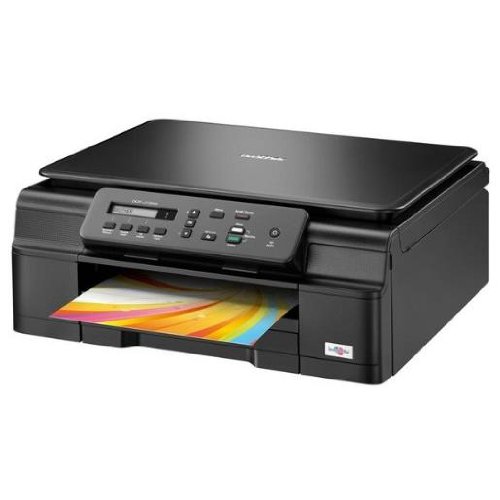
4.1 pav.: priekis view of the Brother DCP-J132W printer, showing the paper output tray with a colorful document.
4.2 Rašalo kasečių įdėjimas
- Open the ink cartridge cover located on the front of the printer.
- Unpack each ink cartridge (Black, Cyan, Magenta, Yellow).
- Insert each cartridge into its corresponding slot, pressing down until it clicks into place.
- Uždarykite rašalo kasečių dangtelį. Spausdintuvas pradės rašalo įkrovimo procesą.
4.3 Popieriaus įdėjimas
- Pull out the paper tray completely from the printer.
- Adjust the paper guides to fit the paper size you are loading (e.g., A4).
- Load paper into the tray, print side down. Do not overfill.
- Švelniai stumkite popieriaus dėklą atgal į spausdintuvą, kol jis užsifiksuos.
4.4 Maitinimo prijungimas
- Prijunkite maitinimo laidą prie spausdintuvo maitinimo įvesties.
- Kitą maitinimo laido galą įkiškite į sieninį lizdą.
- Paspauskite maitinimo mygtuką, kad įjungtumėte spausdintuvą.
4.5 Programinės įrangos diegimas ir tinklo prijungimas
Install the printer drivers and software from the included CD-ROM or download the latest versions from the official Brother support websvebsaitą. Vadovaukitės ekrane pateikiamomis diegimo instrukcijomis.
- Belaidžio ryšio sąranka: During software installation, select the wireless connection option and follow the prompts to connect your printer to your Wi-Fi network. You may need your network SSID and password.
- USB jungtis: If using a USB cable (not included), connect it to the printer and your computer when prompted by the installation software.

4.2 pav.: Kampinis view of the Brother DCP-J132W printer, highlighting its compact design and control panel.
5. Spausdintuvo valdymas
5.1 Dokumentų spausdinimas
- Atidarykite dokumentą arba vaizdą, kurį norite spausdinti, savo kompiuteryje arba mobiliajame įrenginyje.
- Programos meniu pasirinkite „Spausdinti“.
- Choose "Brother DCP-J132W" as your printer.
- Adjust print settings (e.g., paper size, color/grayscale, number of copies) as needed.
- Spustelėkite „Spausdinti“.
5.2 Dokumentų nuskaitymas
- Place the document face down on the scanner glass, aligning it with the guide marks.
- Uždarykite skaitytuvo dangtį.
- On your computer, open the Brother ControlCenter software or a scanning application.
- Select "Scan" and choose your desired scan settings (e.g., resolution, color mode, destination).
- Norėdami pradėti procesą, spustelėkite „Skenuoti“.
5.3 Dokumentų kopijavimas
- Padėkite dokumentą puse žemyn ant skaitytuvo stiklo.
- On the printer's control panel, press the "Copy" button.
- Use the arrow keys to select the number of copies or other settings (e.g., quality).
- Press "Start" (Color or Black & White) to begin copying.
6. Priežiūra
6.1 Rašalo kasečių keitimas
When an ink cartridge is low or empty, a message will appear on the printer's display or your computer. Use genuine Brother LC121 or LC123 series ink cartridges for optimal performance.
- Atidarykite rašalo kasetės dangtį.
- Paspauskite tuščios kasetės atleidimo svirtį ir išimkite ją.
- Unpack a new cartridge and insert it firmly into the correct slot until it clicks.
- Uždarykite rašalo kasetės dangtelį.
6.2 Spausdinimo galvutės valymas
If print quality declines (e.g., missing lines, streaking), perform a print head cleaning from the printer's control panel or through the printer driver software on your computer. Refer to the on-screen instructions for the cleaning procedure.
6.3 Skaitytuvo stiklo valymas
To ensure clear scans and copies, regularly clean the scanner glass with a soft, lint-free cloth moistened with a non-abrasive glass cleaner. Avoid spraying cleaner directly onto the glass.
7. Problemų sprendimas
This section addresses common issues you might encounter with your Brother DCP-J132W printer.
- Spausdintuvas neįsijungia:
- Įsitikinkite, kad maitinimo laidas yra tvirtai prijungtas tiek prie spausdintuvo, tiek prie veikiančio elektros lizdo.
- Try plugging another device into the outlet to confirm it has power.
- Popieriaus strigtys:
- Carefully open all covers and remove any jammed paper following the instructions on the printer's display or in the full user guide.
- Įsitikinkite, kad popierius įdėtas teisingai ir neperpildytas popieriaus dėkle.
- Prasta spausdinimo kokybė:
- Patikrinkite rašalo lygį ir pakeiskite visas kasetes, kuriose yra mažai rašalo arba kurios yra tuščios.
- Spausdinimo galvutės valymą ir lygiavimą atlikite spausdintuvo priežiūros meniu.
- Įsitikinkite, kad naudojate tinkamą popierių pagal spausdinimo nustatymus.
- Belaidžio ryšio problemos:
- Įsitikinkite, kad spausdintuvas yra jūsų „Wi-Fi“ maršrutizatoriaus diapazone.
- Iš naujo paleiskite maršrutizatorių, kompiuterį ir spausdintuvą.
- Re-run the wireless setup utility from the printer's control panel or the Brother software.
- Įsitikinkite, kad jūsų „Wi-Fi“ slaptažodis įvestas teisingai.
For more detailed troubleshooting, refer to the comprehensive user manual available on the Brother support websvetainę.
8. Specifikacijos
| Funkcija | Detalė |
|---|---|
| Prekės ženklas | brolis |
| Modelio pavadinimas | DCPJ132W |
| Ryšio technologija | Wi-Fi, USB |
| Spausdintuvo išvestis | Spalva |
| Maksimalus spausdinimo greitis (spalvotas) | 27 puslapių per minutę |
| Maksimalus spausdinimo greitis (nespalvotas) | 27 puslapių per minutę |
| Maksimali spausdinimo raiška (spalvota) | 1200 x 1200 dpi |
| Maksimali spausdinimo raiška (juodai balta) | 1200 x 1200 dpi |
| Gaminio matmenys (DxPxA) | 16.1P x 41lx 16.1A cm |
| Max Supported Paper Size | A4 |
| Printing Media Support | Plain paper, Glossy photo paper, Transparencies |
| Skaitytuvo tipas | Plokščiasis |
| Skaitytuvo raiška | 2400 dpi |
| Dvipusis spausdinimas | Automatinis |
| Suderinamos kasetės | LC121BK/C/M/Y & LC123BK/C/M/Y |
| Maksimali įvesties lapo talpa | 250 |
9. Garantija ir palaikymas
9.1 Informacija apie garantiją
The Brother DCP-J132W typically comes with a manufacturer's warranty. Please refer to the warranty card included with your product or visit the official Brother website for specific terms and conditions applicable in your region. The availability of spare parts in the EU is guaranteed for 1 year.
9.2 Pagalba klientams
Dėl techninės pagalbos, tvarkyklių atsisiuntimo ar papildomos informacijos apsilankykite oficialioje „Brother“ pagalbos svetainėje. websvetainėje. Čia rasite DUK, trikčių šalinimo vadovus ir klientų aptarnavimo kontaktinę informaciją.
Brolio palaikymas Websvetainė: www.brother.eu/support