
Įvadas
This manual provides essential information for the proper setup, operation, maintenance, and troubleshooting of your Medion LIFE P72066 Portable DVD Player with DVB-T Tuner. Please read these instructions carefully before using the device to ensure optimal performance and safety.
Pakuotės turinys
Patikrinkite, ar jūsų pakuotėje yra visi toliau išvardyti daiktai:
- Medion LIFE P72066 Portable DVD Player
- Stereo ausinės
- Nuotolinio valdymo pultas (įskaitant bateriją)
- DVB-T antena
- Maitinimo adapteris
- Automobilio adapteris
- Li-polymer Battery (7.4V/1800 mAh)
- AV kabelis
- Headrest Mounting Kit
- Nešiojimo krepšys
- Instrukcijų vadovas

1 paveikslas: Baigėsiview of all included accessories, including the portable DVD player, remote control, cables, and mounting kit.
Produkto savybės
- Integrated DVB-T Tuner for digital television reception.
- Xvid and MPEG4 compatibility for versatile media playback.
- User-friendly, multi-language On-Screen Display (OSD).
- Integrated stereo speakers with 2 x 1 watt RMS output.
- 4-in-1 card reader supporting SD/SDHC/MMC/MS memory cards.
- Powerful Li-polymer battery providing up to 3 hours of continuous operation.
Sąranka
1. Akumuliatoriaus įkrovimas
Before first use, fully charge the integrated Li-polymer battery. Connect the power adapter to the DC IN port on the device and plug it into a wall outlet. The charging indicator will illuminate. Charging typically takes several hours.
2. Connecting the DVB-T Antenna
For digital TV reception, connect the supplied DVB-T antenna to the antenna input port on the side of the player. Extend the antenna fully for best reception.
3. Car Headrest Mounting
Use the provided headrest mounting kit to secure the DVD player in a vehicle. Attach the mounting bracket to the headrest posts and then slide the player into the bracket. Ensure it is securely fastened before driving.

2 paveikslas: The portable DVD player securely mounted on a car headrest, ideal for in-car entertainment.
Naudojimo instrukcijos
1. Įjungimas/išjungimas
Paspauskite ir palaikykite GALIA button on the device or the remote control to turn the player on or off.
2. Playing DVDs
- Open the disc compartment by pressing the ATIDARYTI mygtuką.
- Atsargiai uždėkite DVD diską ant veleno etikete į viršų.
- Close the disc compartment. The player will automatically begin reading the disc.
- Naudokite naršymo mygtukus ir ENTER on the remote control to select menu options.
3. Using the DVB-T Tuner
- Ensure the DVB-T antenna is connected and extended.
- Paspauskite DVD/DVB button on the remote control to switch to DVB-T mode.
- Eikite į NUSTATYMAS menu and select 'Channel Search' or 'Auto Scan' to find available digital TV channels.
- Use the channel up/down buttons to browse channels once scanning is complete.
4. USB and Card Reader Playback
Insert a USB flash drive into the USB 2.0 port or an SD/SDHC/MMC/MS card into the card reader slot. The player will detect the media. Use the ŠALTINIS button to select USB or Card mode. Navigate through files and select Xvid or MPEG4 videos for playback.
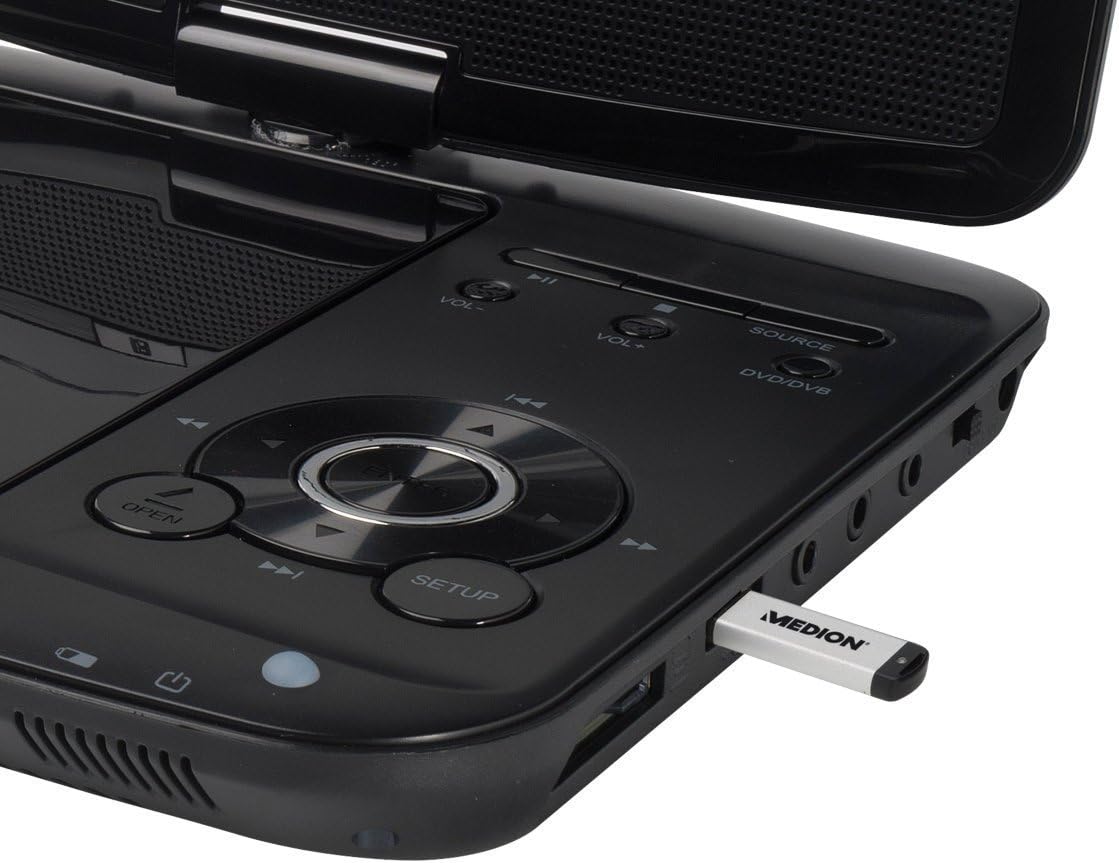
3 paveikslas: The control panel and side ports of the player, showing a USB stick inserted for media playback.
5. Nuotolinio valdymo pulto naudojimas
The remote control provides full functionality for operating the DVD player and DVB-T tuner. Ensure the battery is correctly inserted. Point the remote control towards the infrared sensor on the player.

4 paveikslas: The remote control for the Medion LIFE P72066, showing all function buttons.
Priežiūra
1. Prietaiso valymas
Wipe the exterior of the player with a soft, dry cloth. For stubborn dirt, use a slightly damp cloth and then dry thoroughly. Do not use abrasive cleaners or solvents. Keep the disc compartment free of dust and debris.
2. Akumuliatoriaus priežiūra
To prolong battery life, avoid fully discharging the battery frequently. Recharge the battery regularly, even if the device is not in use for extended periods. Store the device in a cool, dry place.
3. Sandėliavimas
When storing the player for a long time, ensure it is turned off and disconnected from power. Store it in the provided carrying bag to protect it from dust and scratches.
Trikčių šalinimas
| Problema | Galima priežastis | Sprendimas |
|---|---|---|
| Nėra galios | Battery discharged; Power adapter not connected; Device not switched on. | Charge the battery; Connect power adapter; Press the POWER button. |
| No picture/sound from DVD | Disc dirty or scratched; Disc inserted incorrectly; Incorrect source selected. | Clean or replace disc; Insert disc correctly (label up); Press SOURCE to select DVD. |
| Poor DVB-T reception | Antenna not extended; Weak signal area; Channel scan not performed. | Extend antenna fully; Reposition antenna; Perform a channel scan in the SETUP menu. |
| USB/Card not recognized | Incompatible format; Media not inserted correctly; Corrupted files. | Užtikrinti files are Xvid/MPEG4; Reinsert media; Try different media. |
Specifikacijos
- Prekinis ženklas: Medionas
- Modelio pavadinimas: LIFE P72066 (MD84209)
- Modelio numeris: 50044666
- Ekrano dydis: 7 colių
- Baterijos tipas: Lithium-polymer (7.4V/1800 mAh)
- Baterijos veikimo laikas: Iki 3 valandų
- Medijos tipas: DVD-Player
- Ryšys: USB 2.0, 4-in-1 card reader (SD/SDHC/MMC/MS)
- Garsiakalbiai: Integrated stereo speakers (2 x 1 watt RMS)
- Matmenys (P x A x G): 21 x 11 x 4 cm
- Svoris: 1.5 kg
Garantija ir palaikymas
For warranty information, please refer to the warranty card included with your product or visit the official Medion website. If you encounter issues that cannot be resolved using the troubleshooting guide, please contact Medion customer support for assistance. Keep your purchase receipt as proof of purchase for warranty claims.
