
Įvadas
This manual provides comprehensive instructions for the installation, operation, and maintenance of your Azza XT1 Full Tower Gaming Case (Model: CSAZ-XT1 W). Please read this manual thoroughly before beginning installation to ensure proper setup and to maximize the performance and longevity of your product.
Saugos informacija
Observe the following safety precautions to prevent damage to the case or injury to yourself:
- Prieš atlikdami bet kokius montavimo ar priežiūros darbus, visada atjunkite maitinimo šaltinį nuo sieninio lizdo.
- Atsargiai elkitės su vidiniais komponentais, kad išvengtumėte elektrostatinės iškrovos (ESD) sukeltos žalos. Apsvarstykite galimybę naudoti antistatinį riešo dirželį.
- Ensure all cables are routed properly to prevent interference with fans or other moving parts.
- Do not block ventilation openings. Maintain adequate airflow around the case.
- Keep the case away from sources of heat, direct sunlight, and moisture.
Produkto savybės
The Azza XT1 Full Tower Gaming Case is designed with several features to enhance your computing experience:
- VGA Card Support: Accommodates VGA cards up to 340 mm in length.
- Easy Swap Slot: Features a bottom-mounted easy swap slot for tool-less hard drive installation.
- Aušinimo našumas: Equipped with four pre-installed fans for optimal airflow and supports up to two 120mm water cooling radiators.
- Customizable Grilles: Front and top decorative grilles are removable and exchangeable for aesthetic customization.
- Tool-less Installation: Designed for easy installation of 5.25" devices and HDDs with a tool-less mechanism and a 90-degree rotating HDD holder.
- Kabelių valdymas: Includes a dedicated compartment for efficient cable routing, improving internal airflow and aesthetics.
Sąranka ir diegimas
Follow these steps to set up your Azza XT1 case and install components:
1. Parengti bylą
Place the case on a stable, flat surface. Remove the side panels by unscrewing the thumb screws at the rear and sliding the panels backward.
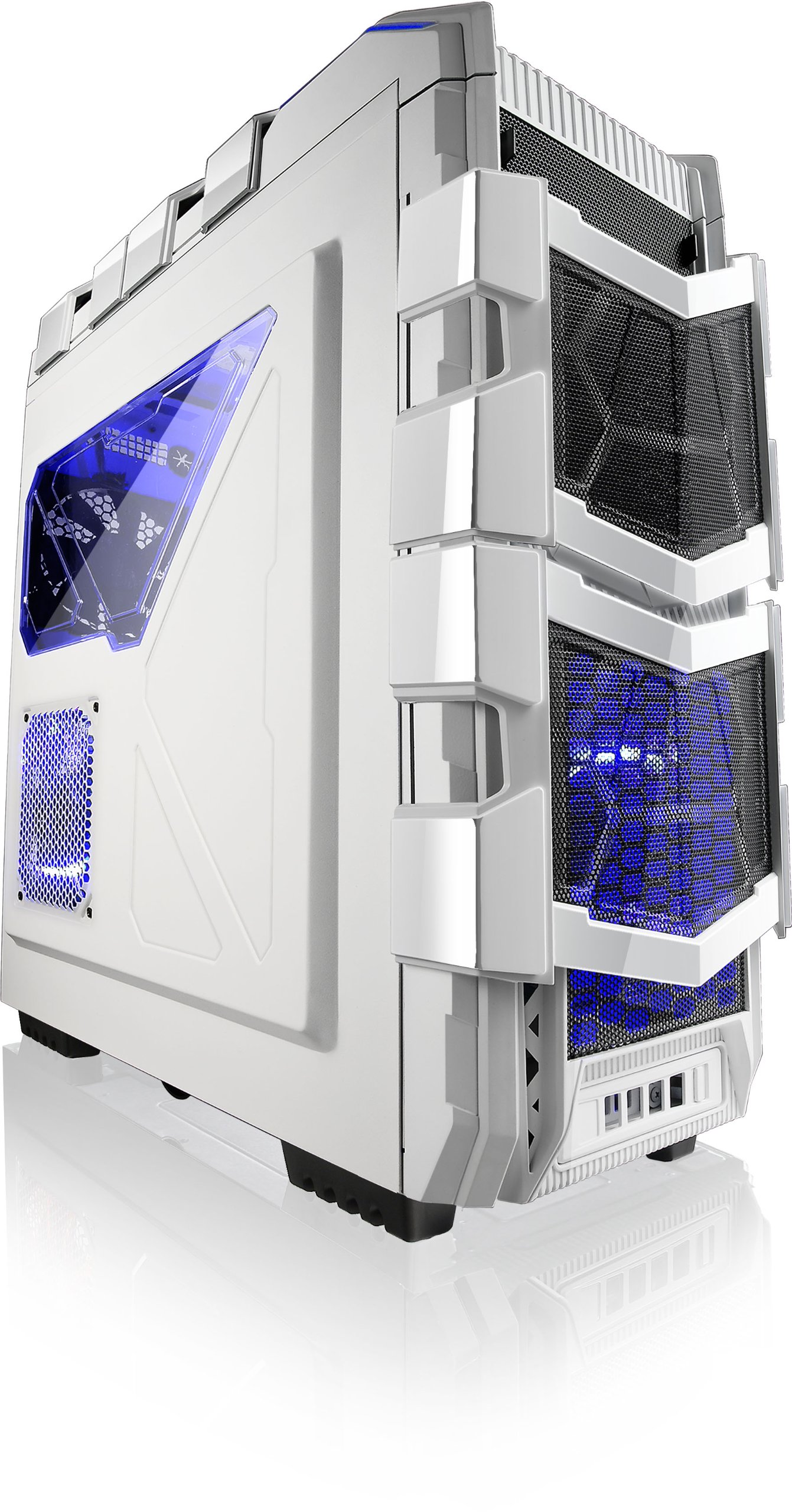
1 pav.: Kampinis view of the Azza XT1 case, showing its overall design and front mesh panels.
2. Pagrindinės plokštės montavimas
Install the I/O shield into the rear opening of the case. Align your ATX motherboard with the standoffs inside the case. Secure the motherboard using the provided screws.

Figure 2: Internal layout of the Azza XT1 case, highlighting the motherboard tray and drive bay areas.
3. Maitinimo šaltinio įrengimas
Mount your power supply unit (PSU) into the designated area at the bottom rear of the case. Secure it with screws from the outside.
4. Drive Installation (HDD/SSD)
Utilize the tool-less HDD holders. For the easy swap slot, simply slide the hard drive into the bottom slot until it clicks into place. For other bays, secure drives using the provided trays or mounting mechanisms. The HDD holder can rotate 90 degrees for easier access.

3 pav.: Galinis vidinis view of the Azza XT1 case, illustrating the drive bays and the space behind the motherboard for cable management.
5. Expansion Card Installation (VGA, etc.)
Remove the necessary expansion slot covers at the rear of the case. Insert your VGA card or other expansion cards into the motherboard's PCIe slots and secure them with screws or the tool-less retention clips.
6. Kabelių valdymas
Route all power and data cables through the designated cutouts and tie-down points behind the motherboard tray. This improves airflow and maintains a clean internal appearance.
7. Uždaryti bylą
Sumontavus visus komponentus ir sutvarkius laidus, vėl pritvirtinkite šoninius skydelius ir pritvirtinkite juos varžtais.
Bylos valdymas
The Azza XT1 case provides the housing and cooling for your PC components. Operation primarily involves using the front panel controls:
- Maitinimo mygtukas: Located on the top panel, press to power on or off your system.
- Atkūrimo mygtukas: Located on the top panel, press to restart your system.
- USB prievadai: Connect USB devices to the front panel USB 2.0 and USB 3.0 ports.
- Garso lizdai: Connect headphones and microphones to the front panel audio jacks.

4 paveikslas: viršuje view of the Azza XT1 case, detailing the power button, USB ports, and audio jacks.
Priežiūra
Regular maintenance helps ensure optimal performance and longevity of your Azza XT1 case and its components.
- Dulkių valymas: Reguliariai valykite dulkių filtrus ir vidinius komponentus suslėgtu oru. Prieš valydami įsitikinkite, kad sistema išjungta ir atjungta nuo elektros tinklo.
- Ventiliatoriaus patikrinimas: Check fans for dust buildup and ensure they are spinning freely. Clean as necessary.
- Kabelio patikrinimas: Verify that all internal cables remain securely connected and are not obstructing airflow.
- Išorinis valymas: Išorinius paviršius nuvalykite minkšta, damp audinys. Venkite abrazyvinių valiklių.
Trikčių šalinimas
Šiame skyriuje aptariamos dažniausiai pasitaikančios problemos, su kuriomis galite susidurti naudodami kompiuterio korpusą.
| Problema | Galima priežastis | Sprendimas |
|---|---|---|
| Sistema neįsijungia. | Power button not connected correctly; PSU issue; motherboard issue. | Verify front panel power button cable is securely connected to the motherboard. Check PSU connections. |
| Ventiliatoriai nesisuka. | Fan cables disconnected; fan failure; insufficient power. | Ensure all fan power cables are properly connected to the motherboard or fan controller. |
| Front panel USB ports not working. | USB header cable disconnected or incorrectly connected. | Check that the USB 2.0 and USB 3.0 header cables from the front panel are correctly plugged into the motherboard. |
| Prastas oro srautas arba perkaitimas. | Dust buildup; blocked vents; improper fan configuration. | Clean dust filters and internal components. Ensure case fans are oriented correctly for optimal airflow. |
Specifikacijos
Detailed specifications for the Azza XT1 Full Tower Gaming Case (CSAZ-XT1 W):
| Funkcija | Detalė |
|---|---|
| Prekės ženklas | Azza |
| Modelio numeris | CSAZ-XT1 W |
| Atvejo tipas | Pilnas bokštas |
| Spalva | Baltas |
| Medžiaga | SECC Steel |
| Pagrindinės plokštės suderinamumas | ATX |
| Gaminio matmenys (IxPxH) | 51.56 x 20.57 x 56.64 cm |
| Prekės svoris | 9.98 kg |
| USB 2.0 prievadai | 2 |
| USB 3.0 prievadai | 1 |
| VGA Card Length Support | Iki 340 mm |
| Vandens aušinimo palaikymas | Up to 2x120mm radiators |
Garantija ir palaikymas
For warranty information and technical support, please refer to the official Azza websvetainėje arba susisiekite su jų klientų aptarnavimo skyriumi. Išsaugokite pirkimo kvitą kaip pirkimo įrodymą garantijos pretenzijoms.
Gamintojas: AZZA (USA) Technology Inc