
1. Įvadas
This manual provides instructions for the setup, operation, and maintenance of your Uniden AS7412 Corded Phone. Please read this manual thoroughly before using your new phone.
The Uniden AS7412 is a corded telephone featuring a large LCD display and a speakerphone function, designed for clear communication and ease of use.
2. Produktas baigtasview
Pagrindinės funkcijos:
- FSK/DTMF Caller ID Display
- Large LCD Display with Clock and Call Timer
- Garsiakalbio funkcija
- Pre-Dial Function and Last Number Redial
- Apsaugos nuo vagystės funkcija
- Memory for 50 Incoming Calls and 15 Outgoing Calls
- 8 One-Touch Memory and 10 Two-Touch Memory Functions
- IDD Code and PABX Dial Out Code Setting
- Adjustable LCD Contrast
- Muzika sulaikyta
- Adjustable Flash Timing (90/95/100/120/180/300/600/1000mS)
Phone Components:
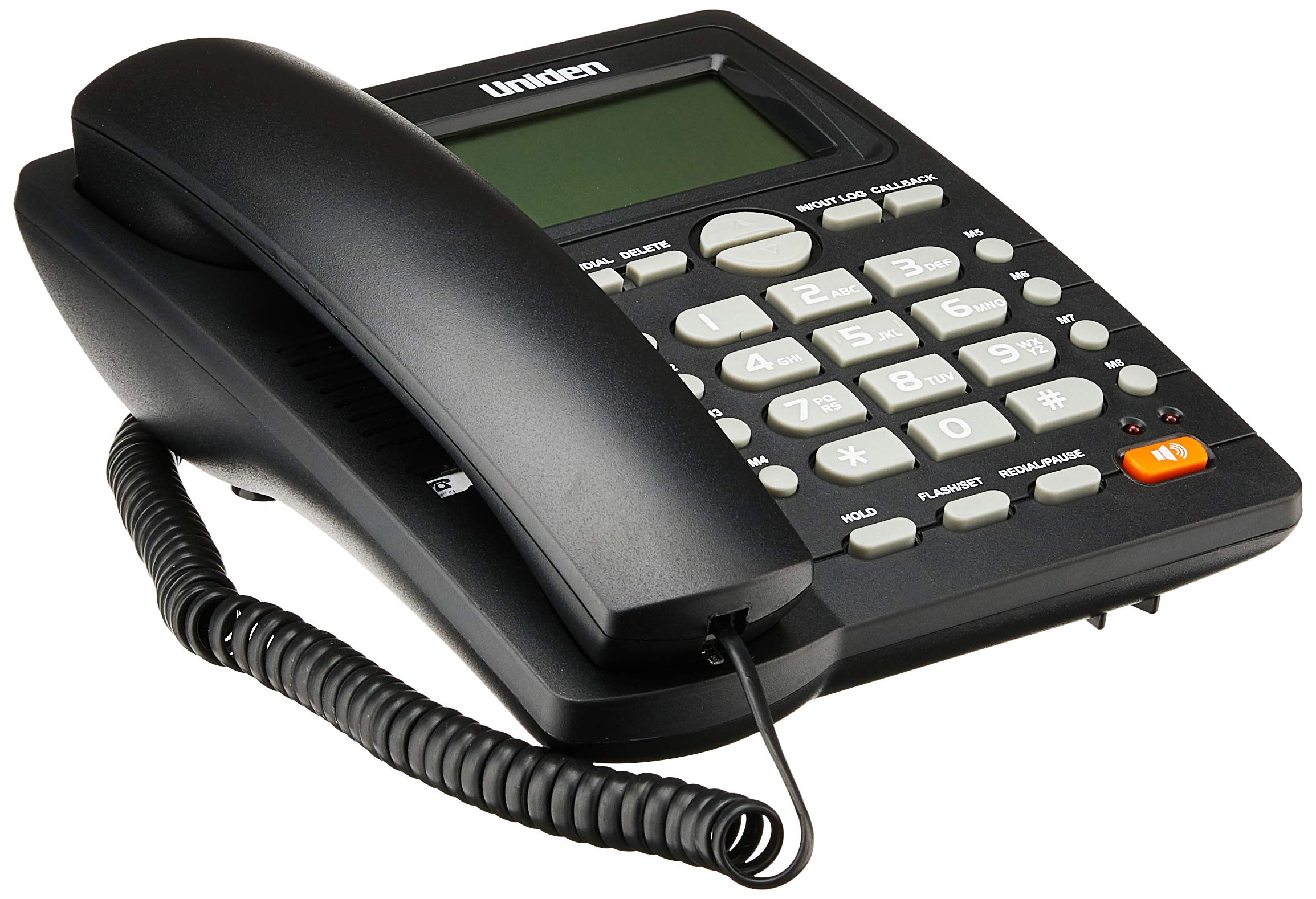
The phone features a standard handset, a numeric keypad, dedicated function buttons, and a large LCD display for caller information and settings. A prominent speakerphone button allows for hands-free communication.

On the rear of the unit, you will find the telephone line input port and a switch for adjusting the ringer volume.
3. Sąranka
- Prijunkite ragelį: Plug one end of the coiled cord into the handset and the other end into the handset jack on the side of the phone base unit.
- Prijunkite telefono liniją: Plug one end of the telephone line cord into the "LINE" jack on the rear of the phone base unit (refer to Figure 2). Plug the other end into your telephone wall jack.
- Maitinimo jungtis: The phone is powered by the telephone line. No external power adapter is required for basic operation.
- Pradinis ekranas: Upon connection, the LCD display should illuminate and show the current time or a default standby screen.
4. Naudojimo instrukcijos
Skambinimas:
- Telefono naudojimas: Lift the handset, wait for a dial tone, then dial the desired number using the keypad.
- Naudojant garsiakalbį: Paspauskite Garsiakalbis button, wait for a dial tone, then dial the desired number. To end the call, press the Garsiakalbis mygtuką dar kartą.
- Išankstinis rinkimas: Dial the number first, then lift the handset or press the Garsiakalbis mygtuką, kad pradėtumėte skambutį.
Skambučio priėmimas:
- Kai suskamba telefonas, pakelkite ragelį arba paspauskite Garsiakalbis mygtuką atsakyti.
Paskutinio numerio perrinkimas:
- Pakelkite ragelį arba paspauskite Garsiakalbis mygtuką, tada paspauskite SKAMBINTI PERSKAITYTI / PAUZĖ mygtuką.
Caller ID Function:
- When a call comes in, the caller's number (and name, if available and subscribed to service) will be displayed on the LCD screen.
- Naudokite IN/OUT LOG buttons (up/down arrows) to scroll through the incoming call history.
- To call back a number from the call log, select the number and press the CALLBACK mygtuką.
Memory Dialing (One-Touch and Two-Touch):
- Saugokite numerius:
- Paspauskite STORE/DIAL.
- Surinkite telefono numerį, kurį norite išsaugoti.
- Paspauskite STORE/DIAL vėl.
- Press the desired memory button (M1-M8 for one-touch, or a numeric key for two-touch).
- Dialing from Memory:
- One-Touch: Pakelkite ragelį arba paspauskite Garsiakalbis, then press the desired memory button (M1-M8).
- Two-Touch: Pakelkite ragelį arba paspauskite Garsiakalbis, tada paspauskite STORE/DIAL followed by the numeric key where the number is stored.
Adjusting LCD Contrast:
- Refer to the on-screen menu or specific button combination (often involving FLASH/SET or similar) to access display settings and adjust contrast for optimal readability.
5. Priežiūra
- Valymas: Nuvalykite telefoną minkšta, d šluosteamp audinys. Nenaudokite stiprių cheminių medžiagų ar abrazyvinių valiklių.
- Vieta: Place the phone on a stable surface, away from direct sunlight, heat sources, and moisture.
- Laidai: Ensure all cords are securely connected and not tangled or pinched.
6. Problemų sprendimas
| Problema | Galima priežastis | Sprendimas |
|---|---|---|
| Nėra rinkimo tono | Telefono linijos laidas atjungtas arba sugedęs. | Check the telephone line connection at both the phone and the wall jack. Try a different line cord if available. |
| LCD ekranas tuščias arba blankus | Contrast setting is too low or phone line power issue. | Adjust the LCD contrast setting. Ensure the phone line is active. |
| Negalima skambinti arba priimti skambučių | Incorrect line connection or service issue. | Verify all connections. Contact your telephone service provider if the issue persists. |
| Ringer does not sound | Ringer volume is set to OFF. | Adjust the ringer volume switch on the rear of the phone to LOW or HI (refer to Figure 2). |
7. Specifikacijos
| Funkcija | Detalė |
|---|---|
| Prekės ženklas | Uniden |
| Modelis | AS7412 |
| Spalva | Juoda |
| Telefono tipas | Virveli |
| Medžiaga | Plastikiniai |
| Maitinimo šaltinis | Laidinis elektrinis (maitinamas iš tinklo) |
| Rinkiklio tipas | Viena klaviatūra |
| Matmenys (I x P x A) | 21.8 x 7 x 22 centimetrai |
| Prekės svoris | 650 gramų |
| Daugiaeilė operacija | Vienos linijos veikimas |
| Skambinančiojo identifikavimas | Yes (FSK/DTMF) |
| Gamintojas | UNIDEN |
8. Garantija ir palaikymas
For warranty information and technical support, please refer to the warranty card included with your product or visit the official Uniden websvetainėje. Išsaugokite pirkimo kvitą kaip pirkimo įrodymą.
Pastaba: Produkto specifikacijos ir funkcijos gali būti keičiamos be įspėjimo.