
1. Įvadas
The Tivoli Audio Albergo is a compact and versatile Bluetooth clock radio designed to provide high-fidelity audio, AM/FM radio reception, and convenient alarm clock functionalities. This manual provides detailed instructions for setting up, operating, and maintaining your Albergo unit.
2. Saugos instrukcijos
- Prieš naudodami įrenginį, perskaitykite visas instrukcijas.
- Išsaugokite šias instrukcijas, kad galėtumėte pasinaudoti ateityje.
- Atkreipkite dėmesį į visus įspėjimus ant gaminio ir vadove.
- Nenaudokite šio prietaiso šalia vandens ar drėgmės.
- Valykite tik sausa šluoste.
- Neužblokuokite jokių ventiliacijos angų. Montuokite pagal gamintojo instrukcijas.
- Nemontuokite šalia jokių šilumos šaltinių, pvz., radiatorių, šilumokaičių, viryklių ar kitų įrenginių (įskaitant ampkeltuvai), kurie gamina šilumą.
- Saugokite maitinimo laidą, kad ant jo neužeitų ar nesuspaustų.
- Naudokite tik gamintojo nurodytus priedus/priedus.
- Atjunkite šį įrenginį žaibuojant arba kai nenaudojate ilgą laiką.
- Visus techninės priežiūros darbus patikėkite kvalifikuotam techninės priežiūros personalui.
3. Pakuotės turinys
Patikrinkite, ar jūsų pakuotėje yra šie elementai:
- Tivoli Audio Albergo Bluetooth Clock Radio Unit
- Maitinimo adapteris
- Nuotolinio valdymo pultas
- FM antena
4. Produktas baigtasview
Priekinio skydelio valdikliai ir ekranas
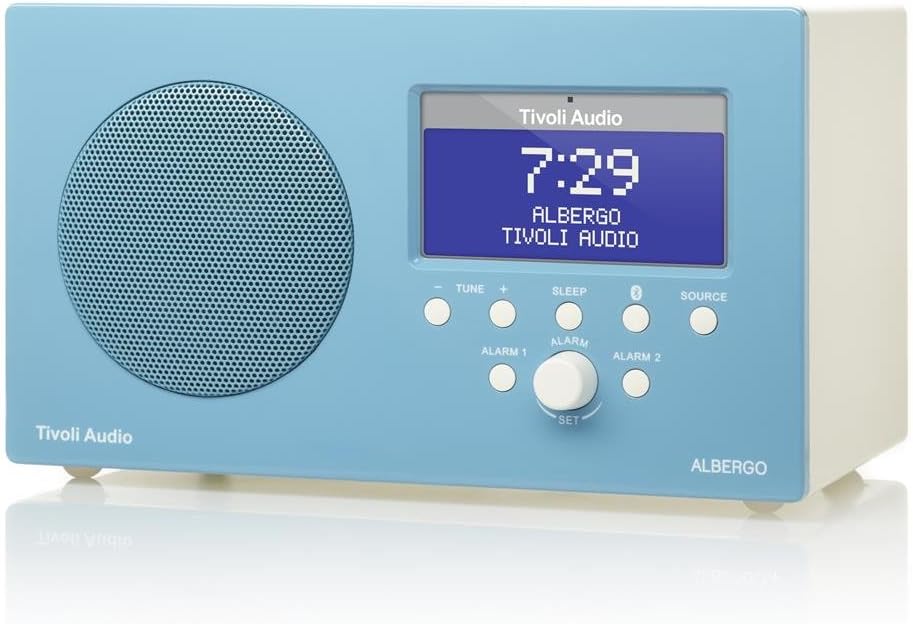
4.1 paveikslas: Priekyje view of the Albergo unit. The front panel features a speaker grille, a digital display, and control buttons for tuning, sleep, Bluetooth, source selection, and alarm settings.
- Ekranas: Shows time, station, source, and menu information.
- Tune - / Tune +: Reguliuoja radijo dažnį arba naršo meniu parinktis.
- Miegas: Įjungia miego laikmatį.
- Bluetooth mygtukas: Įjungia „Bluetooth“ susiejimo režimą.
- Šaltinis: Cycles through available audio sources (FM, AM, Bluetooth, Auxiliary).
- Alarm 1 / Alarm 2: Įjungia arba nustato 1 arba 2 žadintuvą.
- Set Knob: Rotates to adjust values and presses to confirm selections.
Šoninė View and Rear Connections

4.2 paveikslas: Kampuotas view of the Albergo unit. The rear panel typically includes connections for power, external antenna, and auxiliary input.
The rear panel of the Albergo unit contains the following connections:
- DC įvestis: Skirta prijungti pridedamą maitinimo adapterį.
- FM antenos įvestis: Skirta išorinei FM antenai prijungti.
- Pagalbinė įvestis: For connecting external audio devices via a 3.5mm cable (not included).
- Ausinių išvestis: Privačiam pasiklausymui.
5. Sąranka
5.1 Maitinimo jungtis
- Insert the small end of the power adapter into the DC Input jack on the rear of the Albergo unit.
- Kitą maitinimo adapterio galą įkiškite į sieninį lizdą.
- Įrenginys įsijungs arba pereis į budėjimo režimą.
5.2 Antenos prijungimas
- For FM reception, connect the included external FM antenna to the FM Antenna Input on the rear of the unit.
- Optimaliam priėmimui visiškai ištieskite anteną.
- For AM reception, the Albergo has a built-in internal AM antenna. If reception is poor, try repositioning the unit.
6. Naudojimo instrukcijos
6.1 Maitinimo įjungimas/išjungimas
- Paspauskite Galia button (usually integrated with the Set knob or a dedicated button on the remote) to turn the unit on or off.
- When powered off, the clock display will remain active.
6.2 Radijo veikimas (AM/FM)
- Paspauskite Šaltinis mygtuką, kol ekrane pasirodys „FM“ arba „AM“.
- Naudokite Melodija - or Tune + mygtukais, kad rankiniu būdu reguliuotumėte dažnį.
- Norėdami automatiškai ieškoti kitos prieinamos stoties, paspauskite ir palaikykite Melodija - or Tune +.
- The Albergo supports FM RDS (Radio Data System) where available, displaying station information.
6.3 Bluetooth veikimas
- Paspauskite Šaltinis mygtuką, kol ekrane pasirodys „Bluetooth“.
- The unit will enter pairing mode, indicated by a flashing Bluetooth icon on the display.
- Savo „Bluetooth“ įrenginyje (pvz., išmaniajame telefone, planšetiniame kompiuteryje) įjunkite „Bluetooth“ ir ieškokite galimų įrenginių.
- Select "Tivoli Albergo" from the list of devices.
- Once paired, the Bluetooth icon on the Albergo display will stop flashing and remain solid. You can now stream audio wirelessly.
6.4 Laikrodžio ir žadintuvo nustatymai
Many clock and alarm settings are best accessed and adjusted using the included remote control.
- Laiko nustatymas:
- Telefonui veikiant laukimo režimu, paspauskite ir palaikykite Nustatyti rankenėlę arba Meniu nuotolinio valdymo pulto mygtuką.
- Navigate to "Time Set" using the Derinimas +/- buttons or remote arrows.
- Paspauskite Nustatyti or Įeikite nuotolinio valdymo pulte, kad patvirtintumėte.
- Naudodami koreguokite valandas ir minutes Derinimas +/- or remote arrows, confirming each with Nustatyti or Įeikite.
- Setting Alarms (Alarm 1 / Alarm 2):
- Paspauskite Signalas 1 or Signalas 2 button on the front panel or remote.
- Follow the on-screen prompts to set the alarm time, source (buzzer, FM, AM), and volume.
- Confirm each setting using the Nustatyti knob or remote's Įeikite mygtuką.
- Snaudimo funkcija: Kai suskamba žadintuvas, paspauskite Snausti mygtukas (dažnai Miegoti button or a dedicated button on the remote) to temporarily silence the alarm for a set period.
- Miego laikmatis: Paspauskite Miegoti button repeatedly to cycle through available sleep timer durations (e.g., 15, 30, 45, 60 minutes, Off). The unit will automatically turn off after the selected time.
6.5 Nuotolinio valdymo pulto naudojimas
The included full-function remote control provides access to all features and settings, including those not directly available on the front panel. Ensure the remote has working batteries and is pointed towards the front of the Albergo unit during use.
7. Priežiūra
- Valymas: Įrenginiui valyti naudokite minkštą, sausą šluostę. Nenaudokite abrazyvinių valiklių, vaško ar tirpiklių.
- Vieta: Venkite įrenginio laikymo tiesioginiuose saulės spinduliuose, šalia šilumos šaltinių arba vietose, kuriose yra daug dulkių ar didelė drėgmė.
- Antena: Handle the FM antenna carefully to prevent damage.
8. Problemų sprendimas
| Problema | Galima priežastis | Sprendimas |
|---|---|---|
| Nėra galios | Neprijungtas maitinimo adapteris arba sugedęs lizdas. | Įsitikinkite, kad maitinimo adapteris yra tvirtai prijungtas prie įrenginio ir veikiančio sieninio lizdo. |
| Prastas radijo priėmimas | Antenna not properly connected or positioned; weak signal. | Extend the FM antenna fully. Reposition the unit for better AM reception. Try a different location. |
| „Bluetooth“ įrenginys nesusijungia | Albergo not in pairing mode; device too far; previously paired device connected. | Ensure Albergo is in Bluetooth source mode and flashing. Move device closer. Disconnect from other Bluetooth devices. |
| Clock displays incorrect time | Laikas nustatytas neteisingai; nutrūkęs elektros tiekimas. | Refer to Section 6.4 to reset the time. Unplug and replug the unit to reset if necessary. |
| Signalizacija neskamba | Alarm not activated; volume too low; incorrect alarm source. | Verify Alarm 1 or Alarm 2 is enabled. Check alarm volume. Ensure correct alarm source (buzzer/radio) is selected. |
| Nuotolinio valdymo pultas neveikia | Dead batteries; obstruction; not pointed correctly. | Replace remote control batteries. Ensure no obstructions between remote and unit. Point remote directly at the unit. |
9. Specifikacijos
- Prekinis ženklas: Tivoli Audio
- Modelio numeris: ALBERGO
- Ryšio technologija: Bluetooth
- Tuner technologija: AM, FM (with RDS where available)
- Ypatingos savybės: Digital Clock, Dual Alarms, Sleep Timer, Snooze
- Maitinimo šaltinis: Kintamos srovės adapteris
- Ekrano tipas: Skaitmeninis LCD
- Įtraukti komponentai: Nuotolinio valdymo pultas
- Prekės svoris: Maždaug 2.3 svaro (1.04 kg)
- UPC: 815097015581
10. Garantija ir palaikymas
For warranty information and technical support, please refer to the documentation provided with your purchase or visit the official Tivoli Audio websvetainėje. Išsaugokite pirkimo įrodymą garantiniams reikalavimams.