
Įvadas
This manual provides detailed instructions for the safe and efficient operation of your Ozeri 360 Oscillation Micro-Blade Noise Reduction Technology Tower Fan, Model OZF5. Please read all instructions carefully before use and retain this manual for future reference.
Saugos informacija
Kad sumažintumėte gaisro, elektros smūgio ar sužalojimo riziką, visada laikykitės šių pagrindinių saugos priemonių:
- Įsitikinkite, kad ventiliatorius pastatytas ant lygaus, stabilaus paviršiaus, kad jis neapvirstų.
- Nekiškite pirštų ar pašalinių daiktų į jokias ventiliatoriaus angas.
- Keep the fan away from water or moist areas.
- Prieš valydami ar atlikdami bet kokią techninę priežiūrą, atjunkite ventiliatorių nuo elektros lizdo.
- Nenaudokite ventiliatoriaus, jei pažeistas laidas arba kištukas.
- Šis prietaisas skirtas naudoti tik patalpose.
Pakuotės turinys
Patikrinkite, ar yra visi komponentai:
- Ozeri 360 Oscillation Tower Fan Unit
- Fan Base (2 halves)
- Nuotolinio valdymo pultas
- Screws for Base Assembly (3 pieces)
- Vartotojo vadovas
Sąranka
Follow these steps to assemble your Ozeri Tower Fan:
- Carefully remove all packaging materials from the fan unit and its components.
- Connect the two halves of the fan base. Ensure they fit together securely.
- Sulygiuokite surinktą pagrindą su ventiliatoriaus bloko apačia.
- Secure the base to the fan unit using the 3 provided screws. Hand assembly is sufficient; no special tools are required.
- Pastatykite ventiliatorių ant tvirto, lygaus paviršiaus.
- Prijunkite maitinimo laidą į standartinį elektros lizdą.
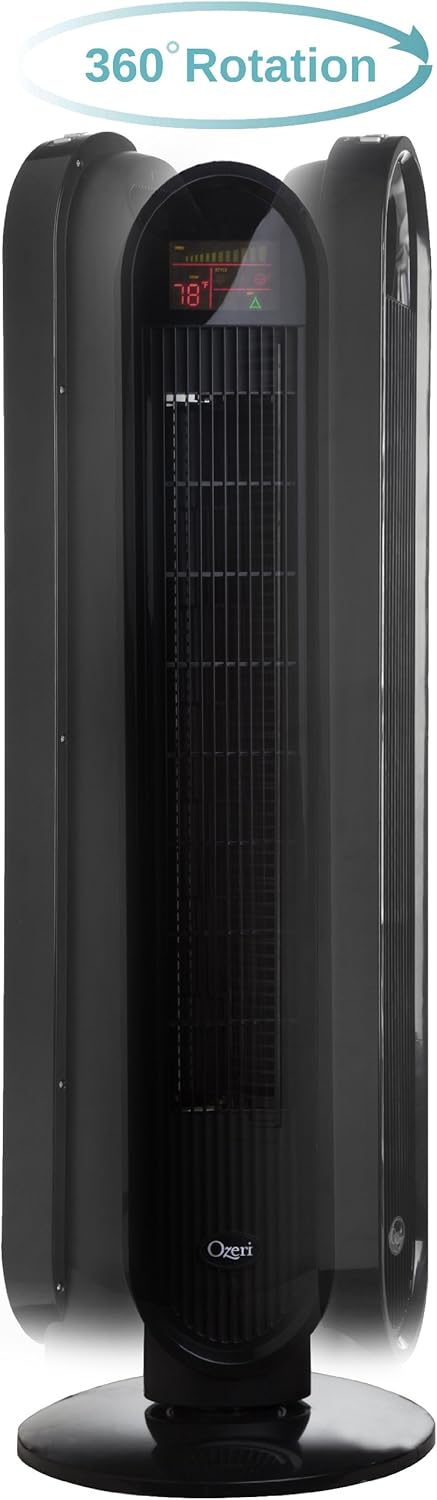
Naudojimo instrukcijos
Your Ozeri Tower Fan can be operated using the control panel on top of the unit or the included remote control.
Valdymo skydelio funkcijos:

- Maitinimo mygtukas: Įjungia arba išjungia ventiliatorių.
- Greičio mygtukas: Cycles through 3 whisper-quiet speed settings. The LCD display will show the current speed level.
- Režimo mygtukas: Selects between 3 preprogrammed airflow patterns (e.g., normal, natural, sleep).
- Oscillation (OSC) Button: Activates or deactivates the oscillation feature. You can select oscillation angles of 60, 90, 120, or 360 degrees for partial to complete air circulation.
- Laikmačio mygtukas: Sets the 8-hour programmable timer in 30-minute increments.
- Automatinis mygtukas: Engages the auto mode, which adjusts fan speed based on room temperature.
LCD ekranas:

The multi-colored LCD displays all active fan functions and the current room temperature, allowing for easy monitoring and control.
Nuotolinio valdymo pultas:
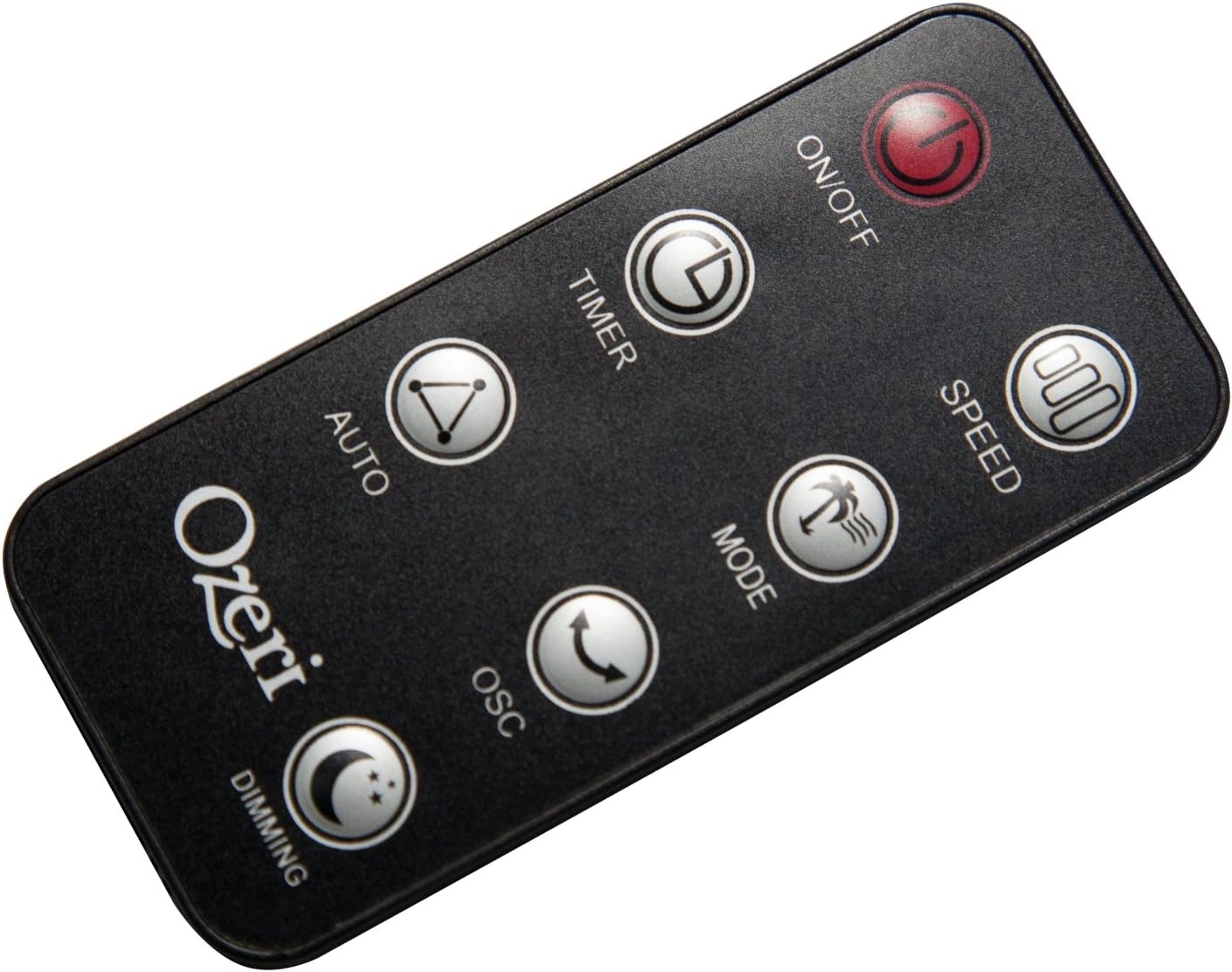
The extended-range remote control provides convenient access to all fan features from a distance. It includes buttons for On/Off, Speed, Timer, Mode, Auto, Oscillation, and Dimming (for the LCD display). The remote can be stored in a dedicated slot on the fan unit.

Oficialus produkto vaizdo įrašas:
Video: This official product video demonstrates the Ozeri 360 Oscillation Tower Fan, highlighting its micro-blade noise reduction technology and various features.
Priežiūra
Reguliarus valymas užtikrina optimalų ventiliatoriaus veikimą ir ilgaamžiškumą:
- Prieš valydami visada atjunkite ventiliatorių.
- Naudokite minkštą, damp šluoste išoriniams paviršiams valyti. Nenaudokite abrazyvinių valiklių ar tirpiklių.
- Švelniai pašalinkite dulkes nuo oro įsiurbimo ir išmetimo grotelių dulkių siurbliu su šepetėliu.
- Nenardinkite ventiliatoriaus į vandenį ir neleiskite vandeniui lašėti į variklio korpusą.
- Nenaudojamą ventiliatorių laikykite vėsioje, sausoje vietoje.
Trikčių šalinimas
Jei kyla problemų dėl ventiliatoriaus, žr. šias dažniausiai pasitaikančias problemas ir sprendimus:
- Ventiliatorius neįsijungia: Ensure the power cord is securely plugged into a working outlet. Check if the power button on the fan or remote has been pressed.
- Silpnas oro srautas: Check the fan speed setting and increase it if necessary. Ensure the air intake and exhaust grilles are not obstructed by dust or other objects.
- Fan makes unusual noise: Turn off and unplug the fan. Inspect for any foreign objects caught in the grilles or internal components. If the noise persists after clearing any obstructions, contact customer support.
- Nuotolinio valdymo pultas neveikia: Ensure the remote control batteries are correctly installed and not depleted. Point the remote directly at the fan's receiver.
Specifikacijos
| Funkcija | Detalė |
|---|---|
| Prekės ženklas | Ozeri |
| Modelio numeris | OZF5 |
| Spalva | Juoda |
| Elektrinio ventiliatoriaus dizainas | Grindų ventiliatorius |
| Maitinimo šaltinis | Su laidu elektra |
| Ypatinga funkcija | Oscillating (60, 90, 120, 360 degrees) |
| Greičių skaičius | 3 |
| Vattage | 60 vatų |
| Oro srauto talpa | 5000 kubinės pėdos per minutę |
| ttage | 127 voltų |
| Kontrolės metodas | Remote Control, Electronic Touch Controls |
| Medžiaga | Plastikiniai |
| Prekės svoris | 9 svaro |
Garantija ir palaikymas
This Ozeri Tower Fan comes with a 1-year no questions asked warranty. For warranty claims, technical support, or any inquiries, please refer to the contact information provided on the Ozeri official websvetainėje arba pirkimo dokumentuose.