
1. Įvadas
This manual provides instructions for the installation, configuration, and operation of the D-Link DGS-1210-28P Web Smart 24-Port Gigabit PoE Switch. This device is designed to provide a high-performance, cost-effective solution for small to medium-sized businesses, offering advanced management features and Power over Ethernet (PoE) capabilities.
2. Saugos informacija
- Užtikrinkite tinkamą vėdinimą aplink jungiklį, kad išvengtumėte perkaitimo.
- Do not place the switch in areas with high humidity or extreme temperatures.
- Naudokite tik su prietaisu pateiktą maitinimo adapterį.
- Prieš valydami ar atlikdami techninę priežiūrą, atjunkite maitinimą.
- This device should be installed by qualified personnel in accordance with all local and national electrical codes.
3. Pakuotės turinys
Patikrinkite, ar jūsų pakuotėje yra šie elementai:
- DGS-1210-28P Web Smart 24-Port Gigabit PoE Switch
- Maitinimo laidas
- Stovo tvirtinimo komplektas (laikikliai ir varžtai)
- Guminės kojelės (montuojant darbalaukyje)
- Konsolės laidas (RJ-45 iki DB-9)
- Greito montavimo vadovas
- CD-ROM (containing product documentation)
Jei trūksta kokių nors daiktų arba jie pažeisti, kreipkitės pagalbos į vietinį „D-Link“ platintoją.
4. Physical Description and Hardware Overview
The DGS-1210-28P switch features 24 Gigabit Ethernet ports with PoE support and 4 SFP slots for fiber optic connections. Below are diagrams illustrating the front and rear panels of the device.
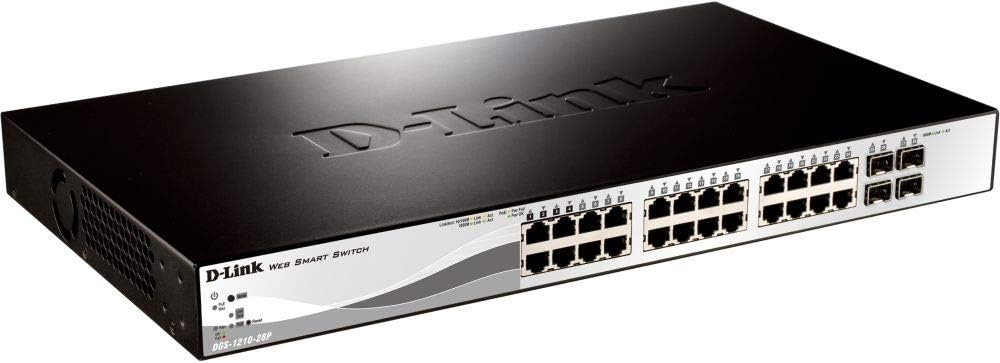
4.1 paveikslas: Priekinis skydelis View
This image displays the front panel of the DGS-1210-28P switch, showing 24 RJ-45 Gigabit Ethernet ports, each with LED indicators for link/activity and PoE status. To the right, there are 4 SFP (Small Form-Factor Pluggable) slots for fiber optic transceivers. The D-Link logo and model number are visible on the left side of the panel.

4.2 pav.: galinis skydelis View
This image shows the rear panel of the DGS-1210-28P switch. The primary feature visible is the AC power input connector on the right side, labeled "AC LINE" with voltage and current specifications (100-240VAC, 50/60Hz, 0.5 A MAX). The D-Link brand name is embossed on the top surface of the switch casing.
4.1 Priekinio skydelio indikatoriai
- Maitinimo šviesos diodas: Nurodo jungiklio maitinimo būseną.
- Sistemos šviesos diodas: Nurodo sistemos būseną.
- Ryšio / veiksmo šviesos diodai (kiekvienam prievadui): Green for Gigabit link/activity, Amber for 10/100 Mbps link/activity.
- „PoE“ būsenos šviesos diodai (kiekvienam „PoE“ prievadui): Nurodo PoE energijos tiekimo būseną.
4.2 galinio skydelio jungtys
- Kintamosios srovės įvestis: Jungiamas prie pridedamo maitinimo laido.
5. Sąranka
5.1 Darbalaukio diegimas
- Pritvirtinkite pridedamas gumines kojeles prie jungiklio apačios.
- Padėkite jungiklį ant lygaus, stabilaus paviršiaus, kuriame būtų tinkama ventiliacija.
5.2 Stovo montavimas
- Attach the two rack-mounting brackets to the side grooves of the switch using the provided screws.
- Pritvirtinkite jungiklį prie standartinio 19 colių įrangos stovo naudodami tinkamus stovo varžtus (nepridedami).
5.3 Jungiklio prijungimas
- Connect your network devices (computers, servers, access points, IP cameras) to the RJ-45 ports on the front panel using standard Ethernet cables.
- For fiber optic connections, insert compatible SFP transceivers into the SFP slots and connect fiber optic cables.
- Connect the power cord to the AC power input on the rear panel of the switch and then to a suitable power outlet.
- Verify that the Power LED on the front panel illuminates.
6. Jungiklio valdymas
6.1 Initial Access to Web-pagrįstas valdymas
The DGS-1210-28P is a Web Smart switch, meaning it can be configured and managed via a web naršyklė.
- Įsitikinkite, kad jūsų kompiuteris prijungtas prie vieno iš komutatoriaus Ethernet prievadų.
- By default, the switch has a pre-configured IP address (e.g., 192.168.0.1). Refer to the Quick Installation Guide or product documentation for the exact default IP address.
- Configure your computer's IP address to be in the same subnet as the switch (e.g., if the switch is 192.168.0.1, set your computer to 192.168.0.10 with subnet mask 255.255.255.0).
- Atidarykite a web browser (e.g., Chrome, Firefox, Edge) and enter the switch's default IP address in the address bar.
- You will be prompted for a username and password. The default credentials are typically "admin" for both username and password. Refer to the documentation for specific defaults.
- Upon successful login, you will access the switch's web management interface, where you can configure various network settings, VLANs, QoS, PoE settings, and more.
Svarbu: For security reasons, it is highly recommended to change the default password immediately after initial login.
6.2 Maitinimo per Ethernet (PoE) funkcionalumas
The DGS-1210-28P supports PoE, allowing it to deliver power to compatible devices (e.g., IP phones, wireless access points, IP cameras) over the Ethernet cable. This eliminates the need for separate power outlets for these devices.
- Connect PoE-compatible devices to any of the 24 Gigabit Ethernet ports.
- The switch will automatically detect and provide power to compliant devices.
- Monitor PoE status via the port LEDs or the web valdymo sąsaja.
- The total power budget for the switch is 193 Watts. Ensure the total power consumption of connected PoE devices does not exceed this limit.
7. Priežiūra
- Valymas: Jungiklio išorę valykite minkštu, sausu skudurėliu. Nenaudokite skystų ar aerozolinių valiklių.
- Firmware atnaujinimai: Reguliariai tikrinkite „D-Link“ palaikymo tarnybą website for firmware updates to ensure optimal performance and security. Follow the instructions provided with the firmware update package.
- Vėdinimas: Ensure that the ventilation openings on the switch are not blocked to prevent overheating.
- Atsarginės kopijos konfigūracija: Regularly back up your switch configuration settings through the web management interface to facilitate quick recovery in case of a reset or failure.
8. Problemų sprendimas
| Problema | Galima priežastis | Sprendimas |
|---|---|---|
| Nėra maitinimo LED indikacijos | Neprijungtas maitinimo laidas arba problema su maitinimo lizdu. | Verify power cord connection to the switch and power outlet. Test the outlet with another device. |
| No Link/Act LED on a connected port | Faulty cable, incorrect cable type, or device not powered on. | Check the Ethernet cable for damage. Ensure the connected device is powered on and functioning correctly. Try a different port or cable. |
| Negaliu prieiti web valdymo sąsaja | Incorrect IP address, subnet mismatch, or browser issue. | Verify the switch's IP address and your computer's IP settings. Ensure they are in the same subnet. Clear browser cache or try a different browser. Reset the switch to factory defaults if necessary (refer to documentation for procedure). |
| PoE įrenginys negauna maitinimo | Device not PoE compliant, cable issue, or power budget exceeded. | Ensure the device is PoE compliant. Check the Ethernet cable. Verify the total PoE power consumption in the web interface and ensure it does not exceed 193 Watts. |
9. Specifikacijos
| Modelis | DGS-1210-28P |
| Uostai | 24 x 10/100/1000BASE-T PoE Ports, 4 x Gigabit SFP Ports |
| „PoE“ standartas | IEEE 802.3af / at |
| Bendras PoE energijos biudžetas | 193 vatų |
| Perjungimo talpa | 56 Gbps |
| Persiuntimo norma | 41.67 Mps |
| MAC adresų lentelės dydis | 16K įrašai |
| „Jumbo Frame“ | 10,000 baitai |
| Matmenys (P x G x A) | 440 x 210 x 44 mm (17.32 x 8.27 x 1.73 colio) |
| Svoris | 3.63 kg (8 svaro) |
| Maitinimo įvestis | 100-240 VAC, 50/60 Hz Internal Universal Power Supply |
| Darbinė temperatūra | nuo 0°C iki 50°C (32°F iki 122°F) |
| Laikymo temperatūra | -20°C iki 70°C (nuo -4°F iki 158°F) |
| Darbinė drėgmė | Nuo 0% iki 95% nekondensuojantis |
10. Garantija ir palaikymas
D-Link provides a limited warranty for this product. For detailed warranty information, please refer to the warranty card included with your product or visit the official D-Link websvetainę.
Dėl techninės pagalbos, produkto dokumentacijos ir programinės įrangos atnaujinimų apsilankykite „D-Link“ pagalbos portale:
You can also find additional resources and community forums on the D-Link websvetainę.