
1. Įvadas
This manual provides comprehensive instructions for the Adesso AKB-132UY Luminous Large Print Multimedia Desktop USB Keyboard. This keyboard is designed with large, high-contrast keys to enhance readability, particularly for users with visual impairments. It also integrates multimedia controls for convenience.

Figure 1: Adesso AKB-132UY Luminous Large Print Multimedia Desktop USB Keyboard. This image displays the full keyboard with its black frame and bright yellow keys, featuring large black characters.
2. Pakuotės turinys
Patikrinkite, ar pakuotėje yra visi reikalingi daiktai:
- Adesso EasyTouch 132 - Florescent Yellow Multimedia Desktop Keyboard
- Greitos pradžios vadovas
3. Sąrankos instrukcijos
3.1 Klaviatūros prijungimas
- Kompiuteryje raskite laisvą USB prievadą.
- Plug the USB connector of the Adesso AKB-132UY keyboard into the USB port.
- The operating system will automatically detect and install the necessary drivers. No additional software installation is typically required.
The keyboard is powered via the USB connection.
4. Klaviatūros valdymas
4.1 Pagrindinės savybės
- Fluorescent 4X Large Print Keys: The keyboard features black characters printed in a large 4X size on bright fluorescent yellow keys. This design provides high contrast for improved visibility and readability, particularly beneficial for users with visual impairments.

2 pav. Iš arti view of the keyboard's QWERTY section, highlighting the large black characters on fluorescent yellow keys.
- Multimedijos valdikliai: Dedicated hotkeys allow for one-touch control of media functions. These include:
- Media Player
- Sumažinti garsumą
- Padidinti garsumą
- Nutildyti
- Leisti / pristabdyti
- Ankstesnis takelis
- Kitas takelis
- Sustok

3 pav. Iš arti view of the numeric keypad and dedicated multimedia control keys located on the upper right side of the keyboard.
- Windows One-Touch Controls: Access common Windows applications directly with dedicated hotkeys:
- Mano kompiuteris
- Paieška
- Skaičiuoklė
- paštas
- Home (Browser)
- Favorites (Browser)
- Quiet Membrane Key Switches: The keyboard utilizes membrane key switches designed to provide a responsive and quiet typing experience. These switches are rated for a lifespan of up to five million keystrokes.
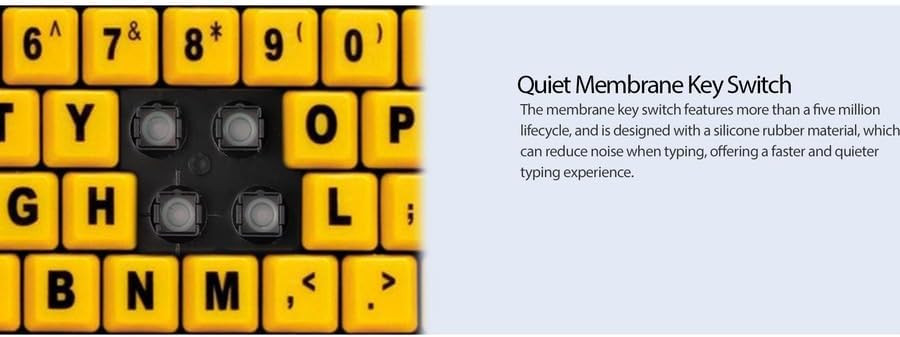
4 pav. Išsamus view showing the internal membrane key switch mechanism beneath a keycap.
- 104-Key US Layout: The keyboard features a standard 104-key US layout, providing a familiar typing experience.
5. Priežiūra
5.1 Klaviatūros valymas
Norėdami išlaikyti klaviatūros išvaizdą ir funkcionalumą:
- Prieš valydami atjunkite klaviatūrą nuo kompiuterio.
- Naudokite minkštą, šiek tiek damp cloth to wipe the surface of the keys and the keyboard body.
- For stubborn dirt or debris between keys, use compressed air or a soft brush.
- Venkite naudoti stiprias chemines medžiagas, abrazyvinius valiklius ar per didelę drėgmę, nes jie gali pažeisti klaviatūros apdailą ar vidinius komponentus.
6. Problemų sprendimas
If you encounter issues with your Adesso AKB-132UY keyboard, refer to the following troubleshooting steps:
6.1 Klaviatūra nereaguoja
- Patikrinkite USB jungtį: Ensure the keyboard's USB cable is securely plugged into a functioning USB port on your computer. Try unplugging and re-plugging the cable.
- Išbandykite kitą USB prievadą: Connect the keyboard to another USB port on your computer to rule out a faulty port.
- Iš naujo paleiskite kompiuterį: Kartais paprastas sistemos paleidimas iš naujo gali išspręsti ryšio problemas.
- Bandymas kitame kompiuteryje: If possible, test the keyboard on a different computer to determine if the issue is with the keyboard or your computer's setup.
6.2 Keys Sticking or Not Registering
- Valyti po klavišais: Dust, crumbs, or debris can get lodged under keys. Use compressed air to clear any obstructions.
- Venkite išsiliejimo: Liquid spills can cause keys to stick or malfunction. If a spill occurs, disconnect the keyboard immediately and allow it to dry completely before reconnecting.
7. Specifikacijos
| Funkcija | Aprašymas |
|---|---|
| Prekės ženklas | Adesso |
| Modelio numeris | AKB-132UY |
| Modelio pavadinimas | EasyTouch 132 |
| Ryšio technologija | USB |
| Klaviatūros aprašymas | Membrana |
| Ypatinga funkcija | Large Print Keys |
| Spalva | Juoda Geltona |
| Medžiaga | Plastikiniai |
| Raktų skaičius | 104 |
| Klaviatūros išdėstymas | QWERTY (US Layout) |
| Maitinimo šaltinis | USB maitinimas |
| Prekės svoris | 1.5 svaro |
| Suderinami įrenginiai | PC |
8. Informacija apie garantiją
The Adesso AKB-132UY keyboard comes with a 1 metų ribota garantija from the date of purchase. This warranty covers defects in materials and workmanship under normal use. For specific terms and conditions, please refer to the warranty card included in your package or visit the official Adesso websvetainę.
9. Parama
For technical support, product registration, or additional information, please visit the official Adesso websvetainė adresu www.adesso.com. You may also find FAQs and driver downloads on their support pages.