
Įvadas
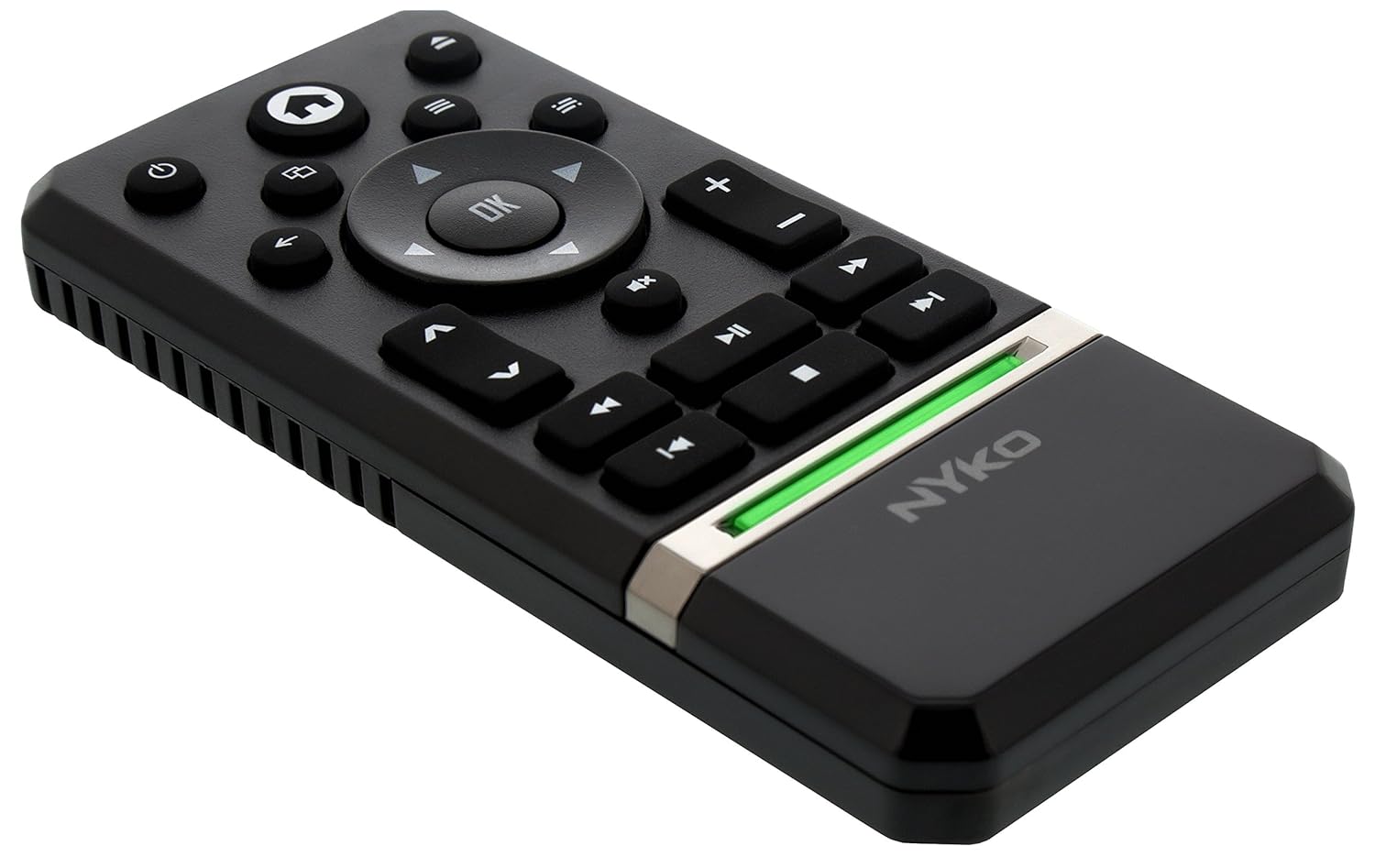
The Nyko Media Remote for Xbox One provides convenient control over your Xbox One console and various media applications. This remote simplifies navigation and playback of streaming content and physical media, offering dedicated buttons for common functions. It also features the ability to power your Xbox One on and off, and control basic functions of your television.

Image: Nyko Media Remote for Xbox One, front view.
Pakuotės turinys
- Nyko Media Remote for Xbox One (Model: 86116)
- Pastaba: AAA baterijos nepridedamos ir turi būti įsigytos atskirai.

Image: Nyko Media Remote for Xbox One in its retail packaging.
Sąranka
1. Akumuliatoriaus įdėjimas
- Nuotolinio valdymo pulto gale raskite baterijos skyrių.
- Norėdami atidaryti, pastumkite akumuliatoriaus dangtelį žemyn.
- Įdėkite dvi (2) AAA baterijas, užtikrindami teisingą poliškumą (+/-), kaip nurodyta skyriaus viduje.
- Uždėkite akumuliatoriaus dangtelį, stumdami jį aukštyn, kol jis užsifiksuos vietoje.
Vaizdas: Galinis view of the remote with the battery cover removed, illustrating the AAA battery placement.
2. Pradinis prisijungimas
The Nyko Media Remote uses infrared (IR) technology. No manual pairing is required for the Xbox One. Simply ensure a clear line of sight between the remote's IR emitter and the Xbox One's IR receiver.
For TV control functions (volume, channels, power), your TV must be configured to respond to the Xbox One's IR signals, typically through the Xbox One's OneGuide settings. The remote sends commands to the Xbox One, which then relays them to your TV via its IR blaster (if configured) or Kinect sensor.
Naudojimo instrukcijos
The Nyko Media Remote provides comprehensive control for your Xbox One and various media applications. Refer to the diagram below for button identification and their primary functions.

Vaizdas: priekis view of the Nyko Media Remote, displaying all control buttons.
Mygtukų funkcijos:
| Mygtukas | Funkcija |
|---|---|
| Maitinimo mygtukas (⏻) | Powers the Xbox One console on or off. |
| Pagrindinis mygtukas (⌂) | Returns to the Xbox One Home screen. |
| View Mygtukas (🗀) | Accesses additional information or options within an app or game. |
| Meniu mygtukas (☰) | Opens context-sensitive menus or options. |
| Krypties pagalvėlė (D-Pad) | Naršo meniu ir turinį. |
| Gerai mygtukas | Confirms selections. Can also function as Play/Pause in some apps. |
| Mygtukas Atgal (←) | Grįžta į ankstesnį ekraną arba meniu. |
| OneGuide Button (📱) | Launches the Xbox OneGuide for live TV and media. |
| Garsumo didinimas / sumažinimas (⏸ / ⏷) | Adjusts the television volume (requires TV setup via Xbox One). |
| Nutildymo mygtukas (🔇) | Mutes or unmutes television audio. |
| Kanalas aukštyn/žemyn (▲ / ▼) | Changes television channels (requires TV setup via Xbox One). |
| Greitas atsukimas (⏪) | Atsuka medijos atkūrimą. |
| Leisti / pristabdyti (⏯) | Paleidžia arba pristabdo medijos atkūrimą. |
| Greitai pirmyn (⏩) | Greitai persukti medijos atkūrimą į priekį. |
| Ankstesnis takelis (⏮) | Peršoka į dabartinio arba ankstesnio takelio pradžią. |
| Sustok (⏹) | Sustabdo medijos atkūrimą. |
| Kitas takelis (⏭) | Peršoka į kitą takelį arba skyrių. |
Media and App Control:
The remote is designed for seamless control of various Xbox One applications, including:
- OneGuide
- Netflix
- Hulu Plus
- „Amazon“ momentinis vaizdo įrašas
- Other streaming services and Blu-ray/DVD playback
Dedicated playback buttons (Play, Pause, Fast Forward, Rewind, Stop, Skip) provide intuitive control for movies, music, and other media.
Priežiūra
Baterijos keitimas:
When the remote's performance diminishes or it stops responding, it is likely time to replace the batteries. Follow the "Battery Installation" steps in the Setup section to replace the two AAA batteries.
Valymas:
To clean the remote, gently wipe it with a soft, dry cloth. Avoid using harsh chemicals, abrasive cleaners, or excessive moisture, as these can damage the remote's finish or internal components.
Trikčių šalinimas
- Nuotolinio valdymo pultas nereaguoja:
- Įsitikinkite, kad tinkamai įdėtos naujos AAA baterijos.
- Verify there is a clear line of sight between the remote and the Xbox One console. Obstructions can block the infrared signal.
- Move closer to the Xbox One console. The remote has a maximum effective range of approximately 9 meters (25 feet).
- TV Control (Volume, Channel, Power) Not Working:
- Confirm that your Xbox One's OneGuide settings are properly configured for your television. The remote sends commands to the Xbox One, which then controls the TV.
- Ensure any necessary IR blasters or Kinect sensors are correctly set up and positioned.
- Intermittent Response:
- This can sometimes occur due to weak batteries or environmental interference. Replace batteries and ensure a clear line of sight.
Specifikacijos
| Funkcija | Detalė |
|---|---|
| Prekės ženklas | Nyko |
| Modelio pavadinimas | Medijos nuotolinio valdymo pultas |
| Modelio numeris | 86116 |
| Ryšio technologija | Infraraudonųjų spindulių (IR) |
| Suderinami įrenginiai | Xbox One, Television (via Xbox One IR blaster/Kinect) |
| Baterijos tipas | 2 x AAA baterijos (į komplektą neįeina) |
| Didžiausias diapazonas | Iki 9 metrų (25 pėdų) |
| Prekės svoris | 0.1 svaro (apie 45 gramų) |
| Spalva | Tamsiai Pilka |
| Papildomos funkcijos | Ergonomic design, dedicated media playback controls. |
Garantija ir palaikymas
Nyko products are designed for quality and reliability. For specific warranty details, please refer to the documentation included with your purchase or visit the official Nyko website. The product includes warranty information in multiple languages.
Klientų aptarnavimas:
- El. paštas: customer.support@nyko.com
- Telefonas: +1-888-400-6956
- Registracija internetu: www.nyko.com
- Papildoma informacija: http://uqr.me/nykotechnologies/qr/83215

Vaizdas: Galinis view of the product packaging, detailing features and customer support contact information.


