
1. Įvadas
This manual provides essential information for the proper installation, operation, and maintenance of the Furuno FAP7011C Control Unit. The FAP7011C is designed to serve as the primary interface for the Furuno NavPilot 711C autopilot system, enabling precise control and navigation for marine vessels. Please read this manual thoroughly before using the unit to ensure safe and efficient operation.
2. Saugos informacija
Observe the following safety precautions to prevent injury, damage to the equipment, or other property. Always prioritize safety when operating marine electronics.
- Maitinimas: Užtikrinkite maitinimo šaltinio ttage matches the unit's requirements. Incorrect voltage gali sukelti žalą.
- Montavimas: Installation should be performed by qualified personnel to ensure correct wiring and mounting.
- Vandens ekspozicija: While designed for marine environments, avoid direct high-pressure water spray on the unit.
- Navigacija: The autopilot is an aid to navigation. Always maintain a proper lookout and be prepared to take manual control of the vessel.
- Priežiūra: Prieš atlikdami bet kokius techninės priežiūros ar valymo darbus, atjunkite maitinimą.
3. Pakuotės turinys
Prieš tęsdami montavimą, patikrinkite, ar pakuotėje yra visi reikalingi daiktai:
- Furuno FAP7011C Control Unit
- Montavimo laikiklis ir aparatūra
- Maitinimo kabelis
- Data Cable (NMEA2000 or NMEA0183, depending on configuration)
- Naudotojo vadovas (šis dokumentas)
4. Produktas baigtasview
The Furuno FAP7011C is a dedicated control unit for the NavPilot 711C autopilot system. It features a clear display and intuitive controls for setting course, engaging autopilot modes, and accessing navigation functions. Its robust design is suitable for demanding marine conditions.
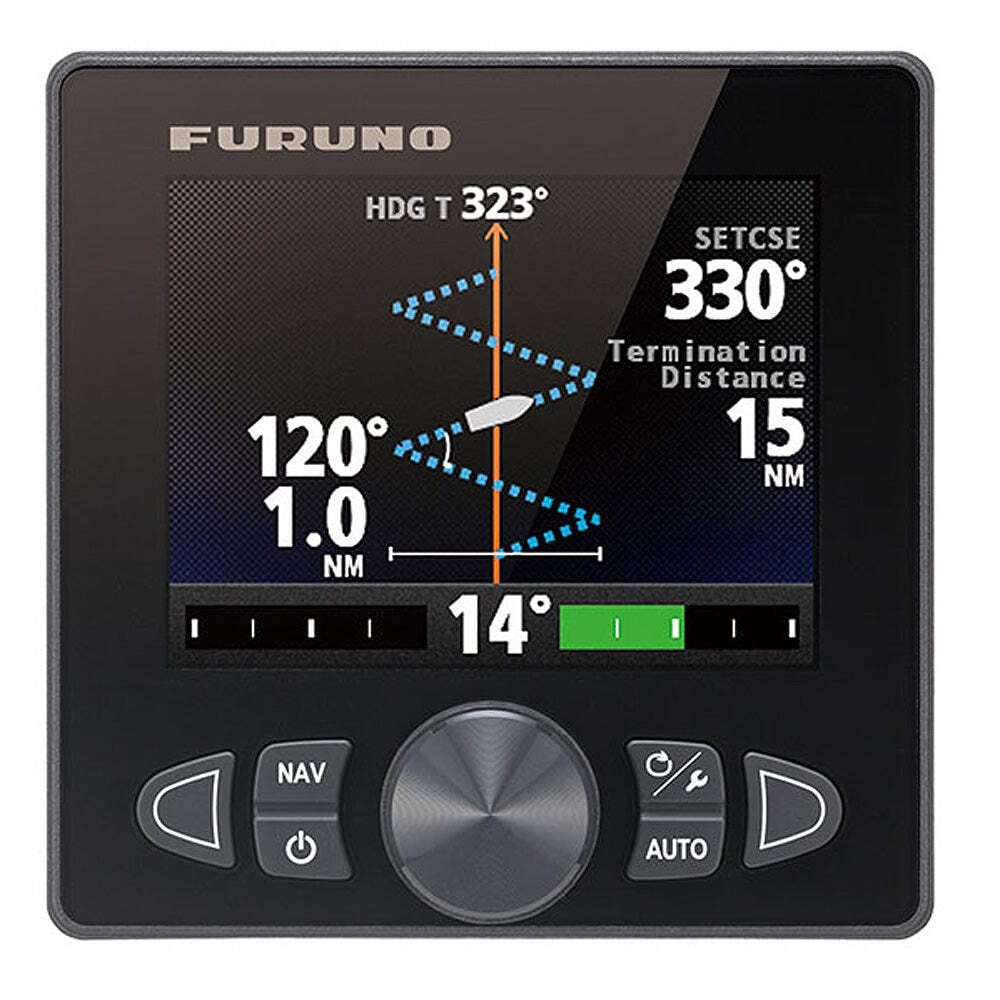
1 paveikslas: Priekyje view of the Furuno FAP7011C Control Unit. This image displays the unit's screen, rotary knob, and various control buttons, designed for easy interaction with the NavPilot 711C autopilot system.
5. Diegimas ir sąranka
Proper installation is crucial for the performance of your FAP7011C control unit. It is recommended that installation be performed by a certified marine electronics technician.
5.1 Montavimas
- Vietos pasirinkimas: Choose a location on the helm that is easily accessible, visible, and protected from direct impact or excessive vibration. Ensure adequate space for wiring connections at the rear.
- Šablono naudojimas: Use the provided mounting template to mark drilling locations for the mounting bracket.
- Saugus montavimas: Secure the mounting bracket using the supplied hardware. Ensure a watertight seal if flush mounting.
5.2 Laidų jungtys
- Maitinimo jungtis: Connect the power cable to a suitable 12V or 24V DC power source, ensuring proper polarity. Install an appropriate fuse or circuit breaker as specified in the full NavPilot 711C system manual.
- Duomenų ryšys: Connect the data cable to the NavPilot 711C processor unit. This typically involves a NMEA2000 or NMEA0183 connection, depending on your system configuration. Refer to the NavPilot 711C installation manual for specific wiring diagrams.
- Įžeminimas: Ensure the unit is properly grounded to the vessel's common ground system to prevent electrical interference.
6. Naudojimo instrukcijos
The FAP7011C control unit provides intuitive control over your NavPilot 711C autopilot system.
6.1 Įjungimas / išjungimas
- Norėdami įjungti: Paspauskite ir palaikykite GALIA mygtuką, kol užsidegs ekranas.
- Norėdami išjungti: Paspauskite ir palaikykite GALIA mygtuką, kol įrenginys išsijungs.
6.2 Engaging Autopilot
- Ensure the vessel is on a stable course.
- Paspauskite AUTO button. The autopilot will engage and maintain the current heading.
6.3 Course Adjustment
- Tikslus reguliavimas: Rotate the large rotary knob to adjust the course in 1-degree increments.
- Grubus reguliavimas: Naudokite UOSTAS (rodyklė kairėn) ir STARBOARD (right arrow) buttons for larger course changes, typically 10-degree increments, or to quickly avoid an obstruction and return to the previous course.
6.4 Navigation Modes
The FAP7011C supports various navigation modes when connected to compatible chartplotters or navigation systems:
- NAV Mode: Engages the autopilot to follow a pre-programmed route or steer to a waypoint. The unit will typically alarm upon approaching waypoints.
- AUTOMATINIS režimas: Maintains a set magnetic or true heading.
- TRK Mode: Maintains a track over ground, compensating for set and drift.
Refer to the comprehensive NavPilot 711C operation manual for detailed instructions on advanced navigation features, including auto route following and specific menu functions.
7. Priežiūra
Regular maintenance ensures the longevity and optimal performance of your FAP7011C control unit.
- Valymas: Nuvalykite ekraną ir casing su minkštu, damp cloth. Do not use abrasive cleaners, solvents, or chemical sprays, as these can damage the screen and plastic components.
- Patikra: Periodically check all cables and connections for signs of wear, corrosion, or damage. Ensure connections are secure.
- Saugykla: If the vessel is stored for an extended period, ensure the unit is powered off and, if possible, protected from extreme temperatures and humidity.
8. Problemų sprendimas
This section addresses common issues you might encounter with the FAP7011C control unit.
| Problema | Galima priežastis | Sprendimas |
|---|---|---|
| Įrenginys neįsijungia. | Nėra maitinimo; Perdegęs saugiklis; Atsilaisvinusi jungtis. | Check power cable connection; Inspect fuse/circuit breaker; Verify battery voltage. |
| Ekranas tuščias arba blankus. | Brightness setting too low; Power issue. | Adjust display brightness (refer to NavPilot 711C manual for menu options); Check power supply. |
| Autopilot does not engage. | No valid heading data; System error; NavPilot processor not powered. | Check compass/heading sensor connection; Verify NavPilot 711C processor is powered and functioning; Consult NavPilot 711C manual for error codes. |
| Valdikliai nereaguoja. | Unit frozen; Loose data connection. | Power cycle the unit; Check data cable connection to the NavPilot processor. |
For more complex issues or if troubleshooting steps do not resolve the problem, contact Furuno customer support or a certified service technician.
9. Specifikacijos
Key technical specifications for the Furuno FAP7011C Control Unit:
- Modelio pavadinimas: FAP7011C
- Dalies numeris: FAP7011C
- Prekinis ženklas: Furuno
- Medžiaga: Plastikiniai
- Prekės matmenys (PxPxH): 12 x 8 x 7 colio
- Prekės svoris: 4 svaro
- Pakuotės matmenys (IxPxH): 11.46 x 8.27 x 6.97 colio
- Pakuotės svoris: 1.87 kilogramo
- Pirmoji prieinama data: 27 m. birželio 2014 d
10. Informacija apie garantiją
The Furuno FAP7011C Control Unit is covered by a manufacturer's warranty. Specific warranty terms and conditions, including duration and coverage details, are provided with the product documentation or can be found on the official Furuno websvetainėje. Prašome išsaugoti pirkimo įrodymą garantiniams reikalavimams.
11. Pagalbos informacija
For technical assistance, service, or further inquiries regarding your Furuno FAP7011C Control Unit or NavPilot 711C system, please contact Furuno customer support. You can find contact details, FAQs, and additional resources on the official Furuno websvetainę.
Websvetainė: www.furunousa.com