
1. Įvadas
This manual provides essential information for the safe and efficient operation, installation, and maintenance of your Carrier Durakool Plus 42KGL-024D+51MSG-024RD Split Air Conditioner. Please read this manual thoroughly before using your AC unit and retain it for future reference. Proper use and maintenance will ensure optimal performance and longevity of your appliance.
2. Saugos informacija
Svarbios saugos instrukcijos: Visada laikykitės pagrindinių saugos priemonių, kad sumažintumėte gaisro, elektros smūgio ar sužalojimo riziką.
- Installation must be performed by qualified personnel in accordance with all applicable national wiring standards.
- Įsitikinkite, kad maitinimo šaltinis atitinka tūrįtage specified on the unit's nameplate.
- Do not operate the AC unit with wet hands or when standing on a wet surface.
- Laikykite vaikus atokiau nuo įrenginio ir nuotolinio valdymo pulto.
- Nekiškite jokių daiktų į oro įleidimo angą ar išleidimo angą.
- Prieš valydami ar atlikdami bet kokią techninę priežiūrą, išjunkite maitinimą.
- In case of abnormal operation (e.g., burning smell), immediately turn off the unit and disconnect the power supply. Contact a qualified service technician.
3. Produktas baigtasview
The Carrier Durakool Plus 42KGL-024D+51MSG-024RD is a 2 Ton, 2 Star rated split air conditioner designed for residential use. It features a robust rotary compressor and an anti-bacterial filter for improved air quality.
Pagrindinės funkcijos:
- 2 Ton Capacity, 2 Star Energy Rating
- Rotary Compressor for efficient cooling
- Anti Bacterial Filter and Electrostatic Dust Filter for cleaner air
- Sleep Mode and Auto Restart functions
- LCD Remote Control and LED Panel Display
- Auto Fan Speed, Auto Swing, Real Time Clock, Auto Mode, Turbo Mode
Įtraukti komponentai:
- 1 x Main Unit (Indoor Unit)
- 1 x Outdoor Unit (Required, not explicitly listed in "whats_in_the_box" but implied by "Split AC" and "Is Outdoor Unit Required: Yes")
- 1x nuotolinio valdymo pultas
- 1x garantinis talonas
- Vartotojo vadovas (šis dokumentas)
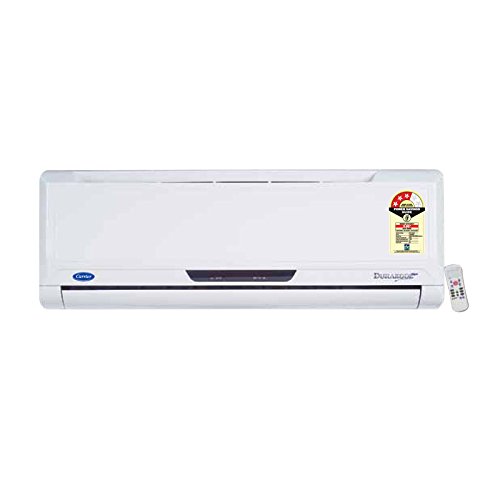
Figure 3.1: Carrier Durakool Plus Split AC Indoor Unit. This image shows the white indoor unit of the air conditioner, typically mounted on a wall.
4. Sąranka
The Carrier Durakool Plus is a split system air conditioner, requiring both an indoor and an outdoor unit. Professional installation is mandatory to ensure proper functioning, safety, and warranty validity.
4.1 Profesionalus įrengimas
Due to the complexity of refrigerant handling, electrical connections, and structural mounting, installation must be carried out by a certified HVAC technician. Attempting self-installation may void your warranty and pose significant safety risks.
4.2 Svetainės pasirinkimas
- Vidinis blokas: Pasirinkite vietą, kurioje oras tolygiai pasiskirstytų visame kambaryje, atokiau nuo tiesioginių saulės spindulių ar šilumos šaltinių. Užtikrinkite pakankamai vietos aplink įrenginį techninei priežiūrai.
- Lauko blokas: Choose a well-ventilated area, free from obstructions, and away from direct sunlight or excessive dust. Ensure the unit is placed on a stable, level surface. The outdoor unit should be easily accessible for maintenance.
4.3 Elektros prijungimas
The unit requires a dedicated power circuit. The electrical wiring must comply with local and national electrical codes. Ensure the power source is properly grounded. Refer to the wiring diagram provided with the outdoor unit for specific connection details.
5. Naudojimo instrukcijos
Your Carrier Durakool Plus AC unit is controlled via an LCD remote control. Familiarize yourself with the remote's functions for optimal use.
5.1 Nuotolinio valdymo pulto funkcijos
The remote control allows you to adjust temperature, fan speed, operating mode, and set timers. An LED display on the indoor unit will show current settings. Refer to the remote control's specific user guide for detailed button functions and display indicators.
- Maitinimo mygtukas: Įjungia arba išjungia įrenginį.
- Režimo mygtukas: Perjungia veikimo režimus: automatinį, vėsinimą, džiovinimą, ventiliatorių, šildymą (jei taikoma).
- Temperatūros mygtukai (▲/▼): Reguliuoja pageidaujamą kambario temperatūrą.
- Ventiliatoriaus greičio mygtukas: Pasirenka ventiliatoriaus greitį (automatinis, mažas, vidutinis, didelis).
- Swing mygtukas: Activates or deactivates the automatic vertical air swing.
- Miegojimo rezimas: Optimizuoja temperatūrą ir ventiliatoriaus greitį, kad būtų patogus miegas ir taupoma energija.
- Laikmatis ĮJUNGTAS/IŠJUNGTAS: Sets a specific time for the unit to turn ON or OFF.
- Turbo režimas: Provides rapid cooling by operating at maximum fan speed and cooling capacity.
- Automatinis paleidimas: If power is interrupted, the unit will automatically restart with previous settings once power is restored.
6. Priežiūra
Regular maintenance ensures efficient operation and extends the lifespan of your air conditioner. Always disconnect power before performing any maintenance.
6.1 Oro filtro valymas
The unit is equipped with an electrostatic dust filter and an active carbon filter. Clean these filters regularly (every 2-4 weeks, depending on usage and air quality) to maintain cooling efficiency and air quality.
- Turn off the AC unit and disconnect the power supply.
- Atidarykite priekinį vidaus bloko skydelį.
- Atsargiai nuimkite oro filtrus.
- Filtrus išvalykite dulkių siurbliu arba išplaukite drungnu vandeniu ir švelniu plovikliu. Kruopščiai išskalaukite.
- Prieš įdėdami filtrus atgal, leiskite jiems visiškai išdžiūti šešėlinėje vietoje.
- Uždarykite priekinį skydelį ir atkurkite maitinimą.
6.2 Bendras valymas
- Nuvalykite vidinio bloko išorę minkšta,amp audinys. Nenaudokite stiprių cheminių medžiagų ar abrazyvinių valiklių.
- Ensure the outdoor unit's coils are free from debris, leaves, and dirt. Use a soft brush or vacuum to clean the fins.
6.3 Sezoninė priežiūra
It is recommended to have your AC unit professionally serviced annually, especially before the cooling season, to check refrigerant levels, electrical connections, and overall system performance.
7. Problemų sprendimas
Prieš kreipdamiesi į aptarnavimo tarnybą, patikrinkite šias dažniausiai pasitaikančias problemas:
| Problema | Galima priežastis | Sprendimas |
|---|---|---|
| Įrenginys neįsijungia | Nėra maitinimo; Išsikrovusios nuotolinio valdymo pulto baterijos; Suveikė grandinės pertraukiklis. | Patikrinkite maitinimo jungtį; Pakeiskite nuotolinio valdymo pulto baterijas; Atstatykite grandinės pertraukiklį. |
| Nepakankamas aušinimas | Dirty air filters; Doors/windows open; Temperature setting too high; Outdoor unit obstructed. | Išvalykite oro filtrus; Uždarykite duris / langus; Sumažinkite temperatūros nustatymą; Pašalinkite kliūtis nuo lauko įrenginio. |
| Neįprastas triukšmas | Atsilaisvinusios dalys; Įrenginys nelygus; Ventiliatoriuje yra šiukšlių. | Ensure unit is securely mounted; Check for and remove debris. If noise persists, contact service. |
| Vandens nuotėkis iš vidinio bloko | Užsikimšęs kanalizacijos vamzdis; Netinkamas montavimas. | Clear drain pipe obstruction; Contact professional for inspection. |
If the problem persists after attempting these solutions, please contact Carrier customer support or a qualified service technician.
8. Specifikacijos
| Funkcija | Detalė |
|---|---|
| Prekės ženklas | Vežėjas |
| Modelio pavadinimas | Durakool Plus 42KGL-024D+51MSG-024RD |
| Talpa | 2 tonos |
| Aušinimo galia | 6741 vatų |
| Energijos efektyvumas | 2 žvaigždučių BEE įvertinimas |
| Ypatingos savybės | Anti Bacterial Filter, Electrostatic Dust Filter, Sleep Mode, Auto Restart, Auto Swing, Turbo Mode |
| Spalva | Baltas |
| Triukšmo lygis (patalpose) | 47 decibelų |
| Inverterio tipas | Nėra keitiklio |
| Diegimo tipas | Padalinta sistema |
| Kompresoriaus tipas | Rotacinis slinktis |
| Pagrindinė medžiaga | Varis |
| Maitinimo šaltinis | Su laidu elektra |
| Rekomenduojamas grindų plotas | 180 kvadratinių pėdų |
| Kontrolės metodas | Nuotolinio valdymo pultas |
9. Garantija ir palaikymas
9.1 Informacija apie garantiją
Your Carrier Durakool Plus AC unit comes with a limited warranty:
- 1 metų garantija ant gaminio.
- 5 metų garantija ant kompresoriaus.
Please retain your purchase receipt and warranty card for any warranty claims. The warranty terms and conditions are detailed on the warranty card included with your product.
9.2 Pagalba klientams
For technical assistance, service requests, or further inquiries, please contact Carrier customer support. Refer to your warranty card or the official Carrier websvetainę, kurioje rasite naujausią kontaktinę informaciją.
You can also visit the official Carrier store for more information: Carrier Store on Amazon.in