
D-Link DCS-6501LH/E
D-Link DCS-6501LH/E kompaktiška „Full HD“ panoraminio vaizdo „Wi-Fi“ kamera, naudotojo vadovas
Model: DCS-6501LH/E
Įvadas
This manual provides comprehensive instructions for the setup, operation, and maintenance of your D-Link DCS-6501LH/E Compact Full HD Pan & Tilt Wi-Fi Camera. This camera is designed to monitor large areas of your home or small office with its Full HD resolution and versatile pan and tilt functionality. It features integrated night vision for monitoring in low light, two-way audio for communication, and motion/sound detection for security alerts. The camera supports local recording to an SD card and cloud storage, and can be controlled via the mydlink app or voice commands with Amazon Alexa and Google Assistant.
Pakuotės turinys
- D-Link DCS-6501LH/E Compact Full HD Pan & Tilt Wi-Fi Camera
- Greitos pradžios vadovas
- Tvirtinimo varžtai
- Mikro USB maitinimo adapteris
- Tripod/Mounting Base
Sąranka
1. Fotoaparatas baigtasview

Priekyje view of the D-Link DCS-6501LH/E camera, showing the lens, status LED, and D-Link logo.

Atgal view of the D-Link DCS-6501LH/E camera, showing the speaker grille, micro USB power port, and reset button.
2. Fotoaparato įjungimas
Connect the micro USB power adapter to the camera's power port and plug it into a wall outlet. The camera's status LED will illuminate, indicating it is powering on.
3. Installing the mydlink App
Download the official mydlink app from the Apple App Store or Google Play Store on your smartphone or tablet. Create a mydlink account or log in if you already have one.
4. Adding the Camera to mydlink
- Open the mydlink app and tap the "Add a Device" icon.
- Nuskaitykite QR kodą, esantį ant fotoaparato arba jo pakuotės.
- Follow the on-screen instructions to connect the camera to your Wi-Fi network. Ensure your Wi-Fi network is 2.4 GHz for optimal compatibility.
- Once connected, the camera's status LED will turn solid green.
5. Kameros montavimas
The camera can be placed on a flat surface using its integrated base or mounted to a wall or ceiling using the provided mounting screws and tripod/mounting base. Ensure the camera is positioned to cover the desired monitoring area.
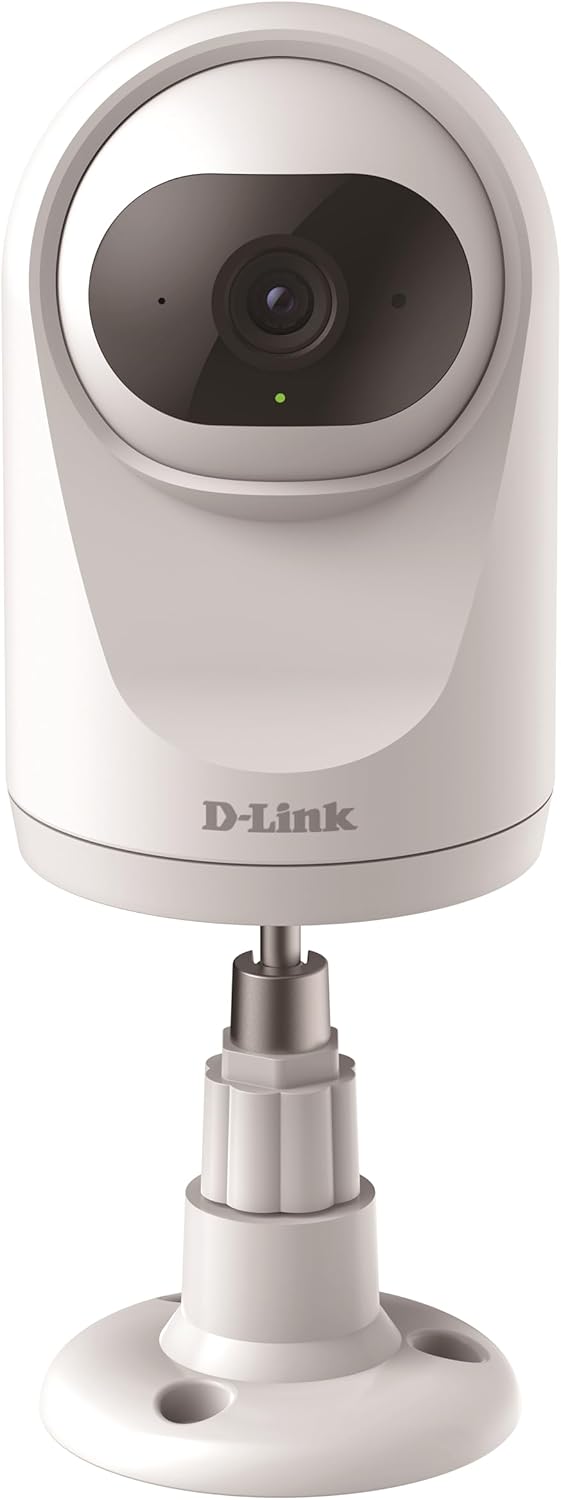
The camera can be placed on a flat surface using its included stand, providing stability and a clear view.

The camera can also be securely mounted to a wall or ceiling using the provided hardware for a fixed installation.
Fotoaparato valdymas
Paniravimo ir pakreipimo funkcija
The DCS-6501LH/E features motorized pan (340°) and tilt (90°) capabilities, allowing you to remotely adjust the camera's viewing angle through the mydlink app. This enables comprehensive coverage of large areas.

The camera offers a wide 340-degree horizontal pan and 90-degree vertical tilt range for extensive area coverage.
Automatic Motion Tracking
When enabled, the camera can automatically detect and track moving objects within its field of view, ensuring that important events are captured. This feature utilizes the pan and tilt motors to follow the subject.

The camera's automatic motion tracking feature follows moving subjects, keeping them in frame.
Naktinis matymas
The integrated night vision allows the camera to capture clear video footage even in complete darkness, up to a range of 5 meters. This ensures 24/7 monitoring capabilities.
Judesio ir garso aptikimas
The camera is equipped with advanced motion and sound detection. When motion or sound is detected, the camera can automatically send push notifications to your mydlink app and begin recording video.
Dvipusis garsas
Utilize the built-in microphone and speaker for two-way communication. You can listen to what's happening in the camera's vicinity and speak through the camera from your smartphone.

The camera supports two-way audio, allowing users to listen and speak through the device.
Vaizdo įrašymas ir saugojimas
The camera supports recording video locally to a microSD card (not included) or to the mydlink cloud. A 1-year free mydlink cloud subscription is included, allowing remote storage, playback, and download of recorded videos.
Privatumo režimas
For enhanced privacy, the camera features a physical privacy mode that rotates the lens to completely cover it, ensuring no video is captured when privacy is desired.

The camera's privacy mode physically covers the lens, ensuring complete privacy when needed.
Priežiūra
- Valymas: Švelniai nuvalykite fotoaparato objektyvą ir korpusą minkštu, sausu skudurėliu. Nenaudokite skystų valiklių ar abrazyvinių medžiagų.
- Firmware atnaujinimai: Regularly check for and install firmware updates through the mydlink app to ensure optimal performance, security, and access to new features.
- „MicroSD“ kortelė: If using a microSD card, periodically check its status and format it if necessary to maintain recording performance.
Trikčių šalinimas
Kamera neprisijungia prie „Wi-Fi“
- Ensure your Wi-Fi network is 2.4 GHz. The camera does not support 5 GHz networks.
- Patikrinkite, ar teisingas „Wi-Fi“ slaptažodis.
- Perkelkite kamerą arčiau „Wi-Fi“ maršrutizatoriaus, kad pagerintumėte signalo stiprumą.
- Restart both the camera and your Wi-Fi router.
- Perform a factory reset on the camera (refer to the Quick Start Guide for instructions) and try the setup process again.
Prasta vaizdo kokybė
- Patikrinkite interneto ryšio greitį. Optimaliam transliavimui reikalingas stabilus ir greitas ryšys.
- Įsitikinkite, kad fotoaparato objektyvas yra švarus ir be dulkių ar dėmių.
- Sureguliuokite kameros padėtį, kad išvengtumėte tiesioginio akinimo ar stipraus foninio apšvietimo.
Motion/Sound Detection Not Working
- Verify that motion and sound detection settings are enabled in the mydlink app.
- Adjust the sensitivity levels for detection in the app.
- Įsitikinkite, kad nėra jokių kliūčių, blokuojančių kameros view.
Specifikacijos
| Funkcija | Detalė |
|---|---|
| Modelio numeris | DCS-6501LH/E |
| Rezoliucija | 1080p „Full HD“ |
| "Pan" diapazonas | 340 laipsnių |
| Pakreipimo diapazonas | 90 laipsnių |
| Naktinio matymo diapazonas | 5 metrų |
| Ryšys | „Wi-Fi“ (2.4 GHz) |
| Energijos suvartojimas | 4 vatų |
| Matmenys (I x P x A) | 7.7 x 7.7 x 12.1 cm |
| Svoris | 190 gramų |
| Ypatingos savybės | Two-Way Audio, Motion Detection, Sound Detection, Automatic Motion Tracking, Privacy Mode, SD Card/Cloud Recording |
| Naudojimas viduje / lauke | Vidinis |
Garantija ir palaikymas
Dėl garantijos informacijos ir techninės pagalbos kreipkitės į oficialią „D-Link“ websvetainėje arba susisiekite su „D-Link“ klientų aptarnavimo tarnyba. Išsaugokite pirkimo kvitą garantiniams reikalavimams.
D-Link oficialus Websvetainė: www.dlink.com
Ask a question about this manual
Ask about setup, troubleshooting, compatibility, parts, safety, or missing instructions. Manuals+ will review the question and use this page’s manual context to help answer it.