
1. Sąranka
1.1 Išpakavimas ir turinys
Atsargiai išimkite televizorių ir visus priedus iš pakuotės. Įsitikinkite, kad yra visi komponentai:
- Sharp LC-40LE653U 40-Inch Smart LED TV
- Nuotolinio valdymo pultas
- 2 AA baterijos
1.2 Stovo montavimas
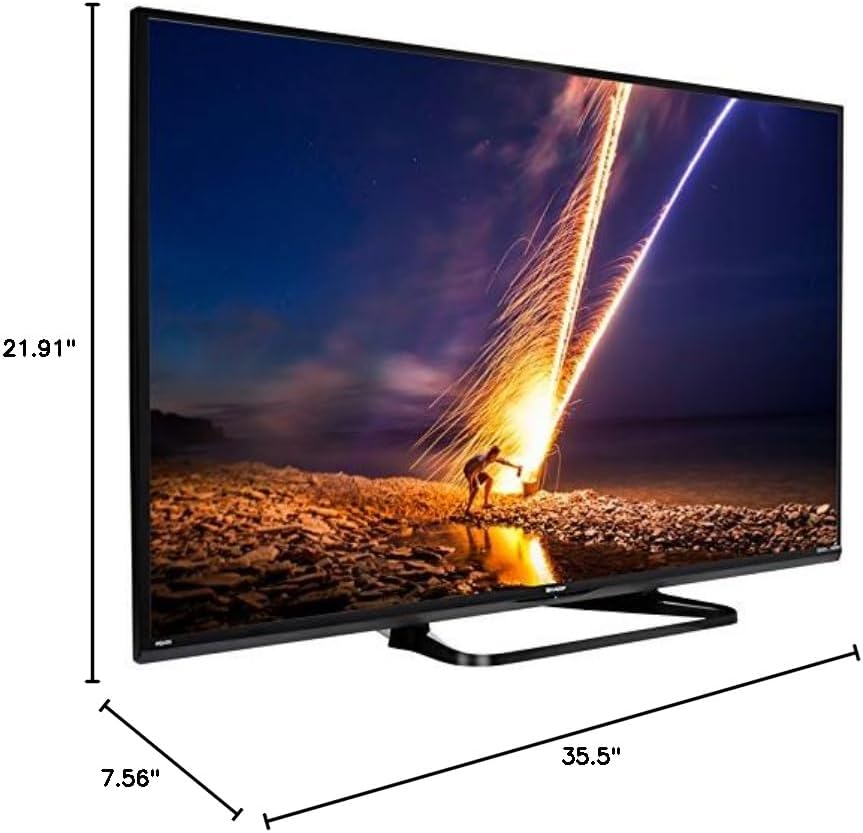
If placing the TV on a table, attach the included stand. Refer to the diagram below for proper assembly. Ensure all screws are securely fastened.
1.3 Išorinių įrenginių prijungimas
Connect your external devices such as cable boxes, Blu-ray players, or gaming consoles to the TV's input ports. The TV features multiple connectivity options.


Galimi prievadai:
- HDMI: 2 ports for high-definition audio and video. One HDMI port supports MHL (Mobile High-Definition Link).
- USB: 1 port for media playback or connecting a USB device.
- Ethernet: Laidinio tinklo ryšiui.
- Component/Video: For older video devices.
- DTV/TV (Antenna): Skirta antenos arba kabelinės televizijos tiekimui prijungti.
- Garso išvestis: Optical for digital audio, and RCA for analog audio.
1.4 Maitinimo jungtis
After connecting all necessary devices, plug the TV's power cord into a wall outlet.
1.5 Pradinė sąranka
Upon first power-on, the TV will guide you through an initial setup process. This includes language selection, time zone, and network configuration. For Wi-Fi setup, select your network and enter the password.
2. Naudojimo instrukcijos
2.1 Nuotolinio valdymo pulto funkcijos
Nuotolinio valdymo pultas leidžia pasiekti visas televizoriaus funkcijas. Įdėkite dvi AA baterijas į nuotolinio valdymo pultą, užtikrindami teisingą poliškumą.

- Maitinimas (raudonas mygtukas): Įjungia arba išjungia televizorių.
- Įvestis: Pasirenka įvesties šaltinį (HDMI, TV, USB ir kt.).
- VOL +/-: Reguliuoja garsumo lygį.
- CH +/-: Keičia televizijos kanalus.
- Naršymo mygtukai (aukštyn / žemyn / kairėn / dešinėn / „Enter“): Naudojamas naršyti meniu ir pasirinkti parinktis.
- SMART: Accesses the Smart Central Apps menu.
- MENIU: Opens the main TV menu for settings adjustments.
- NETFLIX: Tiesioginės prieigos mygtukas „Netflix“ programai.
2.2 Smart TV Features (Smart Central Apps)
The Sharp LC-40LE653U features Smart Central Apps, providing access to various online services and a web browser. Ensure your TV is connected to the internet via Wi-Fi or Ethernet.

- Prieiga prie programų: Press the 'SMART' button on your remote to open the Smart Central Apps menu.
- Palaikomos paslaugos: Includes Hulu Plus, Netflix, Pandora, Vudu, and YouTube.
- Web Naršyklė: Naudokite įmontuotą web browser for general internet browsing. Navigation is done via the remote control.
2.3 Wallpaper Mode
When the TV is turned off, Wallpaper Mode can display virtually any image. To use this feature, connect a USB drive containing your desired images to the TV's USB port. Navigate to the Wallpaper Mode settings in the TV menu to select and configure your images.
3. Priežiūra
3.1 Televizoriaus valymas
Norėdami išvalyti ekraną, švelniai nuvalykite jį minkštu, sausu, nepūkuotu skudurėliu. Jei dėmės sunkiai pašalinamos, šiek tiek nuvalykiteampen the cloth with water or a specialized screen cleaner. Avoid using harsh chemicals, abrasive cleaners, or direct spraying of liquids onto the screen or cabinet.
Clean the TV cabinet with a soft, dry cloth. Ensure the TV is unplugged before cleaning.
3.2 Programinės įrangos naujiniai
Periodically check for software updates through the TV's settings menu to ensure optimal performance and access to the latest features. Updates can be performed via the internet connection.
4. Problemų sprendimas
If you encounter issues with your Sharp LC-40LE653U TV, refer to the following common solutions:
- Nėra galios: Ensure the power cord is securely plugged into both the TV and a working wall outlet. Check if the power indicator light on the TV is on.
- Nėra vaizdo / garso: Verify the correct input source is selected using the 'Input' button on the remote. Check all cable connections (HDMI, component, etc.) are secure.
- Prasta vaizdo kokybė: Televizoriaus meniu reguliuokite vaizdo nustatymus (ryškumą, kontrastą, aiškumą). Įsitikinkite, kad įvesties šaltinis teikia aukštos kokybės signalą.
- Nėra interneto ryšio: Check your Wi-Fi router or Ethernet cable connection. Re-enter your Wi-Fi password in the TV's network settings. Restarting your router may resolve connectivity issues.
- Nuotolinio valdymo pultas neveikia: Pakeiskite nuotolinio valdymo pulto baterijas. Įsitikinkite, kad tarp nuotolinio valdymo pulto ir televizoriaus IR jutiklio nėra jokių kliūčių.
For more detailed troubleshooting steps, consult the full online manual or contact customer support.
5. Specifikacijos
Key technical specifications for the Sharp LC-40LE653U 40-Inch Smart LED TV:
| Funkcija | Specifikacija |
|---|---|
| Modelio numeris | LC-40LE653U |
| Ekrano dydis | 39.5 colio (40 colių klasė) |
| Ekrano technologija | LCD |
| Rezoliucija | 1080p (viskas viename) |
| Atnaujinimo dažnis | 60 Hz |
| Krašto santykis | 16:9 |
| Ryšio technologija | Wi-Fi |
| Techninės įrangos sąsaja | Ethernet, HDMI, USB |
| Total Number of HDMI Ports | 2 (one with MHL support) |
| Iš viso USB prievadų | 1 |
| Garso įvestis | HDMI, Optical, USB |
| Didžiausia garsiakalbio išėjimo galia | 20 vatų |
| Gaminio matmenys (D x P x A) | 7.56" x 35.5" x 21.91" |
| Prekės svoris | 16.3 svaro |
| Montavimo tipas | Stalo laikiklis |
| Palaikomos interneto paslaugos | Hulu Plus, Netflix, Pandora, Vudu, YouTube |
| „Energy Star“ sertifikatas | Taip |
6. Garantija ir palaikymas
6.1 Gaminio garantija
This Sharp LC-40LE653U TV comes with a 1 metų ribota garantijaPrašome išsaugoti pirkimo įrodymą garantiniams reikalavimams. Garantija taikoma gamybos defektams, esant įprastoms naudojimo sąlygoms.
6.2 Pagalba klientams
For technical assistance, troubleshooting beyond this manual, or warranty service, please contact Sharp customer support. Refer to the official Sharp webNaujausią kontaktinę informaciją rasite svetainėje arba produkto registracijos kortelėje.