
Įvadas
This manual provides essential information for the safe and efficient use of your Sharp LC-48LE653U 48-Inch 1080p 60Hz Smart LED TV. Please read these instructions thoroughly before operating the television and retain them for future reference. This television offers reliable performance with AquoMotion 120 technology for smooth motion, reduced blur, and access to SmartCentral Apps for various streaming services. It features an ultra-narrow bezel, a sleek modern design, Wallpaper Mode, three HDMI inputs (including MHL support), and built-in 20W audio.
Kas yra dėžutėje
Prieš tęsdami sąranką, įsitikinkite, kad yra visi komponentai.
- Sharp LC-48LE653U 48-Inch Smart LED TV
- Nuotolinio valdymo pultas
- Televizoriaus staliukas
- AA baterijos (2)
- Maitinimo laidas
- Dokumentacija (greito paleidimo vadovas, garantijos kortelė)
Sąranka
1. Išpakavimas ir įdėjimas
Carefully remove the television from its packaging. Place the TV on a stable, level surface or mount it on a wall using a compatible VESA mount (sold separately). Ensure adequate ventilation around the television.
2. Stovo pritvirtinimas
If using the included stand, align the stand with the mounting holes on the bottom of the TV. Secure it with the provided screws. Refer to the diagram below for proper orientation.

Figure 1: Television with stand and dimensions (10.55"D x 42.56"W x 26.28"H).
3. Prietaisų prijungimas
Connect your external devices (e.g., cable box, Blu-ray player, gaming console) to the appropriate ports on the back or side of the TV. The TV features 3 HDMI inputs (one with MHL support), 1 USB port, and component/composite video inputs.

Figure 2: Detail of TV input ports.
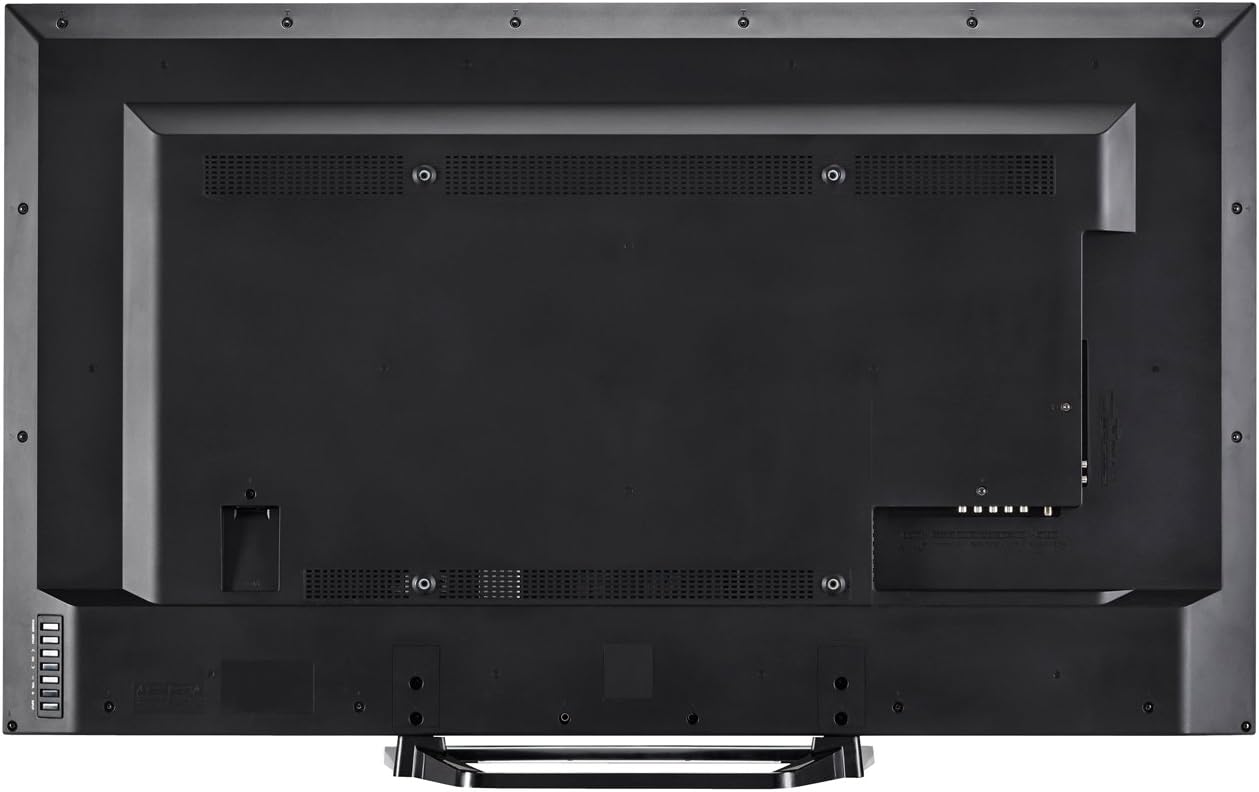
3 pav.: galinis view of the television with all connections.
4. Maitinimo prijungimas
Plug the power cord into the TV's power input, then into a standard electrical outlet (110 VAC, 60 Hz).
5. Pradinis įjungimo ir sąrankos vedlys
Press the Power button on the TV or remote control. Follow the on-screen instructions to complete the initial setup, including language selection, network connection (Wi-Fi or Ethernet), and channel scanning.
Naudojimo instrukcijos
1. Nuotolinio valdymo funkcijos
The included remote control allows you to navigate menus, change channels, adjust volume, and access smart features. Insert the two AA batteries into the remote control, observing polarity.

4 pav.: Nuotolinio valdymo pulto išdėstymas.
- Galia: Įjungia arba išjungia televizorių.
- Įvestis: Selects the input source (HDMI, Component, etc.).
- Garsas (+/-): Reguliuoja garso lygį.
- Kanalas (CH +/-): Keičia kanalus.
- Išmanusis: Accesses SmartCentral Apps.
- Meniu: Atidaro pagrindinį nustatymų meniu.
- Naršymo mygtukai (aukštyn / žemyn / kairėn / dešinėn / „Enter“): Naršo meniu ir patvirtina pasirinkimus.
- Netflix, YouTube, Pandora, Vudu: Specialūs mygtukai, skirti greitai pasiekti šias transliacijos paslaugas.
2. SmartCentral Apps
Your Sharp Smart LED TV comes with built-in Wi-Fi and SmartCentral Apps, providing access to popular streaming services and a web browser. Press the 'Smart' button on your remote or select the SmartCentral Apps icon from the home screen.

Figure 5: SmartCentral Apps Interface.
- Prieiga prie programų: Use the navigation buttons on the remote to select and launch applications like Netflix, Hulu Plus, Pandora, Vudu, and YouTube.
- Web Naršyklė: Naudokite įmontuotą web browser for general internet browsing.
- Tinklo prisijungimas: Ensure your TV is connected to a stable internet connection via Wi-Fi or Ethernet for optimal Smart TV functionality.
3. Vaizdo ir garso nustatymai
Access the TV's menu to customize picture and sound settings. Adjust brightness, contrast, color, and sharpness for picture quality. For audio, select sound modes or adjust bass/treble settings.
4. Wallpaper Mode
When the TV is turned off, Wallpaper Mode allows it to display virtually any image, transforming your TV into a large-format display for photos or artwork. Configure this feature through the TV's settings menu.
Priežiūra
1. Ekrano valymas
Švelniai nuvalykite ekraną minkštu, sausu, nepūkuotu skudurėliu. Jei dėmės sunkiai pašalinamos, švelniai nuvalykiteampNuvalykite šluostę vandeniu arba specializuotu ekrano valikliu. Venkite stiprių cheminių medžiagų ar abrazyvinių medžiagų.
2. Spintelės valymas
Televizoriaus korpusą valykite minkštu, sausu skudurėliu. Nenaudokite skystų valiklių tiesiai ant korpuso.
3. Programinės įrangos atnaujinimai
Periodically check for software updates through the TV's settings menu to ensure optimal performance and access to the latest features. A stable internet connection is required for updates.
Trikčių šalinimas
Jei kyla problemų dėl televizoriaus, žr. šiuos įprastus sprendimus:
- Nėra galios: Ensure the power cord is securely plugged into both the TV and the electrical outlet. Test the outlet with another device.
- Nėra vaizdo / garso: Verify the correct input source is selected. Check all cable connections to external devices. If using an antenna, ensure it is properly connected and channels are scanned.
- No Sound (intermittent): If sound occasionally cuts out, try unplugging the TV from the power outlet for a few minutes, then plugging it back in. This can reset internal components.
- Prasta vaizdo kokybė: Sureguliuokite vaizdo nustatymus (ryškumą, kontrastą, ryškumą). Įsitikinkite, kad įvesties šaltinis teikia aukštos kokybės signalą.
- Tinklo ryšio problemos: Check your Wi-Fi router or Ethernet cable connection. Restart your router and the TV. Ensure Wi-Fi settings on the TV are correctly configured.
- Nuotolinio valdymo pultas neveikia: Pakeiskite baterijas. Įsitikinkite, kad tarp nuotolinio valdymo pulto ir televizoriaus IR jutiklio nėra jokių kliūčių.
For persistent issues, contact Sharp customer support.
Specifikacijos
| Funkcija | Specifikacija |
|---|---|
| Modelio numeris | LC-48LE653U |
| Ekrano dydis | 48 colių |
| Ekrano technologija | LCD su LED foniniu apšvietimu |
| Rezoliucija | 1080p (1920 x 1080) |
| Atnaujinimo dažnis | 60 Hz (AquoMotion 120) |
| Ryšys | Built-in Wi-Fi, Ethernet |
| HDMI prievadai | 3 (one with MHL) |
| USB prievadai | 1 |
| Palaikomos interneto paslaugos | Hulu Plus, Netflix, Pandora, Vudu, YouTube |
| Garso išvesties galia | 20 vatų |
| Gaminio matmenys (D x P x A) | 10.55" x 42.56" x 26.28" |
| Prekės svoris | 21 svaro |
| ttage | 110 VAC 60 Hz |
Informacija apie garantiją
This Sharp LC-48LE653U television is covered by a 1 metų ribota garantija from the date of purchase. This warranty covers manufacturing defects in materials and workmanship under normal use. It does not cover damage caused by misuse, accidents, unauthorized modifications, or external causes. Please retain your proof of purchase for warranty claims.
Palaikymas
For technical assistance, troubleshooting beyond this manual, or warranty service, please contact Sharp customer support. Refer to the contact information provided in your product documentation or visit the official Sharp websvetainę.
Palaikymas internetu: www.sharpusa.com/support
Pagalba telefonu: Refer to your warranty card or Sharp's official websvetainė, kurioje rasite naujausius kontaktinius numerius.