
Įvadas
This manual provides detailed instructions for the EMOS E0042 Wireless Digital Thermometer. This device is designed to accurately measure and display both indoor and outdoor temperatures using a main unit and a remote wireless sensor. Please read this manual thoroughly before use to ensure proper operation and longevity of your device.

Image showing the EMOS E0042 Wireless Digital Thermometer in its retail packaging.
Pakuotės turinys
The EMOS E0042 package includes the following components:
- 1x EMOS E0042 Main Display Unit
- 1x EMOS Wireless Outdoor Sensor

Image showing the EMOS E0042 main display unit and the wireless outdoor sensor.
Produkto savybės
The EMOS E0042 Wireless Digital Thermometer offers a range of features for convenient temperature monitoring:
- Clear and easy-to-read LCD display with large digits.
- Simultaneous display of indoor and outdoor temperatures.
- Wireless outdoor sensor with a transmission range of up to 100 meters (open area).
- Temperature measurement range: Indoor 0 °C to 60 °C, Outdoor -40 °C to +60 °C.
- Temperature resolution: 0.1 °C.
- Main unit suitable for tabletop placement or wall mounting.
- Sensor designed for outdoor use.
- Powered by AAA batteries (not included).
Icon indicating indoor and outdoor temperature measurement capabilities.
Sąranka
1. Akumuliatoriaus įdėjimas
The main unit and the wireless sensor each require 2x AAA 1.5V batteries (not included).
Pagrindinis ekranas:
- Raskite baterijų skyrių pagrindinio ekrano gale.
- Atidarykite akumuliatoriaus skyriaus dangtelį.
- Įdėkite 2 AAA tipo baterijas, užtikrindami teisingą poliškumą (+/-).
- Saugiai uždarykite akumuliatoriaus skyriaus dangtelį.
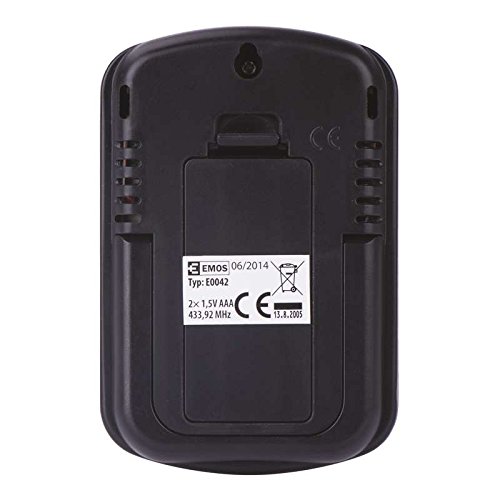
Galinis view of the EMOS E0042 main display unit, showing the battery compartment and wall-mount hole.
Belaidis lauko jutiklis:
- Locate the battery compartment on the back of the wireless outdoor sensor.
- Atidarykite akumuliatoriaus skyriaus dangtelį.
- Įdėkite 2 AAA tipo baterijas, užtikrindami teisingą poliškumą (+/-).
- Saugiai uždarykite akumuliatoriaus skyriaus dangtelį.
- The sensor will automatically begin transmitting data.
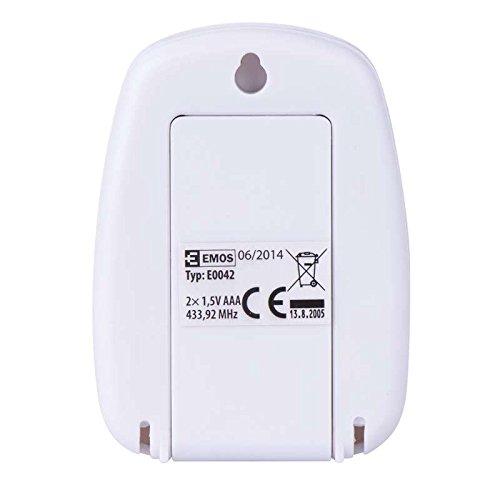
Galinis view of the EMOS wireless outdoor sensor, showing the battery compartment.
2. Jutiklių susiejimas
The main unit and sensor should automatically pair once batteries are installed. If the outdoor temperature is not displayed, ensure both units are within range and try re-inserting the batteries in both units.
3. Įdėjimas
Pagrindinis ekranas:
Place the main unit indoors on a flat surface using its integrated stand, or mount it on a wall using the hanging hole on the back. Ensure it is in a location where the display is easily visible and not exposed to direct sunlight or extreme temperature fluctuations.
Šoninė view of the EMOS E0042 main display unit, showing its integrated stand for tabletop placement.
Belaidis lauko jutiklis:
Position the wireless sensor outdoors in a shaded area, protected from direct rain and sunlight, to ensure accurate temperature readings. The maximum effective range between the sensor and the main unit is 100 meters in an open area. Walls, obstacles, and electronic interference can reduce this range.
Naudojimo instrukcijos
Skaitymo temperatūra
Once powered on and paired, the main display unit will show two temperature readings:
- IŠĖJIMAS: This indicates the outdoor temperature measured by the wireless sensor.
- IN: This indicates the indoor temperature measured by the main display unit itself.
The temperature is displayed in degrees Celsius (°C).
Ekranas
The large LCD screen provides clear, simultaneous readings of both indoor and outdoor temperatures.
Priežiūra
Valymas
Norėdami išvalyti įrenginį, nuvalykite jį minkšta, damp šluoste. Nenaudokite abrazyvinių valiklių ar tirpiklių, nes jie gali pažeisti ekraną arbaasing.
Baterijos keitimas
When the display becomes dim or readings are inconsistent, it is time to replace the batteries in both the main unit and the wireless sensor. Follow the battery installation steps outlined in the "Setup" section.
Trikčių šalinimas
| Problema | Galima priežastis | Sprendimas |
|---|---|---|
| Pagrindiniame įrenginyje nėra ekrano. | Baterijos išsikrovė arba įdėtos neteisingai. | Patikrinkite baterijų poliškumą ir pakeiskite jas naujomis AAA baterijomis. |
| Outdoor temperature not displayed or shows "--". | Sensor out of range, batteries dead, or interference. | Move sensor closer to the main unit. Replace sensor batteries. Ensure no strong electronic interference sources are nearby. Re-pair by removing and re-inserting batteries in both units. |
| Netikslūs temperatūros rodmenys. | Jutiklis veikiamas tiesioginių saulės spindulių, lietaus ar šilumos šaltinių. | Relocate the sensor to a shaded, protected area. Ensure proper ventilation around both units. |
Specifikacijos
| Funkcija | Detalė |
|---|---|
| Modelio numeris | E0042 |
| Prekės ženklas | EMOS |
| Patalpų temperatūros diapazonas | 0 °C iki 60 °C |
| Lauko temperatūros diapazonas | -40 °C iki +60 °C |
| Temperatūros raiška | 0.1 °C |
| belaidis diapazonas | Iki 100 metrų (atvira zona) |
| Dažnis | 433 MHz |
| Pagrindinio įrenginio maitinimo šaltinis | 2x AAA 1.5V baterijos (į komplektą neįeina) |
| Jutiklio maitinimo šaltinis | 2x AAA 1.5V baterijos (į komplektą neįeina) |
| Pagrindinio įrenginio matmenys (I x P x A) | 8.5 x 5.6 x 1.8 cm |
| Jutiklio matmenys (I x P x A) | 6.8 x 4.9 x 2.0 cm |
| Ekrano tipas | Skaitmeninis LCD |
| Ryšio technologija | RF (radijo dažnis) |
| Medžiaga | Plastikiniai |
| Sertifikatai | CE |
Saugos informacija
For detailed safety guidelines and important warnings, please refer to the official Safety Information PDF document provided by the manufacturer. Atsisiųsti saugos informaciją (PDF)
Garantija ir palaikymas
EMOS products are manufactured to high-quality standards. For warranty information or technical support, please contact your retailer or the official EMOS customer service. Keep your purchase receipt as proof of purchase.