
1. Įvadas
The PowerDrive PD3000 is a 3000 Watt power inverter designed to convert 12V DC power from your vehicle's battery into 115V AC household power. This unit provides 3000 Watts of continuous AC power and has a high surge capacity of up to 6000 Watts to accommodate devices with high starting power requirements. It features integrated Bluetooth wireless technology for remote monitoring and control via a mobile application, along with a removable control panel for flexible placement. This manual provides essential information for the safe and efficient operation of your PowerDrive PD3000 inverter.
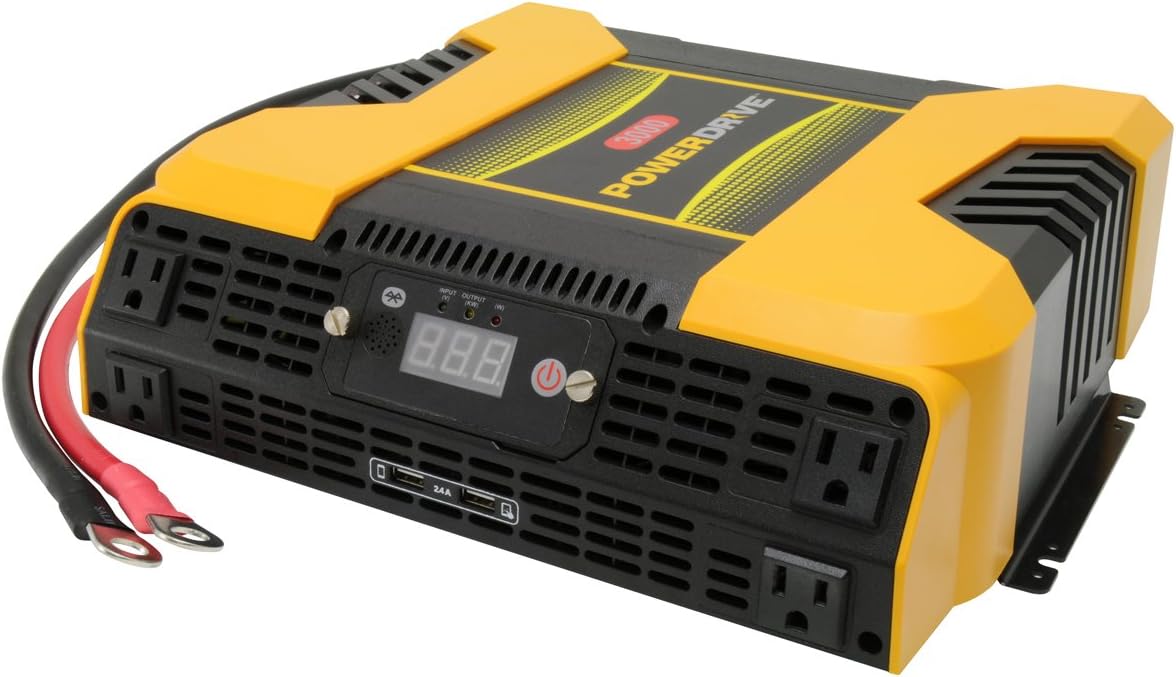
Figure 1.1: PowerDrive PD3000 3000 Watt Power Inverter, front view with outlets and display.
2. Saugos informacija
Please read and understand all safety instructions before installing or operating the inverter. Failure to follow these instructions may result in electrical shock, fire, serious injury, or property damage.
- Elektros smūgio pavojus: Neatidarykite keitiklio casing. Viduje nėra dalių, kurias galėtų aptarnauti vartotojas. Visus techninės priežiūros darbus patikėkite kvalifikuotiems techninės priežiūros darbuotojams.
- Gaisro pavojus: Do not operate the inverter near flammable materials, gases, or vapors. Ensure adequate ventilation around the inverter.
- Baterijos sauga: Connect the inverter only to a 12V DC battery system. Ensure battery terminals are clean and connections are secure. Wear eye protection and gloves when working with batteries.
- Vėdinimas: Įsitikinkite, kad keitiklis sumontuotas gerai vėdinamoje vietoje. Neužblokuokite ventiliacijos angų.
- Apsauga nuo perkrovos: Do not exceed the inverter's continuous power rating of 3000 Watts. Overloading can damage the inverter and connected devices.
- Drėgmė: Do not expose the inverter to rain, moisture, or spray.
3. Pakuotės turinys
Išpakuodami patikrinkite, ar yra visi daiktai:
- PowerDrive PD3000 Power Inverter Unit
- Instrukcijų vadovas
- Battery Cables (Red and Black)
- Removable Control Panel with Cable
4. Produkto ypatybės
The PowerDrive PD3000 inverter offers a range of features for versatile power conversion:
- Didelė galia: Delivers 3000 Watts of continuous AC power with a 6000 Watt surge capacity.
- Keli kintamosios srovės lizdai: Equipped with four (4) 3-prong AC outlets to support various devices.
- USB įkrovimo prievadai: Includes two (2) USB power ports (shared 2400mA total output) for charging mobile devices.
- Bluetooth ryšys: Allows remote access to features and settings via a free downloadable mobile application.
- Nuimamas valdymo skydelis: Detachable control panel enables remote monitoring and testing, offering installation flexibility.
- Patvari konstrukcija: Features a robust ABS PVC composite housing designed to protect internal electronic components.
- Saugos apsaugos: Incorporates audible alarms and automatic shut-off triggers for low battery, high battery, and overload conditions.

Figure 4.1: Front panel of the PowerDrive PD3000 showing AC outlets, USB ports, and digital display.
5. Sąranka ir diegimas
Tinkamas montavimas yra labai svarbus saugiam ir efektyviam keitiklio veikimui.
5.1 Inverterio montavimas
- Choose a dry, well-ventilated location away from direct sunlight, heat sources, and flammable materials.
- Ensure there is sufficient space around the inverter for air circulation, especially around the cooling fans.
- Mount the inverter securely using appropriate hardware (not included) to prevent movement during operation.
5.2 Prijungimas prie 12 V nuolatinės srovės maitinimo šaltinio
Svarbu: Ensure the inverter is turned OFF before making any connections.
- Prijunkite RAUDONA (positive) battery cable to the RAUDONA (positive) terminal on the inverter. Tighten securely.
- Prijunkite kitą galą RAUDONA (positive) battery cable to the teigiamas (+) terminal of your 12V DC battery. Tighten securely.
- Prijunkite JUODAS (negative) battery cable to the JUODAS (negative) terminal on the inverter. Tighten securely.
- Prijunkite kitą galą JUODAS (negative) battery cable to the neigiamas (-) terminal of your 12V DC battery. Tighten securely.
- Verify all connections are tight and free from corrosion. Loose connections can cause overheating and damage.

Figure 5.1: PowerDrive PD3000 Inverter showing battery cable connections.

5.2 pav.: galinis view of the PowerDrive PD3000 showing cooling fans and battery terminals.
5.3 Removable Control Panel Installation
The control panel can be used directly on the inverter or detached for remote operation.
- To use remotely, gently pull the control panel from the inverter.
- Connect the provided cable to the port on the back of the detached control panel and to the corresponding port on the inverter.
- Mount the control panel in a convenient location for monitoring and control.

Figure 5.3: PowerDrive PD3000 Inverter with its control panel detached for remote use.
6. Naudojimo instrukcijos
6.1 Įjungimas / išjungimas
- After ensuring all battery connections are secure, press and hold the power button on the inverter or the remote control panel for approximately 1-2 seconds.
- The digital display will illuminate, and the inverter will begin providing AC power.
- To turn off, press and hold the power button again until the display turns off.
6.2 Kintamosios srovės įrenginių prijungimas
- Plug your 115V AC devices into the 3-prong AC outlets on the front of the inverter.
- Užtikrinkite bendrą vatątage of all connected devices does not exceed 3000 Watts.
- For devices with high starting loads (e.g., motors, compressors), ensure their surge wattage is within the inverter's 6000 Watt surge capacity.
6.3 USB įkrovimo prievadų naudojimas
- Connect your USB-powered devices (e.g., smartphones, tablets) to the USB ports.
- The two USB ports share a total output of 2400mA (2.4A).
6.4 Understanding the Digital Display and Indicators
The digital display shows real-time information such as input voltage or output wattage. Indicator lights provide status feedback:
- Įvesties šviesos diodas: Indicates the status of the DC input power.
- Išvesties šviesos diodas: Indicates the status of the AC output power.
- Gedimo šviesos diodas: Illuminates to indicate an error condition (e.g., overload, low/high voltagir).
7. Bluetooth ryšys
The PowerDrive PD3000 features Bluetooth wireless technology, allowing you to monitor and control the inverter using a compatible smartphone application.
7.1 Downloading the Mobile App
- Ieškokite the official PowerDrive inverter app on your smartphone's app store (e.g., Apple App Store, Google Play Store).
- Atsisiųskite ir įdiekite programą.
7.2 Pairing with Your Inverter
- Įsitikinkite, kad jūsų išmaniajame telefone įjungtas „Bluetooth“.
- Turn on the PowerDrive PD3000 inverter.
- Open the PowerDrive mobile app. The app should automatically detect nearby PowerDrive inverters.
- Follow the on-screen prompts within the app to pair with your PD3000 inverter.
7.3 Programos funkcijos
Once paired, the app allows you to:
- Monitoriaus įvesties ttage ir išėjimo vattage.
- View inverter status and fault codes.
- Remotely turn the inverter on or off.
- Adjust certain settings (refer to the app's help section for details).

Figure 7.1: Smartphone displaying the PowerDrive mobile application interface.
8. Priežiūra
Reguliarus keitiklio aptarnavimas užtikrina optimalų veikimą ir ilgaamžiškumą.
- Valymas: Reguliariai valykite keitiklio išorę sausa, minkšta šluoste. Nenaudokite skystų valiklių ar tirpiklių.
- Vėdinimas: Įsitikinkite, kad aušinimo ventiliatoriuose ir ventiliacijos angose nėra dulkių ir šiukšlių. Jei reikia, užsikimšimams pašalinti naudokite suslėgtą orą.
- Jungtys: Regularly check battery cable connections for tightness and corrosion. Clean terminals with a wire brush if corrosion is present.
- Saugykla: Jei keitiklį ketinate laikyti ilgesnį laiką, atjunkite jį nuo akumuliatoriaus ir laikykite vėsioje, sausoje vietoje.
9. Problemų sprendimas
This section addresses common issues you might encounter with your PowerDrive PD3000 inverter.
9.1 Bendrosios problemos ir sprendimai
- Inverteris neįsijungia:
- Check battery connections for tightness and proper polarity.
- Įsitikinkite, kad akumuliatoriaus talpatage is above 10.5V DC (Low Battery Shut Down Point).
- Verify the power button is pressed and held for the required duration.
- Nėra kintamosios srovės išvesties:
- Check if the inverter is powered on and the Output LED is illuminated.
- Ensure the connected AC device is functioning correctly.
- Check for an overload condition (Fault LED illuminated). Reduce the load.
- Audible Alarm / Fault LED On:
- Senkančios baterijos signalas: Activates at 11 ± 0.3V DC. Recharge or replace the battery. The inverter will shut down at 10.5 ± 0.3V DC.
- High Battery Shut Down: Occurs at 15.5 ± 0.5V DC. Check the charging system of your vehicle.
- Perkrova: Bendras vattage of connected devices exceeds 3000 Watts. Disconnect some devices.
- Virš temperatūros: Inverter is overheating. Ensure proper ventilation and reduce load.
- „Bluetooth“ ryšio problemos:
- Ensure Bluetooth is enabled on your smartphone and the inverter is powered on.
- Restart the mobile app and try pairing again.
- Ensure your smartphone is within range of the inverter.
10. Specifikacijos
| Specifikacija | Vertė |
|---|---|
| Modelis | PD3000 |
| Continuous AC Power Output | 3000 vatų |
| Didžiausia viršįtampio galia | 6000 vatų |
| DC įėjimas ttage | 12.8 V |
| AC išvesties ttage | 115 V |
| Kintamosios srovės išvesties dažnis | 58Hz-62Hz |
| USB išvestis | 5V / 2 (Shared 2400mA) |
| Efektyvumas (maksimalus) | >88 % |
| Efektyvumas (visa apkrova) | >84 % |
| Battery Drain (No AC Load) | <0.6A |
| Low Battery Alarm Trigger | 11 ± 0.3 V DC |
| Low Battery Shut Down Point | 10.5 ± 0.3 V DC |
| High Battery Shut Down Point | 15.5 ± 0.5 V DC |
| Recovering Voltage after Under Voltage Turn-off | 12 ± 0.3 V DC |
| Prekės svoris | 12.14 svaro |
| Gaminio matmenys | 16.2 x 16.3 x 7.6 colio |
11. Garantija ir palaikymas
For warranty information or technical support, please refer to the documentation included with your purchase or visit the official PowerDrive websvetainėje. Išsaugokite pirkimo įrodymą, jei prireiktų pateikti garantinį ieškinį.