
1. Įvadas
This manual provides instructions for the proper use and care of your DeltaTrak 11047 Digital Lollipop Min/Max Probe Thermometer. This device is designed for accurate temperature measurement in various applications, featuring a digital display and Min/Max temperature recording capabilities.
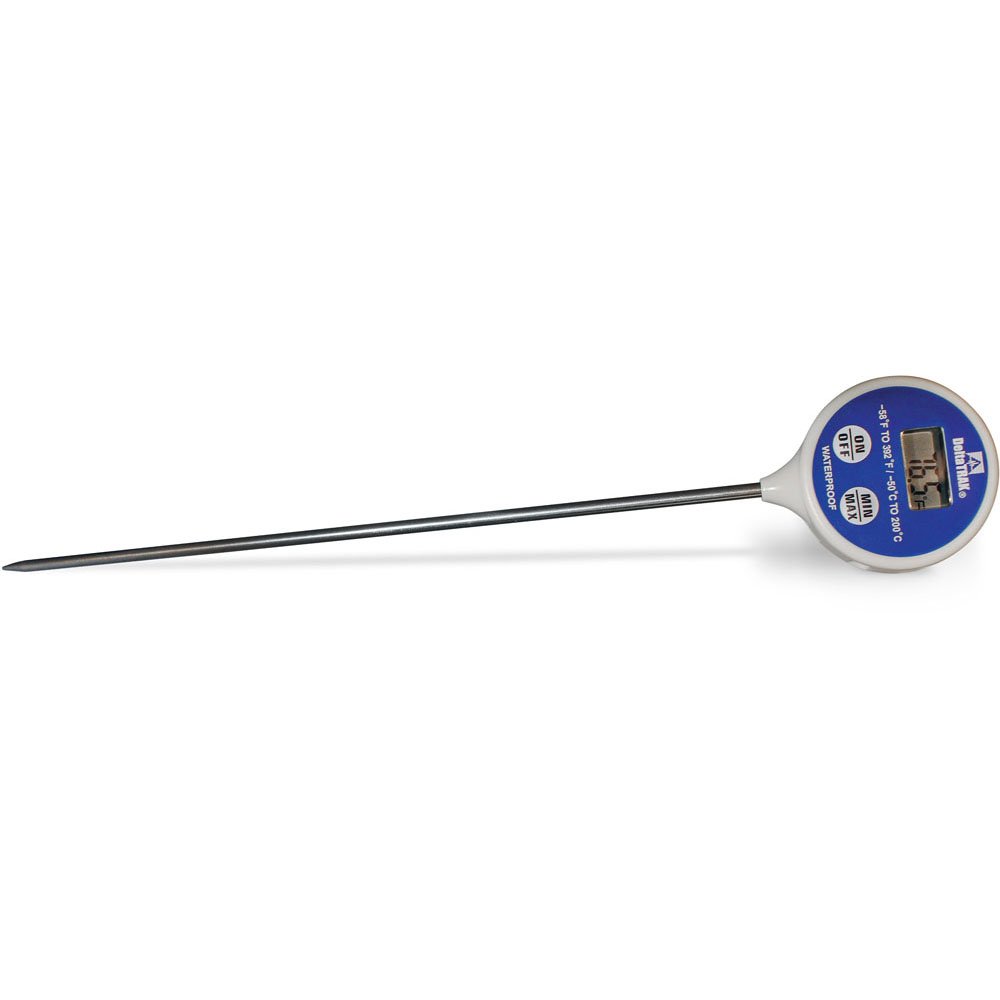
1 paveikslas: DeltaTrak 11047 Digital Lollipop Min/Max Probe Thermometer. This image shows the thermometer with its digital display and probe.
2. Saugos informacija
Please read all safety instructions before using the thermometer to ensure safe operation and prevent damage to the device or injury to yourself.
- Do not expose the thermometer to extreme temperatures outside its specified operating range.
- Do not immerse the main body of the thermometer in water or other liquids. The probe is designed for immersion, but the display unit is not waterproof.
- Laikyti vaikams nepasiekiamoje vietoje.
- Do not attempt to disassemble or modify the thermometer. This will void the warranty and may cause damage.
- Išmeskite baterijas laikydamiesi vietinių taisyklių.
3. Sąranka
3.1. Akumuliatoriaus įdėjimas
The DeltaTrak 11047 thermometer requires batteries for operation (not included). Follow these steps to install them:
- Raskite baterijų skyriaus dangtelį termometro gale.
- Baterijų skyriui atidaryti naudokite mažą atsuktuvą arba monetą.
- Insert the required batteries, ensuring correct polarity (+ and -). Refer to the markings inside the compartment.
- Uždėkite baterijų skyriaus dangtelį ir tvirtai jį pritvirtinkite.
3.2. Pradinis įjungimas
Įdėjus bateriją, paspauskite ĮJUNGTA/IŠJUNGTA button to power on the device. The display will show the current temperature.
4. Naudojimo instrukcijos
4.1. Temperatūros matavimas
- Įsitikinkite, kad termometras įjungtas.
- Insert the stainless steel probe into the substance or environment you wish to measure. Ensure the probe tip is fully immersed or positioned correctly for accurate readings.
- Wait for the temperature reading on the digital display to stabilize. This usually takes a few seconds.
4.2. Min/Max Temperature Function
The thermometer can record the minimum and maximum temperatures measured during a session.
- Paspauskite MIN / MAX button once to display the maximum temperature recorded since the last reset.
- Paspauskite MIN / MAX button a second time to display the minimum temperature recorded.
- Paspauskite MIN / MAX Trečią kartą paspauskite mygtuką, kad grįžtumėte į dabartinės temperatūros rodymą.
- To reset the Min/Max values, press and hold the MIN / MAX button for approximately 3 seconds while in Min or Max display mode.
4.3. Matavimo vieneto pasirinkimas (°C/°F)
Norėdami perjungti tarp Celsijaus (°C) ir Farenheito (°F):
- Raskite ° C / ° F button, usually found near the display or battery compartment.
- Press this button to toggle between the two temperature units.
5. Priežiūra
5.1. Valymas
As per product care instructions, the thermometer should be cleaned by wiping it. Use a damp cloth with mild soap or a sanitizing wipe to clean the probe and the body of the thermometer. Do not use abrasive cleaners or immerse the main unit in water.
5.2. Sandėliavimas
When not in use, store the thermometer in a clean, dry place at room temperature. Ensure the probe is clean and dry before storage. The thermometer often comes with a protective sheath for the probe; use this to prevent damage.
5.3. Baterijos keitimas
If the display becomes dim or the thermometer stops functioning, it may be time to replace the batteries. Follow the battery installation steps in Section 3.1.
6. Problemų sprendimas
| Problema | Galima priežastis | Sprendimas |
|---|---|---|
| Nėra ekrano arba ekranas yra pritemdytas | Dead or low batteries; incorrect battery installation. | Pakeiskite baterijas, užtikrindami teisingą poliškumą. |
| Netikslūs rodmenys | Probe not fully immersed; probe damaged; thermometer outside operating range. | Ensure probe is correctly positioned; check for visible damage; use within specified temperature range. |
| Termometras neįsijungia | Batteries not installed; power button malfunction. | Install or replace batteries; if problem persists, contact support. |
7. Specifikacijos
- Prekinis ženklas: DeltaTrak
- Modelio numeris: 11047
- UPC: 700779110473
- Išorinė medžiaga: Glass (Note: This likely refers to the display or a component, the probe is typically stainless steel)
- Atitinkama specifikacija: NIST
- Prekės svoris: 36.3 g
- Pakuotės matmenys: 26.8 x 5.41 x 2.79 cm
- Įtraukti komponentai: Termometras
- Produkto priežiūros instrukcijos: Nuvalykite Švarus
- Baterijos: Neįtraukta
8. Garantija ir palaikymas
8.1. Informacija apie garantiją
DeltaTrak products are manufactured to high-quality standards. For specific warranty details regarding your DeltaTrak 11047 thermometer, please refer to the warranty card included with your purchase or visit the official DeltaTrak websvetainėje. Išsaugokite pirkimo kvitą kaip pirkimo įrodymą garantiniams reikalavimams.
8.2. Pagalba klientams
If you encounter any issues not covered in this manual or require further assistance, please contact DeltaTrak customer support. Contact information can typically be found on the product packaging or the official DeltaTrak websvetainę.
Norėdami gauti daugiau informacijos, apsilankykite: www.deltatrak.com