
Įvadas
This manual provides detailed instructions for the Inateck Bluetooth 4.1 Sport Headset, Model P20 (BH1001). Please read this guide thoroughly before using the product to ensure proper operation and to maximize your listening experience. This headset is designed for active lifestyles, offering wireless audio with a secure fit and integrated microphone.
1. Sąranka
1.1 Pakuotės turinys
Patikrinkite, ar pakuotėje yra visi reikalingi daiktai:
- Inateck Bluetooth Sport Headset (P20 / BH1001)
- USB įkrovimo laidas
- Multiple pairs of silicone ear tips (various sizes)
- Nešiojimo maišelis
- Vartotojo vadovas (šis dokumentas)
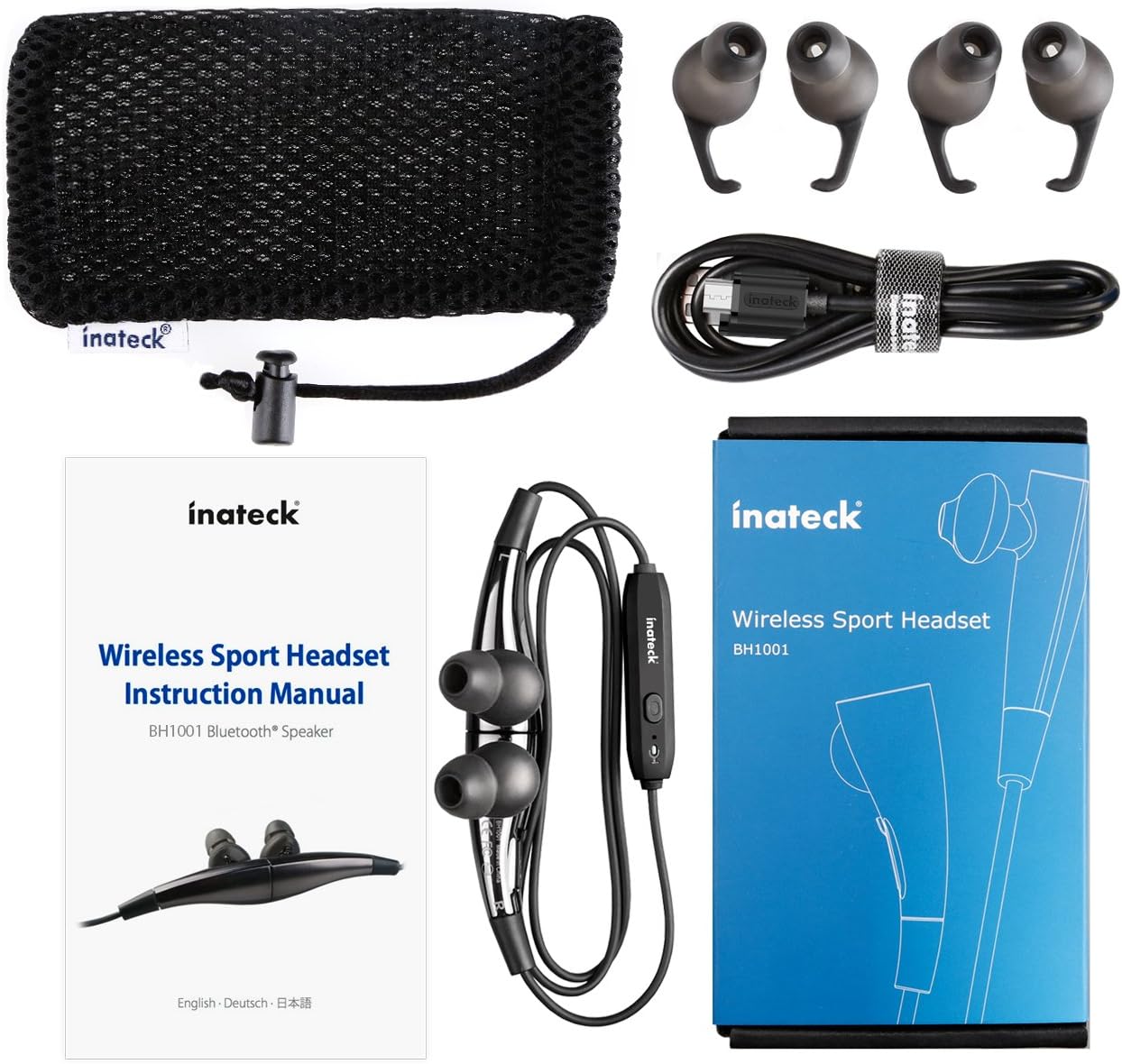
1.1 paveikslas: Contents of the Inateck Bluetooth Sport Headset package.
1.2 Ausinių įkrovimas
Before first use, fully charge the headset. A full charge takes approximately 3 hours and provides at least 8 hours of music playback.
- Locate the Micro USB charging port on the headset.
- Connect the small end of the provided USB charging cable to the headset's Micro USB port.
- Connect the larger end of the USB cable to a USB power source (e.g., computer USB port, USB wall adapter).
- The status indicator light will illuminate during charging. It will change color or turn off once charging is complete.

1.2 paveikslas: Charging the Inateck Bluetooth Sport Headset via Micro USB.
1.3 Susiejimas su „Bluetooth“ įrenginiu
To connect your headset to a smartphone or other Bluetooth-enabled device:
- Įsitikinkite, kad ausinės išjungtos.
- Press and hold the Multifunction Key (MFB) on the inline control unit for approximately 5-7 seconds until the status indicator light flashes red and blue alternately. This indicates pairing mode.
- „Bluetooth“ įrenginyje įjunkite „Bluetooth“ ir ieškokite naujų įrenginių.
- Select "Inateck BH1001" or "Inateck P20" from the list of available devices.
- Once paired, the status indicator light on the headset will flash blue slowly, and you may hear an audible confirmation.
- The headset will automatically attempt to reconnect to the last paired device when turned on.

1.3 paveikslas: Inateck Headset paired with a mobile device for music playback.
2. Naudojimo instrukcijos
2.1 Ausinių valdikliai
The inline control unit provides easy access to various functions:

2.1 paveikslas: Baigėsiview of the Inateck Headset control unit.
- Multifunction Key (MFB):
- Press and hold (5-7s): Power On/Off, Enter Pairing Mode
- Trumpas paspaudimas: Groti / Pristabdyti muziką, Atsiliepti / Baigti skambutį
- Long press (during incoming call): Reject call
- Garsumo didinimas (+) / Kitas takelis:
- Trumpas paspaudimas: padidinkite garsumą
- Paspaudus ilgai: pereiti prie kito takelio
- Garsumo mažinimas (-) / Ankstesnis takelis:
- Trumpas paspaudimas: sumažinkite garsumą
- Long press: Go to previous track
- „Micro USB“ prievadas: Ausinių įkrovimui.
- Būsenos indikatorius: Rodo maitinimo, susiejimo ir įkrovimo būseną.
- Mikrofonas: Skambučiams be rankų.
2.2 Ausinių dėvėjimas
Select the ear tips that provide the most comfortable and secure fit for your ears. The headset is designed to be worn with the cable behind your neck, ensuring stability during physical activity.

2.2 paveikslas: Proper wearing of the Inateck Sport Headset for active use.
2.3 Magnetic Earbuds Feature
The earbuds feature integrated magnets. When not in use, you can connect the two earbuds together, forming a necklace around your neck. This action automatically pauses music playback and prevents the headset from falling off.

2.3 paveikslas: Magnetic earbuds feature for secure wearing around the neck.

2.4 paveikslas: Headset worn as a necklace using the magnetic feature.
3. Priežiūra
- Valymas: Ausines valykite minkštu, sausu skudurėliu. Nenaudokite abrazyvinių valiklių ar tirpiklių.
- Ausų patarimai: Reguliariai nuimkite silikoninius ausų antgalius ir valykite juos švelniu muilu ir vandeniu. Prieš vėl uždėdami, įsitikinkite, kad jie yra visiškai sausi.
- Saugykla: When not in use, store the headset in the provided carrying pouch to protect it from dust and damage. Avoid extreme temperatures.
- Atsparumas vandeniui: The headset is designed to be water-resistant for sports and exercise (e.g., sweat, light rain). Do not submerge it in water or expose it to heavy rain.
4. Problemų sprendimas
4.1 Neįmanoma įjungti
Ensure the headset is fully charged. Connect it to a power source using the USB cable and allow it to charge for at least 30 minutes before attempting to power on again.
4.2 Nepavyksta susieti su įrenginiu
- Ensure the headset is in pairing mode (status indicator flashing red and blue alternately).
- Make sure Bluetooth is enabled on your device and it is within range (typically 10 meters or 33 feet).
- Turn off and on the Bluetooth function on your device.
- If previously paired, try "forgetting" or "unpairing" the headset from your device's Bluetooth settings and then re-pair.
- Įsitikinkite, kad jokie kiti „Bluetooth“ įrenginiai netrukdo ryšiui.
4.3 Nėra garso arba prasta garso kokybė
- Patikrinkite garsumo lygį tiek ausinėse, tiek prijungtame įrenginyje.
- Įsitikinkite, kad ausinės yra tinkamai suporuotos ir prijungtos prie jūsų įrenginio.
- Move closer to your device to reduce potential interference or range issues.
- Ensure the ear tips are correctly seated in your ears for optimal sound delivery.
- Reboot both the headset and your connected device.
4.4 Pertraukiamas ryšys
- Įsitikinkite, kad tarp ausinių ir jūsų įrenginio nėra jokių fizinių kliūčių.
- Avoid placing your device in areas where the signal might be blocked (e.g., deep pockets, behind thick walls).
- Sumažinkite trukdžius iš kitų belaidžių įrenginių („Wi-Fi“ maršrutizatorių, kitų „Bluetooth“ įrenginių).
- Keep the headset and your device within the recommended Bluetooth range.
5. Specifikacijos
| Prekės ženklas | Inateck |
| Modelio pavadinimas | 20 p |
| Modelio numeris | BH1001 |
| Ryšio technologija | Bluetooth 4.1 |
| Formos faktorius | Į ausis |
| Ausų išdėstymas | Intra-aural |
| Ausinių lizdas | USB (įkrovimui) |
| Atsparumo vandeniui lygis | Waterproof (suitable for sweat/light rain) |
| Ypatingos savybės | Sports and exercise, integrated microphone, magnetic earbuds |
| Prekės svoris | 78 gramų |
| Valdymo tipas | Volume Control, Multifunction Button |
| Medžiaga | Plastikiniai |
6. Informacija apie garantiją
Inateck products typically come with a limited warranty. For specific warranty terms and conditions applicable to your Inateck Bluetooth Sport Headset, please refer to the warranty card included in your product packaging or visit the official Inateck websvetainėje. Išsaugokite pirkimo įrodymą garantiniams reikalavimams.
7. Pagalba klientams
If you encounter any issues not covered in this manual or require further assistance, please contact Inateck customer support. You can usually find contact information, FAQs, and additional resources on the official Inateck websvetainė:
Websvetainė: www.inateck.com
Please have your product model (P20 / BH1001) and purchase details ready when contacting support.