
Įvadas
This manual provides essential information for the safe and efficient operation, installation, and maintenance of your HP 5065-5262 DYNAMITE Power Supply. This 340-watt power supply is designed with integrated cooling fans for reliable performance in disk systems. Please read this manual thoroughly before installation and use.
Saugos informacija
Visada laikykitės šių saugos priemonių, kad išvengtumėte sužalojimų ar įrangos sugadinimo:
- Ensure the power supply is disconnected from the main power source before installation, removal, or servicing.
- Montuoti ir prižiūrėti turėtų tik kvalifikuoti darbuotojai.
- Neatidarykite maitinimo šaltinio c.asing. There are no user-serviceable parts inside, and dangerous voltages yra.
- Užtikrinkite tinkamą įžeminimą, kad išvengtumėte elektros smūgio.
- Operate the power supply within its specified voltage ir dabartiniai reitingai.
- Maintain adequate ventilation around the power supply to prevent overheating.
Sąranka ir diegimas
Follow these steps for proper installation of the HP 5065-5262 DYNAMITE Power Supply:
- Paruošimas: Before beginning, ensure your system is powered off and unplugged from the wall outlet. Discharge any static electricity by touching a grounded metal object.
- Išimkite seną maitinimo šaltinį (jei taikoma): Disconnect all cables from the existing power supply. Unscrew and carefully remove the old unit from the chassis.
- Insert New Power Supply: Gently slide the HP 5065-5262 DYNAMITE Power Supply into the designated bay in your disk system chassis. Ensure it aligns correctly with the mounting holes.
- Secure the Power Supply: Use the appropriate screws to firmly secure the power supply to the chassis. Do not overtighten.
- Prijunkite kabelius: Connect all necessary power cables from the power supply to the motherboard, disk drives, and any other components requiring power. Refer to your system's motherboard manual for specific power connector locations.
- Galutinis patikrinimas: Dar kartą patikrinkite visas jungtis, kad jos būtų tvirtai pritvirtintos ir tinkamai pritvirtintos. Įsitikinkite, kad jokie laisvi kabeliai netrukdo oro srautui.
- Maitinimas: Close the system chassis, plug the system back into a grounded power outlet, and power on the system.
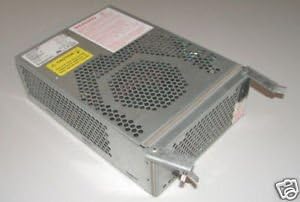
1 pav.: Kampinis view of the HP 5065-5262 DYNAMITE Power Supply, illustrating its size and design for integration into a disk system.
Naudojimo instrukcijos
The HP 5065-5262 DYNAMITE Power Supply operates automatically once installed and connected. It provides stable power to your disk system components.
- Maitinimo įjungimas/išjungimas: The power supply is controlled by the system's main power switch. When the system is powered on, the power supply will activate and deliver power.
- Aušinimo ventiliatoriai: The integrated cooling fans will operate automatically to maintain optimal internal temperatures. Ensure fan vents are not obstructed.
- Būklės rodikliai: Some systems may have diagnostic LEDs on the motherboard or chassis that indicate power supply status. Refer to your system's manual for details.
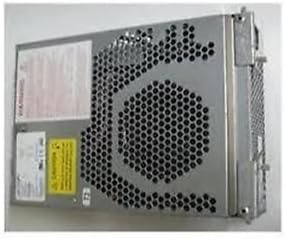
2 pav.: šonas view of the HP 5065-5262 DYNAMITE Power Supply, highlighting the ventilation design crucial for its cooling system.
Priežiūra
Regular maintenance helps ensure the longevity and stable operation of your power supply:
- Dulkių šalinimas: Periodically (e.g., every 6-12 months), power off and unplug your system. Use compressed air to gently clear dust from the power supply's fan vents and internal components. Hold the fan blades to prevent them from spinning too fast during cleaning.
- Kabelio apžiūra: Check all power cables connected to the power supply for any signs of wear, fraying, or loose connections. Replace damaged cables immediately.
- Aplinkos sąlygos: Ensure the operating environment is clean, dry, and within the recommended temperature range to prevent dust buildup and moisture damage.
Trikčių šalinimas
Jei kyla problemų dėl maitinimo šaltinio, žr. šias dažniausiai pasitaikančias problemas ir sprendimus:
| Problema | Galima priežastis | Sprendimas |
|---|---|---|
| Sistema neįsijungia. | Loose power cable connection. Sugedęs sieninis lizdas. Maitinimo sutrikimas. | Check all power connections (wall, power supply, motherboard). Išbandykite lizdą su kitu įrenginiu. If possible, test with a known good power supply. |
| Sistema įsijungia, bet netikėtai išsijungia. | Overheating (poor ventilation). Overload (too many components). Maitinimo šaltinio nestabilumas. | Ensure proper airflow; clean dust from vents. Disconnect non-essential components to check for overload. Consider professional diagnosis or replacement. |
| Loud fan noise from power supply. | Dust buildup in fan. Worn fan bearing. | Clean fan with compressed air. If noise persists, the fan may be failing; consider professional service or replacement of the power supply. |
If these steps do not resolve the issue, contact HP support or a qualified technician.
Specifikacijos
| Funkcija | Detalė |
|---|---|
| Prekės ženklas | HEWLETT PACKARD |
| Modelio numeris | 5065-5262 |
| Vattage | 340 vatų |
| Aušinimo būdas | Air (with integrated fans) |
| ASIN | B014S277MO |
| UPC | 787322237757 |
| Pirmas prieinamas | 9 m. liepos 2013 d |
Garantija ir palaikymas
This HP 5065-5262 DYNAMITE Power Supply is typically covered by Hewlett Packard's standard manufacturer warranty. For specific warranty terms and conditions, please refer to the documentation provided with your original system or contact HP customer support directly.
For technical support, service, or to inquire about replacement parts, please visit the official Hewlett Packard support website or contact their customer service line. Have your product model number (5065-5262) and serial number (if applicable) ready when contacting support.
HP palaikymas Websvetainė: https://www.hp.com/support