
Įvadas
This manual provides detailed instructions for the setup, operation, and maintenance of your Homtime C12PRO Docking Station Speaker. The C12PRO integrates a Bluetooth speaker, FM radio, alarm clock, and dual USB charging capabilities, designed for convenient everyday use.
Pakuotės turinys
Patikrinkite, ar jūsų siuntinyje yra visi toliau išvardyti daiktai:
- 1 x Homtime C12PRO Speaker Unit
- 1x maitinimo adapteris
- 1 x Vartotojo vadovas
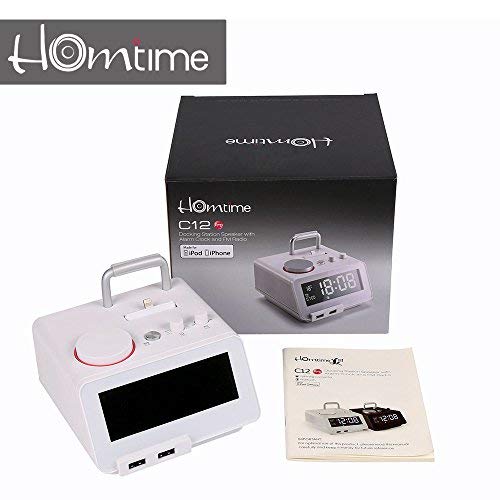
Vaizdas: Contents of the Homtime C12PRO package, showing the main speaker unit, power adapter, and the user manual.
Produktas baigtasview
Familiarize yourself with the various components and controls of your C12PRO unit.

Vaizdas: Priekyje view of the Homtime C12PRO with an iPhone docked. The large digital display shows time and temperature, and the front features dual USB charging ports.

Vaizdas: Priekyje view of the Homtime C12PRO without a phone docked. This image clearly shows the digital display, the docking connector, and the control buttons on the top surface.
Priekinis skydelis ir ekranas
- Didelis 4.2 colio LCD ekranas: Shows time, alarm status, and room temperature (Celsius or Fahrenheit). Brightness is adjustable.
- Dvi USB įkrovimo prievadai: Located at the front base for convenient charging of external devices.
Viršutinio skydelio valdikliai
- Prijungimo jungtis: Apple Certified Lightning connector for iPod/iPhone.
- Control Buttons/Knobs: For setting time, alarm, volume, mode selection, and FM radio tuning.
Galinio skydelio jungtys
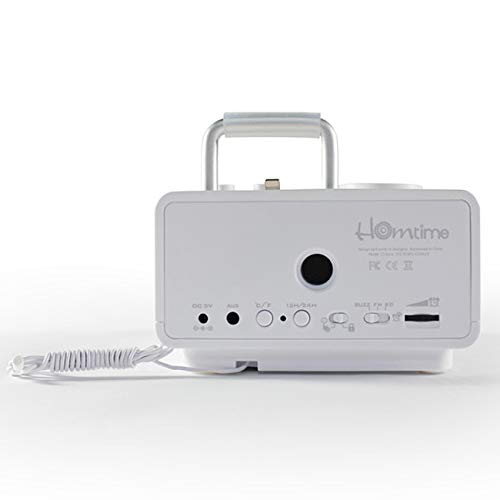
Vaizdas: Galinis view of the Homtime C12PRO. This image displays the DC 9V power input, AUX-in port, 12H/24H time format button, and other rear controls.
- DC 9V maitinimo įvestis: Prijunkite pridedamą maitinimo adapterį čia.
- AUX įvesties prievadas: 3.5 mm lizdas išoriniams garso šaltiniams prijungti.
- 12H/24H mygtukas: Toggles between 12-hour and 24-hour time display formats.
- Kiti valdikliai: May include snooze/dimmer, alarm on/off, and FM antenna connection.
Sąranka
- Išpakuokite įrenginį: Carefully remove the C12PRO speaker and all accessories from the packaging.
- Prijunkite maitinimą: Insert the DC plug of the power adapter into the DC 9V input port on the rear of the unit. Plug the power adapter into a standard wall outlet. The display will illuminate.
- Pradinis laiko nustatymas:
- Paspauskite ir palaikykite LAIKO NUSTATYMAS button (location may vary, typically on top or rear).
- Naudokite +/- buttons or rotary knob to adjust the hour. Press LAIKO NUSTATYMAS dar kartą patvirtinti.
- Adjust the minute using the +/- buttons or rotary knob. Press LAIKO NUSTATYMAS , kad patvirtintumėte ir išeitumėte iš laiko nustatymo režimo.
- Norėdami perjungti tarp 12 valandų ir 24 valandų formato, paspauskite 12H/24H mygtukas galiniame skydelyje.
- Sureguliuokite ekrano ryškumą: Paspauskite SNOZUOTAS/REŽIMUOTOJAS button (often combined) repeatedly to cycle through brightness levels.
- Nustatykite temperatūros vienetą: Jei taikoma, paspauskite ° C / ° F button to switch between Celsius and Fahrenheit display for room temperature.
Naudojimo instrukcijos
Maitinimo įjungimas/išjungimas
Paspauskite GALIA button to turn the unit on or off. When off, the clock display remains active.
Signalo nustatymas
- Paspauskite ir palaikykite ALARM SET mygtuką. Mirksės žadintuvo valandos.
- Naudokite +/- buttons or rotary knob to adjust the alarm hour. Press ALARM SET patvirtinti.
- Adjust the alarm minute. Press ALARM SET patvirtinti.
- Select the alarm source (Buzzer, FM Radio, or Docked Device). Use +/- or rotary knob and press ALARM SET patvirtinti.
- Norėdami įjungti / išjungti žadintuvą, paspauskite ALARM ON / OFF mygtuką. Kai aktyvus, ekrane pasirodys žadintuvo piktograma.
- Kai skamba žadintuvas, paspauskite SNAIGĖ button to temporarily silence it for a few minutes. Press GALIA kad išjungtumėte žadintuvą dienai.
FM radijo veikimas
- Paspauskite REŽIMAS mygtuką, kol ekrane pasirodys „FM“.
- For automatic station scanning, press and hold the PALEISTI / PAUZĖ mygtuką (arba specialų NUSKAITYTI button). The radio will scan and save available stations.
- Norėdami sureguliuoti rankiniu būdu, naudokite PREV/KITAS buttons or rotary knob to adjust the frequency.
- To select a saved station, press the NUSTATYMAS mygtuką ir tada naudokite PREV/KITAS naršyti.
- Reguliuokite garsumą naudodami TOMAS knob or buttons.
"Bluetooth" poravimas
- Paspauskite REŽIMAS button until "BT" or "Bluetooth" appears on the display. The Bluetooth indicator will flash, indicating pairing mode.
- Mobiliajame įrenginyje įjunkite „Bluetooth“ ir ieškokite naujų įrenginių.
- Select "Homtime C12PRO" from the list of available devices.
- Once paired, the Bluetooth indicator on the C12PRO will stop flashing and remain solid. You can now play audio wirelessly from your device.
- Adjust volume on both the C12PRO and your connected device.
Docking Station naudojimas
The C12PRO features an Apple Certified Lightning connector for compatible iPod/iPhone devices.
- Carefully align your iPhone/iPod with the Lightning connector on the top of the unit.
- Gently push down until the device is securely seated.
- The C12PRO will automatically charge your device and can play audio from it.
- Paspauskite REŽIMAS button to select the docking station as the audio source.
USB įkrovimas
The unit includes dual USB ports for charging other devices.
- Connect your USB charging cable to one of the USB ports on the front of the C12PRO.
- Connect the other end of the cable to your device (e.g., Android phone, tablet).
- The C12PRO will provide power to charge your device.
AUX-in Connection
Connect external audio players via the 3.5mm AUX-in port.
- Connect a 3.5mm audio cable (not included) from your external audio device's headphone jack to the AUX-in port on the rear of the C12PRO.
- Paspauskite REŽIMAS mygtuką, kol ekrane pasirodys „AUX“.
- Play audio from your external device. Adjust volume on both the C12PRO and the external device.
Priežiūra
- Valymas: Disconnect the power adapter before cleaning. Use a soft, dry cloth to wipe the exterior surfaces. Do not use abrasive cleaners, waxes, or solvents.
- Saugykla: Jei įrenginį ilgesnį laiką sandėliuosite, atjunkite jį nuo maitinimo šaltinio ir laikykite vėsioje, sausoje vietoje, apsaugotoje nuo tiesioginių saulės spindulių ir ekstremalių temperatūrų.
- Baterija: The unit contains a CR2 battery (included) for clock memory backup. This battery is not user-replaceable for general operation and should only be replaced by qualified service personnel if necessary.
Trikčių šalinimas
| Problema | Galima priežastis | Sprendimas |
|---|---|---|
| Nėra maitinimo / ekranas išjungtas | Neprijungtas maitinimo adapteris arba sugedęs lizdas. | Įsitikinkite, kad maitinimo adapteris yra tvirtai prijungtas prie įrenginio ir veikiančio sieninio lizdo. |
| Nėra garso iš garsiakalbio | Volume too low; incorrect source selected; device not connected properly. | Padidinkite garsumą. Paspauskite REŽIMAS to select the correct audio source (BT, FM, Dock, AUX). Reconnect Bluetooth device or docked phone. |
| „Bluetooth“ susiejimas nepavyksta | C12PRO not in pairing mode; device too far; interference. | Ensure C12PRO is in BT mode and flashing. Move device closer. Turn off other Bluetooth devices. |
| FM radijo signalas neramus / prastas signalas | Silpnas signalas; antena neištiesta. | Extend the FM antenna fully. Reposition the unit for better reception. Perform auto-scan again. |
| Signalizacija neskamba | Alarm not activated; alarm volume too low. | Ensure the alarm icon is visible on the display. Check alarm volume settings. |
| Device not charging via USB/Dock | Laido problema; įrenginys nesuderinamas; įrenginys neįjungtas. | Try a different USB cable. Ensure the C12PRO is powered on. Verify device compatibility with the Lightning dock. |
Specifikacijos

Vaizdas: A table detailing the specifications of the Homtime C12PRO, including driver units, S/N ratio, Bluetooth version, range, radio frequency, power, and dimensions.
| Modelis | C12 Pro |
| Vairuotojų blokai | 2x40mm |
| S/N santykis | >70dB |
| Bluetooth versija | 2.1 + EDR |
| Bluetooth diapazonas | 10 mln |
| Radijo dažnių diapazonas | 87.5 MHz–108 MHz |
| Suderinami įrenginiai | iPad, iPhone, Android, Windows Phone, Computer |
| Maitinimo adapteris | AC100-240V, 50/60Hz, DC 5V 3A |
| Išėjimo galia | 3W + 3W (6 Watts total) |
| Matmenys (IxPxH) | 12.8 x 12.9 x 10.7 cm |
| Prekės svoris | 800 g |
| Garso šaltiniai | Apple Lightning, USB, Bluetooth, Aux-in |
| Ekrano tipas | Digital LCD (4.2 inches) |
| Baterijos | 1 CR2 battery required (included for clock memory) |
Garantija ir palaikymas
Informacija apie garantiją
The Homtime C12PRO comes with a 1 metų ribota garantija from the date of purchase. This warranty covers manufacturing defects in materials and workmanship under normal use. It does not cover damage caused by misuse, accidents, unauthorized modifications, or external causes.
Išsaugokite pirkimo įrodymą, kad galėtumėte kreiptis dėl garantijos.
Pagalba klientams
For technical assistance, troubleshooting not covered in this manual, or warranty inquiries, please contact Homtime customer support. Refer to the contact information provided with your product packaging or visit the official Homtime websvetainę, kurioje rasite naujausią pagalbos informaciją.