
1. Įvadas
The Digilent PowerBRICKS are compact, breadboardable power supplies designed to provide reliable 5V dual output power for your electronic circuits. Powered conveniently via USB, these units integrate directly into your breadboard, offering a low-profile and efficient power solution. Each PowerBRICK can deliver up to 1.1W of power, making them suitable for a variety of prototyping and educational applications.
This manual provides essential information for the proper setup, operation, and maintenance of your PowerBRICKS device.
2. Sąranka
Follow these steps to set up your Digilent PowerBRICKS:
- Breadboard Integration: Carefully align the pins of the PowerBRICKS module with the power rails or desired section of your breadboard. Gently press down to ensure a secure connection. The module is designed for direct plug-in integration.
- Maitinimo jungtis: Connect a standard USB cable from a 5V USB power source (e.g., computer USB port, USB wall adapter) to the USB connector on the PowerBRICKS module. This will supply input voltage į įrenginį.
- Įvesties tomastage Pin Header: The +Vin pin header can also serve as an input. If a USB power source is attached, this pin header becomes an output, providing access to the USB voltage. This feature allows for daisy-chaining multiple PowerBRICKS.
- Ramunėlių grandinės jungimas (neprivaloma): To power multiple PowerBRICKS from a single USB source, connect the +Vin pins of the modules together. Note that the first PowerBRICK in the chain limits the input current. The entire chain should not exceed a total output power of 2.2W. For maximum individual output capabilities (current and capacitive load), each PowerBRICK should be powered individually via its USB connector or +Vin pin.
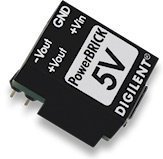
Image: The Digilent PowerBRICKS module, showing its compact design and pins for breadboard integration. This image illustrates how the module connects directly to a breadboard for power distribution.
3. Naudojimo instrukcijos
Once properly set up, the PowerBRICKS module provides the following outputs:
- Positive Output (Vout): +5V at up to 250mA. The maximum capacitive load for this output is 22uF.
- Negative Output (-Vout): -5V at up to -200mA. The maximum capacitive load for this output is 47uF.
Ensure that the total power draw from a single PowerBRICK does not exceed 1.1W. When daisy-chaining, the total power output for the entire chain should not exceed 2.2W.
4. Priežiūra
The Digilent PowerBRICKS are designed for durability and require minimal maintenance. To ensure optimal performance and longevity:
- Tvarkymas: Handle the module with care to avoid damaging the pins or internal components.
- Valymas: If necessary, gently clean the module with a dry, soft cloth. Avoid using liquids or abrasive cleaners.
- Saugykla: Store the PowerBRICKS in a dry, cool environment, away from direct sunlight and extreme temperatures.
- Aplinkos sąlygos: Avoid exposing the device to excessive moisture or dust.
5. Problemų sprendimas
If you encounter issues with your PowerBRICKS, consider the following troubleshooting steps:
- Nėra maitinimo išvesties:
- Verify that the USB power source is active and providing 5V.
- Ensure the USB cable is securely connected to both the power source and the PowerBRICKS module.
- Check for proper insertion into the breadboard; ensure all pins make good contact.
- Neteisingas ttage Išėjimas:
- Confirm that the load connected to the PowerBRICKS does not exceed the specified current limits (+250mA for +5V, -200mA for -5V).
- Ensure the total power draw (1.1W per module, 2.2W for a daisy-chain) is not exceeded. Overloading can cause voltage lašai.
- Check for any short circuits in your breadboard setup.
- Perkaitimas: If the module feels excessively hot, immediately disconnect the power. This usually indicates an overload or a short circuit in the connected circuit. Review your circuit design and power consumption.
6. Specifikacijos
| Funkcija | Specifikacija |
|---|---|
| Modelio numeris | 410-294-A |
| Įvesties tomastage | 5V via USB or +Vin pin |
| Išėjimas ttage (balsuoti) | +5V @ 250mA |
| Išėjimas ttage (-Vout) | -5V @ -200mA |
| Max Capacitive Load (Vout) | 22 uF |
| Max Capacitive Load (-Vout) | 47 uF |
| Max Power Output (Single) | 1.1W |
| Max Power Output (Daisy-Chain) | 2.2W |
| Gaminio matmenys | 1.18 x 1.18 x 0.39 colio |
| Prekės svoris | 0.32 uncijos |
| UPC | 717520027638 |
7. Informacija apie garantiją
For detailed warranty information regarding your Digilent PowerBRICKS, please refer to the official Digilent website or the documentation provided at the time of purchase. Warranty terms and conditions may vary.
8. Parama
If you require further assistance or have questions not covered in this manual, please visit the official Digilent support page or contact their customer service. You can find more resources and contact information on the Digilent websvetainę.