
1. Įvadas
The CLEAN REMOTE CR3BCB is a durable, spillproof television remote control designed for ease of use. Its ergonomic design and simplified button layout make it ideal for controlling basic TV functions. This manual provides instructions for setting up, operating, maintaining, and troubleshooting your CR3BCB remote control.
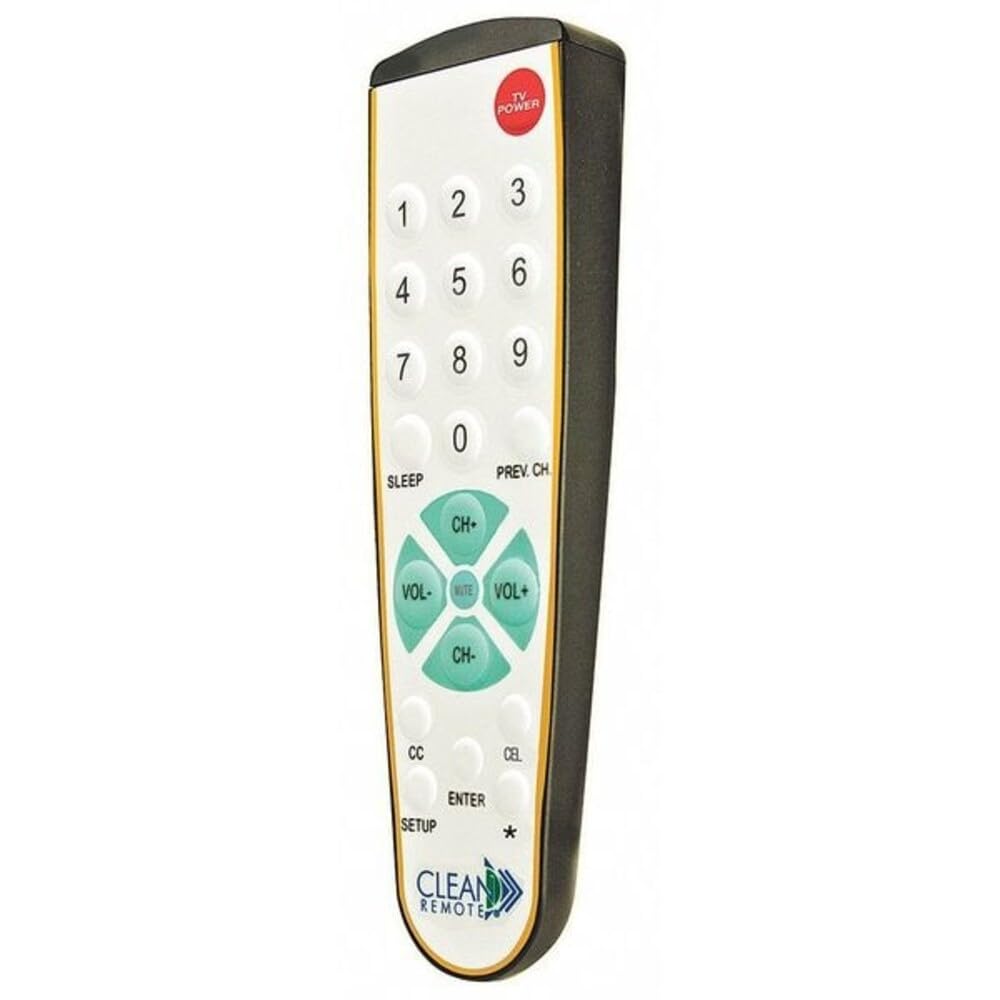
Priekyje view of the CLEAN REMOTE CR3BCB, showing the numerical keypad, channel and volume controls, and power button.
2. Sąranka
2.1. Akumuliatoriaus įdėjimas
- Nuotolinio valdymo pulto gale raskite baterijų skyrių.
- Nustumkite akumuliatoriaus dangtelį žemyn ir jį nuimkite.
- Įdėkite dvi (2) AAA šarmines baterijas, užtikrindami, kad teigiamas (+) ir neigiamas (-) poliai teisingai sutaptų su žymėjimais skyriaus viduje.
- Uždėkite akumuliatoriaus dangtelį, stumdami jį atgal į vietą, kol jis tvirtai užsifiksuos.
2.2. Nuotolinio valdymo pulto programavimas
The CLEAN REMOTE CR3BCB is a universal remote that can be programmed to control most televisions. Follow these general steps for programming:
- Įjunkite televizorių, kurį norite valdyti.
- Paspauskite ir palaikykite NUSTATYMAS button on the remote until the indicator light (usually near the POWER button) illuminates.
- Laikydami NUSTATYMAS button, enter the 3-digit code for your TV brand. (Refer to the included code list, if available, or try common codes for your TV brand).
- If the indicator light turns off, the code has been accepted. Release the NUSTATYMAS mygtuką.
- Patikrinkite nuotolinio valdymo pultą paspausdami GALIA button. If the TV turns off, the remote is programmed.
- If the TV does not respond, repeat steps 2-5 with a different code for your TV brand.
Auto Code Search (if direct code fails):
- Įjunkite televizorių.
- Paspauskite ir palaikykite NUSTATYMAS mygtuką, kol užsidegs indikatoriaus lemputė.
- Paspauskite CH+ (Channel Up) button repeatedly, slowly, until the TV turns off.
- Kai tik televizorius išsijungia, nedelsdami paspauskite NUSTATYMAS button again to lock in the code.
- Test the remote's functions.
3. Naudojimo instrukcijos
The CLEAN REMOTE CR3BCB features a simplified layout for common television functions:
- GALIA: Įjungia arba išjungia televizorių.
- Skaičių klaviatūra (0–9): Tiesiogiai įveskite kanalų numerius.
- CH+ / CH-: Perjungia televizijos kanalą aukštyn arba žemyn.
- VOL+ / VOL-: Padidina arba sumažina televizoriaus garsumą.
- Nutildyti: Silences or restores the television audio.
- MIEGAS: Activates the TV's sleep timer function (if supported by the TV). Pressing repeatedly may cycle through sleep timer options.
- PREV CH: Grįžta prie ankstesnio viewed kanalas.
- Uždarieji subtitrai (CC): Toggles closed captions on or off (if supported by the TV broadcast/content).
- TV: Switches the remote's control mode to TV (if it was previously set to control a cable box, though this model is primarily for TV).
- Įveskite: Confirms selections or completes channel entry.
4. Priežiūra
4.1. Valymas
The CLEAN REMOTE CR3BCB features a spillproof design, making it easy to clean. To clean the remote:
- Nuvalykite paviršių minkšta, damp audinys.
- For stubborn stains, a mild soap solution can be used.
- Ensure no excessive liquid enters the battery compartment.
- Do not use abrasive cleaners or solvents, as these may damage the remote's finish or buttons.
4.2. Baterijos keitimas
Replace batteries when the remote's performance degrades or the indicator light does not illuminate when a button is pressed. Follow the battery installation steps in Section 2.1.
5. Problemų sprendimas
| Problema | Galima priežastis | Sprendimas |
|---|---|---|
| Remote not working / TV not responding | Išsikrovusios arba neteisingai įdėtos baterijos. Nuotolinio valdymo pultas netinkamai užprogramuotas. Kliūtis tarp nuotolinio valdymo pulto ir televizoriaus. | Check battery orientation and replace if necessary. Re-program the remote (see Section 2.2). Ensure a clear line of sight to the TV's IR sensor. |
| Limited functionality after programming | Incorrect TV code used. | Try other codes for your TV brand or use the auto code search feature (see Section 2.2). Some advanced TV functions may not be supported by this simplified remote. |
| Mygtukai lipni arba nereaguoja | Dirt or residue under buttons. | Clean the remote thoroughly (see Section 4.1). |
6. Specifikacijos
- Prekinis ženklas: VALYMAS NUOTOLINIO PULTAS
- Modelio pavadinimas / numeris: CR3BCB
- Tipas: Television Remote Control, Spillproof
- Medžiaga: Plastikiniai
- Spalva: Black Case/White Keypad with Gold Trim
- Baigti: Micro-Texture Case
- Matmenys (P x P x A): 7.93" x 2.5" x 1.31" (7-15/16" x 2-1/2" x 1-5/16")
- Ypatinga funkcija: Ergonomiškas
- Maksimalus palaikomų įrenginių skaičius: 1
- Suderinami įrenginiai: Televizija
- Ryšio technologija: Infraraudonųjų spindulių
- Button Quantity: 25
- Valdiklio tipas: Mygtukų valdymas
- Didžiausias diapazonas: 10 metrai
- Baterijos tipas: Šarminės baterijos (2x AAA, nepridedamos)
- UPC: 709317695991
- Kilmės šalis: Kinija
7. Informacija apie garantiją
Specific warranty details for the CLEAN REMOTE CR3BCB are not provided in this manual. For information regarding warranty coverage, terms, and conditions, please refer to the product packaging or contact CLEAN REMOTE customer support directly.
8. Pagalba klientams
If you encounter issues not covered in this manual or require further assistance, please contact CLEAN REMOTE customer support. Contact information can typically be found on the product packaging or the official CLEAN REMOTE websvetainę.