
1. Įvadas
Ačiū, kad pirkoteasing the ipega PG-9057 Wireless Game Controller. This manual provides detailed instructions for setting up, operating, and maintaining your device. Please read this manual carefully before use to ensure optimal performance and longevity of your controller.
2. Produkto ypatybės
- Belaidis ryšys: Enjoy gaming freedom with wireless connection technology.
- Kelių platformų suderinamumas: Supports Android devices (smartphones, tablets, TV boxes) and Windows PCs.
- High Durability Buttons: Equipped with high-quality, durable buttons for extended gaming sessions.
- Tikslumo valdikliai: Features a D-pad with pressure sensitivity and a 360-degree joystick with no dead zone for accurate input.
- Ergonomiškas dizainas: Designed for comfortable grip and prolonged use.
- Integruotas telefono laikiklis: Conveniently mount your smartphone for mobile gaming.
3. Pakuotės turinys
Išpakuodami, patikrinkite pakuotės turinį:
- ipega PG-9057 belaidis žaidimų valdiklis
- USB įkrovimo laidas
- User Manual (Japanese version included)
4. Sąranka
4.1. Valdiklio įkrovimas
Before first use, fully charge the controller using the provided USB cable. Connect the small end of the USB cable to the controller's charging port and the other end to a USB power source (e.g., PC, USB wall adapter).
4.2. Device Compatibility Overview
The ipega PG-9057 controller supports various devices and connection methods as shown below:

This image displays the ipega PG-9057 Wireless Game Controller, highlighting its compatibility with various devices including smartphones, tablets, personal computers, and VR headsets.
4.3. Connection Methods and System Environment
The controller offers multiple connection options depending on your device and operating system. Refer to the table below for detailed compatibility.

This table outlines the system requirements and connection methods for the ipega PG-9057 controller, detailing compatibility with Android smartphones, tablets, and TV boxes via Bluetooth 4.0 or USB, and PCs via USB.
4.3.1. Bluetooth Connection (Android Devices)
- Įsitikinkite, kad valdiklis įkrautas.
- Paspauskite ir palaikykite NAMAI mygtuką ir A button simultaneously until the indicator light flashes rapidly. This puts the controller into pairing mode.
- „Android“ įrenginyje eikite į „Bluetooth“ nustatymus ir įjunkite „Bluetooth“.
- Ieškokite available devices and select "ipega PG-9057" (or similar name) from the list.
- Suporavus, valdiklio indikatoriaus lemputė ims šviesti nuolat.
4.3.2. USB Wired Connection (Windows PC / Android Devices)
- Connect the controller to your Windows PC or Android device using the USB cable.
- The device should automatically recognize the controller. No special drivers are usually required for basic functionality.
5. Naudojimo instrukcijos
5.1. Pagrindiniai valdikliai
The ipega PG-9057 features standard gamepad controls for intuitive gaming.

Išsamią view of the ipega PG-9057 controller's D-pad, joystick, and A/B/X/Y buttons, illustrating their high sensitivity and precise input capabilities.
- D-Pad: For directional input, offering pressure sensitivity.
- Kairysis/dešinysis valdymo svirtys: 360-degree movement with no dead zone for precise control.
- A/B/X/Y mygtukai: Standard action buttons with zero delay response.
- L1/R1, L2/R2 Triggers: Pečių mygtukai ir paleidikliai įvairiems žaidimo veiksmams.
- PASIRINKIMO/PRADĖJIMO mygtukai: For in-game menu navigation and actions.
- HOME mygtukas: To power on/off the controller or return to the main menu.
5.2. Using with a Smartphone
The controller includes an integrated holder for smartphones, allowing for a portable gaming experience.
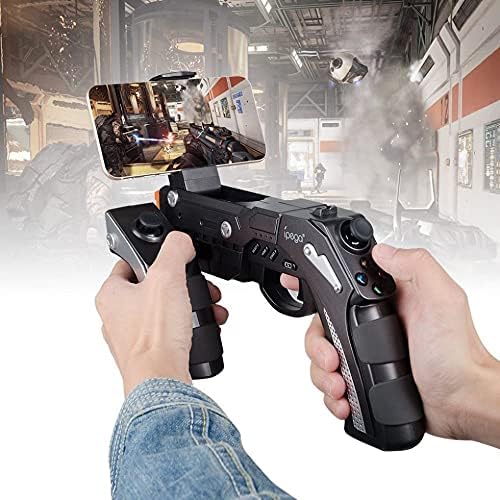
A user is shown holding the ipega PG-9057 Wireless Game Controller with a smartphone securely attached, actively engaged in mobile gaming.
- Extend the phone holder located on the top of the controller.
- Carefully place your smartphone into the holder, ensuring it is securely gripped.
- Connect the controller to your smartphone via Bluetooth as described in Section 4.3.1.
- Launch your desired game and configure controller settings if necessary.
6. Priežiūra
To ensure the longevity and optimal performance of your ipega PG-9057 controller, follow these maintenance guidelines:
- Valymas: Use a soft, dry cloth to wipe the surface of the controller. Do not use harsh chemicals or abrasive cleaners.
- Saugykla: Laikykite valdiklį vėsioje, sausoje vietoje, apsaugotoje nuo tiesioginių saulės spindulių ir ekstremalių temperatūrų.
- Venkite lašų: Protect the controller from drops and impacts, as this can damage internal components.
- Įkrovimas: Neperkraukite akumuliatoriaus. Atjunkite įkrovimo laidą, kai valdiklis bus visiškai įkrautas.

The ipega PG-9057 Wireless Game Controller is shown, emphasizing its construction from high-quality, durable ABS material.
7. Problemų sprendimas
If you encounter issues with your controller, please refer to the following common solutions:
- Valdiklis neprisijungia:
- Įsitikinkite, kad valdiklis yra visiškai įkrautas.
- Patikrinkite, ar jūsų įrenginyje įjungtas „Bluetooth“ ryšys, o valdiklis veikia susiejimo režimu.
- Pabandykite iš naujo paleisti valdiklį ir įrenginį.
- If using USB, ensure the cable is securely connected and try a different USB port.
- Mygtukai arba valdymo svirtys nereaguoja:
- Patikrinkite, ar valdiklis tinkamai prijungtas prie jūsų įrenginio.
- Iš naujo prijunkite valdiklį ir vėl jį prijunkite.
- Įsitikinkite, kad žaidimas, kurį žaidžiate, palaiko išorinius valdiklius.
- Vėlavimas arba įvesties uždelsimas:
- Ensure there are no obstructions or excessive distance between the controller and your device.
- Sumažinkite kitų belaidžių įrenginių keliamus trukdžius.
- For critical gaming, consider using a wired USB connection if supported by your device.
8. Specifikacijos
| Specifikacija | Vertė |
|---|---|
| Prekės ženklas | ipega |
| Modelis | PG-9057 |
| Suderinami įrenginiai | Android, Windows |
| Valdiklio tipas | Žaidimų kilimėlis |
| Ryšio technologija | Bevielis |
| Savybės | Bevielis |
| Suderinami elementai | Android, Windows |
| Prisijungimo būdas | Bevielis |
| Ypatingos savybės | Bevielis |
| Aparatinės įrangos platforma | Televizorius |
| Maitinimo šaltinis | Maitinamas baterijomis |
| Number of Package Items | 1 |
| UPC | 602747571722 |
| ASIN | B018TSBFE4 |
| GTIN | 602747571722 |
9. Garantija ir palaikymas
For warranty information and customer support, please refer to the documentation provided with your purchase or visit the official ipega websvetainėje. Išsaugokite pirkimo įrodymą, jei prireiktų pateikti garantinį ieškinį.