
1. Įvadas
The Perixx PERIDUO-712B is a compact wireless keyboard and mouse combo designed for efficiency and convenience. This set includes a space-saving mini keyboard and a 3-button optical mouse, ideal for various environments such as home, office, or travel. It features a stable 2.4 GHz wireless connection and plug-and-play setup for immediate use.

Image 1.1: The Perixx PERIDUO-712B Wireless Mini Keyboard and Mouse Set, showcasing its compact design and included nano receiver.
Pakuotės turinys:
- 1 x belaidė klaviatūra
- 1 x belaidė pelė
- 1 x USB nano imtuvas
- 1 x Naudotojo vadovas (šis dokumentas)
2. Darbo pradžia (sąranka)
Follow these steps to set up your Perixx PERIDUO-712B wireless keyboard and mouse set.
2.1 Akumuliatoriaus įdėjimas
- Klaviatūra: Locate the battery compartment on the underside of the keyboard. Insert two (2) AA alkaline batteries (not included), ensuring correct polarity.
- Pelė: Locate the battery compartment on the underside of the mouse. Insert one (1) AA alkaline battery (not included), ensuring correct polarity.
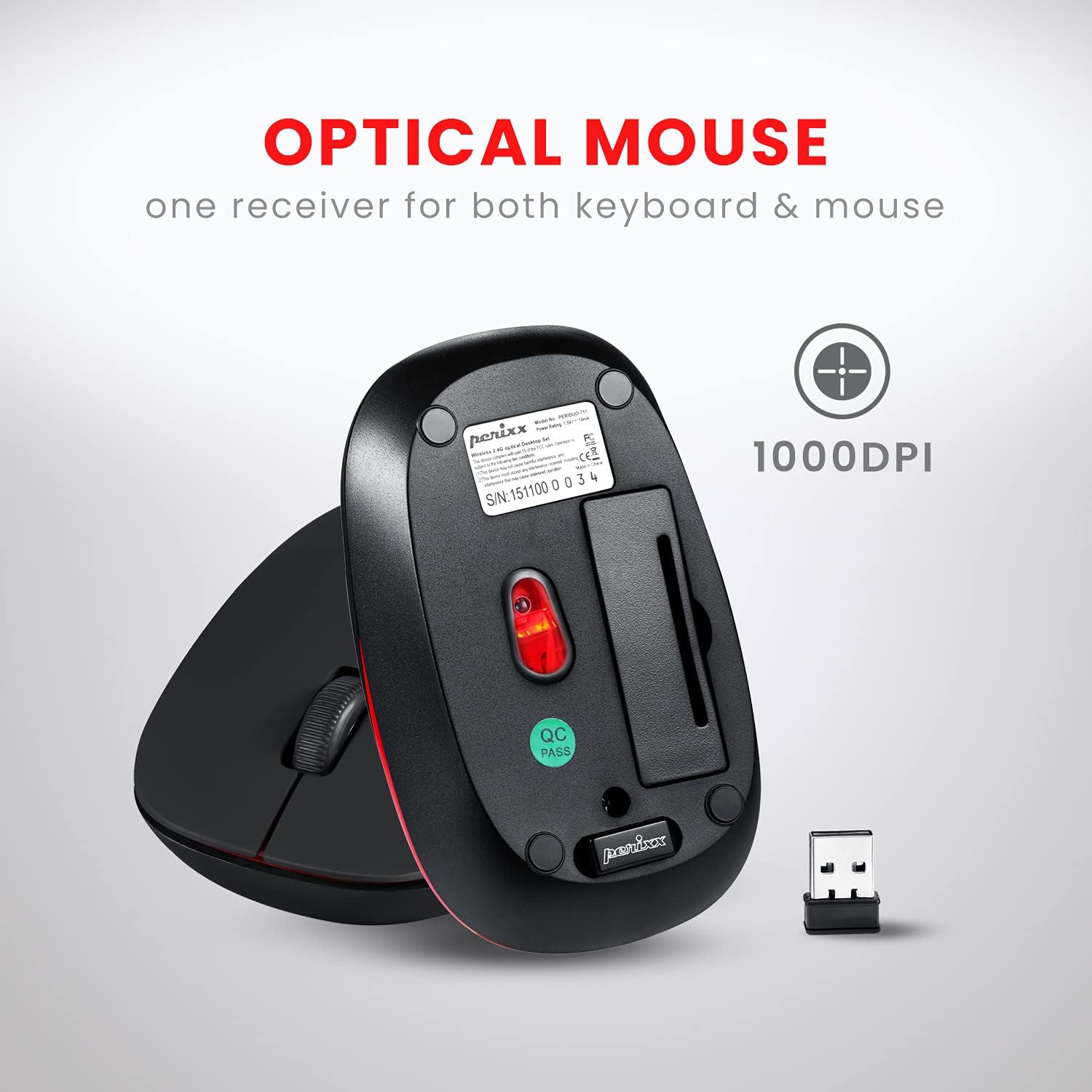
Image 2.1: Underside of the mouse, indicating the battery compartment and the storage slot for the USB nano receiver.
2.2 Imtuvo prijungimas
The USB nano receiver connects both the keyboard and mouse to your computer.
- Remove the USB nano receiver from its storage slot on the underside of the mouse.
- Prijunkite USB nano imtuvą prie laisvo kompiuterio USB prievado.
- Your computer will automatically detect and install the necessary drivers. No additional software is required.
- Klaviatūra ir pelė dabar paruoštos naudoti.
3. Naudojimo instrukcijos
3.1 Klaviatūros naudojimas
Klaviatūra pasižymi žemo lygio profesionalumufile design with membrane switches for comfortable and quiet typing. It has a standard US English QWERTY layout.

Image 3.1: Detailed diagram illustrating the keyboard layout, including standard keys and function key assignments.
Multimedia Function Keys (Fn + F1-F12):
The keyboard includes 12 integrated multimedia hotkeys for quick access to various functions. To activate these functions, press and hold the Fn key, then press the corresponding F klavišas (F1-F12).
- Fn + Esc: Media Player
- Fn + F1: Ankstesnis takelis
- Fn + F2: Leisti / pristabdyti
- Fn + F3: Kitas takelis
- Fn + F4: Nutildyti
- Fn + F5: Sumažinti garsumą
- Fn + F6: Padidinti garsumą
- Fn + F7: Pradžia
- Fn + F8: Paieška
- Fn + F9: El. paštas
- Fn + F10: Skaičiuoklė
- Fn + F11: Mėgstamiausi
- Fn + F12: Mano kompiuteris

Image 3.2: Visual guide to the multimedia function keys and their corresponding actions.
3.2 Pelės naudojimas
The 3-button optical mouse provides precise tracking and a comfortable grip with its soft rubber coating. It operates at 1000 DPI.
- Kairysis spustelėjimas: Standartinis pasirinkimas ir aktyvinimas.
- Dešiniuoju pelės mygtuku spustelėkite: Prieiga prie kontekstinio meniu.
- Slinkties ratukas: Scroll documents and web puslapiai. Taip pat galima paspausti, kad būtų įjungta vidurinio pelės mygtuko paspaudimo funkcija.

Image 3.3: The Perixx mouse, highlighting its ergonomic design, nano receiver, 3-button functionality, 30 ft operating range, and 75g weight.
4. Priežiūra ir priežiūra
- Valymas: Klaviatūrą ir pelę valykite minkšta, sausa šluoste. Jei nešvarumai sunkiai įveikiami, šiek tiek nuvalykite.ampNuvalykite šluostę vandeniu arba švelniu valymo tirpalu. Venkite stiprių cheminių medžiagų ar abrazyvinių medžiagų.
- Baterijos keitimas: Replace batteries when performance degrades. Always use fresh alkaline batteries of the specified type (AA).
- Saugykla: When not in use for extended periods, remove batteries to prevent leakage. Store the USB nano receiver in its dedicated slot on the mouse to prevent loss.
- Aplinka: Avoid exposing the devices to extreme temperatures, direct sunlight, or excessive moisture.
5. Problemų sprendimas
If you encounter issues with your PERIDUO-712B set, refer to the following common solutions:
| Problema | Sprendimas |
|---|---|
| Klaviatūra arba pelė nereaguoja |
|
| Pertraukiamas ryšys arba vėlavimas |
|
| Pelės sekimo problemos |
|
| Caps Lock indicator light behaves erratically |
|
6. Techninės specifikacijos

Image 6.1: Technical drawing showing precise dimensions of the keyboard and mouse.
| Funkcija | Detalė |
|---|---|
| Modelis | PERIDUO-712B |
| Ryšys | 2.4 GHz belaidis ryšys |
| Veikimo diapazonas | Iki 30 pėdų (10 m) |
| Klaviatūros matmenys | 11.46 × 5.43 × 0.77 colio (291 × 138 × 19.5 mm) |
| Klaviatūros svoris | 0.78 svaro (apie 354 g) |
| Klaviatūros išdėstymas | US English QWERTY, 84 keys |
| Pelės matmenys | 4.09 × 2.44 × 1.33 colio (104 × 62 × 34 mm) |
| Pelės svoris | apytiksliai 75 g |
| Pelės DPI | 1000 DPI |
| Maitinimo šaltinis | Keyboard: 2 x AA batteries; Mouse: 1 x AA battery (not included) |
| Suderinama OS | Windows 7, 8, 10, 11 (and older versions like XP, Vista) |
7. Garantija ir palaikymas
7.1 Informacija apie garantiją
The Perixx PERIDUO-712B Wireless Mini Keyboard and Mouse Set is backed by a 12 mėnesių ribota garantijaŠi garantija taikoma gamybos defektams nuo įsigijimo datos. Prašome išsaugoti pirkimo įrodymą garantiniams reikalavimams.
7.2 Pagalba klientams
For technical assistance, warranty claims, or general inquiries, please visit the official Perixx website or contact their customer support directly. Information regarding spare USB receivers can also be found on the Perixx website or Amazon.
Gamintojas: Perixx Computer GmbH
Norėdami gauti daugiau informacijos, apsilankykite: „Perixx“ parduotuvė „Amazon“ platformoje