
RIGEXPERT AA-230
RIGEXPERT AA-230 ZOOM Antenna Analyzer
Vartotojo vadovas
Model: AA-230 | Brand: RIGEXPERT
Įvadas
The RIGEXPERT AA-230 ZOOM is a powerful antenna analyzer designed for testing, checking, tuning, and repairing antennas and antenna feedlines. It operates within a frequency range of 0.1 to 230 MHz, making it suitable for a wide array of amateur radio and professional applications. This manual provides essential information for the proper setup, operation, and maintenance of your device.
Please read this manual thoroughly before using the AA-230 ZOOM to ensure safe and efficient operation.
Pakuotės turinys ir sąranka
Before beginning, ensure all components are present and undamaged. Carefully unpack the device and its accessories.

Figure 1: The AA-230 ZOOM antenna analyzer as it appears in its retail packaging, ready for unboxing.

Figure 2: The AA-230 ZOOM device alongside its essential accessories, including the USB cable, N-UHF adapter, and four AAA alkaline batteries.
Įtraukti komponentai:
- RIGEXPERT AA-230 ZOOM Antenna Analyzer Unit
- 4 x 1.5 V AAA šarminės baterijos
- USB kabelis
- N-UHF Adapter
- Strap Cover
- Vartotojo vadovas (šis dokumentas)
Akumuliatoriaus montavimas:
- Locate the battery compartment on the rear of the AA-230 ZOOM unit.
- Atidarykite akumuliatoriaus skyriaus dangtelį.
- Insert four (4) 1.5V AAA alkaline batteries, ensuring correct polarity (+/-) as indicated inside the compartment.
- Saugiai uždarykite akumuliatoriaus skyriaus dangtelį.
Pastaba: The device can operate for up to 4 hours of continuous measurement or up to 2 days in standby mode on a full charge of alkaline batteries. Always use fresh alkaline batteries for optimal performance.
Prisijungimas prie kompiuterio:
The AA-230 ZOOM features a USB port for connection to a computer, enabling data transfer and potential firmware updates. Use the provided USB cable for this connection.

Figure 3: The bottom of the AA-230 ZOOM, highlighting the USB port for computer connectivity and power input.
Naudojimo instrukcijos
This section details the basic operation of your RIGEXPERT AA-230 ZOOM antenna analyzer.
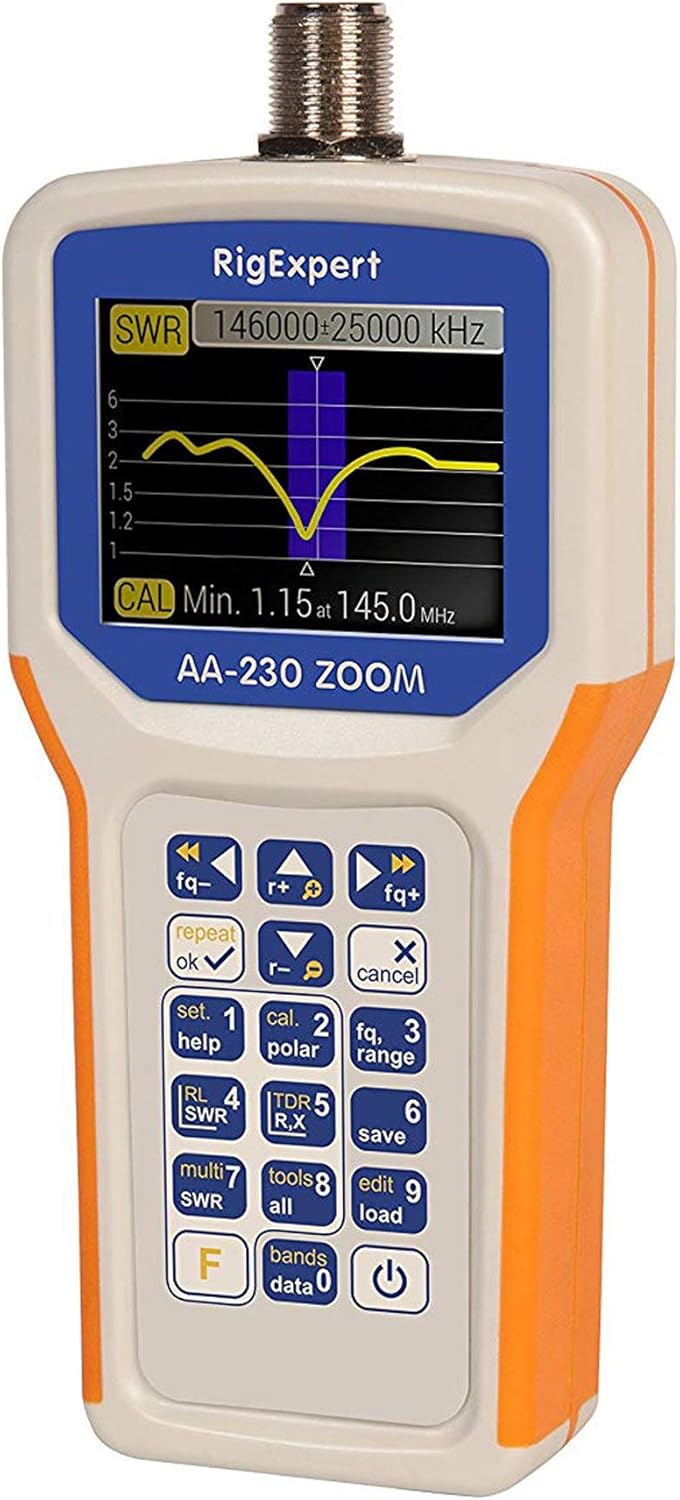
Figure 4: The main display of the AA-230 ZOOM showing an SWR sweep, along with the keypad for navigation and function selection.

5 pav.: Išsamus view of the AA-230 ZOOM's screen, displaying a numerical SWR reading of 2.3 and corresponding return loss in dB.
Įjungimas / išjungimas:
- Norėdami įjungti įrenginį, paspauskite ir palaikykite Galia button (usually located at the bottom right of the keypad) until the screen illuminates.
- Norėdami išjungti, paspauskite ir palaikykite Galia button again until the screen turns off.
Klaviatūros funkcijos:
The AA-230 ZOOM features a tactile keypad for navigating menus and selecting functions. Key functions include:
- Dažnio valdymas: Naudokite fq- ir fq+ buttons to adjust the operating frequency.
- OK/Repeat: Confirms selections or repeats the last measurement.
- Cancel/X: Cancels an operation or exits a menu.
- Set/Help (1): Accesses settings or displays help information.
- Cal/Polar (2): Initiates calibration or changes polarization.
- Fq/Range (3): Adjusts frequency range for sweeps.
- RL/SWR (4): Displays Return Loss or SWR.
- TDR/R,X (5): Activates Time Domain Reflectometer mode or displays Resistance and Reactance.
- Save (6): Išsaugo dabartinius matavimo duomenis.
- Multi SWR (7): For multi-frequency SWR measurements.
- Tools/All (8): Accesses additional tools or displays all parameters.
- Edit/Load (9): Edits saved data or loads configurations.
- Bands/Data (0): Selects frequency bands or accesses stored data.
- F (funkcija): Prieina prie antrinių klavišų funkcijų.
Performing SWR Measurements:
- Connect the antenna or load to be tested to the N-type connector on the top of the AA-230 ZOOM. Use the N-UHF adapter if necessary.
- Įjunkite įrenginį.
- Navigate to the SWR measurement mode using the keypad (e.g., press RL/SWR (4)).
- Adjust the frequency using fq- ir fq+ buttons to the desired test frequency.
- The display will show the SWR value numerically and/or graphically.
- For a frequency sweep, use the Fq/Range (3) button to set the start and end frequencies.
Priežiūra
Proper maintenance ensures the longevity and accuracy of your AA-230 ZOOM.
Valymas:
- Nuvalykite prietaisą minkšta, sausa šluoste.
- Pritvirtinusius nešvarumus naudokite šiek tiek damp šluoste su švelniu muilu, tada nedelsdami nusausinkite.
- Nenaudokite abrazyvinių valiklių, tirpiklių ar stiprių cheminių medžiagų, nes jos gali pažeistiasing arba ekranas.
Akumuliatoriaus priežiūra:
- Jei prietaisas ilgesnį laiką nebus naudojamas, išimkite baterijas, kad išvengtumėte elektrolito pratekėjimo.
- Išmeskite panaudotas baterijas laikydamiesi vietinių taisyklių.
Saugykla:
- Prietaisą laikykite vėsioje, sausoje vietoje, toliau nuo tiesioginių saulės spindulių ir ekstremalių temperatūrų.
- Use the provided strap cover for protection during storage and transport.

Figure 6: The AA-230 ZOOM with its protective strap cover, which helps shield the device from dust and minor impacts during storage or transport.
Trikčių šalinimas
If you encounter issues with your AA-230 ZOOM, refer to the following common problems and solutions:
| Problema | Galima priežastis | Sprendimas |
|---|---|---|
| Įrenginys neįsijungia. | Neišsikrovusios arba neteisingai įdėtos baterijos. | Check battery polarity. Replace with fresh AAA alkaline batteries. |
| Inaccurate SWR readings. | Improper calibration; faulty cable/connector; external interference. | Perform a calibration. Check all cable connections. Ensure no strong RF sources are nearby. |
| Ekranas tuščias arba užstrigo. | Programinės įrangos triktis; išsikrovusi baterija. | Remove and reinsert batteries to perform a hard reset. Ensure batteries are charged. |
| Nepavyksta prisijungti prie kompiuterio per USB. | Faulty USB cable; driver issue; incorrect port. | Try a different USB port or cable. Install necessary drivers from the RIGEXPERT website if prompted by your PC. |
Specifikacijos
Detailed technical specifications for the RIGEXPERT AA-230 ZOOM Antenna Analyzer.
| Dažnių diapazonas | 0.1–230 MHz |
| Frequency Step Resolution | 1 kHz |
| Varžos suderinamumas | 25, 50, 75, and 100 Ohm systems |
| SWR Measurement Range | 1-100 (numerical mode) / 1-10 (graphical mode) |
| R and X Range | 0-10000, -10000-10000 (numerical) / 0-1000, -1000-1000 (graphical) |
| RF išvesties jungtis | N tipo |
| Signal Output Form | Kvadratinė banga |
| Išėjimo galia | -10 dBm (esant 50 omų apkrovai) |
| Maitinimo šaltinis | 4 x 1.5 V AAA šarminės baterijos |
| Baterijos veikimo laikas | Up to 4 hours continuous measurement / Up to 2 days standby |
| Ekranas | Color TFT, 290 x 220 pixels |
| Klaviatūra | Atsparus vandeniui |
| PC sąsaja | USB prievadas |
| Matmenys (A x P x G) | 182 x 82 x 32 mm (7.17 x 3.23 x 1.26 colio) |
| Svoris | 236 g (0.52 svaro) |
| Darbinė temperatūra | 0°C iki +40°C (32°F iki +104°F) |
| Modelio numeris | AA-230 |
| UPC | 644730932592 |
Garantija ir palaikymas
For detailed warranty information, please refer to the warranty card included with your product or visit the official RIGEXPERT websvetainėje. Garantijos sąlygos gali skirtis priklausomai nuo regiono ir mažmenininko.
For technical support, software updates, or additional resources, please visit the official RIGEXPERT support page or contact their customer service directly. Always provide your product model (AA-230) and serial number (if applicable) when seeking support.
Official RIGEXPERT Websvetainė: www.rigexpert.com
Ask a question about this manual
Ask about setup, troubleshooting, compatibility, parts, safety, or missing instructions. Manuals+ will review the question and use this page’s manual context to help answer it.