
Įvadas
This manual provides instructions for the safe and effective use of your Clatronic AT 3605 Alcohol Tester. Please read this manual thoroughly before operating the device and keep it for future reference. This device is designed for personal use as a preliminary indicator of alcohol presence and should not be used as a basis for legal decisions or official measurements.
Svarbi saugos informacija
- This device is intended for personal use as a preliminary indicator of alcohol presence. It is not a substitute for official breathalyzer tests or legal evidence.
- Do not operate the device while driving or performing other activities that require full attention.
- Laikyti vaikams nepasiekiamoje vietoje.
- Nelaikykite prietaiso ekstremaliose temperatūrose, tiesioginiuose saulės spinduliuose ar drėgmėje.
- Naudokite tik nurodyto tipo baterijas (2 x AAA).
- Išmeskite baterijas ir prietaisą pagal vietinius reikalavimus.
- Wait at least 20 minutes after consuming alcohol before performing a test to ensure accurate readings.
Produktas baigtasview
The Clatronic AT 3605 is a compact alcohol tester designed for personal use. It features a dual LCD display and provides optical warnings at specific alcohol levels.
Įrenginio komponentai
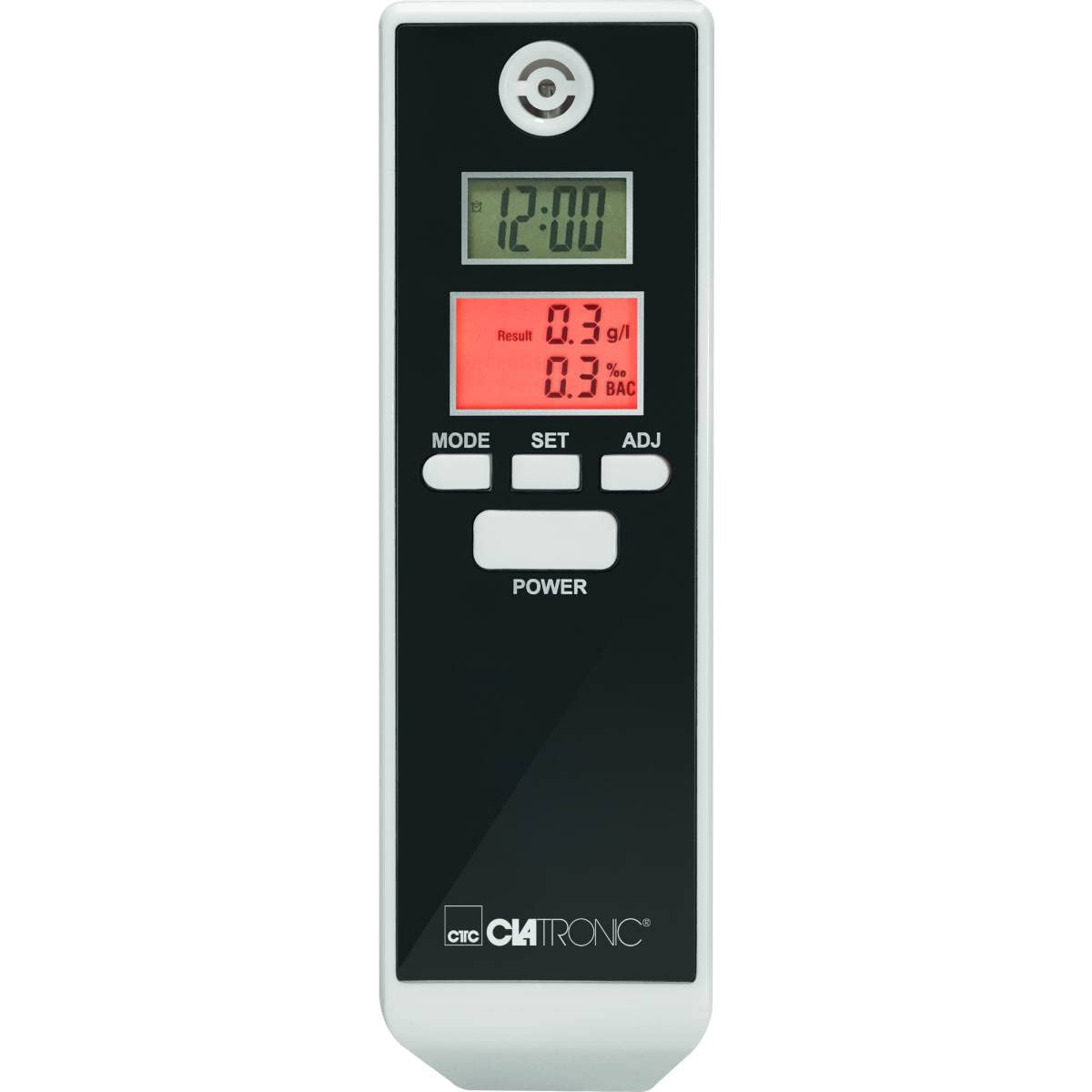
1 vaizdas: Priekyje view of the Clatronic AT 3605 Alcohol Tester. The device features a black face with a white casing. It has two digital LCD screens, one for time (12:00) and another for alcohol test results (e.g., 0.3 g/l and 0.3% BAC). Below the screens are three control buttons: MODE, SET, and ADJ. A larger POWER button is located further down. The Clatronic logo is visible at the bottom.
Valdikliai ir ekranas
- Įjungimo mygtukas: Įjungia/išjungia įrenginį.
- MODE mygtukas: Switches between different display modes (e.g., time display, alarm setting).
- SET mygtukas: Patvirtina pasirinkimus arba įjungia nustatymų režimus.
- ADJ mygtukas: Adjusts values during settings.
- Upper LCD Display: Shows current time (12/24 hour format).
- Lower LCD Display: Shows alcohol test results in g/l and % BAC. Features red backlighting for results and optical warnings.
- Mouthpiece Opening: Located at the top for breath sampmolva.
Sąranka
Akumuliatoriaus montavimas
- Suraskite baterijų skyriaus dangtelį įrenginio gale.
- Pastumkite arba atidarykite dangtelį.
- Įdėkite 2 AAA tipo baterijas, užtikrindami teisingą poliškumą (+/-).
- Saugiai uždarykite akumuliatoriaus skyriaus dangtelį.
Pastaba: The device requires 2 AAA batteries. Ensure fresh batteries are used for accurate readings.
Pradinis laiko nustatymas
Upon first use or after battery replacement, you may need to set the time. Refer to the 'Operating Instructions' for time adjustment.
Naudojimo instrukcijos
Performing an Alcohol Test
- Paspauskite GALIA button to turn on the device. The device will perform a brief self-check.
- Wait for the device to display "WAIT" or a similar indicator, followed by "BLOW" or a countdown.
- When prompted, take a deep breath and blow steadily into the mouthpiece opening for approximately 5 seconds. Ensure a continuous breath sample.
- The device will process the sample and display the results on the lower LCD screen in g/l and % BAC. The display will be red.
- Optical Warning: The device provides an optical warning at 0.2‰ and 0.5‰. If your result is at or above these levels, the display will flash.
- The device will automatically shut off after a period of inactivity to conserve battery life.
Setting Time and Alarm (if applicable)
- Įjungę įrenginį, paspauskite REŽIMAS button to cycle through display modes until the time setting mode is reached.
- Paspauskite NUSTATYTI button to enter the time adjustment. The hour digit will flash.
- Naudokite ADJ button to change the hour.
- Paspauskite NUSTATYTI again to move to the minute digit and adjust with ADJ.
- Continue this process for 12/24 hour format or alarm settings if available.
- Paspauskite REŽIMAS norėdami išeiti iš nustatymo režimo.
Priežiūra
Valymas
- Wipe the device exterior with a soft, dry cloth.
- Nenaudokite abrazyvinių valiklių ar tirpiklių.
- Nemerkite prietaiso į vandenį ar kitą skystį.
Sandėliavimas
- Prietaisą laikykite vėsioje, sausoje vietoje, apsaugotoje nuo tiesioginių saulės spindulių.
- Jei ilgesnį laiką sandėliuosite, išimkite baterijas, kad išvengtumėte jų ištekėjimo.
Trikčių šalinimas
| Problema | Galima priežastis | Sprendimas |
|---|---|---|
| Įrenginys neįsijungia. | Išsikrovusios arba neteisingai įdėtos baterijos. | Pakeiskite baterijas naujomis AAA baterijomis, užtikrindami teisingą poliškumą. |
| Netikslūs arba nenuoseklūs rodmenys. | Nepakankamas kvėpavimas sample; device not calibrated; recent alcohol consumption. | Ensure a strong, continuous breath sample. Wait at least 20 minutes after consuming alcohol before testing. If issues persist, contact customer support. |
| Ekrane rodomas klaidos pranešimas. | Device malfunction or sensor issue. | Išjunkite ir vėl įjunkite įrenginį. Jei klaida išlieka, susisiekite su klientų aptarnavimo tarnyba. |
| Laiko rodymas neteisingas. | Time not set or batteries removed. | Refer to "Setting Time and Alarm" section to adjust the time. |
Specifikacijos
| Funkcija | Detalė |
|---|---|
| Modelio numeris | AT 3605 (Article Model: 271704) |
| Maitinimo šaltinis | 2x AAA baterijos |
| Matavimo diapazonas | 0.0 to 1.9‰ (g/l) / 0.0 to 1.9% BAC |
| Ekranas | 2 Digital LCDs (one with red backlight for results) |
| Ypatingos savybės | Time display (12/24 hours), Automatic shut-off, Optical warning at 0.2‰ and 0.5‰ |
| Matmenys (I x P x A) | 30L x 40 W x 120 H mm |
| Medžiaga | Plastikiniai |
| Spalva | Juoda/Balta |
Garantija ir palaikymas
For warranty information or technical support, please refer to the warranty card included with your product or visit the official Clatronic website. Keep your purchase receipt as proof of purchase. Spare parts availability is typically 1 year from purchase date.