
WASABI MANGO UHD430 SE
Wasabi Mango UHD430 4K Monitor User Manual
Model: UHD430 SE
Įvadas
The Wasabi Mango UHD430 Real 4K HDMI 2.0 Monitor is a high-performance display featuring a 43-inch LG AH-IPS panel, delivering stunning 3840 x 2160 UHD 4K resolution. Designed for clarity and vibrant colors, this monitor supports 10-bit color depth and offers wide viewkampų.
Pagrindinės funkcijos:
- 43-inch LG AH-IPS LED Backlit Panel for superior image quality.
- UHD 4K (3840 x 2160) resolution for incredibly detailed visuals.
- 1.06 billion colors (10-bit) for rich and accurate color reproduction.
- Multiple connectivity options: HDMI 2.0 (x2), HDMI 1.4a (x2), DisplayPort 1.2 (x1), D-Sub, USB 3.0 Hub.
- 60Hz refresh rate via DisplayPort 1.2 and HDMI 2.0 for smooth motion.
- Built-in 10W + 10W speakers for integrated audio.

Vaizdas: priekis view of the Wasabi Mango UHD430 4K monitor, showcasing its sleek design and a remote control for operation.
Pakuotės turinys
Pažymėkite langelį prie šių elementų:
- Wasabi Mango UHD430 Monitor
- „DisplayPort“ laidas
- HDMI kabelis
- Remote Control (Note: Text on remote may be in Korean)
- Power Cable (110~240V adapter + US plug)
- USB šakotuvo kabelis
- Screws for stand
- Optinis garso kabelis
- Vartotojo vadovas
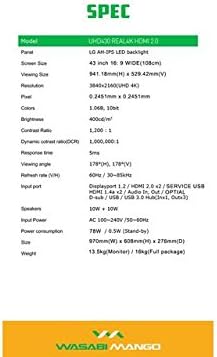
Image: A visual representation of the monitor's dimensions and a list of all accessories included in the package, such as various cables, remote control, and stand screws.
Sąranka
1. Stovo surinkimas
- Atsargiai padėkite monitorių ekranu žemyn ant minkšto, švaraus paviršiaus, kad nesubraižytumėte.
- Attach the stand base to the monitor using the provided screws. Ensure it is securely fastened.
2. Prijungimas prie maitinimo šaltinio
- Connect the power cable to the monitor's power input port.
- Kitą maitinimo laido galą prijunkite prie įžeminto elektros lizdo.
3. Connecting to a Source Device
The monitor supports various input types. Choose the appropriate cable for your device:
- „DisplayPort 1.2“: For optimal 4K @ 60Hz performance, use the included DisplayPort cable. Connect one end to the monitor's DisplayPort input and the other to your computer's DisplayPort output.
- HDMI 2.0: For 4K @ 60Hz, use an HDMI 2.0 cable. Connect to one of the HDMI 2.0 ports on the monitor.
- HDMI 1.4a: Supports 4K @ 30Hz. Connect to one of the HDMI 1.4a ports.
- D-Sub: For analog connections.
- USB 3.0 šakotuvas: Connect the USB Hub cable from your computer to the monitor's USB 3.0 input to enable the monitor's USB ports.
Note: Using a longer (over 1.5m) or low-quality DisplayPort/HDMI cable may limit the refresh rate to 30Hz at 4K resolution.
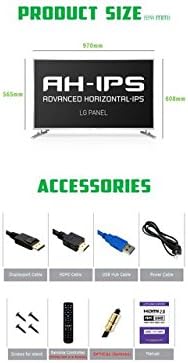
Image: The back panel of the monitor, illustrating the arrangement of power input, DisplayPort, HDMI, D-Sub, and USB ports for connection.
Monitoriaus valdymas
Maitinimo įjungimas/išjungimas
- Norėdami įjungti arba išjungti monitorių, paspauskite monitoriaus arba nuotolinio valdymo pulto maitinimo mygtuką.
Įvesties pasirinkimas
- Use the "Input" button on the remote control to cycle through available input sources (DisplayPort, HDMI1, HDMI2, HDMI3, HDMI4, D-Sub).
Ekrano ekrano (OSD) meniu
The OSD menu allows you to adjust various display settings. Use the remote control to navigate:
- Norėdami atidaryti OSD, paspauskite mygtuką „Meniu“.
- Use the arrow keys (Up/Down/Left/Right) to navigate through menu options.
- Press "OK" or "Enter" to select an option or confirm a setting.
- Press "Exit" or "Menu" again to close the OSD.
Įprasti OSD nustatymai:
- Vaizdo nustatymai: Brightness, Contrast, Color Temperature, Sharpness.
- Garso nustatymai: Garsumas, nutildymas.
- Įvesties pasirinkimas: Manual input source selection.
- OSD nustatymai: OSD kalba, OSD skaidrumas, OSD skirtasis laikas.
- Kiti nustatymai: Aspect Ratio, ECO Mode.

Image: The monitor displaying content, with the remote control visible, indicating its use for navigating the monitor's functions and settings.
Priežiūra
Monitoriaus valymas
- Prieš valydami visada atjunkite monitorių nuo maitinimo lizdo.
- Šiek tiek naudokite minkštą, be pūkelių šluostę dampnuplaukite vandeniu arba neabrazyviniu ekrano valikliu.
- Nepurkškite valiklio tiesiai ant ekrano.
- Venkite naudoti benzeną, skiediklį, amoniaką ar abrazyvinius valiklius, nes jie gali pažeisti ekrano paviršių.
- Švelniai nuvalykite ekraną, kad pašalintumėte dulkes ir dėmes.
Bendroji priežiūra
- Laikykite monitorių atokiau nuo tiesioginių saulės spindulių, šilumos šaltinių ir per didelio dulkių kiekio.
- Užtikrinkite tinkamą vėdinimą aplink monitorių, kad išvengtumėte perkaitimo.
- Nedėkite sunkių daiktų ant monitoriaus ar jo laidų.
- Venkite monitoriaus numetimo ar stiprių smūgių.
Trikčių šalinimas
| Problema | Galima priežastis | Sprendimas |
|---|---|---|
| Nėra galios | Neprijungtas maitinimo laidas; neveikia maitinimo lizdas. | Įsitikinkite, kad maitinimo laidas yra tvirtai prijungtas prie monitoriaus ir lizdo. Išbandykite lizdą su kitu įrenginiu. |
| Nėra signalo / Tuščias ekranas | Incorrect input source selected; Video cable loose or faulty; Source device not powered on. | Press "Input" button on remote to select correct source. Check video cable connections. Ensure source device is on and outputting video. |
| Vaizdas iškraipytas arba neryškus | Incorrect resolution setting; Faulty video cable; Graphics card driver issue. | Set display resolution to 3840x2160. Try a different video cable. Update graphics card drivers. |
| Nėra garso | Volume too low or muted; Audio cable not connected (if using external speakers); Incorrect audio output selected on source device. | Increase volume or unmute. Ensure audio is routed correctly from source device to monitor. |
| Nuotolinio valdymo pultas neveikia | Batteries are dead or incorrectly inserted; Obstruction between remote and monitor. | Replace batteries. Ensure clear line of sight to the monitor's IR receiver. |
Specifikacijos
| Funkcija | Detalė |
|---|---|
| Modelio pavadinimas | UHD430 Real 4K HDMI 2.0 |
| Skydelio tipas | LG AH-IPS LED Backlight |
| Ekrano dydis | 43 inches (109.2 cm), 16:9 Wide |
| Rezoliucija | 3840 x 2160 UHD 4K |
| Spalvos | 1.06 milijardo (10 bitų) |
| Kontrasto santykis | 1200:1 |
| Dinaminis kontrasto santykis | 1,000,000:1 |
| Ryškumas | 400 cd/m² |
| Reagavimo laikas | 5 ms (nuo G iki G) |
| Viewing kampas | 178 laipsnių horizontaliai, 178 laipsnių vertikaliai |
| Atnaujinimo dažnis | 60 Hz (DisplayPort 1.2 & HDMI 2.0), 30 Hz (HDMI 1.4a) |
| Įvesties prievadai | DisplayPort 1.2 x1, HDMI 2.0 x2, HDMI 1.4a x2, D-Sub x1, USB 3.0 Hub (In x1, Out x3) |
| Garsas | 10W + 10W Speakers |
| Maitinimo įvestis | AC 100-240V / 50-60Hz |
| Energijos suvartojimas | 78W (Operating) / 0.5W (Stand-by) |
| Matmenys (P x A x G) | 970 mm x 608 mm x 276 mm (su stovu) |
| Svoris | 13.5 kg (Monitor) / 18 kg (Full package) |
Image: A graphic detailing the technical specifications of the UHD430 monitor, such as screen size, resolution, and refresh rate.
Garantija ir palaikymas
The Wasabi Mango UHD430 monitor comes with a manufacturer's warranty. Please refer to the warranty card included in your package for specific terms and conditions.
Defective Pixel Policy: For the UHD430 SE model, 0-15 defective pixels (including dead/stuck/sub pixels) are permitted under the warranty policy.
For technical support or service inquiries, please contact your retailer or the official Wasabi Mango support channels. Keep your purchase receipt and product serial number handy for faster service.
Ask a question about this manual
Ask about setup, troubleshooting, compatibility, parts, safety, or missing instructions. Manuals+ will review the question and use this page’s manual context to help answer it.