
1. Įvadas
The Protmex MS6208A is a compact, portable handheld digital tachometer designed for precise contact measurement of rotational and linear speeds. It is equipped with a high-speed integrated chip for stable and reliable performance. This device is ideal for a wide range of applications, including measuring the speed of motors, fans, conveyor belts, and various industrial and automotive equipment.
This manual provides detailed instructions on the proper setup, operation, maintenance, and troubleshooting of your MS6208A tachometer to ensure accurate measurements and extend the product's lifespan.
2. Saugos informacija
Please read and understand all safety instructions before operating the device. Failure to follow these instructions may result in injury or damage to the instrument.
- Always wear appropriate personal protective equipment (PPE) when taking measurements, especially when working with moving machinery.
- Do not attempt to measure rotating objects that are unstable or could pose a hazard.
- Ensure the device is clean and dry before use. Do not operate in wet or explosive environments.
- Saugokite įrenginį nuo stiprių elektromagnetinių laukų.
- Do not disassemble or modify the instrument. Refer all servicing to qualified personnel.
- Kad rodmenys būtų tikslūs, nedelsdami pakeiskite baterijas, kai pasirodys išsikrovusių baterijų indikatorius.
3. Pakuotės turinys
Išpakuodami patikrinkite, ar visi daiktai yra ir yra geros būklės.
- 1 x Protmex MS6208A Digital Tachometer
- 1 x 6-inch Idler Wheel
- 1 x 0.1m Idler Wheel
- 2 x Touch Tips (Protruding and Concave)
- 1 x prailginimo juosta
- 4 x 1.5 V AAA baterijos
- 1 x Naudotojo vadovas (šis dokumentas)
- 1 x Meter Bag
4. Produktas baigtasview
The MS6208A tachometer is designed for versatility and ease of use, featuring a robust build and intuitive controls.

Figure 4.1: Labeled diagram of the Protmex MS6208A Digital Tachometer, showing the LCD screen, transmission shaft, power button, mode switch, data storage (MEM), data storage read (READ), and plus/minus buttons.
Pagrindinės funkcijos:
- Highly Reliable Digital Tachometer: Features a 16-bit high-speed integrated chip for stable and reliable performance. The double-layer ABS casing, produced by secondary injection molding, offers an ergonomic design for easy operation and maintenance.
- Kontakto išmatavimai: Measures rotational speeds from 50 RPM to 19999 RPM and surface speeds. Includes 5 different contact accessories (idler wheels, touch tips) to suit various measurement needs.
- Kelios funkcijos: Offers 5 unit selections (m/min, m/sec, ft/min, ft/sec, in/min). Features include 100 groups of data recording, data hold, and average value functions.
- LCD foninis apšvietimas: Equipped with an LCD backlight display for easy data reading in dark environments.
- Energijos taupymas: Includes a low battery indicator and automatically powers off after 30 seconds of inactivity to conserve energy.
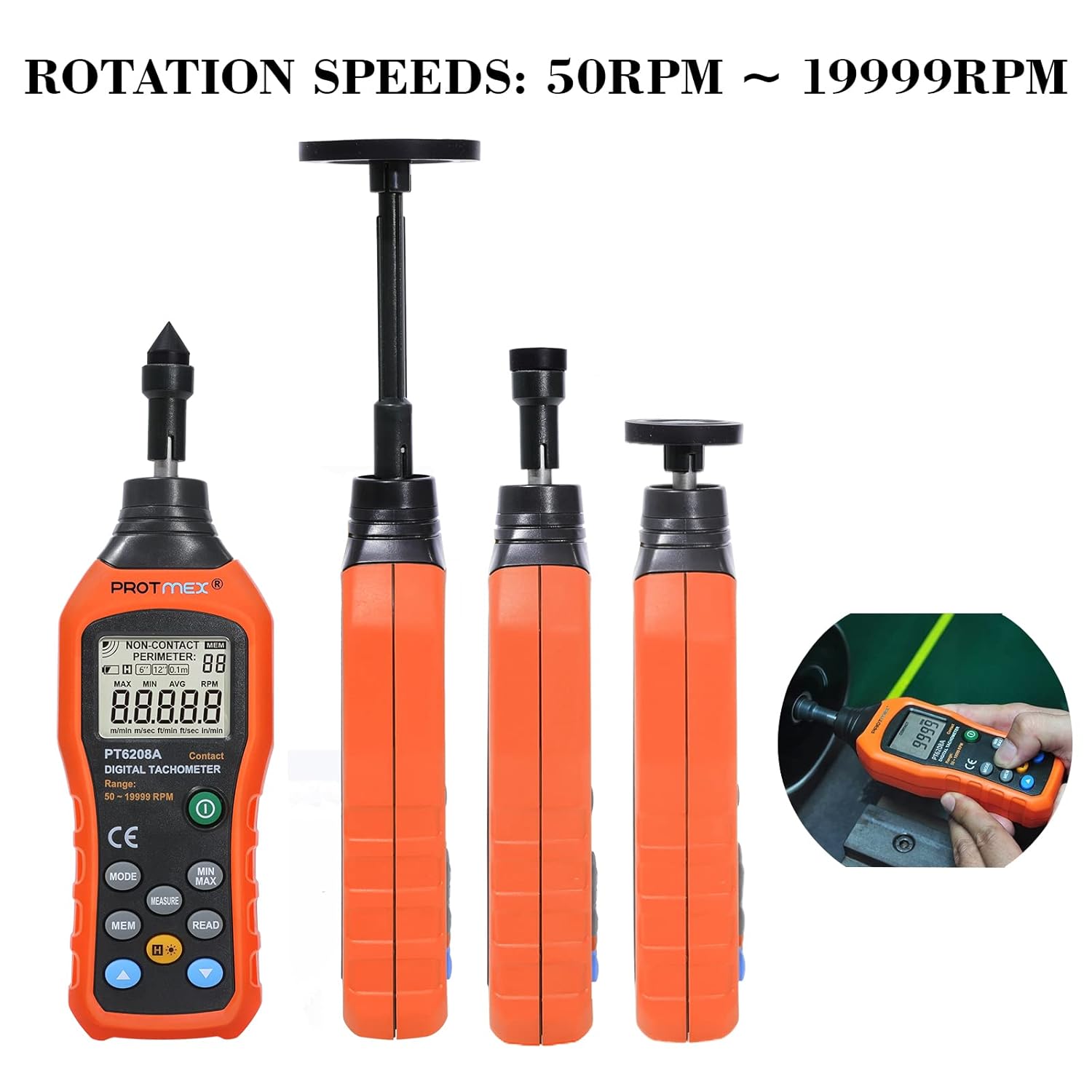
Figure 4.2: The Protmex MS6208A tachometer shown with different contact attachments, illustrating its capability to measure rotation speeds from 50 RPM to 19999 RPM.
5. Sąranka
5.1 Akumuliatoriaus įdėjimas
- Locate the battery compartment on the back of the tachometer.
- Open the battery cover by sliding it off or unscrewing it, depending on the model.
- Insert four (4) 1.5V AAA batteries, ensuring correct polarity (+ and -).
- Saugiai uždarykite akumuliatoriaus skyrių.

5.1 paveikslas: View of the Protmex MS6208A's battery compartment, showing the placement for four AAA batteries and the internal 16-bit low-power MCU chip.
5.2 Attaching Measurement Accessories
The tachometer comes with various accessories for different measurement scenarios.
- Select the appropriate contact accessory (idler wheel or touch tip) for your measurement task.
- Attach the chosen accessory firmly to the transmission shaft at the top of the tachometer. For extended reach, use the extension bar between the shaft and the accessory.

Figure 5.2: The Protmex MS6208A tachometer demonstrating its adaptability with a 0.1m/6in. idler wheel, protruding touch tip, and concave touch tip, along with an extension bar.
6. Naudojimo instrukcijos
6.1 Maitinimo įjungimas/išjungimas
- Paspauskite Galia mygtukas (), kad įjungtumėte įrenginį.
- The device will automatically power off after 30 seconds of inactivity. To manually turn off, press and hold the Galia mygtuką.
6.2 Measurement Modes and Unit Selection
- After powering on, the device defaults to RPM measurement.
- Paspauskite REŽIMAS button to cycle through different measurement units: RPM, m/min, m/sec, ft/min, ft/sec, in/min.
- Ensure the selected unit matches your measurement requirement.
6.3 Matavimo atlikimas
- Attach the appropriate contact accessory to the tachometer.
- Gently press the contact accessory against the center of the rotating object or surface you wish to measure.
- Ensure stable contact. The LCD will display the real-time measurement.
- For surface speed measurements, use an idler wheel and press it against the moving surface.
6.4 Data Hold, MAX/MIN/AVG Functions
- Paspauskite PAMATUOKITE button to hold the current reading on the display. Press again to release.
- Paspauskite MIN / MAX button to cycle through Maximum, Minimum, and Average readings during a measurement session.
6.5 Data Storage (MEM) and Recall (READ)
The device can store up to 100 groups of data.

Figure 6.1: The Protmex MS6208A tachometer in use, demonstrating its ability to store up to 100 sets of measurement data.
- Norėdami išsaugoti rodmenis, paspauskite MEM button while a measurement is displayed. The display will show the storage location number.
- To recall stored data, press the SKAITYTI mygtuką. Naudokite Pliusas (+) ir Minusas (-) buttons to navigate through the stored data groups.
6.6 Apšvietimas
- Paspauskite Foninis apšvietimas mygtukas () to turn the LCD backlight on or off for improved visibility in low-light conditions.

6.2 pav. Iš arti view of the Protmex MS6208A's backlit LCD display, showing clear readability of contact RPM measurements.
7. Priežiūra
7.1 Valymas
- Nuvalykite įrenginį minkšta, sausa šluoste. Įsisenėjusiam purvui naudokite šiek tiek drėgnąamp cloth with mild detergent, then dry thoroughly.
- Nenaudokite abrazyvinių valiklių ar tirpiklių, nes jie gali pažeisti casing arba ekranas.
- Keep the transmission shaft and contact accessories free from dust and debris to ensure smooth operation and accurate readings.
7.2 Saugykla
- Kai ilgesnį laiką nenaudojate, išimkite baterijas, kad išvengtumėte ištekėjimo ir prietaiso pažeidimo.
- Store the tachometer and its accessories in the provided meter bag in a cool, dry place, away from direct sunlight and extreme temperatures.
7.3 Akumuliatoriaus keitimas
- When the low battery indicator appears on the display, replace all four AAA batteries promptly.
- Laikykitės 5.1 skyriuje aprašytų akumuliatoriaus įdėjimo veiksmų.
8. Problemų sprendimas
If you encounter issues with your Protmex MS6208A, refer to the following common problems and solutions:
| Problema | Galima priežastis | Sprendimas |
|---|---|---|
| Įrenginys neįsijungia. | Neišsikrovusios arba neteisingai įdėtos baterijos. | Patikrinkite baterijų poliškumą. Pakeiskite naujomis AAA baterijomis. |
| Netikslūs rodmenys. | Poor contact with the rotating object; incorrect accessory used; low battery. | Ensure firm and stable contact. Use the correct accessory for the surface. Replace batteries. |
| Ekranas blankus arba mirga. | Senka baterija. | Pakeiskite naujomis AAA tipo baterijomis. |
| Cannot store data. | Memory full; incorrect operation. | Ensure you are pressing MEM during a live measurement. If memory is full, consider clearing data (refer to advanced functions in full manual if available). |
| Auto-off too quickly. | Normal operation (30 seconds inactivity). | This is a power-saving feature. Press any button to keep the device active. |
9. Specifikacijos
| Parametras | Vertė |
|---|---|
| Modelis | MS6208A (PT6208A Contact Tachometer) |
| Matavimo tipas | Susisiekite |
| RPM Measurement Range | 50 ~ 19999 aps./min |
| Tikslumas | ± (0.03 % + 2 skaitmenys) |
| Matavimo atstumas | N/A (Contact Measurement) |
| Vieneto pasirinkimas | m/min, m/sec, ft/min, ft/sec, in/min |
| Duomenų įrašas | 100 grupės |
| Funkcijos | MAX/MIN/AVG, Data Hold, Display Backlight, Low Battery Indication |
| Automatinis išjungimas | 30 sekundžių neveiklumo |
| Maitinimo šaltinis | 4 x 1.5 V AAA baterijos |
| Gaminio matmenys (I x P x A) | 19.3 x 6 x 2.9 cm (7.6 x 2.4 x 1.1 colio) |
| Produkto svoris | 120 g (0.26 svaro) |
| Medžiaga | ABS plastikas |
| Sertifikatai | CE (LVE, EMC, RoHS) |
10. Garantija ir palaikymas
Protmex is committed to providing quality products and customer satisfaction. This product is CE (LVE, EMC, RoHS) certified.
For any questions, technical assistance, or support needs, please contact Protmex customer service. We provide friendly 24/7 online support to assist you with any inquiries regarding your MS6208A Digital Tachometer.
Please refer to your purchase documentation or the official Protmex websvetainėje rasite konkrečias garantijos sąlygas ir kontaktinę informaciją.