
Yaheetech YT-00009601
Yaheetech Mobile Computer Desk Instruction Manual
Modelis: YT-00009601
Įvadas
Ačiū, kad pirkoteasing the Yaheetech Mobile Computer Desk. This manual provides detailed instructions for assembly, operation, and maintenance to ensure safe and efficient use of your new desk. Please read this manual thoroughly before assembly and retain it for future reference.
Saugos informacija
To prevent injury and damage to the product, please observe the following safety guidelines:
- Prieš naudojimą įsitikinkite, kad visi komponentai tinkamai surinkti.
- Do not exceed the maximum weight limits for each shelf:
- Top: 30 kg (66.1 lb)
- Drawer: 2 kg (4.4 lb)
- Middle Shelf: 20 kg (44.1 lb)
- Bottom Shelf: 10 kg (22 lb)
- Use the locks on the casters to stabilize the desk when it is in place.
- Surinkdami mažas dalis laikykite vaikams nepasiekiamoje vietoje.
- Venkite dėti karštus daiktus tiesiai ant stalo paviršiaus be apsaugos.
- Nestokite ir nesėdėkite ant stalo.
Pakuotės turinys
Please verify that all components listed in your product's included parts list are present before beginning assembly. If any parts are missing or damaged, please contact customer support.
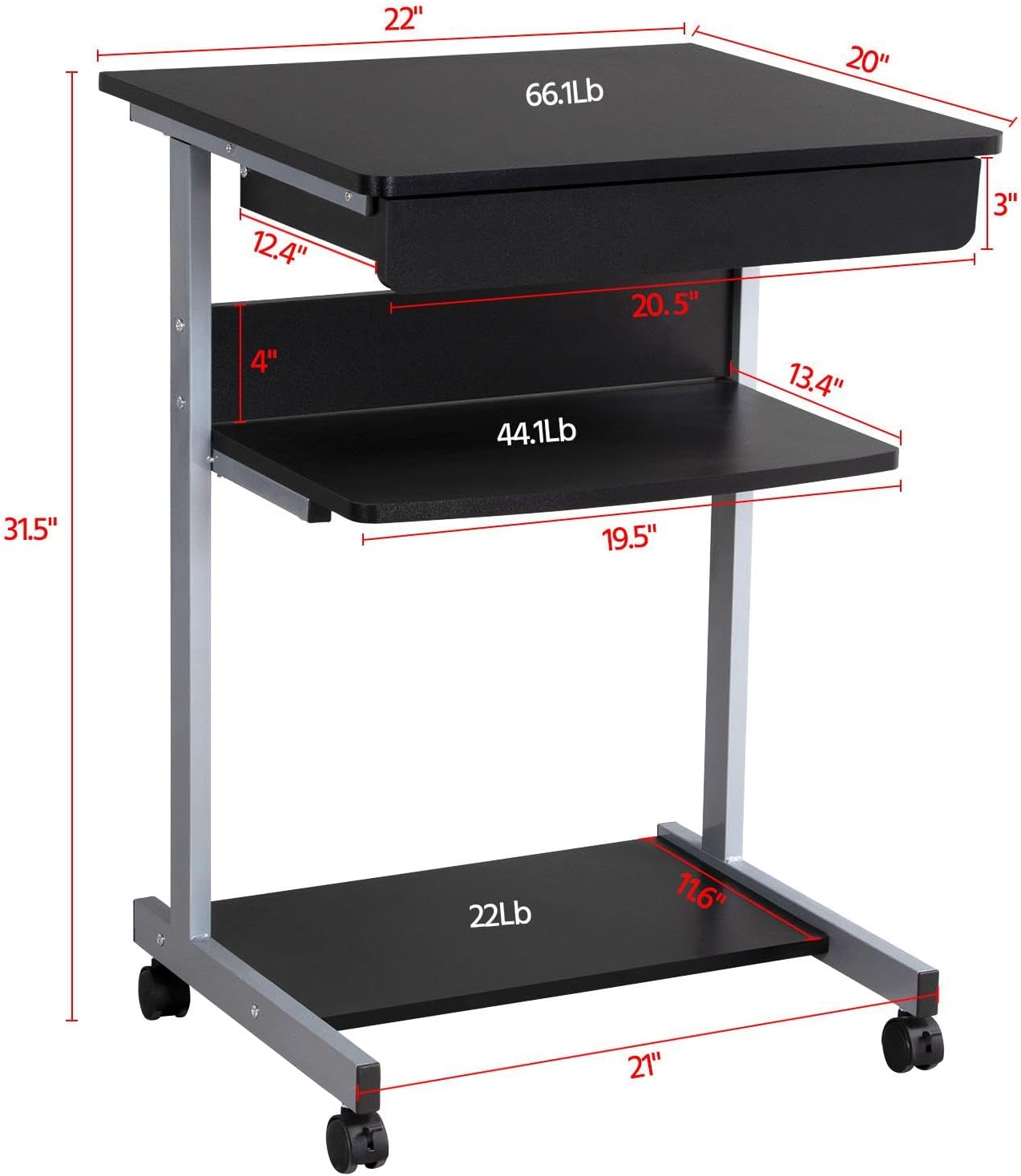
Image: Diagram showing the dimensions and weight capacities of the desk components.
Sąranka ir surinkimas
Assembly is designed to be straightforward. It is recommended to have a clear, spacious area for assembly. All necessary tools are included.
Surinkimo žingsniai:
- Attach the side frames: Secure the horizontal bars to the vertical support frames using the provided screws.
- Install casters: Screw the four rolling casters into the bottom of the desk frame. Ensure the two lockable casters are placed at the front for easy access.
- Mount the bottom shelf: Attach the bottom shelf to the lower section of the frame using the designated screws.
- Attach the middle shelf: Secure the middle shelf to the frame at the desired height.
- Install the keyboard tray slides: Attach the drawer slides to the desk frame. Ensure they are correctly oriented for smooth operation.
- Assemble the keyboard tray: Connect the sides and back of the keyboard tray, then slide the bottom panel into place. Attach the remaining drawer slides to the keyboard tray.
- Insert the keyboard tray: Carefully slide the assembled keyboard tray into the installed drawer slides on the desk frame.
- Attach the top desktop panel: Secure the main desktop panel to the top of the frame.
Video: Detailed installation instructions for the Yaheetech Mobile Computer Desk.

Vaizdas: Stambus planas view highlighting the heavy MDF boards, thickened frame, smooth steel ball drawer, open middle shelf, open bottom shelf, and lockable casters.
Naudojimo instrukcijos
Mobilumas ir stabilumas:
- The desk is equipped with four rolling casters for easy movement.
- To secure the desk in place, engage the locks on the two front casters. Push the lever down to lock and up to unlock.
Klaviatūros dėklo naudojimas:
- The keyboard tray slides smoothly on metal runners. Gently pull the tray outwards to extend it for use.
- Push the tray inwards until it is fully retracted when not in use to save space.
Sandėliavimo lentynos:
- The top surface is suitable for a laptop or monitor, with a maximum load of 30 kg (66.1 lb).
- The middle shelf can hold items up to 20 kg (44.1 lb), such as books or accessories. The back plate helps prevent items from falling.
- The bottom shelf is designed for a printer or other larger items, with a maximum load of 10 kg (22 lb).
Video: Demonstration of the small rolling computer desk cart for home office use, highlighting mobility and storage.

Image: The desk in use with a laptop, showing its compact design and functionality.
Priežiūra
To maintain the appearance and longevity of your Yaheetech Mobile Computer Desk:
- Valymas: Nuvalykite paviršius reklamaamp skudurėliu. Venkite stiprių cheminių medžiagų ar abrazyvinių valiklių.
- Patikra: Periodiškai patikrinkite visus varžtus ir jungtis, kad įsitikintumėte, jog jie yra tvirtai priveržti. Jei reikia, priveržkite.
- Ratukai: Kad ratukai sklandžiai riedėtų, laikykite juos be šiukšlių.
Trikčių šalinimas
Jei kyla problemų dėl stalo, žr. šiuos įprastus sprendimus:
- Stalas nestabilus: Ensure all screws are securely tightened. Check that the desk is on a flat, even surface. Engage the locks on the casters.
- Keyboard tray not sliding smoothly: Check the drawer slides for any obstructions or debris. Ensure the slides are properly aligned and lubricated if necessary.
- Trūksta dalių: If any parts are missing upon arrival, please contact customer support immediately.
For issues not covered here, please contact Yaheetech customer support.
Specifikacijos
| Prekės ženklas | Yaheetech |
| Modelio numeris | YT-00009601 |
| Gaminio matmenys (D x P x A) | 20 colio gylis x 22 colio plotis x 31.1 colio aukštis (56 x 51 x 79 cm) |
| Prekės svoris | 24.3 svaro |
| Spalva | Juoda |
| Medžiagos tipas | Engineered Wood (MDF), Metal (Iron) |
| Maksimalaus svorio rekomendacija (viršuje) | 30 Kilograms (66.1 lb) |
| Maksimalus rekomenduojamas svoris (stalčius) | 2 Kilograms (4.4 lb) |
| Maximum Weight Recommendation (Middle Shelf) | 20 Kilograms (44.1 lb) |
| Maximum Weight Recommendation (Bottom Shelf) | 10 Kilograms (22 lb) |
| Stalčių skaičius | 1 |
| Lentynų skaičius | 2 (atviros lentynos) |
| Ypatinga funkcija | Compact, Mobile with Lockable Casters |
| Reikalingas surinkimas | Taip |
| Apima visus surinkimo įrankius | Taip |
Garantija ir palaikymas
For warranty information, please refer to the documentation included with your purchase or contact Yaheetech directly. Yaheetech aims to provide quality products and customer satisfaction.
If you require further assistance, have questions about assembly, or need to report missing/damaged parts, please contact Yaheetech customer support through their official websvetainę arba mažmenininką, iš kurio buvo pirktas produktas.
Ask a question about this manual
Ask about setup, troubleshooting, compatibility, parts, safety, or missing instructions. Manuals+ will review the question and use this page’s manual context to help answer it.