
Įvadas
This manual provides instructions for the proper setup, operation, maintenance, and troubleshooting of your Excalibur Deluxe Virtual Casino 5-in-1 Video Game. Please read this manual thoroughly before using the device to ensure optimal performance and longevity.
The Excalibur Deluxe Virtual Casino is a handheld electronic gaming device featuring five classic casino games: Poker, Blackjack, Slots, Craps, and Roulette. It is designed for portable entertainment.
Sąranka
1. Akumuliatoriaus įdėjimas
The Excalibur Deluxe Virtual Casino requires 3 AAA batteries (not included) for operation.
- Suraskite baterijų skyriaus dangtelį įrenginio gale.
- Atidarykite dangtelį rodyklės nurodyta kryptimi.
- Insert 3 AAA batteries, ensuring the correct polarity (+ and -) as marked inside the compartment.
- Uždėkite baterijų skyriaus dangtelį, įsitikindami, kad jis tvirtai užsifiksavo.
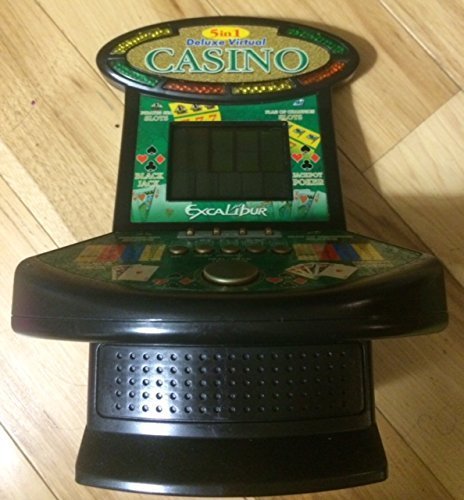
1 paveikslas: Excalibur Deluxe Virtual Casino handheld device. This image shows the front of the device, featuring the LED display and control buttons, which include a directional pad and action buttons.
2. Pradinis įjungimas
After installing batteries, press the GALIA button, usually located on the top or front of the device, to turn it on. The screen should illuminate, displaying the main menu or game selection screen.
Naudojimo instrukcijos
Kontroliuojaview
- Krypties valdikliai (D-Pad): Used for navigating menus and making selections within games.
- SELECT/MENU Button: Typically used to confirm selections or access in-game menus.
- ACTION Buttons (A, B, C, etc.): Used for specific game actions, such as dealing cards, spinning reels, or placing bets. Refer to individual game instructions for specific button functions.
- SOUND/VOLUME Button: Adjusts the device's sound level or mutes audio.
- Įjungimo mygtukas: Įjungia arba išjungia įrenginį.
Žaidimo pasirinkimas
Pagrindiniame meniu naudokite D-Pad to highlight your desired game (Poker, Blackjack, Slots, Craps, or Roulette). Press the PASIRINKTI button to confirm your choice and start the game.
Basic Gameplay (General)
- Placing Bets: Naudokite D-Pad to select bet amounts or areas on the table (for Craps/Roulette). Confirm with an VEIKSMAI mygtuką.
- Game Actions: Follow on-screen prompts. For example, in Poker/Blackjack, use VEIKSMAI buttons to "Hit," "Stand," "Deal," or "Fold." In Slots, press an VEIKSMAI button to "Spin."
- Viewing Rules: Some games may have an option to view rules within their respective menus. Access this via the MENIU mygtuką, jei yra.
Priežiūra
Valymas
To clean the device, gently wipe the exterior with a soft, dry cloth. Do not use abrasive cleaners, solvents, or immerse the device in water. For the screen, use a soft, lint-free cloth specifically designed for electronics displays.
Akumuliatoriaus priežiūra ir laikymas
- Jei prietaisas ilgesnį laiką nebus naudojamas, išimkite baterijas, kad išvengtumėte elektrolito pratekėjimo.
- Prietaisą laikykite vėsioje, sausoje vietoje, toliau nuo tiesioginių saulės spindulių ir ekstremalių temperatūrų.
- Nemaišykite senų ir naujų baterijų arba skirtingų tipų baterijų.
Trikčių šalinimas
| Problema | Galima priežastis | Sprendimas |
|---|---|---|
| Įrenginys neįsijungia. | Neišsikrovusios arba neteisingai įdėtos baterijos. | Patikrinkite baterijų poliškumą. Pakeiskite naujomis AAA baterijomis. |
| Ekranas tuščias arba mirga. | Low batteries or a temporary software glitch. | Pakeiskite baterijas. Išjunkite ir vėl įjunkite įrenginį. |
| Mygtukai nereaguoja. | Low batteries or a software issue. | Replace batteries. Turn the device off and on again. Ensure buttons are not stuck. |
| Nėra garso. | Garsas nutildytas arba nustatytas per mažas. | Paspauskite SOUND/VOLUME button to adjust volume or unmute. |
Specifikacijos
- Modelis: B01GGZSPTA
- Prekinis ženklas: Excalibur
- Ekrano tipas: LED
- Formos faktorius: Rankinis
- Maitinimo šaltinis: 3 x AAA baterijos (į komplektą neįeina)
- Įtraukti žaidimai: Poker, Blackjack, Slots, Craps, Roulette
Garantija ir palaikymas
Excalibur products are designed for quality and reliability. For information regarding warranty coverage, please refer to the warranty card included with your purchase or visit the official Excalibur websvetainę.
For technical support or customer service inquiries, please contact Excalibur customer support through their official channels. Contact details are typically available on the product packaging or the manufacturer's websvetainę.