
DEEGO DEEGOMICRO02
DEEGO Micro USB Cable User Manual
Model: DEEGOMICRO02
Įvadas
Thank you for choosing DEEGO Micro USB Cables. This manual provides essential information for the proper use, care, and maintenance of your new cables. These cables are designed for reliable charging and data synchronization for a wide range of Micro USB compatible devices.
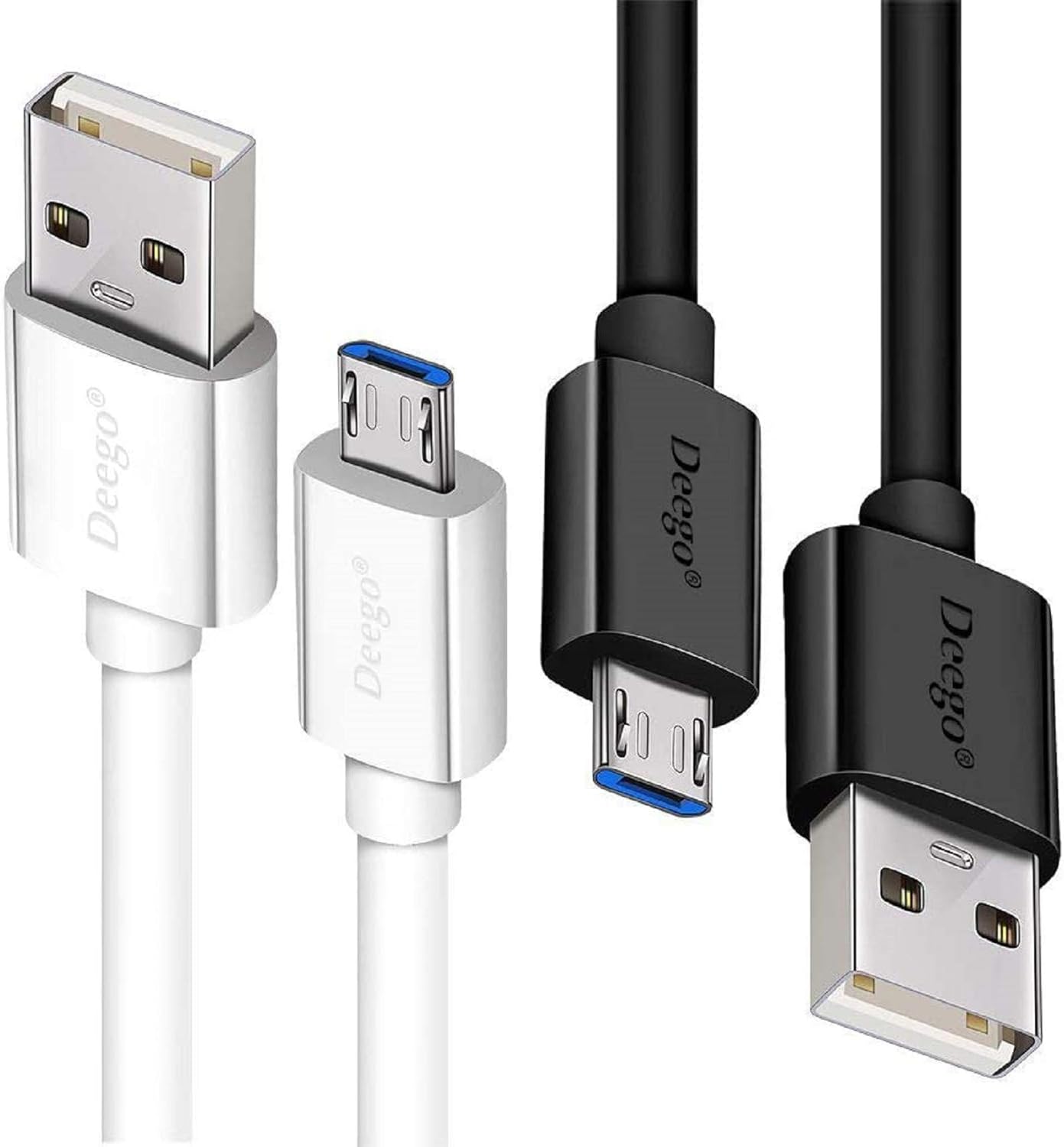
Image: DEEGO Micro USB Cables (White and Black)
This image displays the two Micro USB cables included in the pack, one in white and one in black. Both the standard USB-A connector and the Micro-B connector are visible, highlighting the product's design and color options.
Produkto savybės
- Visuotinis suderinamumas: Designed to work with a broad range of Micro USB devices, including smartphones, tablets, gaming controllers, and other peripherals.
- Fast Charging & Sync: Supports up to 2.4A charging speed and 480Mbps data transmission, ensuring efficient power delivery and quick file pervedimai.
- High Quality & Flexible: Constructed with a durable PVC jacket for increased flexibility and tangle-free use, offering a long lifespan.
- Extra Long & Convenient: Includes two cables of 10ft and 6ft lengths, providing extended reach and convenience for various usage scenarios.
- Sturdy & Perfect Fit: Features reinforced connectors with a 10000+ bend lifespan and heat-resistant aluminum connectors for a secure and reliable connection.

Image: Fast Charging & Sync Capabilities
This image illustrates the cable's ability to provide both high-speed data synchronization and quick charging. It shows a smartphone connected to a power bank, with visual cues indicating efficient power and data flow.
Suderinamumas
These DEEGO Micro USB cables are compatible with a wide array of devices that utilize a Micro USB port for charging and data transfer. This includes, but is not limited to, the following:
- Samsung Galaxy S7/S7 Edge/S6/S6 Edge/S5/S4, Note 5/4
- Samsung Tablets/Tab
- PS4 controller/Dual Shock 4/Xbox One Controller
- Windows Phones
- LG G4/G4 Stylus/G3/G3 Stylus/K40/K30/Tribute Empire
- Huawei Honor 7X/6X
- Motorola, Google Nexus (older models)
- Blackberry Aurora/DTEK50/Leap/Z3/Z30/Z10
- Wireless keyboards, Bluetooth speakers, HP devices, Cameras, Printers, E-readers
- Most Android cell phones and Android devices with a Micro USB port.
Svarbios suderinamumo pastabos:
- Not compatible with Apple iPhone or devices using a Lightning Port.
- Not compatible with devices using a USB-C Connector.
- Not compatible with Samsung A01 /A9/ A9 star/A10s / S9 /Galaxy Tab S5 /Galaxy S8/9/10/21/S21 Ultra/Galaxy note 8 9 10.
- Not compatible with Moto G Power / Moto G Stylus / Moto G 5G / Moto G8 / Moto G7 G7 Plus/ Moto G6.
- Not compatible with LG K51, LG Stylo 4,5,6, G7, G5, G6, G8.
- Not compatible with HTC U Ultra/ HTC U12+/ HTC U19e/ HTC U12 life.
- Not compatible with mini USB devices.

Image: Compatible Micro USB Devices
This image visually represents the broad compatibility of the DEEGO Micro USB cables, showcasing various smartphones, tablets, e-readers, and other electronic devices that can be charged and synced using these cables.

Image: Connector Compatibility Guide
This graphic clearly distinguishes between compatible Micro USB connectors and incompatible Lightning and USB-C connectors, helping users identify the correct port type for their devices.
Sąranka ir prijungimas
Using your DEEGO Micro USB cable is straightforward. Follow these steps to connect your devices:
- Nustatyti uostus: Locate the Micro USB port on your device (e.g., smartphone, tablet) and a standard USB-A port on your power source (e.g., wall adapter, computer, power bank).
- Connect Micro USB End: Gently insert the smaller Micro USB (Micro-B) connector into the Micro USB port of your device. Ensure the connector is oriented correctly to avoid damage.
- Prijunkite USB-A galą: Insert the larger USB-A connector into the USB-A port of your power source or computer.
- Patikrinkite ryšį: Once both ends are connected, your device should indicate that it is charging or connected for data transfer.

Image: Device Connection Example
This image demonstrates the cable in use, showing a Kindle e-reader and a smartphone connected, illustrating how the cable facilitates charging for various portable devices.
Naudojimo instrukcijos
Your DEEGO Micro USB cables are designed for two primary functions: charging and data synchronization.
Įrenginio įkrovimas:
Connect the Micro USB end to your device and the USB-A end to a compatible USB wall charger, car charger, or power bank. The cable supports fast charging up to 2.4A, allowing for quicker power replenishment compared to standard cables. Ensure your charger also supports fast charging for optimal results.
Duomenų sinchronizavimas:
To transfer data (e.g., photos, videos, documents) between your device and a computer, connect the Micro USB end to your device and the USB-A end to an available USB port on your computer. Your computer should recognize the device, allowing you to access its storage for file management. The cable supports data transfer speeds of up to 480Mbps (USB 2.0 standard).

Image: Data Transfer and Durability
This image illustrates the cable's use for connecting a smartphone to a laptop for data transfer, while also highlighting its durable, tangle-free PVC jacket and impressive 10,000+ bend lifespan, emphasizing its robust construction.
Priežiūra ir priežiūra
To ensure the longevity and optimal performance of your DEEGO Micro USB cables, please follow these maintenance guidelines:
- Elkitės atsargiai: Always grasp the connector head when plugging or unplugging the cable. Avoid pulling directly on the cable itself, as this can damage the internal wires or the connector.
- Venkite lenkimo: While the cables are designed for flexibility, avoid sharp bends or kinks, especially near the connectors, to prevent internal wire breakage.
- Laikyti švarų: Periodically wipe the cable and connectors with a dry, soft cloth to remove dust and debris. Do not use liquid cleaners directly on the connectors.
- Tinkamai laikykite: When not in use, coil the cable loosely. Avoid tightly wrapping or knotting the cable, which can stress the internal conductors.
- Venkite ekstremalių sąlygų: Do not expose the cables to extreme temperatures, direct sunlight for prolonged periods, or excessive moisture.

Image: Cable Internal Construction
This diagram illustrates the robust internal construction of the DEEGO Micro USB cable, detailing layers such as the OFC conductor, foil & mylar shielding, aluminum triple shielding, rubber divider, and the protective PVC jacket, all contributing to its durability and performance.
Trikčių šalinimas
If you encounter issues with your DEEGO Micro USB cables, try the following troubleshooting steps:
| Problema | Galima priežastis | Sprendimas |
|---|---|---|
| Įrenginys neįkraunamas. | Loose connection, faulty power source, incompatible device, damaged cable. |
|
| Lėtas įkrovimo greitis. | Low-power USB port, non-fast charging adapter, background apps on device. |
|
| Duomenų perdavimas neveikia. | Loose connection, incorrect device settings, driver issues on computer. |
|
| Kabelis atrodo pažeistas. | Fizinis stresas, netinkamas elgesys. |
|
Specifikacijos
| Prekės ženklas | DEEGO |
| Modelio pavadinimas | DEEGOMICRO02 |
| Jungties tipas | USB A tipo (kištukas) į Micro B tipo (kištukas) |
| Kabelio tipas | USB 2.0 |
| Duomenų perdavimo sparta | 480 megabitų per sekundę |
| AC Adapter Current (Max) | 2.4 Amps |
| Maksimalus tūristage | 5 voltų |
| Kabelių ilgiai | 10 feet (3.05 meters) and 6 feet (1.83 meters) |
| Išorinė medžiaga | Polivinilchloridas (PVC) |
| Spalva | Juoda, Balta |
| Prekės svoris | 4.8 uncijos (komplektui) |
| Gaminio matmenys | 7.99 x 4.8 x 0.98 colio (pakuotė) |
| Prekių skaičius | 2 (one 10ft, one 6ft cable) |
| UPC | 714929938220 |
Garantija ir palaikymas
For information regarding product warranty, returns, or technical support, please refer to the official DEEGO websvetainėje arba susisiekite su pirkimo vieta. Išsaugokite pirkimo kvitą kaip pirkimo įrodymą bet kokiems garantiniams reikalavimams.
Taip pat galite apsilankyti DEEGO Store on Amazon daugiau informacijos apie produktą ir klientų aptarnavimo galimybes.
A digital User Guide (PDF) may also be available for download: Atsisiųsti naudotojo vadovą (PDF)
Ask a question about this manual
Ask about setup, troubleshooting, compatibility, parts, safety, or missing instructions. Manuals+ will review the question and use this page’s manual context to help answer it.