
1. Įvadas
This manual provides comprehensive instructions for the installation, operation, and maintenance of the HP Aruba 2930F 24G 4SFP+ Switch (Model JL253A). Please read this manual thoroughly before using the device to ensure proper setup and optimal performance. Retain this manual for future reference.
2. Produktas baigtasview
The HP Aruba 2930F 24G 4SFP+ Switch is a high-performance network switch designed for enterprise edge deployments. It features 24 Gigabit Ethernet ports and 4 SFP+ ports for high-speed uplinks, providing reliable and secure connectivity.

2.1 pav.: priekis view of the HP Aruba 2930F 24G 4SFP+ Switch, showing 24 RJ45 Gigabit Ethernet ports, 4 SFP+ uplink ports, and LED indicators.

2.2 pav.: Kampinis view of the HP Aruba 2930F 24G 4SFP+ Switch, highlighting its compact design suitable for rack mounting.
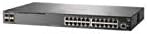
2.3 pav.: šonas view of the HP Aruba 2930F 24G 4SFP+ Switch, showing ventilation slots for heat dissipation.
3. Sąranka
3.1 Išpakavimas ir turinio patikrinimas
Atsargiai išpakuokite jungiklį ir patikrinkite, ar yra visi komponentai. Pakuotėje turėtų būti:
- HP Aruba 2930F 24G 4SFP+ Switch (Model JL253A)
- Maitinimo kabelis
- Stovo montavimo komplektas
- Konsolės laidas
If any items are missing or damaged, contact your vendor immediately.
3.2 Fizinis įrengimas
- Stovo montavimas: Use the provided rack-mount kit to secure the switch in a standard 19-inch equipment rack. Ensure adequate ventilation around the switch.
- Maitinimo jungtis: Connect the power cable to the switch's power input and then to a grounded AC power outlet.
- Pradinis tinklo ryšys: Connect a computer to the switch's console port using the console cable for initial configuration, or connect to any RJ45 port for network access if DHCP is available.
Ensure all cables are securely connected and routed to prevent accidental disconnections.
4. Naudojimo instrukcijos
4.1 Įjungimas ir pradinis paleidimas
Once the power cable is connected, the switch will automatically power on. Observe the LED indicators on the front panel. The Power LED should illuminate, indicating the device is receiving power. Other LEDs will indicate port status and activity.
4.2 Prievado jungtys
- RJ45 Ports (10/100/1000BASE-T): Connect standard Ethernet cables (Cat5e or higher) to these ports for connecting network devices such as computers, servers, and other switches. These ports support auto-negotiation for speed and duplex settings.
- SFP+ Ports (10 Gigabit Ethernet): Use compatible SFP+ transceivers and fiber optic cables for high-speed uplinks to core switches or servers.
- PoE+ (maitinimas per Ethernet Plus): If your model supports PoE+, these ports can provide power to compatible devices like IP phones, wireless access points, and security cameras, eliminating the need for separate power supplies.
4.3 LED indikatoriai
Priekinio skydelio šviesos diodai rodo komutatoriaus ir jo prievadų būseną:
- Maitinimo šviesos diodas: Rodo maitinimo būseną (įjungta / išjungta).
- Gedimo šviesos diodas: Indicates system errors or malfunctions.
- Prievado ryšio / aktyvumo šviesos diodai: Indicate link status (solid green for link) and network activity (flashing green). Different colors or patterns may indicate different speeds (e.g., amber for 100Mbps, green for 1Gbps). Refer to the device's specific LED guide for detailed interpretation.
5. Priežiūra
5.1 Valymas
Regularly clean the exterior of the switch with a soft, dry cloth. Do not use liquid or aerosol cleaners. Ensure ventilation openings are free from dust and obstructions to maintain proper airflow.
5.2 Firmware atnaujinimai
Periodically check the Hewlett Packard (Aruba) support website for firmware updates. Keeping the firmware up-to-date ensures optimal performance, security, and access to new features. Follow the instructions provided with the firmware update package carefully.
6. Problemų sprendimas
This section addresses common issues you might encounter with your HP Aruba 2930F switch.
- Nėra galios:
- Verify the power cable is securely connected to both the switch and a working power outlet.
- Patikrinkite maitinimo lizdą su kitu įrenginiu, kad įsitikintumėte, jog jis veikia.
- Nėra nuorodos uoste:
- Įsitikinkite, kad Ethernet kabelis tinkamai prijungtas abiejuose galuose.
- Išbandykite kitą Ethernet kabelį.
- Test the connected device with another port or switch to isolate the issue.
- Patikrinkite, ar prijungtas įrenginys įjungtas ir veikia tinkamai.
- Slow Network Connection:
- Check for excessive network traffic or bottlenecks.
- Ensure cables are Cat5e or higher for Gigabit speeds.
- Verify duplex settings on connected devices match the switch's auto-negotiated settings.
- Consider updating the switch firmware.
For more advanced troubleshooting or persistent issues, consult the official Hewlett Packard (Aruba) support documentation or contact technical support.
7. Specifikacijos
| Funkcija | Vertė |
|---|---|
| Prekės ženklas | HEWLETT PACKARD |
| Modelio numeris | JL253A |
| Prekės svoris | 2.4 kilogramų (5.28 svarai) |
| Gaminio matmenys (IxPxH) | 17.42 x 7.88 x 1.73 colio |
| ttage | 200 voltų |
| Sąsajos tipas | RJ45, SFP+, PoE+ |
| Duomenų perdavimo sparta | 100 Megabits Per Second (per port, supports Gigabit on RJ45 and 10 Gigabit on SFP+) |
| RAM | 1024 MB |
| Prievadų skaičius | 24 Gigabit Ethernet, 4 SFP+ (Total 28 logical ports) |
| Įtraukti komponentai | Maitinimo kabelis, stovo tvirtinimo rinkinys, konsolės kabelis |
| Spalva | Juoda |
| Suderinami įrenginiai | Desktop (general network devices) |
Note: Data Transfer Rate of "100 Megabits Per Second" may refer to a baseline or specific port type; the switch supports Gigabit Ethernet on RJ45 ports and 10 Gigabit Ethernet on SFP+ ports.
8. Garantija ir palaikymas
This HP Aruba 2930F 24G 4SFP+ Switch is manufactured by HEWLETT PACKARD. For warranty information, please refer to the warranty card included with your product or visit the official Hewlett Packard Enterprise (Aruba) website. Technical support and additional resources can be found on their support portal.
Jei reikia pagalbos, apsilankykite: Aruba Networks palaikymas