
Įvadas
This manual provides comprehensive instructions for the safe and efficient operation, assembly, maintenance, and troubleshooting of your Dirt Devil ND40150MDI Pressure Flex Pro. This versatile appliance combines a powerful pressure washer with an effective wet/dry vacuum, designed for various cleaning tasks. Please read this manual thoroughly before first use and retain it for future reference.

Image: The Dirt Devil ND40150MDI Pressure Flex Pro, showing both the pressure washer unit and the wet/dry vacuum unit side-by-side.
Svarbi saugos informacija
Always observe basic safety precautions when using electrical appliances to reduce the risk of fire, electric shock, and personal injury. Failure to follow these instructions may result in serious injury or property damage.
- Perskaitykite visas instrukcijas: Susipažinkite su prietaiso valdikliais ir tinkamu naudojimu.
- Elektros sauga: This unit is equipped with a GFCI (Ground Fault Circuit Interrupter) for user protection against electrical shocks. Do not bypass or modify the GFCI. Always connect to a properly grounded outlet.
- Vandens slėgio saugumas: The pressure washer generates high-pressure water. Never direct the spray at people, pets, or electrical devices. Keep hands and feet clear of the nozzle.
- Vėdinimas: Ensure adequate ventilation when operating the vacuum, especially in enclosed spaces.
- Vaikai ir augintiniai: Prietaiso veikimo metu laikykite vaikus ir naminius gyvūnus toliau nuo prietaiso.
- Priežiūra: Disconnect from power supply before performing any maintenance or cleaning.
- Pažeistos dalys: Do not operate the appliance with a damaged cord, plug, or any other damaged part. Contact customer support for repairs.
Produkto komponentai
Your Dirt Devil ND40150MDI Pressure Flex Pro comes with the following components:
- Slėgio plovimo įrenginys
- Šlapio/sauso valymo dulkių siurblys
- Aukšto slėgio žarna (5.8 m)
- Purškimo pistoletas
- Vacuum Suction Hose
- Dulkių valymo šepetys
- Purkštukas
- Rotacinis šepetys
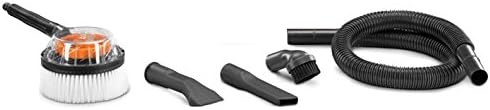
Image: Various accessories including a dust cleaning brush, nozzle, rotary brush, and vacuum suction hose.
Sąranka
Slėginio plovimo įrenginio sąranka
- Surinkite rankeną: Attach the handle to the main pressure washer unit, ensuring it clicks securely into place.
- Aukšto slėgio žarnos prijungimas: Screw the high-pressure hose firmly to the pressure washer outlet and to the spray gun.
- Prijunkite vandens tiekimą: Prijunkite sodo žarną (nepridedama) prie slėginio plovimo įrenginio vandens įleidimo angos. Įsitikinkite, kad jungtis yra sandari, kad išvengtumėte nuotėkių.
- Pritvirtinkite antgalį: Select the desired nozzle and attach it to the spray gun.
- Oro išleidimas: Before turning on the power, turn on the water supply and squeeze the spray gun trigger to allow air to escape from the system until a steady stream of water emerges.

Vaizdas: priekis view of the Dirt Devil pressure washer unit, showing the water inlet and high-pressure hose connection points.
Šlapio/sauso siurbimo sąranka
- Pritvirtinkite siurbimo žarną: Connect the vacuum suction hose to the inlet port on the vacuum unit.
- Įdiegti filtrą: For dry vacuuming, ensure the dry filter is properly installed. For wet vacuuming, remove the dry filter and ensure the foam filter (if included) is in place.
- Pritvirtinkite priedus: Select and attach the appropriate accessory (e.g., dust cleaning brush, nozzle) to the end of the suction hose.

Image: A person demonstrating how to lift and carry the Dirt Devil wet/dry vacuum unit by its integrated handle.
Naudojimo instrukcijos
Slėginio plovimo įrenginio valdymas
- Maitinimas: Plug the power cord into a grounded electrical outlet. Press the ON/OFF switch to the 'ON' position.
- Pradėkite valymą: Hold the spray gun firmly and direct the spray at the surface to be cleaned. Maintain a safe distance to avoid damaging the surface.
- Sureguliuokite slėgį: Pressure can be adjusted by changing nozzles or by varying the distance from the surface. The unit provides up to 1800 PSI.
- Išjungti: When finished, turn off the power switch, then turn off the water supply. Squeeze the trigger to release any remaining pressure before disconnecting the hose.
Operating the Wet/Dry Vacuum
- Maitinimas: Plug the power cord into a grounded electrical outlet. Press the ON/OFF switch to the 'ON' position.
- Sausas siurbimas: Ensure the dry filter is installed. Use appropriate attachments for dust, debris, or other dry materials.
- Šlapias siurbimas: Ensure the dry filter is removed and the foam filter (if applicable) is installed. Use for liquids or wet spills. The vacuum will automatically shut off when the tank is full.
- Emptying Tank: After wet vacuuming, or when the tank is full, turn off the unit, unplug it, and empty the collection tank.
- Išjungti: When finished, turn off the power switch and unplug the unit.

Image: A person demonstrating the use of the Dirt Devil wet/dry vacuum to clean debris from a tiled floor.
Priežiūra
Regular maintenance ensures optimal performance and extends the life of your appliance. Always unplug the unit before performing any maintenance.
- Valymo purkštukai: Periodically clean the pressure washer nozzles to remove any blockages. Use the provided nozzle cleaning tool if necessary.
- Vacuum Filter Maintenance: Clean or replace the dry filter regularly. Wash the foam filter after wet vacuuming and allow it to air dry completely before reuse.
- Emptying and Cleaning Tank: After each use, especially after wet vacuuming, empty and rinse the collection tank to prevent mold and odors.
- Žarnos ir laido patikra: Regularly inspect the high-pressure hose, vacuum hose, and power cord for any signs of wear, cuts, or damage. Replace damaged parts immediately.
- Saugykla: Store the appliance in a dry, frost-free area. Drain all water from the pressure washer pump and hoses before storing to prevent freezing damage.
Trikčių šalinimas
If you encounter issues with your Dirt Devil ND40150MDI, refer to the following common problems and solutions:
| Problema | Galima priežastis | Sprendimas |
|---|---|---|
| Pressure washer not starting | Nėra maitinimo, suveikė GFCI, išjungtas įjungimo/išjungimo jungiklis | Check power connection, reset GFCI, ensure switch is ON. |
| Low pressure from washer | Nepakankamas vandens tiekimas, užsikimšęs antgalis, oras siurblyje | Ensure full water flow, clean nozzle, bleed air from system. |
| Vakuumas mažai siurbiamas | Clogged hose/filter, full tank, improper filter for wet/dry | Clear blockages, clean/replace filter, empty tank, ensure correct filter type. |
| Water leaking from pressure washer | Loose connections, damaged O-rings/seals | Tighten all connections, inspect and replace damaged seals. |
Jei problema išlieka ir išbandžius šiuos sprendimus, susisiekite su klientų aptarnavimo tarnyba.
Specifikacijos
Key technical specifications for the Dirt Devil ND40150MDI Pressure Flex Pro:
- Modelio pavadinimas: ND40150MDI
- Tipas: 2-in-1 Pressure Washer and Wet/Dry Vacuum
- Pressure Washer Max PSI: 1800 psi
- Maitinimo šaltinis: Su laidu elektra
- Vattage: 120 vatų
- Aukšto slėgio žarnos ilgis: 5.8 metrų
- Ypatinga funkcija: Wet/Dry Vacuum capability
- Saugos funkcija: GFCI (žemės gedimo grandinės pertraukiklis)
- Svoris: 11 kilogramo
- Spalva: Red with Black accents
- Rekomenduojamas naudojimas: Outdoor cleaning
Informacija apie garantiją
This Dirt Devil ND40150MDI Pressure Flex Pro is covered by a manufacturer's warranty for a period of 1 metai from the date of purchase. This warranty covers defects in materials and workmanship under normal use. Please retain your proof of purchase for warranty claims. For specific terms and conditions, refer to the warranty card included with your product or contact customer support.
Pagalba klientams
For technical assistance, warranty claims, or to order replacement parts, please contact Dirt Devil customer support. Have your model number (ND40150MDI) and purchase information ready when contacting support.
Websvetainė: www.dirtdevil.com (Prašome patikrinti oficialų webregioninės kontaktinės informacijos svetainė)
Telefonas: Refer to the contact section on the official Dirt Devil website for your region's customer service number.