
1. Produktas baigtasview
The Canon EF 24-105mm f/4L IS II USM is a versatile standard zoom lens designed for Canon EOS cameras. It features a constant f/4L aperture and a broad focal range from wide-angle to mid-telephoto, making it suitable for various photographic situations. The integrated Image Stabilizer (IS) provides up to 4 stops of shake correction, enhancing sharpness in handheld shooting. Its optical design includes Air Sphere Coating (ASC) to minimize flare and ghosting, and a 10-blade circular aperture for smooth background blur.
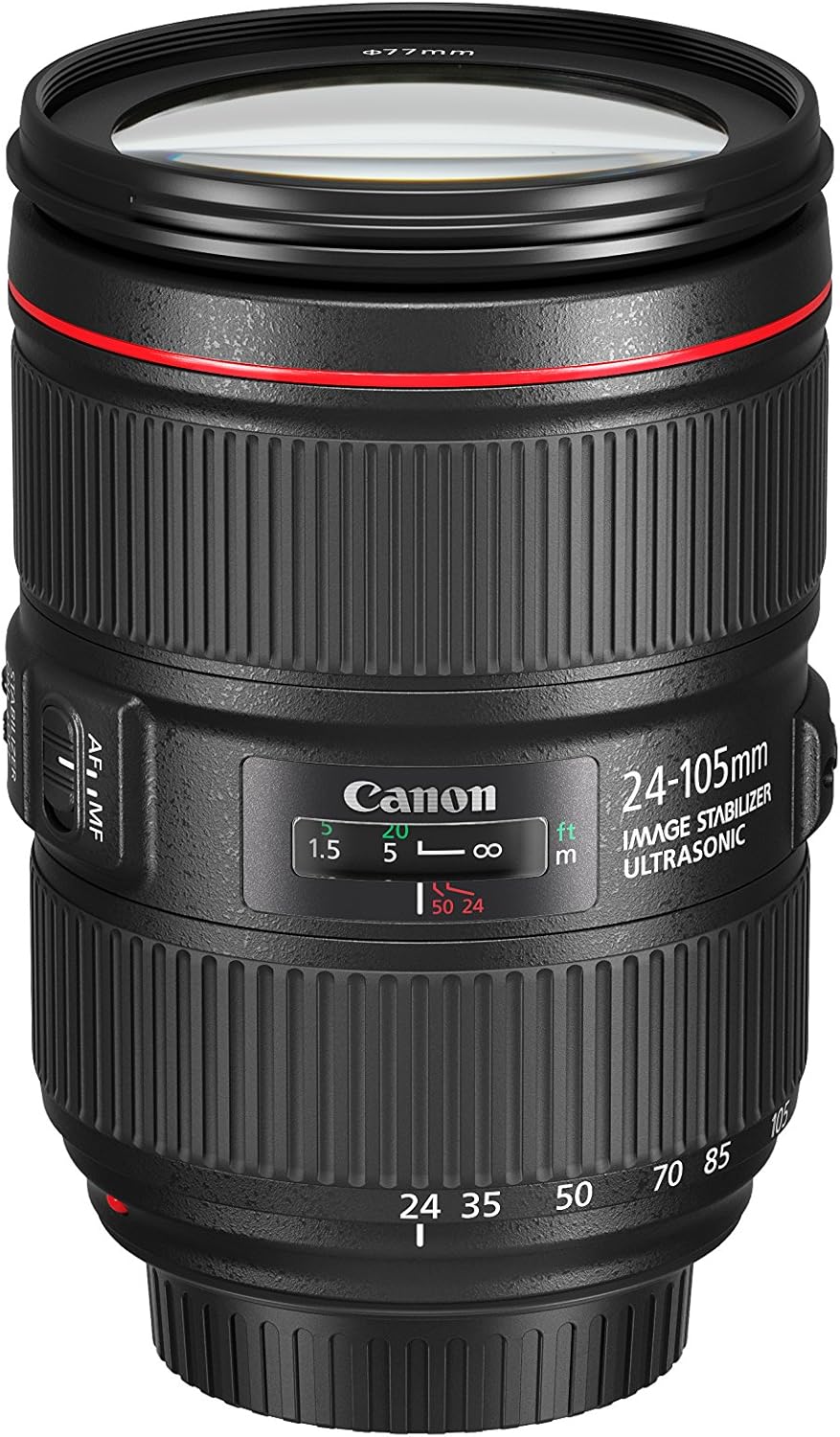
Image 1.1: The Canon EF 24-105mm f/4L IS II USM Lens, showcasindėl savo kompaktiško dizaino.
Pagrindinės funkcijos:
- All-new optical design: Significant improvements in peripheral brightness.
- High-performance standard zoom lens: Constant f/4L aperture with a broad angle of view (wide angle to mid-telephoto).
- Air Sphere Coating (ASC): Helps to significantly reduce flare and ghosting.
- Vaizdo stabilizatorius: Up to 4 stops of shake correction for sharp images.
- Circular Aperture (10 blades): Delivers beautiful, soft backgrounds.
2. Kas yra dėžutėje
Verify that all the following items are included with your Canon EF 24-105mm f/4L IS II USM Lens:
- EF 24-105mm f/4 L IS II USM Lens
- Objektyvo dangtelis E-77II
- Objektyvo dulkių dangtelis E
- Objektyvo dėklas LP1219
- Lens Hood EW-83M
- Naudojimo instrukcija
- Garantinis talonas
3. Sąranka
3.1 Objektyvo pritvirtinimas
- Nuimkite galinį objektyvo dangtelį ir fotoaparato korpuso dangtelį.
- Suderinkite raudoną indekso žymę ant objektyvo su raudonu indekso žyme ant fotoaparato korpuso.
- Sukite objektyvą pagal laikrodžio rodyklę, kol jis užsifiksuos vietoje.
3.2 Objektyvo nuėmimas
- While pressing the lens release button on the camera, turn the lens counter-clockwise until it stops.
- Nuimkite objektyvą.
- Attach the rear lens cap to the lens and the body cap to the camera.
3.3 Attaching the Lens Hood (EW-83M)
Align the red dot on the lens hood with the red dot on the front of the lens. Turn the hood clockwise until it clicks into place. The lens hood helps to prevent flare and ghosting by blocking unwanted light.
4. Objektyvo valdymas

4.1 paveikslėlis: Šonas view of the lens showing the AF/MF and Stabilizer switches.
4.1 Fokusavimo režimo jungiklis (AF/MF)
- AF (automatinis fokusavimas): Set the switch to AF for automatic focusing.
- MF (rankinis fokusavimas): Set the switch to MF to manually adjust focus using the focus ring.
4.2 Image Stabilizer Switch (ON/OFF)
- ĮJUNGTA: Turn the Image Stabilizer ON to reduce camera shake when shooting handheld.
- IŠJUNGTA: Turn the Image Stabilizer OFF when using a tripod or when shooting at very high shutter speeds.
4.3 Priartinimo žiedas
Rotate the zoom ring to change the focal length from 24mm (wide-angle) to 105mm (telephoto). The lens maintains a constant f/4 aperture throughout the zoom range.

4.2 vaizdas: priekis view of the lens, showing the zoom ring and filter thread.
4.4 Fokusavimo žiedas
When the focus mode switch is set to MF, rotate this ring to adjust the focus manually.
4.5 Zoom Lock Switch
This switch is located on the side of the lens. When engaged, it locks the lens at the 24mm position to prevent zoom creep during transport or when the camera is pointed downwards.
5. Priežiūra
5.1 Objektyvo valymas
- Use a lens blower to remove dust from the lens surface.
- For smudges or fingerprints, use a soft, clean lens cloth and a small amount of lens cleaning solution. Wipe gently in a circular motion.
- Niekada nenaudokite abrazyvinių medžiagų ar stiprių cheminių medžiagų.
5.2 Storing the Lens
- Kai nenaudojate, visada uždėkite priekinį ir galinį objektyvo dangtelius.
- Objektyvą laikykite vėsioje, sausoje vietoje, toliau nuo tiesioginių saulės spindulių ir ekstremalių temperatūrų.
- If storing for an extended period, place it in a lens case with a desiccant to prevent mold and mildew.
6. Problemų sprendimas
Jei kyla problemų dėl objektyvo, apsvarstykite šiuos dažniausiai pasitaikančius sprendimus:
- Objektyvas nefokusuoja: Ensure the AF/MF switch is set to AF for autofocus, or adjust manually in MF mode. Check that the lens is securely attached to the camera body.
- Vaizdo suliejimas: Verify the Image Stabilizer is ON if shooting handheld. Check your camera's shutter speed and ISO settings.
- Fotoaparatas neatpažįsta objektyvo: Remove and reattach the lens. Clean the electrical contacts on both the lens and camera body with a clean, dry cloth.
For more detailed troubleshooting or persistent issues, refer to your camera's instruction manual or contact Canon customer support.
7. Oficialus produkto vaizdo įrašas
7.1 vaizdo įrašas: Oficialus asmuoview of the Canon EF 24-105mm f/4L IS II USM lens, highlighting its features and design.
8. Specifikacijos
| Funkcija | Detalė |
|---|---|
| Prekės ženklas | Canon |
| Modelio numeris | 1380C002 |
| Židinio nuotolis | 24-105 mm |
| Objektyvo tipas | Padidinti |
| Suderinami tvirtinimai | „Canon EF“ |
| Didžiausia diafragma | f/4 |
| Minimali diafragma | f/22 |
| Vaizdo stabilizavimas | Optinis |
| Fokusavimo tipas | Automatinis fokusavimas |
| Diafragmos ašmenų skaičius | 10 |
| Photo Filter Size | 77 mm |
| Objektyvo danga | Air Sphere Coating |
| Spalva | Juoda |
9. Garantija ir palaikymas
This Canon EF 24-105mm f/4L IS II USM Lens comes with a 1 metų gamintojo garantija. For warranty claims, technical support, or service inquiries, please visit the official Canon website or contact your local authorized Canon service center. Keep your purchase receipt and warranty card as proof of purchase.
Palaikymas internetu: „Canon“ palaikymas Websvetainę