
1. Produktas baigtasview
The D-Link DFE-530TX+ is a 10/100BASE-TX Fast Ethernet PCI Adapter designed to provide high-speed network connectivity for desktop computers. This adapter supports both 100BASE-TX (Category 5 UTP cable) and 10BASE-T (Category 3/4/5 UTP cable) connections, operating at speeds of 10Mbps or 100Mbps. It features full-duplex capability, effectively doubling the network speed to 20/200Mbps, and includes Plug-and-Play functionality for simplified installation.
Pagrindinės funkcijos:
- PCI interface for desktop computer compatibility.
- Supports a wide range of operating systems.
- Full Duplex Mode support for 20/200Mbps operation.
- Half Duplex Mode support for 10/100Mbps operation.
- Compliant with PCI 2.1/2.2 ACPI Power Management.
- Wake-On-LAN (WOL) functionality, including Magic Packet, LinkChg, and Microsoft wake-up frame.
- Compliant with PC 99 Standard.
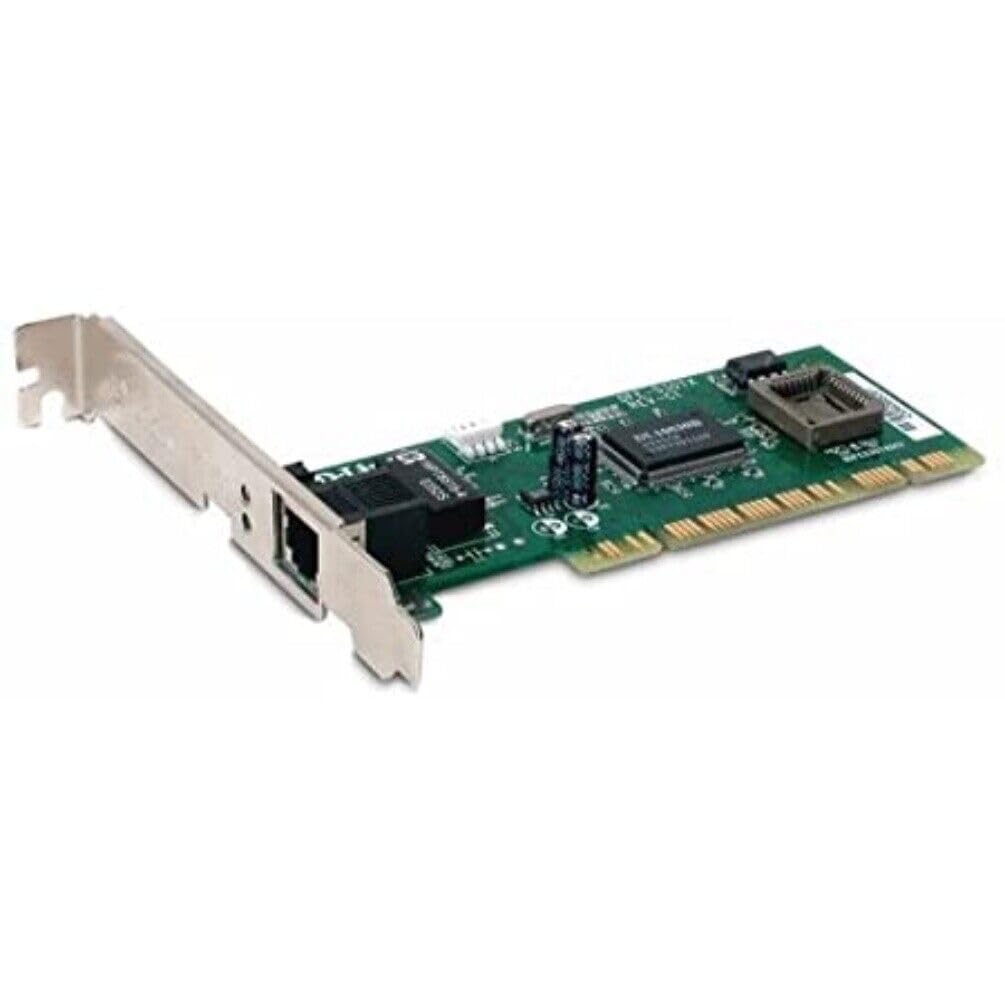
1 paveikslas: D-Link DFE-530TX+ Fast Ethernet PCI Adapter. This image shows the green circuit board with various electronic components, including chips and capacitors, and a silver PCI bracket with an RJ-45 Ethernet port.
2. Sąranka ir diegimas
Follow these steps to install your D-Link DFE-530TX+ PCI Adapter into your desktop computer.
- Paruoškite savo kompiuterį:
- Power off your computer and unplug the power cord from the electrical outlet.
- Open the computer case. Refer to your computer's manual for instructions on how to safely open the case.
- Install the PCI Adapter:
- Locate an available PCI slot on your computer's motherboard.
- Remove the metal bracket cover from the chosen PCI slot on the back of your computer case.
- Carefully insert the DFE-530TX+ adapter into the PCI slot, ensuring it is firmly seated. Apply even pressure to both ends of the card.
- Secure the adapter with the screw removed from the metal bracket cover.
- Uždarykite kompiuterio dėklą:
- Replace the computer case cover and secure it.
- Plug the power cord back into the electrical outlet and power on your computer.
- Tvarkyklės diegimas:
- The DFE-530TX+ supports Plug-and-Play. Most modern operating systems (e.g., Windows 10) will automatically detect and install the necessary drivers upon startup.
- If drivers are not automatically installed, refer to the driver CD (if included) or download the latest drivers from the official D-Link support websvetainę.
3. Adapterio valdymas
Once the adapter is physically installed and drivers are loaded, you can connect it to your network.
- Prijunkite Ethernet kabelį:
- Connect one end of a standard Ethernet cable (Category 5 or higher for 100Mbps) to the RJ-45 port on the DFE-530TX+ adapter.
- Connect the other end of the Ethernet cable to an available port on your network switch, router, or hub.
- LED indikatoriai:
The DFE-530TX+ features three on-board LEDs for diagnostics:
- Nuorodos LED: Rodo sėkmingą tinklo ryšį.
- Tvirtai žalia: Užmegztas galiojantis tinklo ryšys.
- Išjungta: No network link detected.
- Veiklos šviesos diodas: Indicates network data transmission.
- Mirksi žaliai: Duomenys perduodami arba gaunami.
- Išjungta: Nėra tinklo veiklos.
- 10/100Mbps LED: Indicates the current connection speed.
- Tvirtai žalia: Connected at 100Mbps.
- Išjungta: Connected at 10Mbps.
- Nuorodos LED: Rodo sėkmingą tinklo ryšį.
Verify that the Link LED is solid green and the Activity LED flashes when network traffic is present. The 10/100Mbps LED will indicate your current connection speed.
4. Priežiūra
The D-Link DFE-530TX+ adapter requires minimal maintenance. To ensure optimal performance and longevity:
- Keep the computer's interior clean and free of dust to prevent overheating of components, including the network adapter.
- Ensure proper airflow within the computer case.
- Saugokite adapterį nuo ekstremalių temperatūrų ar drėgmės.
- Periodically check for updated drivers on the D-Link support website to ensure compatibility and performance enhancements.
5. Problemų sprendimas
If you encounter issues with your D-Link DFE-530TX+ adapter, refer to the following troubleshooting tips:
- Nėra ryšio lemputės:
- Ensure the Ethernet cable is securely connected to both the adapter and the network device (switch/router).
- Išbandykite kitą Ethernet kabelį.
- Verify that the network device (switch/router) is powered on and functioning correctly.
- Check if the adapter is properly seated in the PCI slot.
- Iš naujo paleiskite kompiuterį.
- Mažas tinklo greitis:
- Check the 10/100Mbps LED. If it's off, the connection is at 10Mbps. Ensure your network device supports 100Mbps and the cable is Category 5 or higher.
- Įsitikinkite, kad jūsų kompiuterio adapterio tvarkyklės yra atnaujintos.
- Išbandykite su kitu Ethernet kabeliu.
- Verify that other devices on your network are not consuming excessive bandwidth.
- Adapter Not Detected by Operating System:
- Ensure the adapter is correctly installed in the PCI slot.
- Check Device Manager (Windows) to see if the adapter is listed, possibly with a yellow exclamation mark. If so, reinstall or update the drivers.
- Try installing the adapter in a different PCI slot.
- Pertraukiamas ryšys:
- Patikrinkite, ar nėra laisvų kabelių jungčių.
- Ensure there is no electromagnetic interference from other devices.
- Update the adapter drivers.
- Consider replacing the Ethernet cable.
6. Specifikacijos
| Modelio numeris | DFE-530TX+ |
| Tinklo tipas | Tinklo adapteris |
| Formos faktorius | Įkišama kortelė |
| Tinklo sąsaja | PCI |
| Prievadų kiekis | 1 x RJ-45 (Ethernet 10Base-T/100Base-TX) |
| Duomenų perdavimo sparta | 100 Mbps |
| Duomenų nuorodos protokolas | Ethernet, Fast Ethernet |
| Ryšio technologija | Laidinis |
| Atitinkami standartai | IEEE 802.3, IEEE 802.3U |
| Kabelio tipas | Ethernet 10BASE-T, Ethernet 100Base-TX (Category 3/4/5 UTP) |
| Suderinamumas su kompiuteriu | PC, Mac, Unix |
| Savybės | Auto-negotiation, Full duplex capability, Wake on LAN (WOL) |
| Gaminio matmenys | 9.4 x 6.7 x 1.5 colio |
| Prekės svoris | 181 gramų (6.38 uncijos) |
| UPC | 790069220333 |
7. Garantija ir palaikymas
The D-Link DFE-530TX+ Fast Ethernet PCI Adapter comes with a 2 metų ribota garantija nuo pirkimo datos. Ši garantija apima medžiagų ir gamybos defektus normaliai naudojant.
For technical support, driver downloads, or further information, please visit the official D-Link support websvetainė. Ten taip pat galite rasti papildomų išteklių ir DUK.
Išsaugokite pirkimo įrodymą, kad galėtumėte kreiptis dėl garantijos.