
Instapark PWT-07
Instapark PWT-07 Digital Programmable Water Timer User Manual
Model: PWT-07
Įvadas
This manual provides detailed instructions for the setup, operation, maintenance, and troubleshooting of your Instapark PWT-07 Digital Programmable Water Timer. Please read this manual thoroughly before using the device to ensure proper function and longevity.
Saugos informacija
- Use only 1.5V AA alkaline batteries. Do not mix old and new batteries, or different battery types.
- Įsitikinkite, kad baterijų skyrius yra sandariai uždarytas, kad išlaikytumėte IP66 atsparumo vandeniui klasę.
- Do not expose the timer to extreme temperatures or direct sunlight for prolonged periods, which may affect battery life and device performance.
- Disconnect the timer from the faucet and drain it before freezing temperatures to prevent damage.
- This device is designed for outdoor use with standard ¾” (GHS) threaded faucets.
Pakuotės turinys
Patikrinkite, ar pakuotėje yra visi reikalingi daiktai:
- Instapark PWT-07 Water Timer
- Vartotojo vadovas (šis dokumentas)
- Garantijos kortelė
Note: 2 AA alkaline batteries are required and not included.
Produkto savybės
- Single-station digital programmable faucet water timer.
- Impulse solenoid valve for reliable operation.
- Compatible with standard ¾” (GHS) threaded outdoor hose faucets.
- User-friendly interface with a single oversized rotary dial and 4 pushbuttons.
- Large, easy-to-read LCD display (2.1” x 1”).
- Atsparumas vandeniui: IP66.
- Built-in rain delay function (24, 48, or 72 hours).
- Manual watering option without interrupting programmed schedules.
- Detachable battery compartment for easy battery replacement.
- Low power consumption, up to 4,000 on/off cycles per battery set.
Sąranka
1. Akumuliatoriaus įdėjimas
The Instapark PWT-07 requires two (2) 1.5V AA alkaline batteries (not included).
- Raskite baterijų skyrių laikmačio gale.
- Slide the battery compartment cover downwards to open.
- Įdėkite dvi naujas AA šarmines baterijas, užtikrindami teisingą poliškumą (+/-).
- Stumkite baterijų skyriaus dangtelį atgal į vietą, kol jis tvirtai spragtelės.
- The LCD display should illuminate, indicating successful battery installation. If the display shows a low battery indicator, remove the batteries, wait for the screen to go completely dark, then reinsert them.
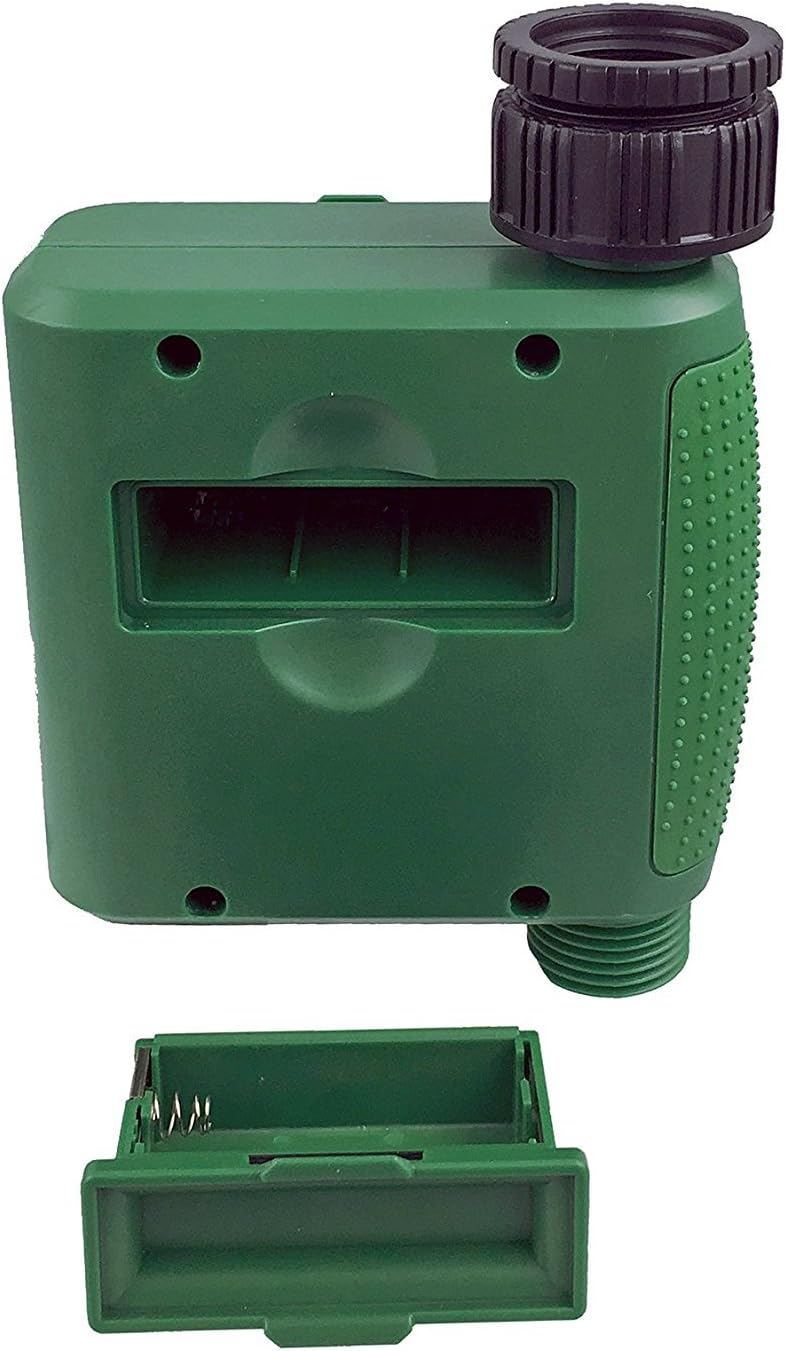
1 pav.: Baterijų skyrius su nuimtu dangteliu.
2. Laikmačio montavimas
Attach the timer to your outdoor faucet:
- Įsitikinkite, kad čiaupas yra švarus ir be šiukšlių.
- Screw the timer's inlet (top connector) onto a standard ¾” (GHS) outdoor hose faucet. Hand-tighten only to prevent damage. Do not overtighten.
- Connect your garden hose or irrigation system to the timer's outlet (bottom connector). Hand-tighten securely.
- Turn on the faucet fully. The timer is designed to operate under pressure.

Figure 2: Instapark PWT-07 mounted on a faucet.
Naudojimo instrukcijos
The timer features a large rotary dial and four buttons: NUSTATYTI, +, -, ir VADOVAS.

Figure 3: Control panel and LCD display.
1. Dabartinio laiko nustatymas
- Pasukite sukamąjį ratuką į padėtį NUSTATYTI LAIKRODĮ.
- Naudokite + ir - mygtukais nustatykite esamą valandą. Paspauskite NUSTATYTI patvirtinti.
- Naudokite + ir - buttons to adjust the current minute. Press NUSTATYTI patvirtinti.
2. Programming Watering Schedule
The timer allows you to set a start time, duration, and frequency for watering.
Nustatyti pradžios laiką:
- Pasukite sukamąjį ratuką į padėtį PRADŽIOS LAIKAS.
- Naudokite + ir - buttons to set the desired watering start hour. Press NUSTATYTI patvirtinti.
- Naudokite + ir - buttons to set the desired watering start minute. Press NUSTATYTI patvirtinti.
Nustatykite trukmę:
- Pasukite sukamąjį ratuką į padėtį KIEK ILGAI.
- Naudokite + ir - buttons to set the watering duration (from 5 seconds to 360 minutes). Press NUSTATYTI patvirtinti.
Nustatykite, kaip dažnai (dažnumą):
- Pasukite sukamąjį ratuką į padėtį KAIP DAŽNAI.
- Naudokite + ir - buttons to select the watering frequency (e.g., every 10 seconds, 30 seconds, 1 minute, 3 minutes, 5 minutes, 1 hour, 2 hours, 4 hours, 12 hours, 1 day, 2 days, 3 days, 4 days, 5 days, 6 days, 7 days). Press NUSTATYTI patvirtinti.
After setting all parameters, turn the rotary dial to BĖGTI , kad aktyvuotumėte užprogramuotą tvarkaraštį.
3. Rankinis laistymas
Norėdami laistyti rankiniu būdu nepakeisdami užprogramuoto grafiko:
- Įsitikinkite, kad ratukas nustatytas į BĖGTI or IŠJUNGTA.
- Paspauskite VADOVAS mygtuką. Ekrane bus rodoma numatytoji rankinio laistymo trukmė.
- Naudokite + ir - buttons to adjust the desired manual watering duration.
- Paspauskite NUSTATYTI to start manual watering. The timer will run for the selected duration and then automatically shut off.
- Norėdami anksčiau sustabdyti rankinį laistymą, paspauskite VADOVAS mygtuką dar kartą.
4. Lietaus uždelsimo funkcija
The rain delay function allows you to pause your watering schedule for a set period without losing your program settings.
- Įsitikinkite, kad ratukas nustatytas į BĖGTI.
- Paspauskite ir palaikykite - button for 3 seconds. The display will show "DELAY" and a default delay duration.
- Naudokite + ir - buttons to select a delay duration of 24, 48, or 72 hours.
- Paspauskite NUSTATYTI to activate the rain delay. The timer will resume its programmed schedule after the delay period ends.
- To cancel the rain delay, press and hold the - dar kartą paspauskite mygtuką 3 sekundes.
Priežiūra
- Baterijos keitimas: Replace batteries when the low battery indicator appears on the LCD. Always use new AA alkaline batteries.
- Valymas: Nuvalykite laikmatį su skelbimuamp audinys. Nenaudokite abrazyvinių valiklių ar tirpiklių.
- Žieminimas: Before the first frost, disconnect the timer from the faucet. Remove the batteries and store the timer indoors in a dry, frost-free location. Failure to do so may result in damage from freezing water.
- Filtro ekranas: Periodically check the filter screen inside the inlet connector for debris. Clean if necessary to ensure proper water flow.
Trikčių šalinimas
| Problema | Galima priežastis | Sprendimas |
|---|---|---|
| Timer does not turn on / LCD is blank. | Neišsikrovusios arba neteisingai įdėtos baterijos. | Replace with new AA alkaline batteries, ensuring correct polarity. If still blank, remove batteries, wait for screen to fully clear, then reinsert. |
| Water does not turn on at scheduled time. |
|
|
| Water does not turn off. |
|
|
| Iš jungčių teka vanduo. |
|
|
| Low battery indicator flashes even with new batteries. | Firmware not booting correctly after battery change. | Remove batteries, wait for the LCD screen to go completely dark (may take a few minutes), then reinsert new batteries. |
Specifikacijos
| Modelis | PWT-07 |
| Maitinimo šaltinis | 2 x 1.5 V AA šarminės baterijos (nepridedamos) |
| Vožtuvo tipas | Impulsinis solenoidinis vožtuvas |
| Darbinis vandens slėgis | 14.5–116 psi |
| Budėjimo srovė | <100 µA |
| Watering Frequency Settings | 10s, 30s, 1m, 3m, 5m, 1h, 2h, 4h, 12h, 1d, 2d, 3d, 4d, 5d, 6d, 7d (16 settings) |
| Watering Duration Settings | 5s, 10s, 15s, 20s, 25s, 30s, 35s, 40s, 45s, 50s, 55s, 1-360m |
| Laiko rodymo formatas | 24 valandų |
| Atsparumo vandeniui įvertinimas | IP66 |
| Medžiaga | ABS plastikas |
| Gaminio matmenys | 4.25 "D x 6" P x 2.6" A |
| Prekės svoris | 14.2 uncijos |
Garantija ir palaikymas
The Instapark PWT-07 Digital Programmable Water Timer is backed by a standard 1-year manufacturer's warranty from the date of purchase. This warranty covers defects in materials and workmanship under normal use.
For warranty claims, technical support, or any questions regarding your product, please contact Instapark customer service. Please have your purchase receipt and product model number (PWT-07) available when contacting support.
Contact information for Instapark customer service can typically be found on the manufacturer's websvetainėje arba pirkimo dokumentuose.
Ask a question about this manual
Ask about setup, troubleshooting, compatibility, parts, safety, or missing instructions. Manuals+ will review the question and use this page’s manual context to help answer it.