
1. Įvadas
Ačiū, kad pirkoteasing the Syma X5HW RC Quadcopter Drone. This manual provides essential information for the safe operation, setup, and maintenance of your drone. Please read it thoroughly before first use to ensure proper function and to avoid damage.
The Syma X5HW is a 2.4G 4-channel RC quadcopter featuring a 0.3MP HD camera for FPV real-time transmission, high-hold mode, 360° 3D flips, headless mode, and a built-in 6-axis gyro for stable flight. It is designed for both beginners and experienced users.
2. Saugos priemonės
- Skrydžio aplinka: Fly in open areas, away from people, animals, buildings, and power lines. Avoid flying in strong winds or adverse weather conditions.
- Amžiaus rekomendacija: Šis produktas rekomenduojamas 14 metų ir vyresniems naudotojams. Jaunesniems naudotojams rekomenduojama suaugusiųjų priežiūra.
- Baterijos sauga: Use only the provided charger and battery. Do not overcharge or short-circuit the battery. Disconnect the battery after use and during charging. Do not expose batteries to extreme temperatures or direct sunlight.
- Propelerio sauga: Keep hands, face, and loose clothing away from rotating propellers. Always ensure propellers are securely attached before flight.
- Vandens ekspozicija: Dronas nėra atsparus vandeniui. Venkite sąlyčio su vandeniu ar drėgme.
- Vizualinė regėjimo linija: Skrydžio metu visada palaikykite vizualinį matymo lauką su dronu.
- Gerbti privatumą: When using the camera, respect the privacy of others.
3. Pakuotės turinys
Patikrinkite, ar pakuotėje yra visi reikalingi daiktai:
- Syma X5HW RC Quadcopter Drone
- Nuotolinio valdymo pultelis
- USB įkrovimo laidas
- Main Blades (Propellers)
- Sraigto apsaugai
- Nusileidimo pavara
- HD Camera (0.3MP)
- Atsuktuvas
- Vartotojo vadovas (šis dokumentas)
- 3.7 V 600 mAh ličio polimerų akumuliatorius

Image: Syma X5HW package contents, showing the drone, remote, and various accessories.
4. Komponento identifikavimas
4.1 Drono komponentai

Vaizdas: Viršus view of the Syma X5HW drone.
- Propeleriai: Four main blades for lift and propulsion.
- Propelerio apsaugos: Protective frames around the propellers.
- Varikliai: Varyti sraigtus.
- LED lemputės: Indicate drone orientation and status (front: red, rear: green).
- Baterijų skyrius: Located on the underside of the drone.
- Kamera: Attaches to the bottom for photo and video capture.
- Važiuoklė: Provides stable landing and protects the camera.
4.2 Nuotolinio valdymo pulto komponentai
Image: Syma X5HW remote controller (part of the package contents image).
- Kairė valdymo svirtis (droselis/kryptis): Valdo aukštį (aukštyn/žemyn) ir sukimąsi (kairėn/dešinėn).
- Dešinė valdymo svirtis (kryptis): Valdo judėjimą pirmyn/atgal ir į kairę/dešinę.
- Maitinimo jungiklis: Įjungia / išjungia valdiklį.
- Apkirpimo mygtukai: Adjust drone stability (forward/backward, left/right, yaw).
- Greičio režimo mygtukas: Toggles between low and high speed.
- 3D apvertimo mygtukas: Initiates 360° flips.
- Režimo be galvos mygtukas: Įjungia / išjungia begalvį režimą.
- Nuotraukos / vaizdo įrašo mygtukas: Fotografuoja arba pradeda / sustabdo vaizdo įrašymą.
- Telefono laikiklis: For mounting a smartphone to view FPV maitinimas.
5. Sąranka
5.1 Drono akumuliatoriaus įkrovimas
- Prijunkite drono bateriją prie USB įkrovimo laido.
- Prijunkite USB laidą prie USB maitinimo šaltinio (pvz., kompiuterio USB prievado, USB sieninio adapterio).
- USB laido indikatoriaus lemputė šviečia įkrovimo metu ir užgęsta, kai visiškai įkraunama.
- Charging time is approximately 90 minutes. Do not leave unattended during charging.
5.2 Nuotolinio valdymo pulto baterijų įdėjimas
- Atidarykite baterijų skyrių, esantį nuotolinio valdymo pulto gale.
- Įdėkite 4 x AA baterijas (nepridedamos) pagal poliškumo žymes.
- Saugiai uždarykite akumuliatoriaus skyrių.
5.3 Propelerio montavimas
Ensure propellers are installed correctly. Each propeller is marked with 'A' or 'B'. Match them to the corresponding motor shafts marked 'A' or 'B'.
- Attach propeller 'A' to motor shafts 'A'.
- Attach propeller 'B' to motor shafts 'B'.
- Press down firmly until they are seated.
5.4 Propelerio apsaugos įrengimas
Attach the propeller guards to the drone's arms using the provided screws and screwdriver for added protection.
5.5 Važiuoklės montavimas
Slide the landing gear into the designated slots on the underside of the drone until they click into place.
5.6 Fotoaparato diegimas
- Connect the camera's cable to the port on the underside of the drone.
- Secure the camera module into its slot.
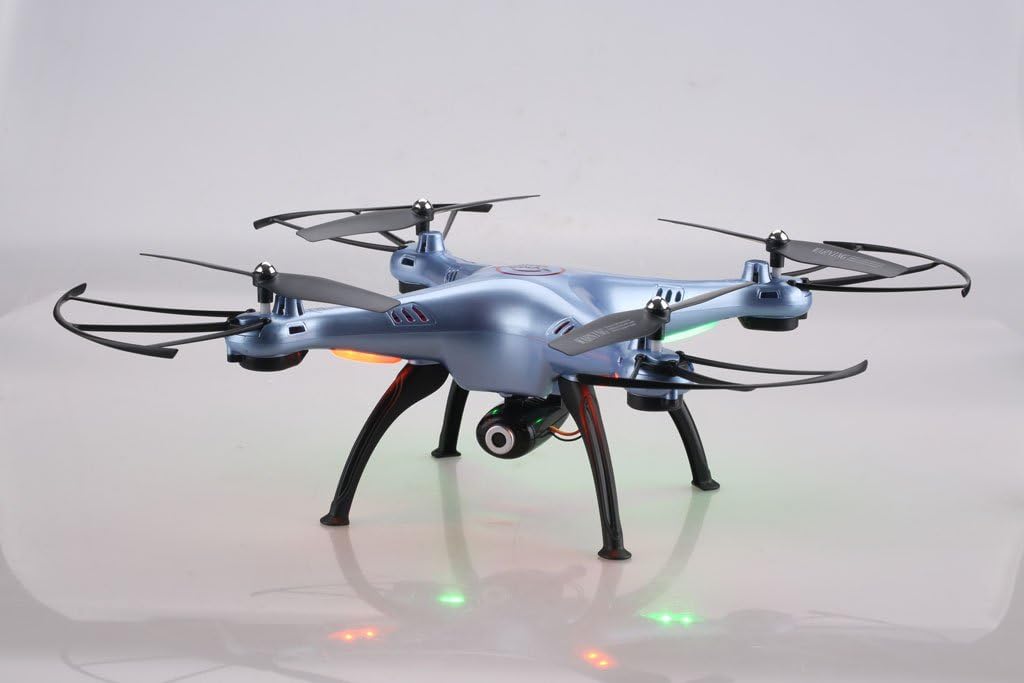
Image: Syma X5HW drone with camera and landing gear attached.
6. Naudojimo instrukcijos
6.1 Drono ir nuotolinio valdymo pulto susiejimas
- Padėkite droną ant lygaus, lygaus paviršiaus.
- Insert the charged battery into the drone and connect it. The drone's LED lights will flash.
- Įjunkite nuotolinio valdymo pultą. Nuotolinio valdymo pulto indikatoriaus lemputė mirksės.
- Paspauskite kairįjį valdymo svirtį (droselį) iki galo aukštyn, tada iki galo žemyn.
- The drone's LED lights and the remote's indicator light will become solid, indicating successful pairing.
6.2 Calibration (Gyroscope Reset)
If the drone drifts during flight, perform a gyroscope calibration:
- After pairing, place the drone on a flat, level surface.
- Push both joysticks to the bottom-right corner simultaneously for 2-3 seconds.
- The drone's LED lights will flash rapidly and then become solid, indicating successful calibration.
6.3 Pagrindiniai skrydžio valdymo įtaisai
- Kilimas: After pairing and calibration, gently push the left joystick (throttle) up. The propellers will start spinning, and the drone will ascend.
- Nusileidimas: Gently pull the left joystick (throttle) down. The drone will descend and land.
- Aukščio kontrolė: Kairysis valdymo svirtis aukštyn/žemyn.
- Sukimasis (kryptis): Kairysis vairasvirtės jungiklis kairėn/dešinėn.
- Pirmyn/atgal: Dešinysis valdymo svirtis aukštyn/žemyn.
- Skrydis į kairę/dešinę šoną: Dešinysis vairasvirtės jungiklis kairėn/dešinėn.
6.4 Išplėstinės skrydžio funkcijos
- Greičio režimas: Press the Speed Mode button to switch between low and high speed. Low speed is recommended for beginners.
- Režimas be galvos: Press the Headless Mode button. The drone will orient itself relative to the pilot, regardless of its actual front direction. Press again to exit.
- High-Hold Mode (Altitude Hold): The drone automatically maintains its altitude using an integrated air pressure sensor. After taking off, release the left joystick, and the drone will hover at its current height. Adjust altitude by pushing the left joystick up or down.
- 3D apvertimai: Fly the drone to a height of at least 3 meters. Press the 3D Flip button, then quickly push the right joystick in any direction (forward, backward, left, or right). The drone will perform a 360° flip in that direction.
6.5 FPV ir kameros valdymas
The Syma X5HW features a 0.3MP HD camera for real-time FPV transmission via Wi-Fi.
- Atsisiųskite programą: Download the free "SYMA FPV" app from the App Store (iOS) or Google Play Store (Android) to your smartphone.
- Prisijunkite prie „Wi-Fi“: Turn on the drone. On your smartphone, go to Wi-Fi settings and connect to the Wi-Fi network named "SYMA-X5HW" (or similar).
- Paleiskite programą: Open the SYMA FPV app. You should see the live video feed from the drone's camera.
- Fotografuoti: Press the Photo/Video button on the remote controller once to take a photo. Photos are saved to your smartphone.
- Įrašyti vaizdo įrašą: Press and hold the Photo/Video button on the remote controller to start video recording. Press and hold again to stop. Videos are saved to your smartphone.
7. Priežiūra
- Valymas: Use a soft, dry cloth to clean the drone and remote controller. Do not use solvents or harsh chemicals.
- Propelerio apžiūra: Regularly check propellers for damage (cracks, bends). Replace damaged propellers immediately.
- Variklio priežiūra: Laikykite variklius švarius nuo dulkių ir šiukšlių.
- Baterijos saugykla: Jei droną ilgesnį laiką laikysite, įkraukite bateriją iki maždaug 50 % ir išimkite ją iš drono. Laikykite vėsioje, sausoje vietoje.
- Bendra saugykla: Store the drone and remote in a cool, dry environment, away from direct sunlight and extreme temperatures.
8. Problemų sprendimas
| Problema | Galima priežastis | Sprendimas |
|---|---|---|
| Dronas nereaguoja į nuotolinio valdymo pultą. | Nesuporuota; išsikrovusi baterija (drono arba nuotolinio valdymo pulto). | Ensure drone and remote are powered on and paired correctly. Charge drone battery. Replace remote batteries. |
| Dronas dreifuoja skrydžio metu. | Gyroscope not calibrated; uneven surface during startup; wind interference. | Perform gyroscope calibration on a flat surface. Fly in calm conditions. Use trim buttons to fine-tune. |
| Propeleriai nesisuka. | Propellers jammed; motor issue; low battery. | Check for obstructions. Ensure battery is charged and connected. |
| Nėra FPV vaizdo transliacijos. | Wi-Fi not connected; app not open; camera not connected. | Ensure smartphone is connected to drone's Wi-Fi. Open SYMA FPV app. Check camera connection to drone. |
| Trumpas skrydžio laikas. | Baterija nėra iki galo įkrauta; sena baterija; agresyvus skraidymas. | Ensure battery is fully charged. Consider replacing old batteries. Fly more gently. |
9. Specifikacijos
- Modelis: Syma X5HW
- Dažnis: 2.4 GHz
- Kanalai: 4 kanalas
- Giroskopas: 6 ašių giroskopas
- Kamera: 0.3MP HD Camera (720p video resolution)
- FPV: Wi-Fi Real-time Transmission
- Skrydžio režimai: High-Hold Mode, Headless Mode, 3D Flips
- Baterija: 3.7 V 600 mAh LiPo
- Įkrovimo laikas: Maždaug 90 minučių
- Skrydžio laikas: Maždaug 10 minučių
- Valdymo diapazonas: Iki 100 metrų
- Medžiaga: Plastikiniai
- Rekomenduojamas amžius: 14+
10. Garantija ir palaikymas
Syma products are manufactured to high quality standards. For warranty information or technical support, please refer to the contact details provided with your purchase documentation or visit the official Syma websvetainėje. Išsaugokite pirkimo įrodymą garantiniams reikalavimams.