
1. Įvadas
The Amkette Trubeats S50 is a versatile smart wireless Bluetooth speaker designed to enhance your audio experience. It features multiple connectivity options including Bluetooth, USB, Micro SD card, and AUX input, along with an integrated FM radio. The speaker also includes a digital clock with alarm functions and can be controlled via a dedicated smartphone application. Additionally, it can function as a power bank to charge your mobile devices.
2. Pakuotės turinys
Pažymėkite langelį prie šių elementų:
- Amkette Trubeats S50 Smart Wireless Bluetooth Speaker
- USB įkrovimo laidas
- AUX laidas
- Vartotojo vadovas (šis dokumentas)
3. Produktas baigtasview
Familiarize yourself with the various parts and controls of your Amkette Trubeats S50 speaker.
3.1 Priekis View

1 pav.: priekis view of the Amkette Trubeats S50 speaker, showing the speaker grille and LED display.
3.2 Viršutinis valdymo skydelis

Figure 2: Labeled diagram of the Amkette Trubeats S50 speaker's top control buttons: Mode, Volume Down/Previous, Play/Pause/Answer Call, Volume Up/Next, Clock, and Microphone.
- MODE mygtukas: Press to switch between Bluetooth, FM, AUX, USB, and Micro SD modes.
- K-/ Button: Press to decrease volume; long press for previous track/station.
- Play/Pause/Answer Call Button: Press to play/pause audio; press to answer/end calls.
- +/N Button: Press to increase volume; long press for next track/station.
- LAIKRODŽIO mygtukas: Press to set time and alarms.
- Mikrofonas: Skambinimas laisvų rankų įrangai.
3.3 Rear Ports and Switch

Figure 3: Labeled diagram of the Amkette Trubeats S50 speaker's rear ports: AUX, Micro SD, USB Host, USB DC, and On/Off switch.
- AUX įvestis: Prijunkite išorinius garso įrenginius naudodami 3.5 mm AUX laidą.
- „Micro SD“ kortelės lizdas: Įdėkite „Micro SD“ kortelę garso atkūrimui.
- USB pagrindinio kompiuterio prievadas: Insert a USB drive for audio playback or use as a power bank.
- USB DC Input: Connect the USB charging cable to power the speaker.
- ĮJUNGIMO/IŠJUNGIMO jungiklis: Power the speaker on or off.
4. Sąranka
4.1 Garsiakalbio įkrovimas
- Connect the small end of the USB charging cable to the USB DC Input prievadą garsiakalbio gale.
- Prijunkite didesnį USB įkrovimo laido galą prie USB maitinimo adapterio (nepridedamas) arba kompiuterio USB prievado.
- LED indikatorius rodys įkrovimo būseną. Visiškas įkrovimas paprastai trunka maždaug 4 valandos.
Pastaba: The speaker does not have a visible battery level indicator. It is recommended to charge fully before first use and when the battery is low.
4.2 Įjungimas / išjungimas
- Norėdami įjungti, pastumkite ON/OFF jungiklis on the rear of the speaker to the 'ON' position.
- Norėdami išjungti, pastumkite ON/OFF jungiklis į padėtį „IŠJUNGTA“.
5. Naudojimo instrukcijos
5.1 Bluetooth poravimas

Figure 4: Speaker in Bluetooth pairing mode, indicated by 'BT' on the display.
- Power on the speaker. It will automatically enter Bluetooth pairing mode, indicated by 'BT' flashing on the LED display.
- Įjunkite „Bluetooth“ savo išmaniajame telefone ar kitame įrenginyje.
- Ieškokite available devices and select "Amkette S50" from the list.
- Once paired, the speaker will emit a confirmation tone, and 'BT' will stop flashing.
- Dabar galite leisti garsą iš savo įrenginio per garsiakalbį.
5.2 AUX įvesties naudojimas

Figure 5: Speaker connected to a smartphone via AUX cable for wired audio playback.
- Prijunkite vieną 3.5 mm AUX laido galą prie AUX įvestis prievadą garsiakalbio gale.
- Connect the other end of the AUX cable to the audio output jack of your external device (e.g., smartphone, MP3 player, laptop).
- Paspauskite MODE mygtukas repeatedly until the speaker enters AUX mode.
- Leiskite garsą iš prijungto įrenginio.
5.3 Using USB/Micro SD Card
- Įkiškite USB atmintinę į USB pagrindinio prievado or a Micro SD card into the Micro SD kortelės lizdas garsiakalbio gale.
- Užtikrinkite savo garsą files (MP3 format recommended) are stored on the drive/card.
- Paspauskite MODE mygtukas repeatedly until the speaker enters USB or Micro SD mode. Playback will begin automatically.
- Naudokite K-/ ir +/N buttons for track navigation and volume control.
5.4 FM radijo veikimas

Figure 6: Speaker displaying FM frequency, with app control for station selection.
- Paspauskite MODE mygtukas repeatedly until the speaker enters FM radio mode.
- Automatinis nuskaitymas: FM režime ilgai paspauskite Leisti / pristabdyti mygtuką, kad pradėtumėte automatinę galimų FM stočių paiešką. Garsiakalbis išsaugos aptiktas stotis.
- Rankinis derinimas: Naudokite K-/ ir +/N mygtukus naršyti per išsaugotas stotis.
- For precise tuning and station management, use the Amkette Trubeats Smart Speaker App (see section 5.7).
5.5 Digital Clock and Alarm Setup

Figure 7: Speaker displaying the current time on its LED screen.
- Nustatymo laikas: Paspauskite ir palaikykite Laikrodžio mygtukas. The hour display will flash. Use the K-/ ir +/N mygtukais nustatykite valandas. Paspauskite Laikrodžio mygtukas again to set minutes, and adjust with K-/ ir +/N. Paspauskite Laikrodžio mygtukas dar kartą patvirtinti.
- Signalų nustatymas: Trumpai paspauskite Laikrodžio mygtukas to cycle through Alarm 1 and Alarm 2 settings. When an alarm time is displayed, long press the Laikrodžio mygtukas to enter alarm setting mode. Adjust hour and minute using K-/ ir +/N, confirming each with a short press of the Laikrodžio mygtukas. You can also set the alarm source (FM/SD Card/USB) via the app.
5.6 Naudojimas kaip išorinės baterijos
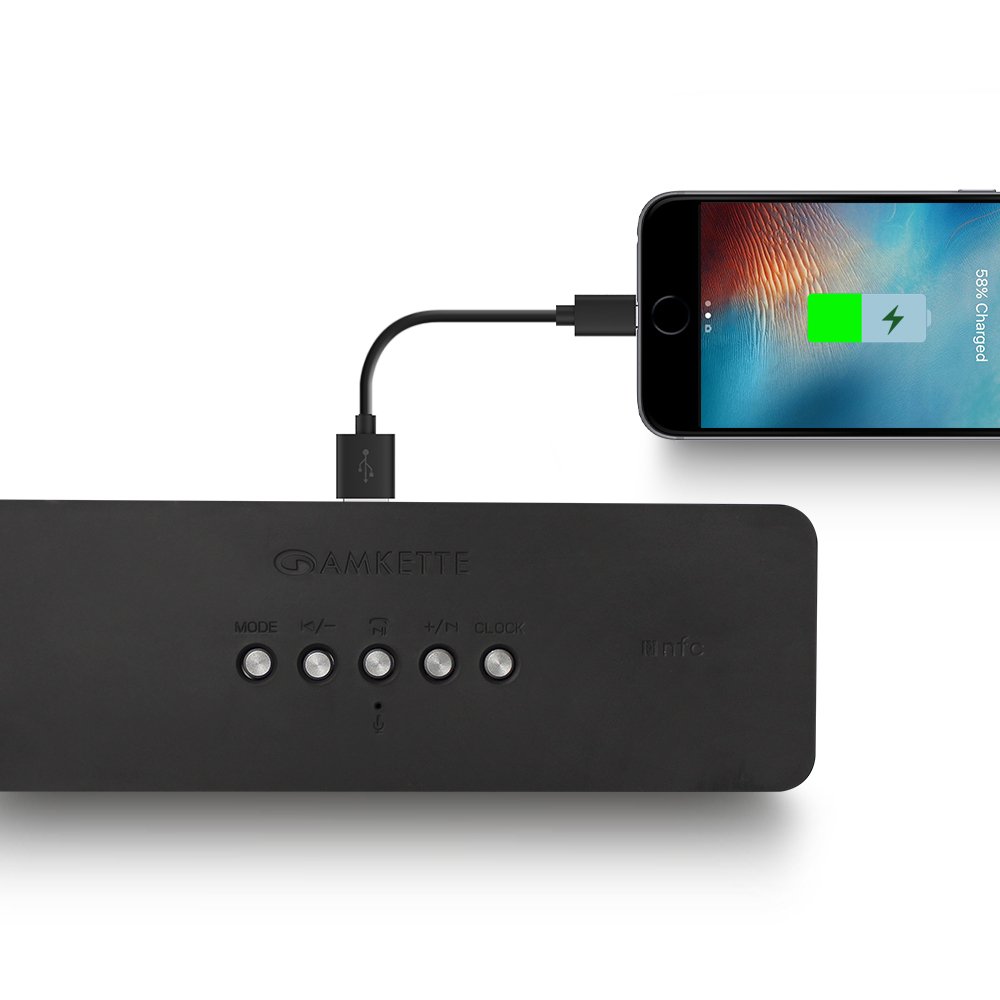
Figure 8: Speaker providing power to a smartphone through its USB Host port.
The Amkette Trubeats S50 can charge your smartphone or other USB-powered devices. Connect your device's charging cable to the USB pagrindinio prievado on the rear of the speaker. The speaker's internal battery will then supply power to your device.
5.7 App Control (Android Only)

Figure 9: Smartphone displaying the Amkette Trubeats Smart Speaker App interface.
For enhanced control, download the Amkette Trubeats Smart Speaker App from the Google Play Store (for Android phones). The app allows you to:
- Perjungti skirtingus garso režimus.
- Control volume and track playback.
- Manage FM radio stations and perform precise tuning.
- Set and customize alarms, including alarm source.
Ensure your speaker is connected via Bluetooth to your smartphone for app functionality.
5.8 Skambučių tvarkymas
When connected via Bluetooth to a smartphone, the speaker can be used for hands-free calling:
- Atsiliepti į skambutį: Paspauskite Play/Pause/Answer Call Button vieną kartą.
- Baigti skambutį: Paspauskite Play/Pause/Answer Call Button vieną kartą skambučio metu.
- Atmesti skambutį: Ilgai paspauskite mygtuką Play/Pause/Answer Call Button.
6. Priežiūra
- Garsiakalbį saugokite nuo ekstremalių temperatūrų, tiesioginių saulės spindulių ir drėgmės.
- Garsiakalbį valykite minkšta, sausa šluoste. Nenaudokite abrazyvinių valiklių ar tirpiklių.
- Venkite garsiakalbio numetimo ir stiprių smūgių.
- Kai garsiakalbio nenaudojate ilgesnį laiką, laikykite jį vėsioje, sausoje vietoje ir periodiškai jį įkraukite, kad palaikytumėte baterijos veikimo laiką.
7. Problemų sprendimas
| Problema | Galima priežastis | Sprendimas |
|---|---|---|
| Garsiakalbis neįsijungia. | Baterija išsikrovusi. | Visiškai įkraukite garsiakalbį. |
| Iš garsiakalbio nėra garso. | Garsumas per mažas; pasirinktas neteisingas režimas; įrenginys netinkamai prijungtas. | Increase speaker and source device volume. Ensure correct mode (Bluetooth, AUX, etc.) is selected. Reconnect the device. |
| „Bluetooth“ susiejimas nepavyksta. | Garsiakalbis neįjungtas susiejimo režimu; įrenginys per toli; trukdžiai. | Ensure speaker is in pairing mode ('BT' flashing). Move device closer to speaker. Turn off other Bluetooth devices. |
| Prastas FM radijo priėmimas. | Silpnas signalas; aplinkos trukdžiai. | Relocate the speaker to an area with better reception. Perform an auto-scan again. |
| Programėlė neprisijungia prie garsiakalbio. | Bluetooth not connected; app issue. | Ensure speaker is paired via Bluetooth to your phone. Restart the app and try again. |
8. Specifikacijos
- Modelis: S50
- Prekinis ženklas: Amketė
- Garsiakalbio tipas: Portable Bluetooth Speaker (Outdoor)
- Ryšys: „Bluetooth“, USB, „Micro SD“, AUX, FM radijas
- Belaidžio ryšio technologija: Bluetooth
- Kontrolės metodas: Buttons, App (Android)
- Garso išvesties režimas: Stereo
- Garso vatatage: 10 vatų
- Maitinimo šaltinis: Maitinamas baterijomis
- Baterijos veikimo laikas: Iki 12 valandų (vidutiniškai)
- Įkrovimo laikas: Maždaug 4 val
- Suderinami įrenginiai: Laptop, Mobile, Tablet
- Matmenys (PxPxH): 26.7 x 10.9 x 7.9 cm
- Prekės svoris: 703 gramų
- Atsparus vandeniui: Taip
- Montavimo tipas: Stalviršio laikiklis
9. Garantija ir palaikymas
The Amkette Trubeats S50 Smart Wireless Bluetooth Speaker comes with a 1 metų garantija nuo įsigijimo datos. Ši garantija taikoma gamybos defektams, atsiradusiems įprasto naudojimo sąlygomis.
For warranty claims, technical assistance, or any other support inquiries, please contact Amkette customer support through their official websvetainėje arba kontaktinę informaciją, pateiktą kartu su pirkimo dokumentais.
Prašome išsaugoti pirkimo kvitą kaip pirkimo įrodymą garantijos tikslais.