
Įvadas
Thank you for choosing the ALLOYSEED Bluetooth FM Transmitter Car Charger. This device allows you to stream audio from your Bluetooth-enabled smartphone or tablet to your car's FM radio, make hands-free calls, and charge your mobile devices via its integrated USB port. Please read this manual carefully to ensure proper use and optimal performance.
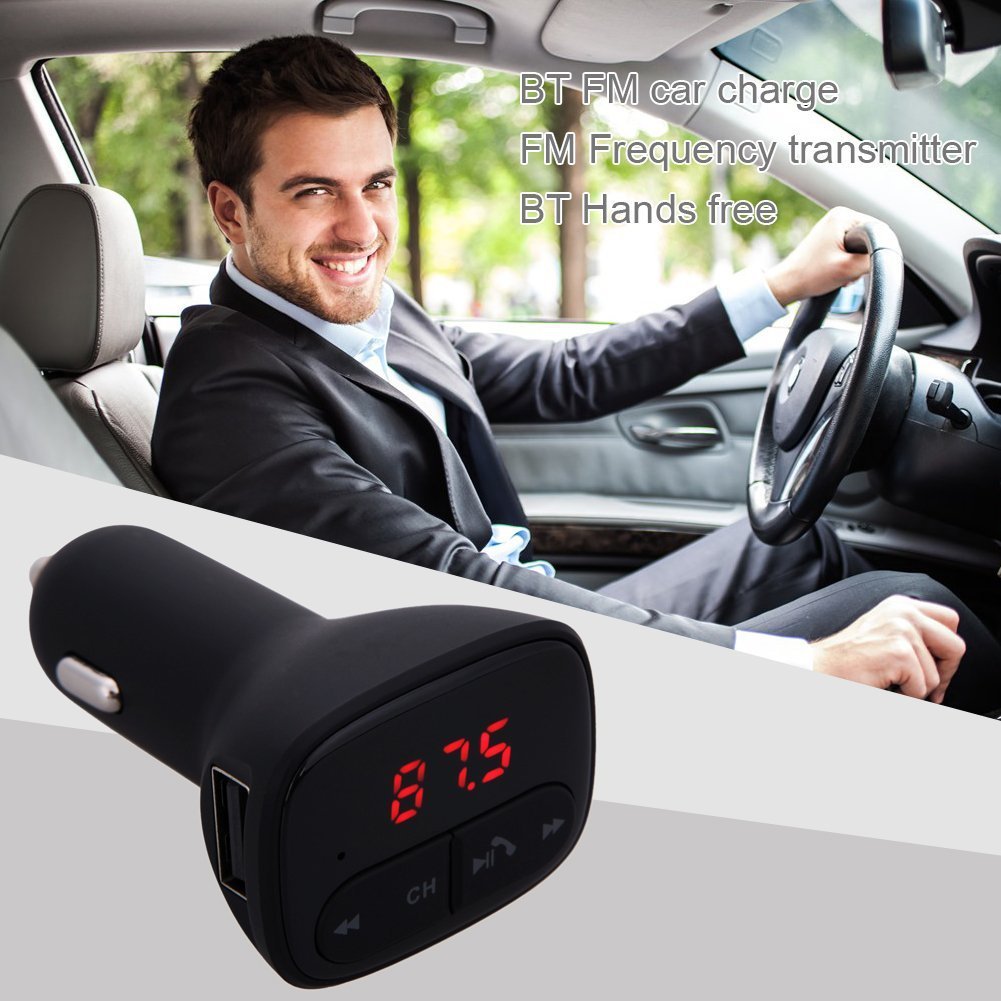
Image: The ALLOYSEED Bluetooth FM Transmitter Car Charger plugged into a car's cigarette lighter socket, with a driver in the background.
Saugos informacija
- Neardykite ir nemodifikuokite įrenginio.
- Saugokite įrenginį nuo vandens, drėgmės ir ekstremalių temperatūrų.
- Venkite ilgą laiką laikyti prietaisą tiesioginiuose saulės spinduliuose.
- Ensure the car's cigarette lighter socket provides the specified DC 12V~24V input voltage.
- Do not operate the device while driving if it distracts you from the road. Prioritize road safety.
Produktas baigtasview
Familiarize yourself with the components of your ALLOYSEED Bluetooth FM Transmitter Car Charger:
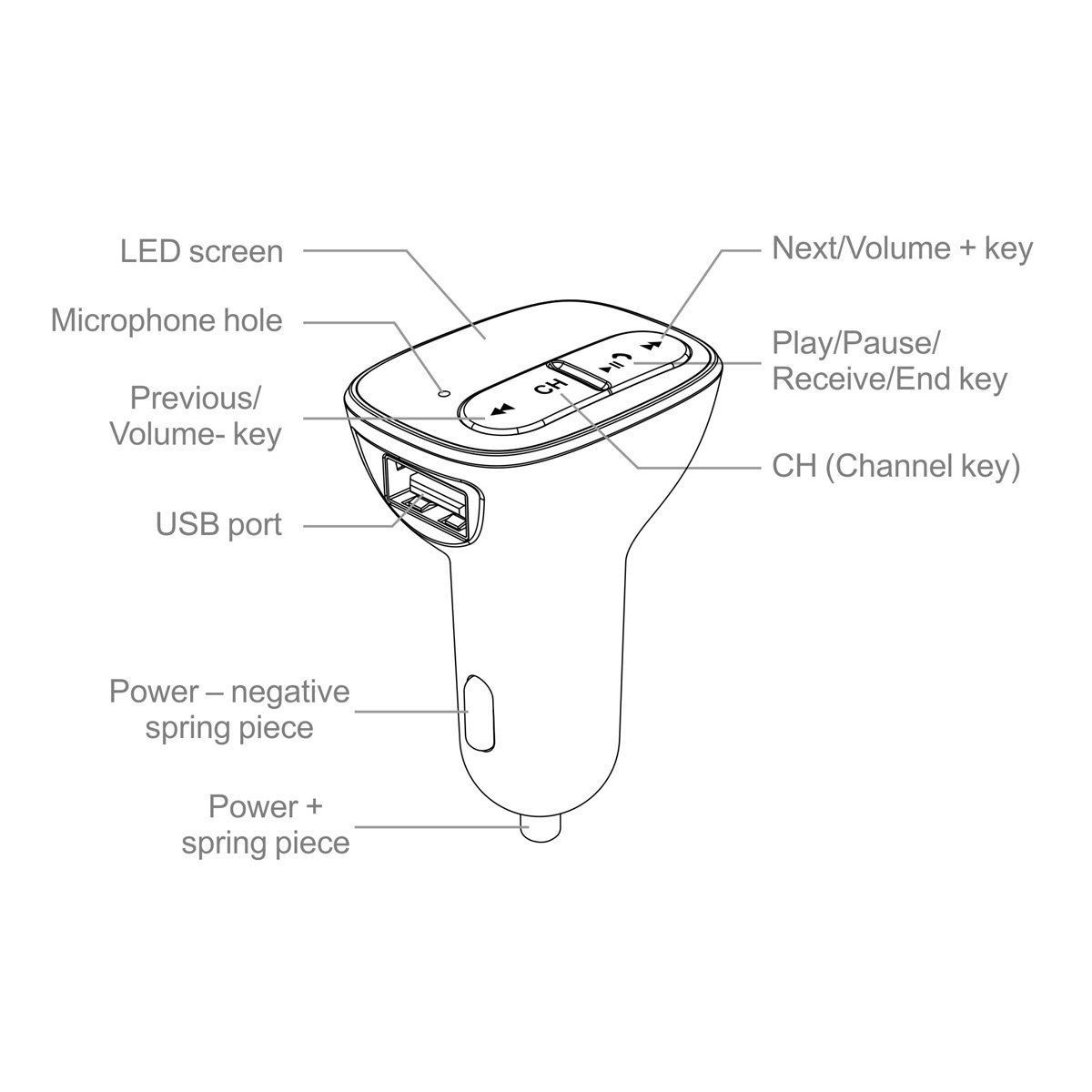
Image: A detailed diagram of the ALLOYSEED Bluetooth FM Transmitter Car Charger, highlighting its various components and controls.
- LED ekranas: Displays FM frequency.
- Microphone Hole: Skambinimas laisvų rankų įrangai.
- Ankstesnis / garsumo klavišas: Trumpas paspaudimas – ankstesniam takeliui, ilgas paspaudimas – garsumui sumažinti.
- Next/Volume+ Key: Trumpas paspaudimas – kitam takeliui, ilgas paspaudimas – garsumui padidinti.
- Play/Pause/Receive/End Key: Trumpas paspaudimas, norint paleisti / pristabdyti muziką, atsiliepti / baigti skambučius. Ilgas paspaudimas, norint atmesti skambučius.
- CH (Channel Key): Short press to enter FM frequency adjustment mode.
- USB prievadas: 2.1A output for charging mobile devices.
- Power - Negative Spring Piece: Connects to the negative terminal of the car's power socket.
- Power + Spring Piece: Connects to the positive terminal of the car's power socket.
Specifikacijos
| Įvesties tomastage | DC 12V ~ 24V |
| Darbo srovė | <100mA (when not charging) |
| FM dažnių diapazonas | 87.5 - 108.0MHz (0.1MHz increments) |
| FM perdavimo atstumas | <3 mln |
| Bluetooth versija | V2.1+EDR |
| Bluetooth Protocols Supported | A2DP/AVRCP/HSP/HFP |
| A2DP Transmission Distance | >5 mln |
| USB išvesties srovė | 2.1A |
| USB išvestis ttage | 5.2 V |
| Prekės svoris | 80 g |
Sąranka
- Įkiškite į automobilio lizdą: Plug the ALLOYSEED Bluetooth FM Transmitter into your car's 12V-24V cigarette lighter socket. The device will power on automatically, and the LED screen will display the current FM frequency.
- Maitinimas: The device powers on automatically when connected to the car's power.
Naudojimo instrukcijos
1. Setting the FM Frequency
- Paspauskite CH (Channel) key. The frequency display on the LED screen will start flashing.
- Naudokite Previous/Volume- key or Next/Volume+ key to adjust the FM frequency. Select a frequency that is clear and not occupied by a local radio station.
- Once the desired frequency is set, wait a few seconds. The display will stop flashing, and the frequency will be saved.
- Tune your car's FM radio to the tas pats dažnis as displayed on the transmitter.
2. „Bluetooth“ poravimas
- After powering on, the device will automatically enter Bluetooth pairing mode. The LED screen may show a Bluetooth icon or similar indicator.
- Išmaniajame telefone arba planšetiniame kompiuteryje įjunkite Bluetooth ir ieškokite galimų įrenginių.
- Select the device named "LEJUOTOJI" (or similar) from the list to pair.
- Once paired, a confirmation sound or indicator may be heard/seen. You are now ready to stream audio.
3. Muzikos atkūrimas
- After successful Bluetooth pairing, open your music player on your smartphone/tablet and start playing music.
- The audio will be transmitted to your car's FM radio.
- Naudokite Paleidimo / pristabdymo klavišas on the transmitter to play or pause music.
- Naudokite Previous/Volume- key ir Next/Volume+ key for track navigation (short press) and volume adjustment (long press).
- The device has an automatic memory function, resuming the last played song when restarted.
4. Skambinimas laisvų rankų įranga
- Kai gaunamas skambutis, muzika automatiškai pristabdoma.
- Paspauskite Play/Pause/Receive/End key vieną kartą, kad atsilieptumėte į skambutį.
- Norėdami baigti pokalbį, paspauskite Play/Pause/Receive/End key dar kartą.
- Norėdami atmesti įeinantį skambutį, ilgai paspauskite Play/Pause/Receive/End key.
- Integruotas mikrofonas užtikrina aiškų bendravimą.
5. Įkrovimo įrenginiai
- Connect your mobile device (smartphone, tablet, etc.) to the USB prievadas on the transmitter using a compatible USB charging cable.
- The USB port provides a 2.1A output for efficient charging.
Priežiūra
- Prietaisą valykite minkštu, sausu skudurėliu. Nenaudokite skystų valiklių ar aerozolių.
- Ensure the USB port and cigarette lighter connector are free from dust and debris.
- Laikykite prietaisą vėsioje, sausoje vietoje, kai jo ilgesnį laiką nenaudojate.
Trikčių šalinimas
- Nėra galios: Ensure the device is securely plugged into the car's cigarette lighter socket and that the car's ignition is on. Check the car's fuse for the cigarette lighter.
- Prasta garso kokybė / statinis triukšmas:
- Adjust the FM frequency on the transmitter and your car radio to find a clear, unoccupied channel.
- Įsitikinkite, kad telefono ir automobilio radijo garsumas nustatytas tinkamai.
- Move away from areas with strong radio interference.
- „Bluetooth“ neporuojamas:
- Įsitikinkite, kad jūsų mobiliajame įrenginyje įjungtas „Bluetooth“.
- Restart the transmitter by unplugging and re-plugging it.
- Pamirškite įrenginį iš telefono „Bluetooth“ nustatymų ir bandykite susieti dar kartą.
- Ensure the transmitter is within range of your phone.
- USB Charging Not Working:
- Check if the charging cable is properly connected to both the device and the USB port.
- Išbandykite kitą USB kabelį.
- Ensure the car charger is receiving power.
Garantija ir palaikymas
This product is covered by a warranty policy. For details regarding warranty coverage, terms, and conditions, please refer to the information provided at the point of purchase or contact ALLOYSEED customer support. Keep your purchase receipt as proof of purchase.
For technical assistance or further inquiries, please contact ALLOYSEED customer support through the official channels provided by the seller or manufacturer.