
Įvadas
Thank you for choosing the Platinet PDLU2BR Desk Lamp. This manual provides essential information for the safe and efficient use of your new desk lamp, which features an integrated thermometer, clock, and calendar display. Please read these instructions carefully before use and retain them for future reference.
Svarbios saugos instrukcijos
- Užtikrinkite maitinimo šaltinio ttage atitinka lamp's requirements (5V/1A).
- Neatskleiskite lamp vanduo arba per didelė drėgmė.
- Venkite ardyti ar modifikuoti lampVisus techninės priežiūros darbus patikėkite kvalifikuotiems darbuotojams.
- Laikykite lamp away from heat sources and direct sunlight to prevent damage to the display and internal components.
- Use only the provided power cable or a compatible replacement.
- Šis lamp skirtas naudoti tik patalpose.
Pakuotės turinys
- Platinet PDLU2BR stalinis D formosamp
- Power Cable (USB to DC5V)
- Vartotojo vadovas (šis dokumentas)
Sąrankos vadovas
1. Išpakavimas
Carefully remove all components from the packaging. Inspect the lamp for any signs of damage. If any damage is found, do not proceed with setup and contact customer support.
2. Maitinimo prijungimas
Connect the provided power cable to the DC 5V input port on the back of the lamp base. Plug the other end of the power cable into a compatible USB power adapter (not included) or a USB port on a computer. Ensure the connection is secure.
3. Pradinis paskirstymas
Padėkite lamp on a stable, flat surface. The flexible arm allows for various lighting angles. Position the lamp to achieve optimal illumination for your workspace.

Priekyje view of the Platinet PDLU2BR Desk Lamp, šouasing its brown finish, flexible arm, and integrated digital display.
Naudojimo instrukcijos
1. Įjungimas / išjungimas ir ryškumo reguliavimas
Raskite jutiklinį maitinimo mygtuką ant lamp base. A single touch will turn the lamp on or off. To adjust brightness, press and hold the power button; the brightness will cycle through different levels. Release the button when the desired brightness is reached.
2. Flexible Arm Adjustment
Lamp features a flexible arm that can be adjusted to direct light precisely where needed. Gently bend the arm to achieve your desired lighting angle. Avoid excessive force to prevent damage.

Image demonstrating the flexible and adjustable arm of the Platinet PDLU2BR Desk Lamp, showing its range of motion.
3. Display Functions: Clock, Calendar, and Thermometer
The integrated digital display shows the current time, date (day of the week), and ambient temperature. The temperature is displayed in Celsius. Specific buttons for setting the time and date are typically located near the display. Refer to the small icons next to the buttons for their functions (e.g., 'M' for Mode, 'S' for Set, 'Up/Down' arrows for adjustment). Press 'Mode' to cycle through settings (Time, Date), then use 'Set' to enter adjustment mode and 'Up/Down' to change values.

Išsamus view iš lamp's digital display, showing the current time, date, and temperature.
Priežiūra ir priežiūra
- Valymas: Prieš valydami atjunkite maitinimą. Nuvalykite minkšta, sausa šluoste.amp's surface. Do not use abrasive cleaners, solvents, or harsh chemicals.
- Saugykla: Jei saugote lamp ilgesnį laiką, užtikrinkite, kad jis būtų švarus ir sausas. Laikykite jį vėsioje, sausoje vietoje, apsaugotoje nuo tiesioginių saulės spindulių.
- LED šviesos šaltinis: The LED light source is integrated and not user-replaceable. Do not attempt to replace the LEDs.
Trikčių šalinimas
| Problema | Galima priežastis | Sprendimas |
|---|---|---|
| Lamp neįsijungia. | Nėra maitinimo arba laisvos jungties. | Check if the power cable is securely connected to both the lamp and the power source. Ensure the power source is active. |
| Display is blank or incorrect. | Power interruption or incorrect settings. | Ensure stable power. Reset time/date settings if necessary using the display buttons. |
| Ryškumo reguliavimas neveikia. | Neteisingas veikimas. | Ensure you are pressing and holding the power button to cycle through brightness levels, not just tapping it. |
Techninės specifikacijos
| Funkcija | Specifikacija |
|---|---|
| Prekės ženklas | Platinet |
| Modelis | PDLU2BR |
| Prekės modelio numeris | 821003 |
| Galia | 7W LED |
| ttage | 5 Volts (DC5V / 1A) |
| Šviesos šaltinio tipas | LED |
| Spalvos temperatūra | 5500 tūkst |
| Šviesos srautas (maks.) | 230lm |
| Spindulio kampas | 120° |
| Medžiaga | Metal, Eco Leather |
| Spalva | Ruda |
| Gaminio matmenys | 35.51 x 8.79 x 2.39 cm (apytiksliai 13.98 x 3.46 x 0.94 colio) |
| Svoris | 560 gramų |
| Ypatingos savybės | Energy-saving, Flexible Arm, Thermometer, Clock, Calendar |
| ES energijos vartojimo efektyvumo ženklas | A |
| Darbinė temperatūra | -20°C iki +40°C |
| Apsaugos įvertinimas | IP20 |
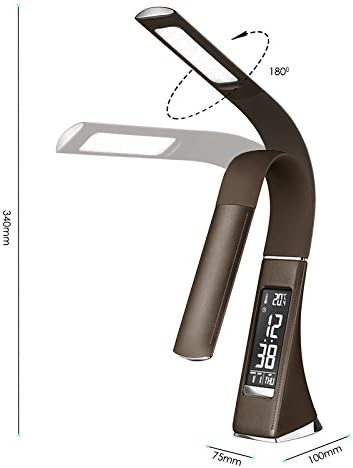
Diagram illustrating various technical specifications and features of the lamp, įskaitant galią, tūr.tage, LED quantity, and operating temperature.
Garantija ir klientų aptarnavimas
Platinet products are designed and manufactured to the highest quality standards. This product is covered by a standard manufacturer's warranty against defects in materials and workmanship from the date of purchase. Please retain your proof of purchase for warranty claims.
For technical support, warranty inquiries, or service, please contact your retailer or visit the official Platinet website for contact information. Please have your product model number (PDLU2BR) and proof of purchase ready when contacting support.