
1. Įvadas
The BFT THALIA P Control Panel is a sophisticated electronic control unit designed for the management of automated gate systems. It serves as the central brain for your gate, ensuring smooth, safe, and reliable operation. This manual provides essential information for the proper installation, configuration, and maintenance of your THALIA P control panel.
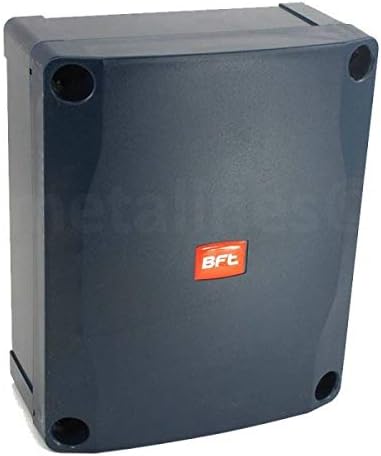
1 pav.: Išorinis view of the BFT THALIA P Control Panel enclosure.
2. Saugos informacija
Svarbu: Installation and maintenance of the BFT THALIA P Control Panel must be carried out by qualified personnel only, in compliance with local electrical codes and safety regulations. Failure to follow these instructions could result in serious injury or damage to property.
- Prieš atlikdami bet kokius montavimo, techninės priežiūros ar trikčių šalinimo darbus, visada atjunkite maitinimą.
- Ensure proper grounding of the control panel and all connected components.
- Keep hands, clothing, and objects clear of moving gate parts.
- Do not allow children to play with or near the gate automation system.
- Install all necessary safety devices (e.g., photocells, safety edges) as required by local regulations.
3. Sąranka ir diegimas
This section outlines the general steps for installing the THALIA P Control Panel. Refer to the detailed wiring diagrams provided with your specific gate motor and accessories for precise connections.
3.1 Valdymo skydelio montavimas
Select a suitable location for mounting the control panel, ensuring it is protected from direct weather exposure and easily accessible for maintenance. Use appropriate fasteners to secure the enclosure firmly to a stable surface.
3.2 Elektros jungtys
Once the enclosure is mounted, open the panel to access the internal components and terminal blocks. The THALIA P control panel requires connections for mains power, gate motor(s), safety devices (photocells, safety edges), command devices (remote controls, keypads), and optional accessories (flashing lights, electric locks).

2 pav. Vidinis view of the BFT THALIA P Control Panel with the cover removed, showing the circuit board and transformer.
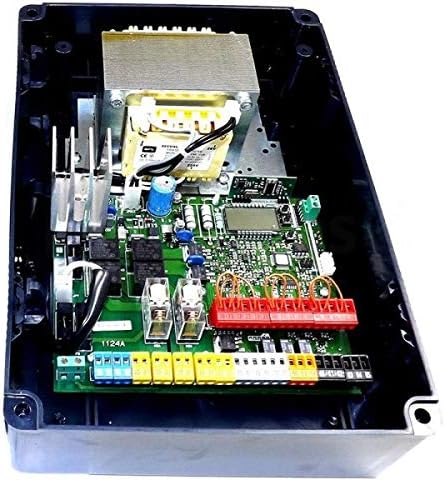
3 pav. Išsamus view of the THALIA P circuit board, highlighting the various terminal blocks for wiring connections.
Carefully follow the wiring diagram provided with your specific gate system. Ensure all connections are secure and correctly terminated. Pay close attention to voltage requirements; auxiliary power output is 24V AC.
3.3 Pradinis įjungimas ir konfigūravimas
After all connections are made and verified, restore power to the control panel. The panel will typically enter a self-test or initial setup mode. Refer to the dedicated programming manual for detailed instructions on setting up motor parameters, remote controls, and operational logic (e.g., automatic closing, pedestrian opening).
4. Naudojimo instrukcijos
Once installed and configured, the BFT THALIA P Control Panel manages your gate's operation. Basic operation is typically initiated via remote control, keypad, or other command devices.
- Atidaryti Uždaryti: A single command typically initiates an open or close cycle. If the gate is already moving, the same command may stop or reverse its direction, depending on the programmed logic.
- Pedestrian Opening: If configured, a specific command can open the gate partially for pedestrian access.
- Automatinis uždarymas: The panel can be programmed to automatically close the gate after a set pause time, provided safety devices are clear.
For advanced features and programming adjustments, consult the comprehensive programming guide for the THALIA P control panel.
5. Priežiūra
Regular maintenance ensures the longevity and reliable operation of your BFT THALIA P Control Panel and the entire gate automation system. Perform these checks periodically:
- Vizuali apžiūra: Check the control panel enclosure for any signs of damage, water ingress, or loose covers.
- Švara: Keep the area around the control panel clean and free from dust, debris, or insect nests.
- Laidų jungtys: With power disconnected, periodically check all terminal connections inside the panel to ensure they are tight and free from corrosion.
- Saugos įtaisai: Regularly test all safety devices (e.g., photocells, safety edges) to ensure they are functioning correctly and preventing gate movement when obstructed.
- Gate Mechanics: Ensure the gate itself moves freely and smoothly, without excessive friction or obstruction, as this can put strain on the motor and control panel.
6. Problemų sprendimas
If your gate system is not functioning as expected, perform the following basic troubleshooting steps. For complex issues, contact a qualified technician.
- Nėra galios: Check the main power supply to the control panel. Verify circuit breakers and fuses.
- Vartai nejuda: Ensure all safety devices (photocells, emergency stops) are clear and not activated. Check for any physical obstructions to the gate's movement.
- Nepastovus elgesys: This could indicate interference or a sensor issue. Check wiring for loose connections or damage.
- Nuotolinio valdymo pultas neveikia: Check remote control batteries. Ensure the remote is correctly paired with the control panel.
If the problem persists after these checks, it is recommended to consult the detailed troubleshooting section in the full technical manual or contact BFT technical support.
7. Specifikacijos
| Funkcija | Vertė |
|---|---|
| Prekės svoris | 2 kg |
| Ryšio technologija | Infraraudonųjų spindulių |
| Ypatinga funkcija | Ergonomiškas |
| Prekės ženklas | BFT |
| Gamintojo nuoroda | THALIA P CONTROL PANEL |
8. Garantija ir palaikymas
The BFT THALIA P Control Panel is covered by a manufacturer's warranty against defects in materials and workmanship. For specific warranty terms and conditions, please refer to the documentation provided at the time of purchase or visit the official BFT websvetainę.
For technical support, spare parts, or professional assistance with installation and complex troubleshooting, please contact your authorized BFT dealer or the BFT customer service department.