
Įvadas
Thank you for choosing the Aqualin Dual Outlet Irrigation Timer Controller. This device is designed to automate your garden watering, providing convenience and efficient water management. With two independently programmable outlets, you can customize watering schedules for different areas of your garden or lawn. Please read this manual carefully to ensure proper installation, operation, and maintenance of your irrigation timer.
Produktas baigtasview
The Aqualin YL21060 features a clear LCD display, intuitive controls, and robust construction for outdoor use. It offers flexible programming options, including a rain delay function to conserve water.

The Aqualin Dual Outlet Irrigation Timer Controller, shown attached to a faucet, featuring a digital display and two independent water outlets.
Pagrindinės funkcijos:
- Dual Independent Outlets: Program two separate watering zones with unique schedules.
- Lankstus programavimas: Set desired frequency and duration for each zone.
- Lietaus uždelsimo funkcija: Skip watering sessions during and after rainy days (1-7 days).
- Rankinis laistymas: Initiate immediate watering without interrupting programmed cycles.
- „IPX5“ atsparus vandeniui: Designed for outdoor durability.
- Lengvas montavimas: Features a swivel joint for quick connection to standard faucets (3/4" or 1").
- LCD ekranas: Clear digital display for easy programming and monitoring.
- Įleidimo filtras: Helps prevent debris from entering the system.

ir baigtaview of the Aqualin timer's features, including manual watering, IPX5 waterproofing, two independent zones, an inlet filter, an LCD display, and a rain delay function.
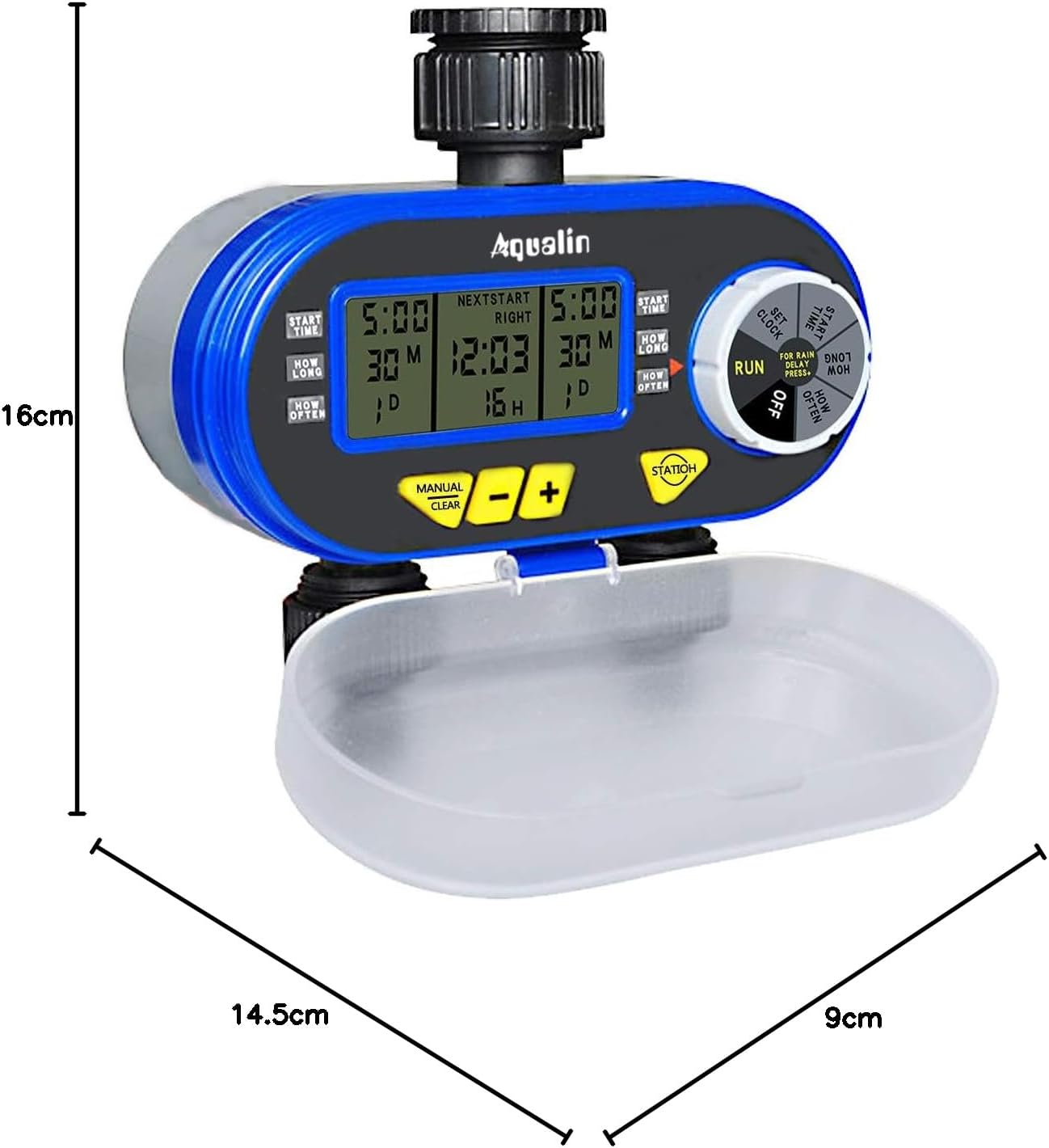
A diagram showing the physical dimensions of the Aqualin timer: 16cm height, 14.5cm length, and 9cm depth.
Sąranka
- Akumuliatoriaus montavimas:
- Open the battery compartment cover located at the back of the unit.
- Insert two (2) AA alkaline batteries, ensuring correct polarity.
- Saugiai uždarykite akumuliatoriaus skyrių.
- Prijungimas prie čiaupo:
- Attach the timer to a standard 3/4" (19mm) or 1" (25mm) outdoor faucet. The swivel joint allows for easy, tool-free connection.
- Ensure the connection is tight to prevent leaks. Do not overtighten.
- Prijunkite sodo žarnas prie dviejų nepriklausomų išleidimo angų laikmačio apačioje.
- Pradinis laiko nustatymas:
- Rotate the main dial to the 'SET CLOCK' position.
- Norėdami reguliuoti dabartinį laiką, naudokite mygtukus „+“ ir „-“.
- Press 'ENTER' to confirm the setting.
- Lietaus jutiklis (pasirinktinai):
- If using an external rain sensor, connect it to the designated rain sensor hole.
- Ensure the internal contacts for the rain sensor are not bent if no sensor is connected, as this can prevent watering.

Iš arti view highlighting the 360-degree anti-leak design, the rain sensor input hole, and the battery compartment cover of the Aqualin timer.
Naudojimo instrukcijos
The Aqualin timer offers both automatic and manual watering modes for maximum flexibility.
Video demonstrating the automatic and manual functions of the Aqualin Dual Outlet Irrigation Timer Controller, showing how to set watering schedules and activate manual irrigation.
1. Automatic Function Programming:
The timer allows independent programming for two zones (Zone 1 and Zone 2).

This image illustrates the independent programming capabilities of the Aqualin timer, with separate settings for start time, duration, and frequency for Zone 1 and Zone 2.
- Nustatyti pradžios laiką:
- Rotate the dial to 'START TIME'.
- Use '+' and '-' to set the desired start time for Zone 1. Press 'ENTER'.
- Pakartokite su 2 zona.
- Nustatykite trukmę:
- Rotate the dial to 'HOW LONG'.
- Use '+' and '-' to set the watering duration for Zone 1 (1 minute to 240 minutes). Press 'ENTER'.
- Pakartokite su 2 zona.
- Nustatykite, kaip dažnai (dažnumą):
- Rotate the dial to 'HOW OFTEN'.
- Use '+' and '-' to set the watering frequency for Zone 1 (e.g., every 12 hours, every 3 days). Press 'ENTER'.
- Pakartokite su 2 zona.
- Paleisti programą:
- Once all settings are configured, rotate the dial to 'RUN'. The timer will now operate according to your programmed schedule.
2. Rain Delay Function:
To prevent overwatering and save water, use the rain delay feature.

The timer's display showing the Rain Delay feature, which allows skipping irrigation for 1 to 7 days to conserve water.
- While in 'RUN' mode, press the 'RAIN DELAY' button.
- Use '+' or '-' to select the desired delay period (e.g., 24, 48, 72 hours, or up to 7 days).
- Press 'ENTER' to activate the rain delay. Watering will resume automatically after the selected period.
3. Manual Watering:
Norėdami laistyti nedelsiant, nepaveikiant užprogramuoto grafiko:

The Aqualin timer in manual watering mode, allowing for immediate irrigation without altering programmed schedules.
- While in 'RUN' mode, press the 'MANUAL/CLEAR' button.
- Use '+' or '-' to set the desired manual watering duration (1 to 360 minutes).
- Press 'ENTER' to start manual watering.
- To stop manual watering, press 'MANUAL/CLEAR' again.
Priežiūra
- Baterijos keitimas: Replace AA batteries every 1.5 to 3 months, or when the low battery indicator appears on the display, to ensure continuous operation.
- Įleidimo filtro valymas: Periodically check and clean the inlet filter to prevent clogging and maintain optimal water flow. Remove the timer from the faucet, unscrew the inlet connection, and rinse the filter under running water.
- Žieminimas: Before the first frost, disconnect the timer from the faucet and hoses. Drain any remaining water from the unit and store it indoors in a dry, frost-free location.
- Bendras valymas: Nuvalykite laikmatį su skelbimuamp šluoste nešvarumams ir šiukšlėms pašalinti. Nenaudokite abrazyvinių valiklių ar tirpiklių.
Trikčių šalinimas
| Problema | Galima priežastis | Sprendimas |
|---|---|---|
| Nėra vandens srauto |
|
|
| Nuotėkiai iš jungčių |
|
|
| Timer not programming correctly |
|
|
| Užstrigo akumuliatoriaus skyrius | Battery compartment inserted incorrectly. | Ensure the battery compartment is inserted in the correct orientation. Forcing it can cause damage. |
Specifikacijos
| Funkcija | Detalė |
|---|---|
| Prekės ženklas | Aqualin |
| Modelio numeris | YL21060 |
| Medžiaga | ABS |
| Matmenys (I x P x A) | 14.5 cm x 9 cm x 16 cm |
| Nustatymų skaičius | 2 (Independent Zones) |
| Maišytuvo prijungimas | 3/4" (19mm) or 1" (25mm) |
| Laistymo trukmė | 1 minutė iki 240 minučių |
| Maitinimo šaltinis | 2 x AA baterijos |
| GTIN | 613869410455 |
Garantija ir palaikymas
The Aqualin Dual Outlet Irrigation Timer Controller comes with a standard manufacturer's warranty. For specific warranty details, technical assistance, or to download a detailed PDF instruction manual, please visit the official Aqualin websvetainėje arba susisiekite su jų klientų aptarnavimo skyriumi. Išsaugokite pirkimo kvitą kaip pirkimo įrodymą garantijos pretenzijoms.
Naudojimo scenarijai

This image illustrates the versatility of the Aqualin timer, suitable for various watering applications such as gardens, lawns, farms, and potted plants.