
1. Įvadas
Ačiū, kad pirkoteasing the Auna Dr. Bang LED Portable Boombox. This device is designed to provide a versatile audio experience with its 2.1 channel sound, Bluetooth connectivity, multiple playback options (USB, SD, AUX, MP3), integrated LED light effects, and FM radio. It also features two microphone inputs for karaoke functions. Please read this manual carefully to ensure proper use and to maximize the performance of your device.
2. Saugos instrukcijos
Kad nesugadintumėte įrenginio ar nesusižalotumėte, laikykitės šių saugos priemonių:
- Saugokite prietaisą nuo lietaus ar drėgmės.
- Neardykite įrenginio. Visus techninės priežiūros darbus patikėkite kvalifikuotiems darbuotojams.
- Laikykite prietaisą atokiau nuo tiesioginių saulės spindulių, šilumos šaltinių ir atviros liepsnos.
- Užtikrinkite tinkamą vėdinimą aplink įrenginį.
- Įkrovimui naudokite tik nurodytą maitinimo adapterį.
- Do not insert objects into the device openings.
- Venkite klausytis dideliu garsu ilgą laiką, kad nepažeistumėte klausos.
3. Pakuotės turinys
Carefully unpack your Auna Dr. Bang LED Portable Boombox and ensure all items are present and in good condition. The package should contain:
- Auna Dr. Bang LED Portable Boombox
- USB įkrovimo laidas
- AUX Cable (3.5mm jack)
- Vartotojo vadovas (šis dokumentas)
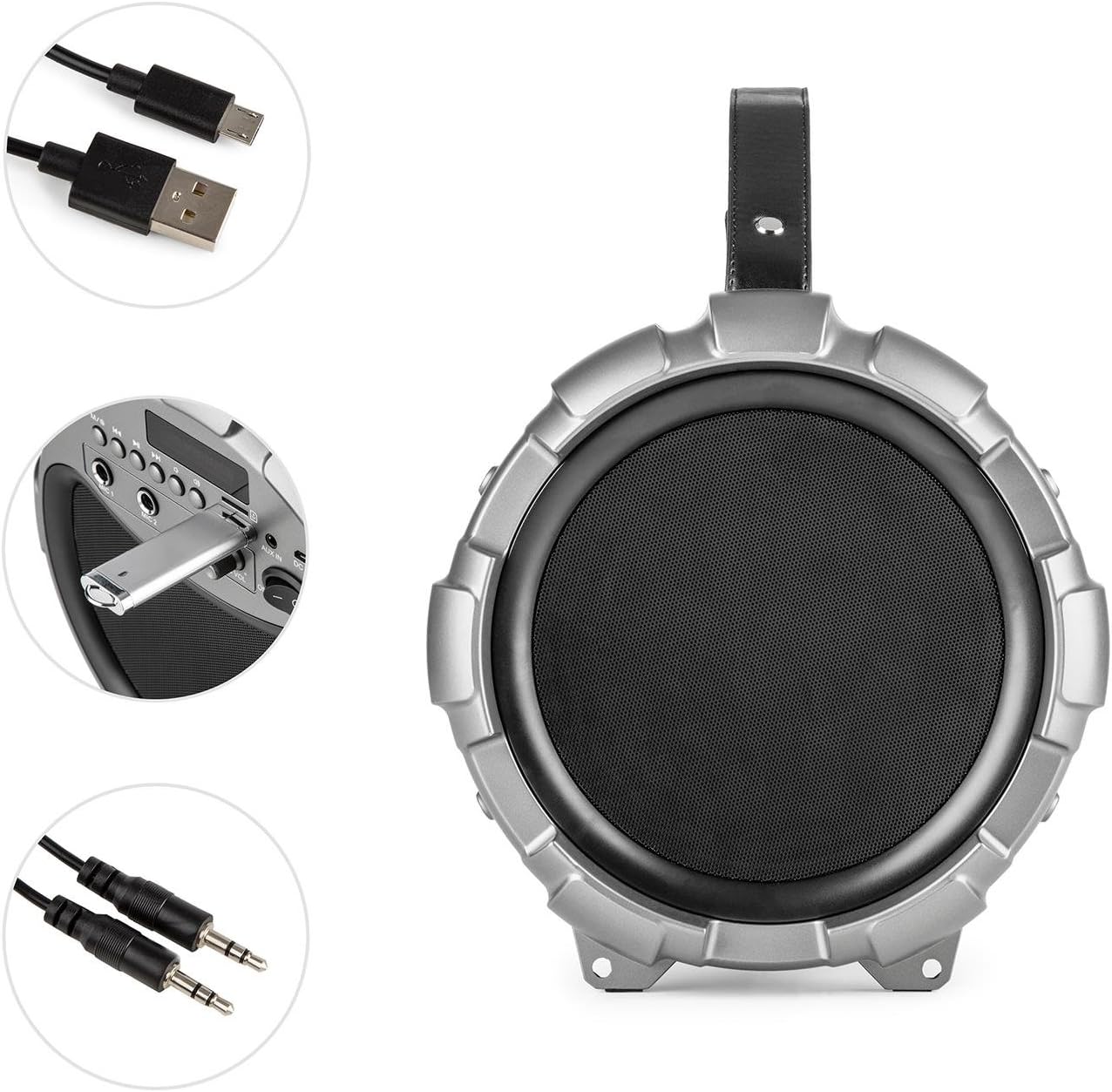
Image: The Auna Dr. Bang LED boombox shown with its included USB charging cable and 3.5mm AUX cable.
4. Produktas baigtasview
Susipažinkite su įvairiomis savo „boombox“ dalimis ir valdikliais.
4.1 Priekis View

Vaizdas: priekis view of the Auna Dr. Bang LED boombox, highlighting the speaker grille and integrated LED lighting effects.
- LED šviesos skydelis: Displays dynamic light effects during playback.
- Garsiakalbio grotelės: Protects the internal speakers.
4.2 Valdymo skydas

Image: Close-up of the control panel on the Auna Dr. Bang LED boombox, showing various buttons, ports, and the display.
- M/Mode Button: Switches between input modes (Bluetooth, USB, SD, AUX, FM Radio).
- Ankstesnio takelio / atsukimo mygtukas: Trumpas paspaudimas – ankstesniam takeliui, ilgas paspaudimas – atsukti atgal.
- Atkūrimo / pristabdymo mygtukas: Paleidžia arba pristabdo dabartinį garso įrašą.
- Kitas takelis / greito perjungimo mygtukas: Trumpas paspaudimas – kitam takeliui, ilgas paspaudimas – persukti pirmyn.
- LED mygtukas: Įjungia LED šviesos efektus.
- Ekranas: Rodo dabartinį režimą, takelio informaciją arba FM dažnį.
- USB prievadas: USB atmintinės įrašų atkūrimui.
- SD kortelės lizdas: Skirta SD kortelės atkūrimui.
- AUX IN: 3.5 mm garso įvestis išoriniams įrenginiams.
- 5 V nuolatinė srovė: Maitinimo įvestis įkrovimui.
- MIC 1 įvestis: 6.3mm microphone input 1.
- MIC 2 įvestis: 6.3mm microphone input 2.
- Mikrofono aidėjimo rankenėlė: Reguliuoja mikrofono aido efektą.
- MIC VOL rankenėlė: Reguliuoja mikrofono garsumą.
- ĮJUNGIMO/IŠJUNGIMO jungiklis: Įjungia arba išjungia įrenginį.
- Garsumo rankenėlė: Adjusts the main playback volume.
5. Sąranka
5.1 Akumuliatoriaus įkrovimas
The Auna Dr. Bang LED boombox is equipped with a built-in Lithium-Ion battery for portable use. Before first use, it is recommended to fully charge the battery.
- Connect the supplied USB charging cable to the DC 5V port on the boombox.
- Kitą USB laido galą prijunkite prie suderinamo USB maitinimo adapterio (nepridedamas) arba kompiuterio USB prievado.
- The charging indicator light (if present, usually near the DC 5V port or on the display) will illuminate to indicate charging.
- Kai telefonas visiškai įkrautas, indikatoriaus lemputė gali pakeisti spalvą arba užgesti. Atjunkite įkrovimo laidą.
Pastaba: The boombox can be operated while charging, but charging time may be longer.
5.2 Pradinis įjungimas
Norėdami įjungti įrenginį, pastumkite ON/OFF jungiklis to the "ON" position. The display will light up, and the unit will enter the default mode (usually Bluetooth).
6. Naudojimo instrukcijos
6.1 Režimo pasirinkimas
Paspauskite M/Mode Button repeatedly to cycle through the available input modes: Bluetooth, USB, SD, AUX, and FM Radio. The current mode will be shown on the display.
6.2 Bluetooth poravimas
- Turn on the boombox and select Bluetooth mode using the M/Mode Button. The display will show "BLUE" and a blinking Bluetooth icon, indicating it's ready for pairing.
- Įjunkite „Bluetooth“ savo mobiliajame įrenginyje (išmaniajame telefone, planšetiniame kompiuteryje ir kt.) ir ieškokite galimų įrenginių.
- Select "Auna Dr. Bang LED" from the list of devices.
- Once paired, the boombox will emit a confirmation sound, and the Bluetooth icon on the display will stop blinking.
- Dabar galite leisti garsą iš savo įrenginio per magnetofoną.
Pastaba: The boombox will automatically attempt to reconnect to the last paired device when in Bluetooth mode.
6.3 USB/SD atkūrimas
- Įdėkite USB atmintinę į USB prievadas arba SD kortelę į SD kortelės lizdas. Ensure the media contains compatible audio files (pvz., MP3).
- The boombox should automatically switch to USB or SD mode and begin playback. If not, press the M/Mode Button to select the correct mode.
- Naudokite Ankstesnis takelis / atsukimas atgal, Leisti / pristabdyti, ir Kitas takelis / greitas sukimas pirmyn mygtukai, skirti valdyti atkūrimą.
6.4 AUX įvestis
- Prijunkite vieną 3.5 mm AUX laido galą prie Aux in port on the boombox.
- Kitą galą prijunkite prie išorinio garso įrenginio ausinių lizdo arba garso išvesties.
- Paspauskite M/Mode Button norėdami pasirinkti AUX režimą.
- Control playback from your external device. The boombox's volume knob will control the output volume.
6.5 FM radijas
- Paspauskite M/Mode Button to select FM Radio mode. The display will show the current frequency.
- Norėdami automatiškai nuskaityti ir išsaugoti galimas stotis, ilgai paspauskite Atkūrimo/pauzės mygtukas. The boombox will scan and store stations automatically.
- To manually tune or select saved stations, use the Ankstesnis takelis / atsukimas atgal ir Kitas takelis / greitas sukimas pirmyn mygtukai.
Patarimas: For better FM reception, try repositioning the boombox or extending any external antenna if available (not explicitly mentioned but common for boomboxes).
6.6 Mikrofono naudojimas (karaoke)
- Connect one or two microphones (not included) to the MIC 1 įvestis ir/arba MIC 2 įvestis.
- Sureguliuokite mikrofono garsumą naudodami MIC VOL rankenėlė.
- Mikrofonų aido efektą reguliuokite naudodami MIC ECHO rankenėlė.
- You can sing along to music playing from any source (Bluetooth, USB, SD, AUX).
6.7 LED Light Effects
Paspauskite LED mygtukas to toggle the integrated LED light effects on or off. The lights will synchronize with the music playback.

Paveikslėlis: kampuotas view of the Auna Dr. Bang LED boombox, showcasing its dynamic red and green LED light effects.
7. Priežiūra
7.1 Valymas
- Always power off the device and disconnect it from any power source before cleaning.
- Išoriniams paviršiams valyti naudokite minkštą, sausą šluostę.
- Nenaudokite abrazyvinių valiklių, vaško ar tirpiklių, nes jie gali pažeisti apdailą.
- Keep the ports and openings free of dust and debris.
7.2 Saugykla
- Kai ilgesnį laiką nenaudojate „boombox“, laikykite jį vėsioje, sausoje vietoje, toliau nuo tiesioginių saulės spindulių ir ekstremalių temperatūrų.
- It is recommended to charge the battery periodically (e.g., every 3-6 months) to maintain its lifespan.
8. Problemų sprendimas
If you encounter any issues with your Auna Dr. Bang LED boombox, please refer to the following common problems and solutions:
| Problema | Galima priežastis | Sprendimas |
|---|---|---|
| Nėra maitinimo / Įrenginys neįsijungia. | Baterija išsikrovusi. Maitinimo jungiklis išjungtas. | Charge the battery. Ensure the ON/OFF switch is in the "ON" position. |
| Nėra garso. | Volume is too low. Incorrect mode selected. Device not properly connected (AUX/Bluetooth). | Increase the volume on the boombox and your source device. Select the correct input mode. Re-pair Bluetooth or re-connect AUX cable. |
| „Bluetooth“ susiejimas nepavyksta. | Boombox not in pairing mode. Device too far. Bluetooth disabled on source. | Ensure boombox is in Bluetooth mode and "BLUE" is blinking. Move source device closer. Enable Bluetooth on your source device. |
| USB/SD atkūrimas neveikia. | Incorrect mode. Incompatible file format. Corrupted media. | Select USB or SD mode. Ensure files are MP3 format. Try a different USB drive or SD card. |
| Prastas FM radijo priėmimas. | Silpnas signalas. Trukdžiai. | Reposition the boombox. Try auto-scanning again. Avoid placing near other electronic devices. |
| Mikrofonas neveikia. | Microphone not connected. MIC VOL knob too low. | Ensure microphone is securely plugged into MIC 1 or MIC 2. Increase the MIC VOL knob. |
9. Specifikacijos
| Modelis: | BTS16-Dr. Bang LED |
| Prekinis ženklas: | AUNA |
| Matmenys (P x A x G): | 22 x 31.5 x 22 cm (apytiksliai 8.7 x 12.4 x 8.7 colio) |
| Svoris: | 2.8 kg (apytiksliai 6.2 svarai) |
| Garsiakalbio išėjimo galia: | 40 vatai (RMS) |
| Garsiakalbio konfigūracija: | 2.1 kanalas |
| Ryšys: | Bluetooth, USB, SD, AUX (3.5mm) |
| Mikrofono įėjimai: | 2 x 6.3 mm lizdas |
| Maitinimo šaltinis: | AC (via adapter, not included) & Battery |
| Baterijos tipas: | Ličio jonų |
| Baterijos talpa: | 2600 mAh (nominal) |
| Suderinami įrenginiai: | Personal computer, Smartphone |
| Montavimo suderinamumas: | Stalviršis |
10. Garantija ir palaikymas
AUNA products are covered by a manufacturer's warranty. For specific warranty terms and conditions, please refer to the documentation provided at the time of purchase or contact your local retailer. For technical support, troubleshooting assistance beyond this manual, or spare parts, please visit the official AUNA websvetainėje arba susisiekite su klientų aptarnavimo skyriumi.
Daugiau informacijos ir pagalbos galite rasti adresu AUNA Brand Store.