
1. Įvadas
The Generation Guard GM-800A is an automatic upper arm blood pressure monitor designed for convenient and accurate home use. This device measures systolic and diastolic blood pressure, as well as heart rate, providing essential health information. It features an advanced measuring technique for accuracy and includes a heartbeat detector and hypertension indicator for comprehensive monitoring.

Image 1: The Generation Guard GM-800A monitor with its arm cuff, displaying blood pressure and heart rate readings.
2. Produkto ypatybės
- Instant Monitoring: Provides quick and easy measurements of systolic, diastolic blood pressure, and heart rate.
- Clinically Accurate: Utilizes an advanced measuring technique for reliable and precise readings.
- Heartbeat Detector & Hypertension Indicator: Alerts users to irregular heart rates and indicates if readings exceed internationally recognized guidelines for normal home blood pressure levels.
- Atmintis: Stores up to 90 previous readings, allowing for tracking of blood pressure fluctuations over time.
- Didelio ekrano ekranas: Features a clear, easy-to-read display for all measurement results.
- Reguliuojama rankovė: Designed to fit a range of arm sizes (22-32 cm).
- Nešiojamas dizainas: Compact and easy to transport, ideal for home or travel.

Image 2: Visual representation of the monitor's key features.
3. Pakuotės turinys
Patikrinkite, ar pakuotėje yra visi reikalingi daiktai:
- Generation Guard GM-800A Blood Pressure Monitor Unit
- Žasto manžetė (22–32 cm)
- Dėklas nešiojimui
- 4 AA baterijos
- Vartotojo vadovas (šis dokumentas)

Image 3: The monitor, cuff, and included carrying case.
4. Sąranka
4.1 Akumuliatoriaus įdėjimas
- Atidarykite baterijų skyriaus dangtelį monitoriaus gale.
- Įdėkite keturias (4) AA baterijas, užtikrindami teisingą poliškumą (+/-).
- Saugiai uždarykite akumuliatoriaus skyriaus dangtelį.
4.2 Manžetės jungtis
- Raskite oro vamzdelio jungtį ant manžetės.
- Insert the air tube connector firmly into the air jack on the side of the monitor unit.
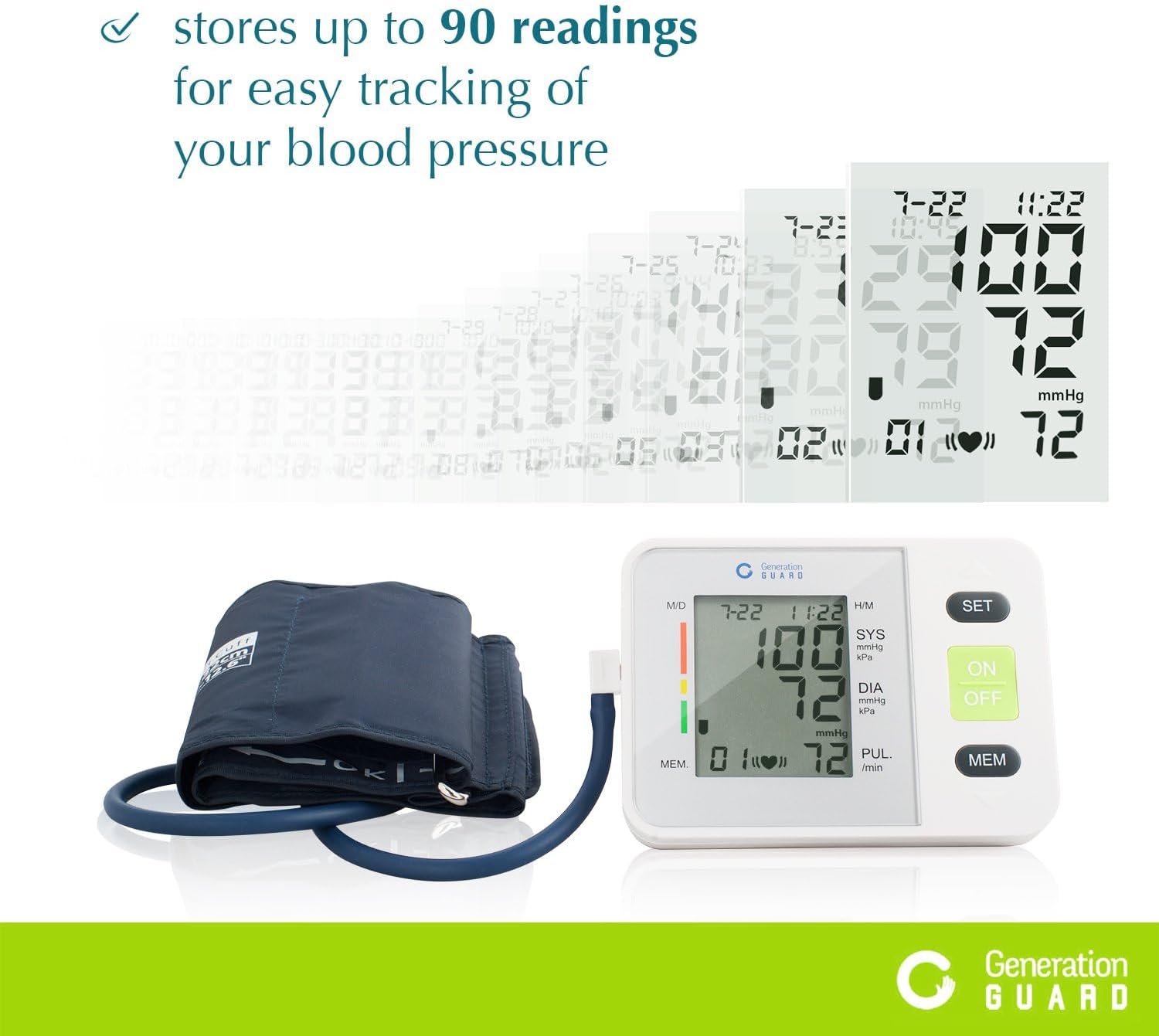
Image 4: The monitor unit with the arm cuff properly connected.
5. Naudojimo instrukcijos
5.1 Prieš matavimą
- Avoid eating, drinking alcohol, smoking, exercising, or bathing for 30 minutes before measurement.
- Prieš atlikdami matavimą, pailsėkite bent 5 minutes.
- Sėdėkite patogioje padėtyje, atremdami nugarą, o kojas remdamiesi ant grindų.
5.2 Manžetės uždėjimas
- Slide the cuff onto your bare left upper arm, approximately 1-2 cm above the elbow joint.
- Įsitikinkite, kad oro vamzdelis eina žemyn per rankos centrą, sulygiuotas su viduriniu pirštu.
- Wrap the cuff snugly around your arm, securing it with the Velcro closure. The index mark on the cuff should fall within the 'OK' range.
- Padėkite ranką ant stalo taip, kad manžetė būtų tame pačiame lygyje kaip jūsų širdis.
5.3 Matavimo atlikimas
- Paspauskite ĮJUNGTA/IŠJUNGTA button to power on the monitor.
- Paspauskite ĮJUNGTA/IŠJUNGTA button again to start the measurement. The cuff will automatically inflate.
- Matavimo metu nejudėkite ir tylėkite. Nekalbėkite ir nejudinkite rankos.
- Once the measurement is complete, the cuff will deflate, and your readings will be displayed on the screen.
- Paspauskite ĮJUNGTA/IŠJUNGTA button to turn off the monitor, or it will automatically shut off after a period of inactivity.
Video 1: A demonstration of how to set up and take a blood pressure reading using the Generation Guard GM-800A monitor.
6. Reading Your Results
The monitor displays three key values:
- SYS (sistolinis slėgis): Viršutinis skaičius, rodantis spaudimą arterijose, kai plaka širdis.
- DIA (diastolinis slėgis): Apatinis skaičius, rodantis slėgį arterijose tarp širdies susitraukimų.
- PUL (pulso dažnis): Jūsų širdies ritmas, matuojamas dūžiais per minutę.
The monitor also includes a color-coded hypertension indicator on the left side of the display, which visually represents your blood pressure category based on established guidelines. An irregular heartbeat detector will display a symbol if an irregular heartbeat is detected during the measurement.
7. Atminties funkcija
The GM-800A monitor can store up to 90 sets of readings, allowing you to track your blood pressure trends over time. Each stored reading includes the blood pressure values, pulse rate, and the date/time of the measurement.
7.1 Prieiga prie atminties
- Išjungę monitorių, paspauskite MEM mygtuką.
- Pirmiausia bus rodomas naujausias rodmuo.
- Paspauskite MEM button repeatedly to scroll through previous readings.

Image 5: The monitor's display showing stored readings for easy tracking.
8. Priežiūra
8.1 Valymas
- Nuvalykite monitorių ir manžetę minkštu, sausu skudurėliu.
- Jei reikia, naudokite šiek tiek damp šluoste su švelniu muilu, tada nusausinkite.
- Do not use abrasive cleaners, solvents, or immerse the unit or cuff in water.
8.2 Saugykla
- Store the monitor and cuff in the provided carrying case when not in use.
- Laikykite prietaisą vėsioje, sausoje vietoje, toliau nuo tiesioginių saulės spindulių ir ekstremalių temperatūrų.
- Venkite lenkimo ar kreidavimoasinper daug įtempkite oro vamzdelį.
9. Problemų sprendimas
Jei kyla problemų dėl kraujospūdžio matuoklio, žr. šias dažniausiai pasitaikančias problemas ir sprendimus:
| Problema | Galima priežastis | Sprendimas |
|---|---|---|
| "E" or Error Message on Display | Manžetė netinkamai uždėta, juda matavimo metu arba yra oro nuotėkis. | Re-apply the cuff correctly, remain still and silent, check for secure cuff connection. |
| Netikslūs rodmenys | Incorrect cuff size/placement, talking/moving during measurement, or insufficient rest before measurement. | Ensure proper cuff placement and size, rest for 5 minutes, avoid talking/moving. Take multiple readings with a few minutes in between. |
| Monitorius neįsijungia | Neišsikrovusios arba neteisingai įdėtos baterijos. | Pakeiskite baterijas naujomis AA baterijomis, užtikrindami teisingą poliškumą. |
10. Specifikacijos
- Modelio pavadinimas:
- GM-800A
- Prekinis ženklas:
- Kartos sargyba
- Maitinimo šaltinis:
- 4 AA baterijos (pridedamos)
- Rankogalių dydis:
- 22-32 cm (Upper Arm)
- Ekrano tipas:
- Didelis skaitmeninis ekranas
- Atminties talpa:
- Iki 90 XNUMX rodmenų
- Item Weight (approx.):
- 0.01 uncijos
- Įtraukti komponentai:
- Monitor Unit, Cuff, Carrying Case
- Pirmą kartą pasiekiama data:
- 7 m. vasario 2017 d
11. Svarbi saugos informacija
Please read all instructions carefully before using this device. This blood pressure monitor is intended for home use to measure blood pressure and pulse rate. It is not intended to be a substitute for professional medical advice, diagnosis, or treatment. Always consult with a healthcare professional for interpretation of your blood pressure readings and for any health concerns.
ĮSPĖJIMAS: This product can expose you to chemicals including [List known chemicals if available, otherwise state 'chemicals known to the State of California to cause cancer and birth defects or other reproductive harm.'], which is/are known to the State of California to cause cancer and birth defects or other reproductive harm. For more information go to www.P65Warnings.ca.gov.
12. Garantija ir palaikymas
For warranty information, technical support, or service inquiries, please refer to the documentation included with your product or visit the official Generation Guard websvetainėje. Išsaugokite pirkimo kvitą kaip pirkimo įrodymą garantiniams reikalavimams.