
Angrox RM-ED047
„Angrox“ universalaus nuotolinio valdymo pulto naudotojo vadovas
Modelis: RM-ED047
1. Įvadas
This manual provides essential information for the proper use and maintenance of your Angrox Universal Remote Control. Designed for seamless compatibility with a wide range of Sony Bravia TVs, this remote offers a reliable and straightforward replacement for your original or damaged remote.
The Angrox remote control is engineered for ease of use, requiring no complex programming or setup. Simply insert batteries, and it's ready to operate your Sony TV.
2. Produktas baigtasview
The Angrox Universal Remote Control is a high-quality, compact, and non-slip device designed for comfortable handling and stable performance. It features a larger transmission range compared to many standard remotes, ensuring reliable operation from a distance.

2.1 paveikslas: Priekis ir galas view of the Angrox Universal Remote Control, showcasindėl savo ergonomiško dizaino ir mygtukų išdėstymo.

2.2 pav.: Keli views of the remote control, highlighting its slim profile and textured back for a secure grip.
Pagrindinės funkcijos:
- Visuotinis suderinamumas: 100% compatible with all Sony TV and Sony Bravia remotes.
- Nereikia programuoti: Ready to use right out of the box after battery insertion.
- Ergonomiškas dizainas: Small size and compact, with a non-slip surface for practical handling.
- Stabilus našumas: Offers a larger transmission range for reliable control.
- Patvari konstrukcija: Made from ABS material for enhanced safety and durability.

2.3 paveikslėlis: Stambus planas view emphasizing the remote's safety features, durable construction, and use of ABS material.
Compatible Sony TV Models:
This remote is compatible with a wide range of Sony TV models, including but not limited to:
- KDL-40BX420, KDL-40BX421, KDL-22BX320, KDL-22BX321, KDL-32R300B, KDL-32BX320, KDL-32BX321, KDL-32BX420, KDL-32BX421, KDL-40BX421, KDL-40BXB, KDL-421, KDL-46BX420, KDL-46BX421, KDL-55BX520
- KDL-65X830B, KDL-70W830B, KDL-70W840B, KDL-70W850B, KDL-70XX70XX, XBR-40B, 9X850B, XBR-55X850B, XBR-55X900B, XBR-65X850B, XBR-65X900B, XBR-65X950B, XBR-70X850B, XBR-79X900B, XBR-800B, 5X950B
- KDL-19MB4000, KDL-19M4000, KDL-22L4000, KDL-32L4000, KDL-37L4000, KDL-40S4100

Image 2.4: The remote control positioned next to a modern Sony TV, visually confirming its compatibility with Sony LED and LCD televisions.
3. Sąranka
The Angrox Universal Remote Control is designed for immediate use with compatible Sony TVs. No complex programming or pairing procedures are required.
Baterijų įdėjimas:
- Nuotolinio valdymo pulto gale raskite baterijų skyrių.
- Norėdami atidaryti akumuliatoriaus dangtelį, stumkite jį žemyn arba rodyklės nurodyta kryptimi.
- Įdėkite dvi (2) AAA baterijas (nepridedamos), užtikrindami, kad teigiamas (+) ir neigiamas (-) poliai teisingai sutaptų su žymėjimais skyriaus viduje.
- Uždarykite akumuliatoriaus dangtelį, stumdami jį atgal į vietą, kol jis tvirtai užsifiksuos.
Once batteries are inserted, the remote control is ready to operate your Sony TV. It is recommended to use new, high-quality alkaline batteries for optimal performance and longevity.

3.1 pav.: Išsamus view of the remote's battery compartment, illustrating the correct orientation for inserting two AAA batteries.
4. Naudojimo instrukcijos
The Angrox Universal Remote Control functions identically to the original Sony TV remote. All buttons are pre-programmed to perform their standard functions.
Pagrindinė operacija:
- Maitinimo mygtukas: Paspauskite, kad įjungtumėte arba išjungtumėte televizorių.
- Skaičių mygtukai (0–9): Naudokite kanalų numeriams tiesiogiai įvesti.
- Kanalo aukštyn/žemyn (CH +/-): Naršyti kanalus nuosekliai.
- Garsumo didinimas / sumažinimas (VOL +/-): Sureguliuokite televizoriaus garsumo lygį.
- Nutildymo mygtukas: Mute or unmute the TV's audio.
- Navigation Pad (Arrow Buttons & Enter): Naudokite naršyti meniu ir pasirinkti parinktis.
- Namų mygtukas: Access the TV's main menu or smart TV interface.
- Įvesties / šaltinio mygtukas: Perjunkite skirtingus įvesties šaltinius (HDMI, AV ir kt.).
- Atkūrimo valdikliai: Buttons for Play, Pause, Stop, Fast Forward, Rewind, etc., for media playback.
Ensure there is a clear line of sight between the remote control and your TV's infrared receiver for optimal signal transmission. The remote offers a stable signal and sensitive buttons for a responsive user experience.

Image 4.1: A hand demonstrating the use of the remote control, highlighting its long-distance capability, fine workmanship, signal stabilization, and sensitive buttons.
5. Priežiūra
Proper maintenance will ensure the longevity and optimal performance of your Angrox Universal Remote Control.
Valymas:
- Wipe the remote control regularly with a soft, dry cloth.
- Įsisenėjusiam purvui šiek tiek pamirkykiteampNuvalykite šluostę vandeniu arba švelniu, neabrazyviniu valikliu. Nepurkškite valiklio tiesiai ant nuotolinio valdymo pulto.
- Venkite naudoti stiprias chemines medžiagas, tirpiklius ar abrazyvines valymo kempines, nes jos gali pažeisti nuotolinio valdymo pulto paviršių arba vidinius komponentus.
Baterijos keitimas:
Replace batteries when the remote's responsiveness decreases or it stops functioning. Always replace both batteries at the same time with new ones of the same type (AAA). Refer to Section 3 for battery insertion instructions.
Saugykla:
Nuotolinio valdymo pultą laikykite vėsioje, sausoje vietoje, toliau nuo tiesioginių saulės spindulių, ekstremalių temperatūrų ir didelės drėgmės. Jei nuotolinio valdymo pulto ilgesnį laiką nenaudosite, patartina išimti baterijas, kad jos neištekėtų.
6. Problemų sprendimas
If you encounter issues with your Angrox Universal Remote Control, please refer to the following common problems and solutions:
| Problema | Galima priežastis | Sprendimas |
|---|---|---|
| Nuotolinio valdymo pultas nereaguoja. | Išsikrovusios arba neteisingai įdėtos baterijos. | Check battery orientation. Replace with new AAA batteries. |
| Nuotolinio valdymo pulto veikimo nuotolis ribotas arba jis reaguoja su pertrūkiais. | Weak batteries, obstruction, or remote too far from TV. | Replace batteries. Ensure clear line of sight to TV's IR receiver. Move closer to the TV. |
| Kai kurie mygtukai neveikia. | Dirt or debris under the button, or internal malfunction. | Clean the remote surface. If problem persists, contact support. |
| Nuotolinio valdymo pultas nevaldo televizoriaus. | Nesuderinamas televizoriaus modelis. | Verify your TV model is listed in the compatible models section (Section 2). |
7. Specifikacijos
| Funkcija | Detalė |
|---|---|
| Modelio pavadinimas | RM-ED047 |
| Prekės ženklas | Angrox |
| Suderinami įrenginiai | Sony Televisions (various models, see Section 2) |
| Ryšio technologija | Infraraudonųjų spindulių (IR) |
| Didžiausias diapazonas | 10 metrai |
| Mygtukų skaičius | 50 |
| Valdiklio tipas | Nuotolinio valdymo pultas |
| Reikalingos baterijos | 2 x AAA (neįtraukta) |
| Gaminio matmenys (I x P x A) | 19.99 x 4.78 x 1.98 cm |
| Prekės svoris | 82 g |
| Ypatingos savybės | Universal, Non-slip design |
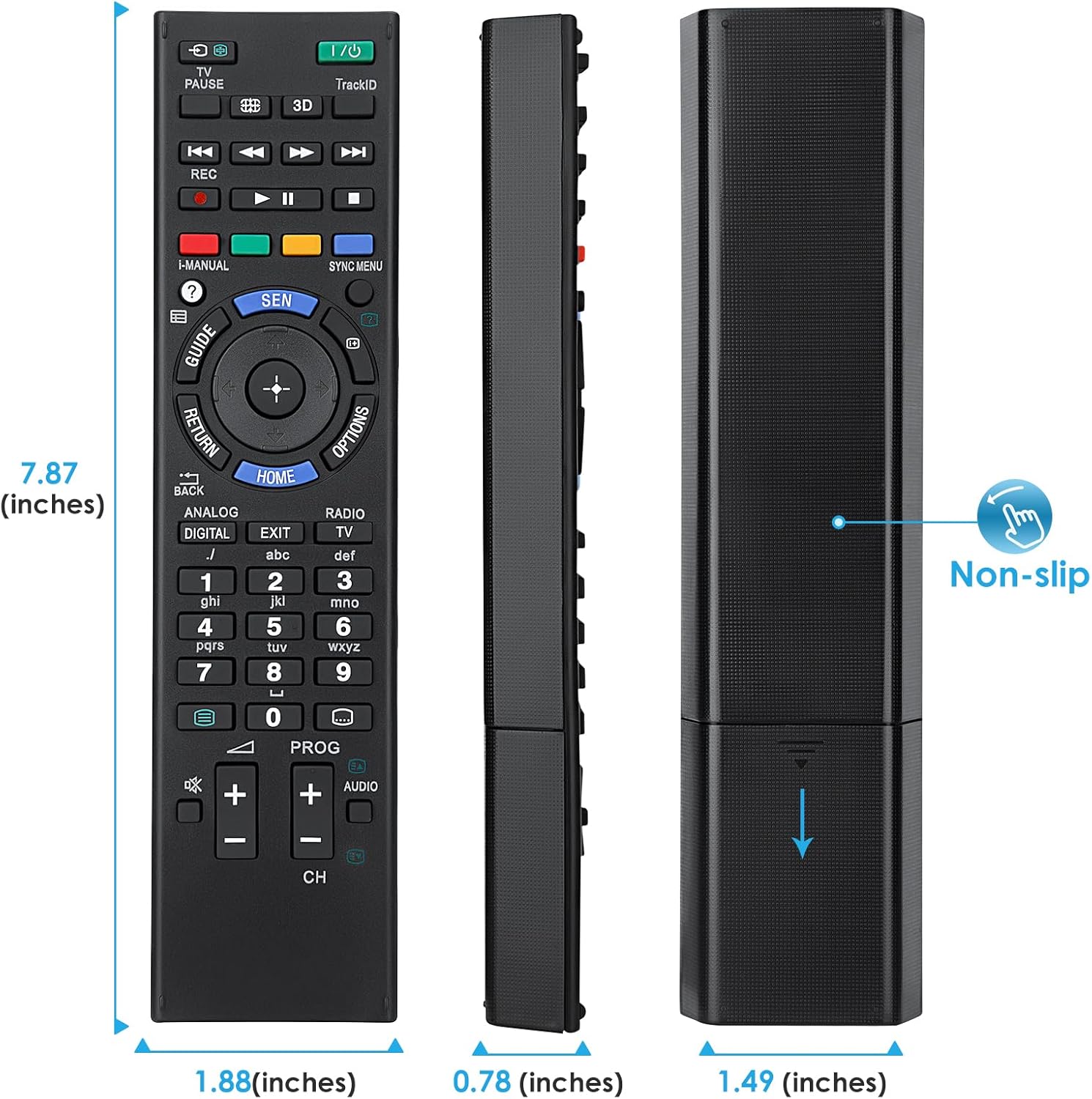
Image 7.1: Visual representation of the remote control's dimensions (length, width, thickness), providing precise measurements for reference.
8. Garantija ir palaikymas
Informacija apie garantiją:
This Angrox Universal Remote Control comes with a 60 dienų garantija nuo įsigijimo datos. Ši garantija taikoma gamybos defektams ir užtikrina, kad gaminys veikia taip, kaip aprašyta įprastai naudojant. Išsaugokite pirkimo įrodymą, jei norėtumėte pateikti pretenzijas dėl garantijos.
Klientų aptarnavimas:
For any questions, concerns, or technical assistance not covered in this manual, please contact the retailer or the manufacturer's customer support. Provide your product model number (RM-ED047) and a detailed description of the issue to facilitate faster service.
Ask a question about this manual
Ask about setup, troubleshooting, compatibility, parts, safety, or missing instructions. Manuals+ will review the question and use this page’s manual context to help answer it.