
Įvadas
Ačiū, kad pirkoteasing the Ezonetronics 1DIN Car Stereo, Model RM-CW9601. This unit features a 7-inch retractable touchscreen, Bluetooth connectivity, FM radio, and multimedia playback capabilities. This manual provides essential information for installation, operation, and maintenance to ensure optimal performance and user satisfaction. Please read this manual thoroughly before using the product.
Saugos informacija
- Nenaudokite įrenginio taip, kad tai atitrauktų jūsų dėmesį nuo vairavimo. Visada teikite pirmenybę eismo saugumui.
- Kad nesugadintumėte įrenginio ar transporto priemonės, užtikrinkite, kad įrenginį tinkamai sumontuotų kvalifikuotas specialistas.
- Venkite įrenginio ilgalaikio laikymo tiesioginiuose saulės spinduliuose, drėgmės ar ekstremalių temperatūrų aplinkoje.
- Do not attempt to disassemble or modify the unit. This may void the warranty and pose safety risks.
- Garsumą palaikykite tokį, kad girdėtumėte išorinio eismo garsus.
Pakuotės turinys
Patikrinkite, ar pakuotėje yra visi reikalingi daiktai:
- Ezonetronics 1DIN Car Stereo Unit (RM-CW9601)
- Maitinimo ir garsiakalbio laidai
- Nuotolinio valdymo pultas
- Vartotojo vadovas (šis dokumentas)
- Tvirtinimo priedai (laikikliai, varžtai)
- Optional: Rearview Camera (if included in your specific package)
Produktas baigtasview
The Ezonetronics RM-CW9601 features a single DIN chassis with a motorized retractable 7-inch touchscreen display. The front panel includes essential controls and ports for easy access.

1 paveikslas: Priekyje view of the Ezonetronics RM-CW9601 car stereo, illustrating the 7-inch screen in both retracted and extended positions, along with front panel controls and ports.
Priekinio skydelio valdikliai ir prievadai:
- Maitinimo / režimo mygtukas: Press to turn on/off, short press to change mode.
- Garsumo rankenėlė: Pasukite, kad sureguliuotumėte garsumą. Paspauskite, kad nutildytumėte / įjungtumėte garsą.
- USB prievadas: Skirta medijos atkūrimui iš USB atmintinių.
- SD kortelės lizdas: For media playback from SD cards.
- AUX įvestis: 3.5 mm lizdas išoriniams garso įrenginiams.
- Atkūrimo mygtukas: Small button to reset the unit (requires a pointed object).
- Screen Retract/Extend Button: Controls the motorized screen movement.
Sąranka
1. Montavimas
The RM-CW9601 is designed for a standard 1DIN car stereo opening. Professional installation is highly recommended. Ensure the vehicle's battery is disconnected before starting installation.
- Nuimkite esamą automobilio stereo sistemą nuo prietaisų skydelio.
- Connect the wiring harness to the vehicle's wiring.
- Secure the unit into the dashboard using the provided mounting brackets and screws.
- Prijunkite automobilio akumuliatorių ir išbandykite įrenginį.
2. Laidų schema (bendroji)
Refer to the detailed wiring diagram included with your product packaging for specific connections. Below are common connections:
- Geltona viela: Nuolatinė 12 V įtampa (baterija)
- Raudonas laidas: Įjungiamas 12 V (priedas / uždegimas)
- Juodas laidas: Žemė
- Oranžinė viela: Apšvietimas (neprivaloma)
- Mėlyna viela: Maitinimo antena / Amp„Lifier“ nuotolinis įjungimas
- Garsiakalbių laidai: Connect to vehicle speakers (e.g., White/White-Black for Front Left, Grey/Grey-Black for Front Right, Green/Green-Black for Rear Left, Purple/Purple-Black for Rear Right).
- Atbulinės kameros įvestis: Connect to the rearview camera video output and reverse trigger wire.
- Steering Wheel Control Input: Prijunkite prie transporto priemonės vairo valdymo laidų (jei taikoma).

2 paveikslas: Illustration of USB connection points, relevant for media input and smartphone integration.
Naudojimo instrukcijos
1. Pagrindinė operacija
- Maitinimo įjungimas/išjungimas: Paspauskite maitinimo mygtuką priekiniame skydelyje arba nuotolinio valdymo pulte.
- Garso reguliavimas: Rotate the volume knob or use the remote control.
- Režimo pasirinkimas: Short press the power/mode button to cycle through available modes (Radio, USB, SD, Bluetooth, AUX, CarPlay/Android Auto).
- Ekrano valdymas: Use the dedicated button to retract or extend the 7-inch display.
2. Bluetooth funkcija
The unit supports Bluetooth for hands-free calling and wireless audio streaming.
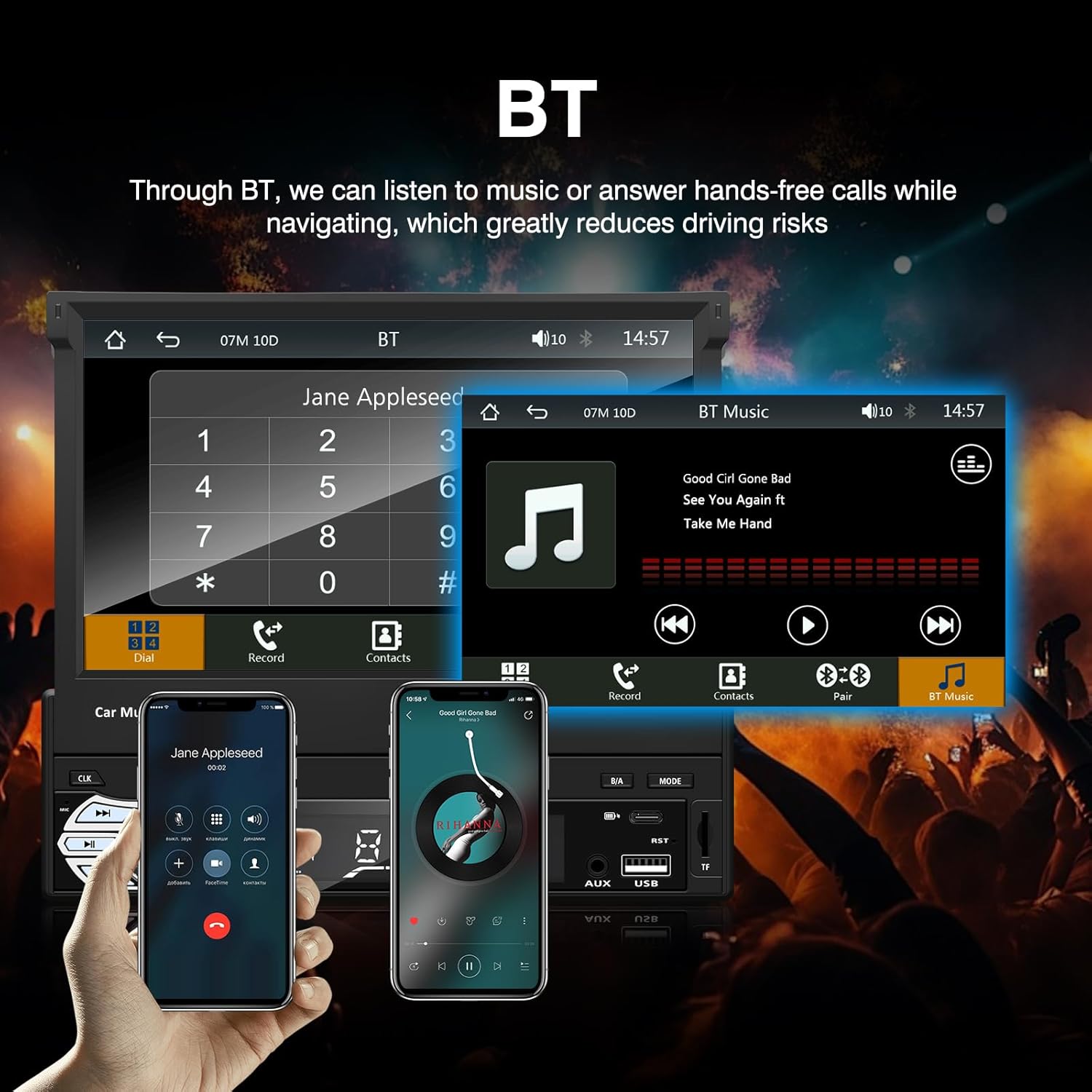
3 paveikslas: Bluetooth interface for hands-free calls and music streaming, showing a dial pad and music controls.
- Poravimas: Įjunkite „Bluetooth“ savo mobiliajame įrenginyje. Ieškokite available devices and select "Ezonetronics" or similar. Enter PIN "0000" if prompted.
- Skambinimas laisvų rankų įranga: Once paired, you can make and receive calls directly through the car stereo. Use the touchscreen or remote to dial, answer, or end calls.
- Garso transliacija (A2DP): Play music from your paired device wirelessly. Control playback (play/pause, skip) from the car stereo or your device.
3. USB/SD Media Playback
Insert a USB drive or SD card into the respective slot. The unit will automatically switch to USB/SD mode and begin playing compatible media files.

4 paveikslas: Icons indicating support for Bluetooth, Auxiliary input, TF (SD) Card, and USB connections for media playback.
- Supported formats include RM, RMVB, ASF, MKV, DIVX, MPEG4, AVI, VOB for video, and MP3/MP4 for audio.
- Naršykite aplankus ir filenaudojant jutiklinio ekrano sąsają.
4. FM radijas
Access the FM radio mode to listen to local broadcasts.

5 paveikslas: FM Radio interface with frequency display and equalizer settings for audio customization.
- Automatinis nuskaitymas: Automatically search and save strong stations.
- Rankinis derinimas: Fine-tune frequencies using the touchscreen.
- Išankstiniai nustatymai: Išsaugokite mėgstamiausias stotis, kad galėtumėte jas greitai pasiekti (iki 18 iš anksto nustatytų stočių).
5. „Apple CarPlay“ / „Android Auto“
Connect your compatible smartphone via USB to access Apple CarPlay or Android Auto features directly on the stereo's display.

6 paveikslas: Wired Apple CarPlay interface, displaying phone applications like navigation, music, and messages on the car stereo screen.

7 paveikslas: Wired Android Auto interface, displaying Android applications like Google Maps, Spotify, and phone calls on the car stereo screen.
- Ensure your phone has CarPlay or Android Auto enabled.
- Use a high-quality USB cable for a stable connection.
- Access navigation, music, messages, and other compatible apps safely while driving.
6. Veidrodinis saitas
Mirror Link allows you to display your smartphone's screen content directly onto the car stereo's display via a USB data cable.

8 paveikslas: Mirror Link function demonstrating a smartphone screen being projected onto the car stereo display.
- Connect your smartphone to the USB port using a data cable.
- Norėdami užmegzti ryšį, vykdykite ekrane pateikiamus nurodymus tiek stereo sistemoje, tiek telefone.
- Note: Functionality may vary depending on your smartphone model and operating system.
7. Galinėview Kameros įvestis
Kai galinisview camera is connected and the vehicle is shifted into reverse, the stereo automatically displays the camera feed.

9 paveikslas: Reversing display showing the view from a rearview camera with parking assistance lines, providing an intuitive aid for parking.
- Užtikrinkite galinę dalįview camera is properly installed and connected to the dedicated input.
- Ekranas automatiškai persijungs į kamerą view kai įjungta atbulinė pavara.
8. Vairo valdymas
The unit supports connection to your vehicle's existing steering wheel controls for convenient operation. Refer to your vehicle's manual and the stereo's wiring diagram for proper connection and configuration.
Priežiūra
- Ekrano valymas: Jutiklinį ekraną švelniai nuvalykite minkšta, nepūkuota šluoste. Nenaudokite abrazyvinių valiklių ar tirpiklių.
- Bendras valymas: Wipe the unit's exterior with a dry, soft cloth.
- Venkite skysčių: Nepurkškite skysčių tiesiai ant įrenginio.
- Temperatūra: Avoid prolonged exposure to extreme heat or cold, which can affect the unit's lifespan.
Trikčių šalinimas
| Problema | Galima priežastis | Sprendimas |
|---|---|---|
| Įrenginys neįsijungia. | Neteisingas laidų prijungimas; perdegęs saugiklis; automobilio akumuliatoriaus problema. | Check power connections (Yellow, Red, Black wires). Inspect vehicle fuses. Ensure battery is charged. |
| Nėra garso. | Per mažas garsumas; Įjungtas nutildymas; Neteisingas garsiakalbių sujungimas. | Padidinkite garsumą. Patikrinkite, ar įjungtas nutildymo režimas. Patikrinkite garsiakalbių jungtis. |
| „Bluetooth“ neprisijungia. | Bluetooth not enabled on phone; Incorrect pairing process. | Ensure phone's Bluetooth is on and discoverable. Re-attempt pairing. |
| USB/SD media not playing. | Nepalaikoma file format; Corrupted media; Drive/card not inserted correctly. | Patikrinkite file formats. Try a different USB drive/SD card. Ensure proper insertion. |
| Galinisview kamera nerodo. | Kamera neprijungta; atbulinės eigos paleidiklio laidas neprijungtas. | Verify camera video input and reverse trigger wire connection. |
Jei problemos išlieka, kreipkitės į kvalifikuotą specialistą arba susisiekite su klientų aptarnavimo tarnyba.
Specifikacijos
- Prekinis ženklas: EZoneTronics
- Modelio numeris: RM-CW9601
- Spalva: Juoda
- Ekranas: 7-inch Capacitive Touchscreen, Retractable
- Ryšio technologija: Bluetooth, USB, SD, AUX, RCA
- Bluetooth: Integrated Bluetooth 2.0 with A2DP/Hands-free
- Suderinami įrenginiai: Išmanusis telefonas
- Garso išvesties režimas: Stereo
- Video Encoding Support: RM, RMVB, ASF, MKV, DIVX, MPEG4, AVI, VOB
- USB/SD palaikymas: Up to 32GB max.
- Ypatingos savybės: Touchscreen, Steering Wheel Control Support, Rear Camera Input, Apple CarPlay, Android Auto, Mirror Link
- Gamintojas: Rhythm Electronics Limited
Garantija ir palaikymas
This product comes with a limited manufacturer's warranty.
- Pagrindinio įrenginio garantija: 12 months for defective items (excluding damaged or misused items after receipt).
- Priedų garantija: 3 months for accessories.
Dėl garantijos ar techninės pagalbos kreipkitės tiesiogiai į pardavėją arba gamintoją. Išsaugokite pirkimo kvitą kaip pirkimo įrodymą.