
1. Įvadas
This manual provides essential instructions for the safe and effective use of your Nikon AF-S VR Micro-NIKKOR 105mm f/2.8G IF-ED Lens. This high-performance macro lens is designed for both close-up and general photography, featuring advanced Vibration Reduction (VR II) technology and a 1:1 life-size magnification ratio. It incorporates Nano-Crystal coat and Extra-low Dispersion (ED) glass elements for superior image quality by reducing flare and chromatic aberrations.
2. Lens Components
Familiarize yourself with the main components of your lens to ensure proper handling and operation.

1 pav.: priekis view of the Nikon AF-S VR Micro-NIKKOR 105mm f/2.8G IF-ED Lens, showing the focus ring, distance scale, and control switches.
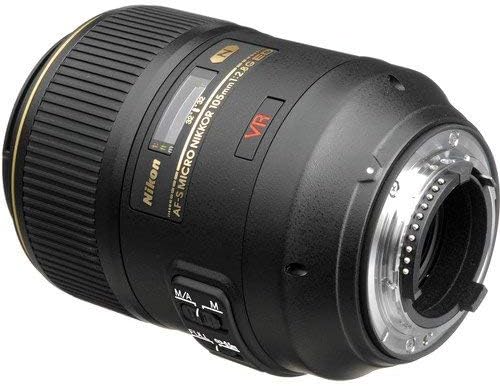
2 pav.: galinis view of the lens, highlighting the Nikon F-mount for camera attachment and electrical contacts.
3. Sąranka ir diegimas
3.1 Attaching the Lens to a Camera
- Įsitikinkite, kad ir fotoaparatas, ir objektyvas yra išjungti.
- Nuimkite galinį objektyvo dangtelį nuo objektyvo ir korpuso dangtelį nuo fotoaparato.
- Align the white mounting dot on the lens barrel with the corresponding white dot on the camera body's lens mount.
- Pasukite objektyvą prieš laikrodžio rodyklę (kai viewed from the front) until it clicks securely into place. Do not force the lens.

Figure 3: Rear lens cap, used to protect the lens mount and rear element when the lens is not attached to a camera.
3.2 Objektyvo gaubto (HB-38) pritvirtinimas
The HB-38 lens hood is designed to reduce lens flare caused by stray light and provides additional protection for the front element of the lens.
- Align the mounting mark on the lens hood with the corresponding mark on the front of the lens barrel.
- Sukite gaubtą pagal laikrodžio rodyklę, kol jis užsifiksuos.
- To reverse the hood for storage, align the marks and rotate it until it locks in the reverse position.
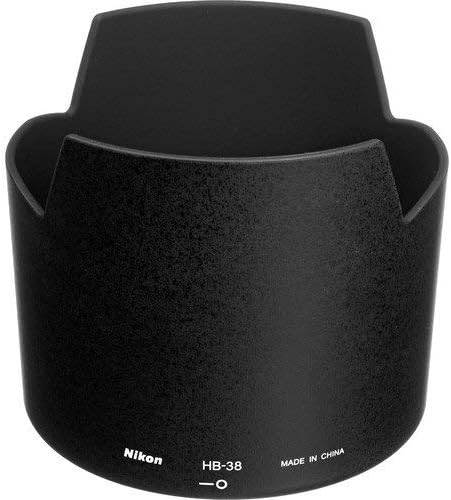
Figure 4: Nikon HB-38 lens hood, designed to minimize stray light and protect the lens.
4. Objektyvo valdymas
4.1 Focus Mode Switch (M/A and M)
The lens features a focus mode switch on its barrel with two settings:
- M/A (Autofocus with Manual Override): This mode allows the camera to autofocus. You can, however, instantly switch to manual focus by rotating the focus ring, even when the camera is in autofocus mode. This is useful for fine-tuning focus after autofocus has been achieved.
- M (rankinis fokusavimas): In this mode, autofocus is disabled. All focusing must be performed manually by rotating the focus ring. This is often preferred for precise macro photography.
4.2 Vibration Reduction (VR) Switch
The VR II system helps reduce blur caused by camera shake, especially beneficial in low light conditions or when shooting handheld. The switch has two positions:
- ĮJUNGTA: Activates Vibration Reduction. This is recommended for most handheld shooting situations.
- IŠJUNGTA: Deactivates Vibration Reduction. It is generally advisable to turn VR OFF when using a tripod or when shooting at very high shutter speeds.
Note: VR is most effective for static subjects. For panning shots, some cameras may offer a dedicated VR mode for such situations.
4.3 Macro Photography Techniques
This lens is optimized for macro photography, offering a 1:1 (life-size) magnification ratio. Achieving sharp focus in macro photography requires precision:
- Minimalus fokusavimo atstumas: The lens can focus as close as 0.314 meters (1.03 feet) from the sensor plane.
- Darbinis atstumas: Be aware of the distance between the front of the lens and your subject. For 1:1 magnification, this distance can be quite short.
- Rankinis fokusavimas: For critical sharpness in macro work, manual focus (M mode) is often preferred. Use Live View on your camera for magnified focusing.
- Trikojo naudojimas: A sturdy tripod is highly recommended for macro photography to eliminate camera shake and allow for precise composition and focusing.
5. Priežiūra ir priežiūra
5.1 Objektyvo valymas
- Use a blower brush to gently remove dust and loose particles from the lens surfaces.
- For smudges, fingerprints, or stubborn dirt, use a clean, soft microfiber cloth specifically designed for optical lenses, along with a small amount of lens cleaning fluid. Apply the fluid to the cloth, not directly to the lens surface.
- Never use abrasive materials, paper towels, or household cleaning products, as these can scratch or damage the lens coatings.
5.2 Saugykla
- Always store the lens with both the front and rear caps securely attached.
- Objektyvą laikykite sausoje, vėsioje vietoje, toliau nuo tiesioginių saulės spindulių ir ekstremalių temperatūrų.
- Avoid storing the lens in areas with high humidity to prevent mold and mildew growth. If storing for extended periods, consider using desiccant packets.

Figure 5: Nikon front lens cap, used to protect the front element from dust and scratches.
6. Problemų sprendimas
| Problema | Galima priežastis | Sprendimas |
|---|---|---|
| Neveikia automatinis fokusavimas | Lens focus mode set to M (Manual Focus). Camera focus mode not set to AF. Insufficient light or contrast. | Set lens switch to M/A. Ensure camera is set to an autofocus mode. Focus on a subject with good contrast. |
| Images are blurry or soft | Vibration Reduction (VR) is off. Insufficient shutter speed for handheld shooting. Subject movement. Incorrect focus. | Turn VR ON for handheld shots. Increase shutter speed. Use a tripod for static subjects. Re-focus carefully. |
| Lens not attaching or detaching from camera | Misalignment of mounting marks. Obstruction on mount. Lens release button not fully pressed. | Re-align mounting marks carefully. Check for any debris on the lens or camera mount. Ensure the lens release button is fully depressed when detaching. |
| VR not functioning correctly | VR switch is OFF. Camera settings interfering with VR. | Ensure VR switch on the lens is set to ON. Check camera manual for any specific settings related to lens VR. |
7. Specifikacijos
| Funkcija | Detalė |
|---|---|
| Prekės ženklas | Nikon |
| Modelio numeris | 2160 |
| Židinio nuotolis | 105 mm |
| Didžiausia diafragma | f/2.8 |
| Mažiausias fokusavimo atstumas | 0.314 m (1.03 pėdų) |
| Maximum Reproduction Ratio | 1.0x (Life-size) |
| Objektyvo tipas | Telephoto, Macro |
| Suderinami tvirtinimai | Nikon F |
| Vaizdo stabilizavimas | VR II (Vibration Reduction) |
| Fokusavimo tipas | Autofocus with Manual Override (M/A), Manual Focus (M) |
| Objektyvo danga | Nano-Crystal Coat, Super Integrated Coating |
| Diafragmos peiliukai | 9 (suapvalinta) |
| Svoris | 1.16 kg (2.55 svaro) |
| Matmenys (skersmuo x ilgis) | Apytiksliai 83 x 116 mm (3.3 x 4.5 colio) |
8. Garantija ir palaikymas
8.1 Informacija apie garantiją
This Nikon lens typically includes a 5-Year Warranty, comprising a 1-Year International Warranty and a 4-Year USA Extension. Please refer to your purchase documentation and the official Nikon website for complete warranty terms, conditions, and registration procedures. Retain your proof of purchase for warranty claims.
8.2 Pagalba klientams
For technical assistance, service, or further inquiries regarding your Nikon AF-S VR Micro-NIKKOR 105mm f/2.8G IF-ED Lens, please contact Nikon customer support or visit the official Nikon websvetainę.
- Oficialus Nikon atstovas Websvetainė: www.nikonusa.com
- Aptarnavimas ir palaikymas: Navigate to the 'Support' or 'Service & Repair' section on the Nikon website for contact information specific to your region and product.