
1. Produktas baigtasview
The GeoVision GV-EFD4700-0F is an indoor, fixed, mini-sized network camera designed for day and night surveillance. It features an automatic IR-cut filter and integrated IR LEDs to ensure clear imaging in various lighting conditions. This model offers an entry-level surveillance solution with essential features and high image quality.
Pagrindinės funkcijos:
- 1/3" progressive scan super low lux CMOS sensor for minimal illumination at 0.02 lux.
- Dual streams supporting H.265, H.264, and MJPEG codecs.
- Video resolutions up to 20 fps at 2592 x 1520, 25 fps at 2560 x 1440, and 30 fps at 2048 x 1520.
- Intelligent IR with a distance of up to 15 meters (50 ft).
- Wide Dynamic Range Pro (WDR Pro) for clear images in high-contrast scenes.
- 3D noise reduction for improved image clarity.
- Built-in microphone for audio monitoring.
- 2-axis mechanism (pan / tilt) for flexible positioning.
- Power options: DC 12V or Power over Ethernet (PoE IEEE 802.3af).
2. Pakuotės turinys
Atidarę pakuotę, patikrinkite, ar visos prekės yra pakuotėje ir geros būklės:
- GeoVision GV-EFD4700-0F Mini Fixed IP Dome Camera
- Montavimo varžtų komplektas
- Diegimo šablonas
- Quick Start Guide / Instruction Manual (this document)
3. Saugos informacija
Read these instructions carefully before installation and operation. Keep this manual for future reference.
- Maitinimo šaltinis: Use only the specified power adapter (DC 12V) or a compliant PoE (IEEE 802.3af) switch. Incorrect voltage galite sugadinti įrenginį.
- Montavimas: Ensure the camera is securely mounted to prevent it from falling. Installation should be performed by qualified personnel if necessary.
- Aplinka: This camera is designed for indoor use. Do not expose it to water, moisture, or extreme temperatures.
- Valymas: Prieš valydami atjunkite maitinimą. Naudokite minkštą, sausą šluostę. Nenaudokite skystų ar aerozolinių valiklių.
- Aptarnavimas: Nemėginkite patys aptarnauti šio gaminio. Visą techninę priežiūrą patikėkite kvalifikuotam aptarnavimo personalui.
4. Sąranka ir diegimas
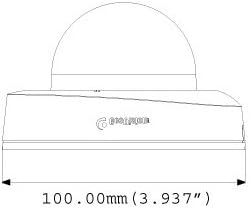
4.1 Fiziniai matmenys
Understand the camera's dimensions for proper placement and mounting.

4.2 Montavimo parinktys
The GV-EFD4700-0F supports both ceiling and wall-surface mounting.


4.3 diegimo žingsniai
- Pasirinkite vietą: Choose a suitable indoor location for optimal surveillance coverage.
- Paruoškite paviršių: Use the provided installation template to mark drilling points on the ceiling or wall.
- Gręžimo skylės: Išgręžkite kreipiamąsias skyles pagal šabloną. Jei reikia, įstatykite sieninius inkarus.
- Saugi kamera: Attach the camera base to the mounting surface using the supplied screws.
- Prijunkite kabelius: Connect the Ethernet cable for network and PoE, or a DC 12V power adapter and a separate Ethernet cable.
- Sureguliuoti kampą: Loosen the adjustment screws to pan and tilt the camera lens to the desired viewSureguliavus, priveržkite varžtus.
4.4 Pradinė konfigūracija
Po fizinio įrengimo ir maitinimo prijungimo, prieikite prie kameros web interface for initial setup:
- Tinklo prisijungimas: Ensure the camera is connected to your network. It will typically obtain an IP address via DHCP.
- Atraskite kamerą: Use GeoVision's IP Device Utility software or a network scanner to find the camera's IP address.
- Prieiga Web Sąsaja: Atidarykite a web naršyklę ir įveskite kameros IP adresą.
- Prisijungimas: Enter the default username and password (refer to the Quick Start Guide or GeoVision documentation for default credentials). Change these immediately for security.
- Pagrindiniai nustatymai: Configure network settings, date/time, video resolution, and recording preferences.
5. Fotoaparato valdymas
5.1 Tiesiogiai View ir Įrašymas
Sukonfigūravus, galite pasiekti tiesioginį vaizdo transliaciją per web interface or compatible NVR/VMS software. The camera supports continuous recording, scheduled recording, and event-triggered recording (e.g., motion detection).
- H.265 suspaudimas: Utilizes H.265 video codec for efficient storage and reduced network bandwidth while maintaining high image quality.
- WDR Pro: Wide Dynamic Range Pro enhances image visibility in scenes with both very bright and very dark areas.
- IR funkcionalumas: The built-in IR LEDs automatically activate in low-light conditions, providing clear black and white images up to 15 meters.
5.2 Judesio aptikimas ir įspėjimai
Configure motion detection zones and sensitivity within the camera's web interface. The camera can be set to trigger recordings, send email alerts, or notify your VMS upon detecting motion.
5.3 Garso stebėjimas
The integrated microphone allows for audio monitoring of the surveillance area. Audio settings can be adjusted via the web sąsaja.
6. Priežiūra
6.1 Valymas
Reguliariai valykite kameros objektyvą ir korpusą, kad užtikrintumėte optimalią vaizdo kokybę. Naudokite minkštą, nepūkuotą šluostę. Įsisenėjusiam purvui šiek tiek nuvalykite.amp Galima naudoti šluostę su švelniu plovikliu, po to nusausinti sausa šluoste. Venkite abrazyvinių valiklių ar tirpiklių.
6.2 Firmware atnaujinimai
Reguliariai tikrinkite „GeoVision“ website for firmware updates. Firmware updates can provide new features, performance improvements, and security enhancements. Follow the instructions provided with the firmware update package carefully to avoid damaging the device.
7. Problemų sprendimas
If you encounter issues with your GV-EFD4700-0F camera, refer to the following common problems and solutions:
- Nėra galios:
- Check if the power adapter is securely connected and providing 12V DC.
- If using PoE, ensure the Ethernet cable is connected to a PoE-enabled switch or injector and that the switch port is active.
- Nėra vaizdo įrašo:
- Verify network connectivity. Ping the camera's IP address.
- Ensure the camera's IP address, subnet mask, and gateway settings are correct.
- Check if the video stream settings (e.g., resolution, frame rate) are compatible with your viewing software or NVR.
- Restart the camera by disconnecting and reconnecting power.
- Prasta vaizdo kokybė:
- Nuvalykite fotoaparato objektyvą.
- Patikrinkite, ar kameros matymo lauke nėra kliūčių view.
- Adjust WDR Pro settings in the web interface for high-contrast scenes.
- Ensure sufficient lighting for optimal color images; IR will provide black and white in low light.
- Nepavyksta pasiekti Web Sąsaja:
- Confirm the camera's IP address is correct.
- Įsitikinkite, kad jūsų kompiuteris yra tame pačiame tinklo segmente kaip ir kamera.
- Išbandykite kitą web naršyklė.
- Laikinai išjunkite bet kokią užkardos programinę įrangą savo kompiuteryje.
If problems persist, contact GeoVision technical support.
8. Specifikacijos
| Funkcija | Detalė |
|---|---|
| Modelio pavadinimas | GV-EFD4700-0F |
| Vaizdo jutiklis | 1/3" progressive scan super low lux CMOS |
| Veiksminga nejudančioji raiška | 4 MP |
| Minimalus apšvietimas | 0.02 liuksų |
| Vaizdo įrašų suspaudimas | H.265, H.264, MJPEG |
| Maks. Kadrų dažnis | 30 fps at 2048 x 1520 |
| IR atstumas | Iki 15 50 m (XNUMX XNUMX pėdos) |
| Objektyvas | 2.8 mm (fiksuotas) |
| Dinaminis diapazonas | „WDR Pro“ |
| Triukšmo mažinimas | 3D triukšmo mažinimas |
| Garsas | Integruotas mikrofonas |
| Pan/Tilt Mechanism | 2 ašių |
| Maitinimo įvestis | 12 V DC / PoE (IEEE 802.3af) |
| Ryšio technologija | Wired (Ethernet), Wi-Fi (for certain functions/protocols) |
| Naudojimas viduje / lauke | Vidinis |
| Matmenys (prekė) | 3.9 x 3.9 x 2.4 colio (100 x 100 x 60.8 mm) |
| Svoris (prekė) | 5.28 uncijos |
| Spalva | Baltas |
| Gamintojas | USA Vision Systems |
9. Informacija apie garantiją
GeoVision products typically come with a limited manufacturer's warranty. Specific warranty terms, conditions, and duration may vary by region and retailer. Please refer to the warranty card included with your purchase or visit the official GeoVision webIšsamią informaciją apie garantiją ir registracijos procedūras rasite svetainėje. Išsaugokite pirkimo įrodymą, jei prireiktų pateikti garantijos pretenzijas.
10. Parama
For technical assistance, product inquiries, or further support, please utilize the following resources:
- „GeoVision“ oficialus Websvetainė: Apsilankykite www.geovision.com.tw produkto dokumentaciją, DUK, programinės įrangos atsisiuntimus ir palaikymo kontaktinę informaciją.
- Techninė pagalba: Contact GeoVision's technical support team through their website or the contact details provided in your product's packaging.
- Internetiniai ištekliai: Naršykite internetinius forumus ir bendruomenes, kad rastumėte vartotojų sugeneruotų patarimų ir sprendimų.