
VIGORWORK AF1313
VIGORWORK 1 Din Car Stereo Bluetooth Car Audio MP3 Recorder User Manual
Modelis: AF1313
Įvadas
Welcome to your new VIGORWORK 1 Din Car Stereo. This manual provides detailed instructions for the installation, operation, and maintenance of your car audio system. Please read it thoroughly before use to ensure proper functionality and safety.
Saugos informacija
- Ensure proper installation by a qualified professional to prevent electrical damage or injury.
- Nenaudokite įrenginio taip, kad tai atitrauktų jūsų dėmesį nuo vairavimo.
- Saugokite įrenginį nuo ekstremalių temperatūrų, tiesioginių saulės spindulių ar drėgmės.
- Disconnect the car battery before installation or maintenance.
- Naudokite tik nurodytą tūrįtage (12V DC) for operation.
Pakuotės turinys
Pakuotėje turi būti šie elementai:
- 1x VIGORWORK 1 Din Car Stereo Unit (Model AF1313)
- 1x nuotolinio valdymo pultas
- 1x Power Cable (ISO Connector)
- 1x Naudotojo vadovas (anglų kalba)
- 2x Fixed Iron Pieces (Installation Keys)

Image: Display of product accessories, including the car stereo unit, remote control, power cables, and installation keys.
Sąranka ir diegimas
This section outlines the general steps for installing your car stereo. Professional installation is recommended to ensure correct wiring and prevent damage.
Laidų schema
Refer to the wiring diagram located on the top of the unit or in the included manual for correct connections. Ensure all wires are connected to their corresponding terminals (power, ground, speakers, antenna).

Vaizdas: Galinis view of the car stereo unit with the wiring diagram label visible.
Fizinis montavimas
- Ensure the vehicle's ignition is off and disconnect the negative terminal of the car battery.
- Nuimkite esamą automobilio stereo sistemą nuo prietaisų skydelio.
- Connect the wiring harness from the new stereo to the vehicle's wiring. Ensure all connections are secure and correctly matched (power, ground, speakers, antenna).
- Slide the new stereo unit into the dashboard opening until it clicks into place. Use the provided fixed iron pieces if necessary to secure it.
- Vėl prijunkite automobilio akumuliatorių.
- Turn on the ignition and test the stereo's functions.
Naudojimo instrukcijos
Pagrindiniai valdikliai
The front panel features a rotary electronic volume control, mode button, band button, and various playback controls for easy access to functions.

Image: Front panel of the car stereo, showing the main controls and display.
Maitinimo įjungimas/išjungimas
- Press the power button (often integrated with the volume knob) to turn the unit on or off.
- The clock display will be shown when the unit is powered off.
Garsumo valdymas
- Rotate the volume knob clockwise to increase volume, and counter-clockwise to decrease.
Režimo pasirinkimas
- Press the "MODE" button to cycle through available audio sources: FM Radio, Bluetooth, USB, SD, and AUX.
FM radijo veikimas
- Press the "BAND" button to select between FM1, FM2, or FM3 bands.
- Press the "AMS" button for automatic station search and storage.
- Use the seek buttons (e.g., >>| or |<<) to manually tune or scan for stations.
- The unit supports storing up to 18 preset stations.
Image: The car stereo displaying an FM radio frequency.
Bluetooth ryšys
This unit supports Bluetooth for hands-free calling and audio streaming from compatible devices.
- Įsitikinkite, kad jūsų mobiliajame įrenginyje įjungtas „Bluetooth“.
- Select "BT" mode on the car stereo. The display will show "BT PAIRING" or a similar indicator.
- Ieškokite available devices on your phone and select "CAR BT" or "VIGORWORK" (or similar name).
- Once successfully paired, you can make/receive calls and stream music wirelessly.

Image: Visual representation of Bluetooth connectivity for hands-free calls and music playback.
USB/SD kortelės atkūrimas
Insert a USB drive or SD card into the respective slot. The unit will automatically switch to USB/SD mode and begin playback of compatible audio files (MP3, WMA, WAV).
- Supports pause, preview, repeat, random play, and 10 tracks up/down selections.
- Supports folder playback function.

Image: Illustration of the SD card function for playing music files.
AUX įvestis
Connect external audio devices (e.g., smartphone, MP3 player) to the front AUX input using a 3.5mm audio cable. Select "AUX" mode on the stereo to play audio from the connected device.

Image: Visual guide for using the AUX input to connect external audio devices.
Įkrovimo funkcija
The USB port can provide 5V charging for mobile devices. Please note that this is not a professional charger and may not support all devices or fast charging capabilities.

Image: Illustration of the USB charging function for mobile phones.
Ekvalaizerio (EQ) funkcija
Press the "EQ" button to cycle through preset equalizer modes such as Jazz, Rock, Pop, and Classical. You can also adjust bass, treble, left/right balance, and front/back fade settings to customize your audio experience.
Nuotolinio valdymo pultas
The included remote control allows for convenient operation of various functions from a distance, including power, volume, mode selection, and track control.
Image: The car stereo unit displayed alongside its remote control.
Priežiūra
- Clean the front panel with a soft, dry cloth. Do not use abrasive cleaners, solvents, or harsh chemicals, as these can damage the surface.
- Keep USB and SD card slots free of dust and debris to ensure proper connection and functionality.
- Užtikrinkite tinkamą vėdinimą aplink įrenginį, kad išvengtumėte perkaitimo.
Trikčių šalinimas
If you encounter any issues with your car stereo, please refer to the following table for common problems and their solutions.
| Problema | Galima priežastis | Sprendimas |
|---|---|---|
| Nėra galios | Neteisingas laidų sujungimas; Perdegęs saugiklis; Išsikrovęs automobilio akumuliatorius | Check wiring connections; Replace fuse; Charge/check car battery |
| Nėra garso | Per mažas garsumas; Įjungtas nutildymas; Neteisingas garsiakalbio sujungimas | Padidinkite garsumą; Išjunkite nutildymą; Patikrinkite garsiakalbių jungtis |
| Prastas FM ryšys | Antena neprijungta; Silpno signalo sritis | Ensure antenna is connected; Try a different location; Consider an external antenna booster |
| „Bluetooth“ neprisijungia | Bluetooth not enabled on device; Incorrect pairing mode; Device too far | Enable Bluetooth on phone; Ensure stereo is in BT pairing mode; Move device closer |
| USB/SD nepaleidžiamas | Nepalaikoma file Formatas; Sugadintas files; USB/SD card faulty | Užtikrinti files are MP3/WMA/WAV; Reformat/replace USB/SD card; Try a different card |
| Nuotolinio valdymo pultas neveikia | Battery depleted; Obstruction; Remote not pointed at sensor | Replace battery; Remove obstructions; Point remote directly at unit |
Specifikacijos
| Prekės ženklas | VIGORWORK |
| Modelis | AF1313 |
| Derintuvo technologija | FM |
| Suderinami įrenginiai | Pranešėjas |
| Ypatingos savybės | Equalizer, Hands-Free Calling |
| Garso išvesties režimas | Stereo |
| Garsiakalbių erdvinio garso kanalų konfigūracija | 2 |
| Išėjimo vattage | 25 vatų |
| Jungties tipas | Bluetooth, 3.5 mm lizdas |
| Medijos formatas | WAV, WMA |
| Gaminio matmenys | 12.5 x 17.8 x 5 cm; 400 g |
| ASIN | B07193ZG75 |
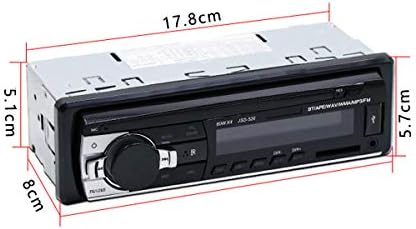
Image: Diagram showing the physical dimensions of the car stereo unit.
Garantija ir palaikymas
This VIGORWORK product is covered by a standard manufacturer's warranty. For specific warranty details, please refer to the documentation included with your purchase or contact VIGORWORK customer support.
For technical assistance, troubleshooting, or further inquiries, please visit the VIGORWORK official website or contact their customer service department through the contact information provided with your product.
Ask a question about this manual
Ask about setup, troubleshooting, compatibility, parts, safety, or missing instructions. Manuals+ will review the question and use this page’s manual context to help answer it.