Įvadas
This manual provides detailed instructions for the installation, operation, and maintenance of your Aux ASW-18B2INV/SS Air Conditioner. Please read this manual thoroughly before using the unit to ensure proper operation and to prevent damage.
The Aux ASW-18B2INV/SS is an advanced air conditioning unit with a capacity of 18,000 BTU, designed for areas ranging from 17 to 24 square meters. It features a smart remote control, self-cleaning function, programmable on/off timer, anti-fungus mode, and automatic restart after power interruptions.
Svarbios saugos instrukcijos
Naudodami elektros prietaisus, visada laikykitės pagrindinių saugos priemonių, kad sumažintumėte gaisro, elektros smūgio ir asmenų sužalojimo riziką.
- Įsitikinkite, kad maitinimo šaltinis atitinka įrenginio reikalavimus.
- Nenaudokite įrenginio šlapiomis rankomis.
- Nekiškite daiktų į oro išleidimo angą.
- Saugokite vaikus nuo įrenginio.
- Prieš valydami arba atlikdami techninę priežiūrą, išjunkite įrenginį.
- Only qualified personnel should perform installation or repairs.
Produkto komponentai
The Aux ASW-18B2INV/SS Air Conditioner package includes the following main components:
- Vidinis blokas
- Lauko blokas
- Nuotolinio valdymo pultas
- Vartotojo vadovas (šis dokumentas)
- Installation Kit (pipes, cables, etc.)

1 pav.: priekis view of the Aux ASW-18B2INV/SS indoor unit. This image shows the sleek, silver-colored front panel with the Aux logo and a digital display on the right side.
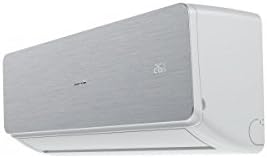
2 pav.: Kampinis view of the Aux ASW-18B2INV/SS indoor unit, highlighting its depth and side profile. The digital display is visible on the right side.
Sąranka ir diegimas
Installation of the Aux ASW-18B2INV/SS Air Conditioner should only be performed by a qualified and certified technician. Improper installation can lead to electric shock, fire, water leakage, and other hazards.
Prieš montavimą kontrolinis sąrašas:
- Patikrinkite maitinimo šaltinio tūrįtage and circuit breaker capacity.
- Užtikrinkite pakankamai vietos oro cirkuliacijai aplink vidinius ir išorinius įrenginius.
- Patikrinkite, ar tinkamai nuteka kondensatas.
- Įsitikinkite, kad visi komponentai yra ir nepažeisti.
„Wi-Fi“ ryšio sąranka:
The unit supports Wi-Fi connectivity via the AC Free APP. To set up:
- Download the "AC Free" application from your smartphone's app store.
- Follow the in-app instructions to register an account and add your Aux ASW-18B2INV/SS unit.
- Ensure your Wi-Fi network is stable and within range of the unit.
Naudojimo instrukcijos
Nuotolinio valdymo pulto naudojimas:
The smart remote control allows for comprehensive management of the air conditioner's functions. It features a built-in sensor that helps the unit automatically select the optimal operating mode for comfort.
- Maitinimo mygtukas: Įjungia arba išjungia įrenginį.
- Režimo mygtukas: Cycles through operating modes (Cool, Heat, Fan, Dry, Auto).
- Temperatūros reguliavimas: Naudokite + ir - mygtukai norimai temperatūrai nustatyti.
- Ventiliatoriaus greitis: Reguliuoja ventiliatoriaus greitį (mažas, vidutinis, didelis, automatinis).
- Laikmačio mygtukas: Sets programmable on/off times for energy saving.
- Miegojimo rezimas: Activates a quiet, energy-efficient mode for nighttime.
- Anti-Fungus Mode: Engages a special operation mode to prevent mold growth.
Automatic Restart Function:
Esant galiai outage, the unit will automatically restart with the last saved settings once power is restored, ensuring continuous comfort without manual intervention.
Priežiūra
Reguliarus techninis aptarnavimas užtikrina optimalų veikimą ir pailgina oro kondicionieriaus tarnavimo laiką. Prieš atlikdami bet kokią techninę priežiūrą, visada atjunkite įrenginį nuo elektros tinklo.
Oro filtro valymas:
The unit is equipped with a dust filter. Clean the air filter every two weeks or more frequently depending on usage and air quality.
- Atidarykite priekinį vidaus bloko skydelį.
- Nuimkite oro filtrus.
- Filtrus valykite dulkių siurbliu arba nuplaukite drungnu vandeniu ir švelniu plovikliu.
- Rinse thoroughly and allow to dry completely in a shaded area before reinserting.
Savaiminio išsivalymo funkcija:
The self-cleaning feature helps prevent bacteria proliferation by removing dust particles from the evaporator. Refer to your remote control or app for instructions on activating this function.
Sezoninė priežiūra:
It is recommended to have a qualified technician perform a comprehensive check-up of the unit annually, especially before the peak cooling season.
Trikčių šalinimas
Prieš kreipdamiesi į klientų aptarnavimo tarnybą, peržiūrėkite šias dažniausiai pasitaikančias problemas ir jų sprendimus:
| Problema | Galima priežastis | Sprendimas |
|---|---|---|
| Įrenginys neįsijungia. | Nėra maitinimo; suveikė grandinės pertraukiklis; išsikrovė nuotolinio valdymo pulto baterijos. | Patikrinkite maitinimo jungtį; atstatykite grandinės pertraukiklį; pakeiskite nuotolinio valdymo pulto baterijas. |
| Nepakankamas aušinimas / šildymas. | Nešvarus oro filtras; užsikimšęs oro įsiurbimo/išleidimo angos; pasirinktas neteisingas režimas; per didelis kambarys. | Išvalykite oro filtrą; pašalinkite kliūtis; pasirinkite tinkamą režimą; įsitikinkite, kad įrenginio galia atitinka kambario dydį. |
| Neįprastas triukšmas. | Loose parts; foreign object inside; unit not level. | Patikrinkite, ar nėra atsilaisvinusių dalių; pašalinkite pašalinius objektus; įsitikinkite, kad įrenginys stovi lygiai. Jei triukšmas nedingsta, kreipkitės į aptarnavimo tarnybą. |
| Vandens nutekėjimas. | Blocked drain hose; improper installation. | Clear drain hose; contact a qualified technician for inspection. |
Specifikacijos
| Funkcija | Detalė |
|---|---|
| Modelis | ASW-18B2INV/SS |
| Prekės ženklas | Aux |
| Aušinimo talpa | 18,000 britų terminių vienetų (BTU) |
| Rekomenduojama sritis | 17–24 m² |
| Kontrolės metodas | App (Wi-Fi), Remote Control, Touch |
| Ypatingos savybės | Dust Filter, Smart Remote Control, Self-Cleaning, Programmable On/Off, Anti-Fungus Mode, Automatic Restart |
| Maitinimo šaltinis | Su laidu elektra |
| Gaminio matmenys | 39.5 x 92 x 60.5 cm |
| Prekės svoris | 3000 gramų (3 kg) |
| Reikalingas surinkimas | No (for user, installation by professional) |
| Reikalingos baterijos | No (for main unit, remote control may need batteries) |
Informacija apie garantiją
The Aux ASW-18B2INV/SS Air Conditioner comes with a Ribota garantija. Please refer to the warranty card included with your product for specific terms, conditions, and duration of coverage. Keep your purchase receipt as proof of purchase for warranty claims.
The warranty typically covers manufacturing defects and malfunctions under normal use. It does not cover damage caused by improper installation, misuse, neglect, unauthorized repairs, or natural disasters.
Pagalba klientams
If you encounter issues that cannot be resolved using the troubleshooting guide, or require professional assistance, please contact Aux customer support.
For service requests, please have your model number (ASW-18B2INV/SS) and purchase date ready.
Contact information (e.g., phone number, website) would typically be provided here by the manufacturer. Please refer to your product packaging or official Aux websvetainę, kurioje rasite naujausią kontaktinę informaciją.